
Kafka Protocol Guide
Use this guide when Kafka is part of the business transaction and you need to measure the downstream path, not just publish speed.
Matching docs
Search across docs titles, summaries, groups, and section headings.
Use Up and Down Arrow to move through results, then press Enter to open the active page.
No indexed docs matched that search. Try a broader term or open the docs hub.
What this page helps you do
What this page helps you do
Model Kafka as part of one transaction so you can measure what happens after publish, not only producer speed.
Who this is for
Teams testing event-driven workflows that start, pass through, or complete on Kafka.
Prerequisites
- A stable tracking field shared between producer and consumer
- A real topic and consumer group strategy for the workload
By the end
A Kafka test shape that keeps publish, consumer lag, and downstream completion inside the same report.
Choose this path when
Use Kafka guidance when the question is about business completion across the broker path, not only the producer-side throughput number.
Visual guide
Guide
What the Kafka guide covers
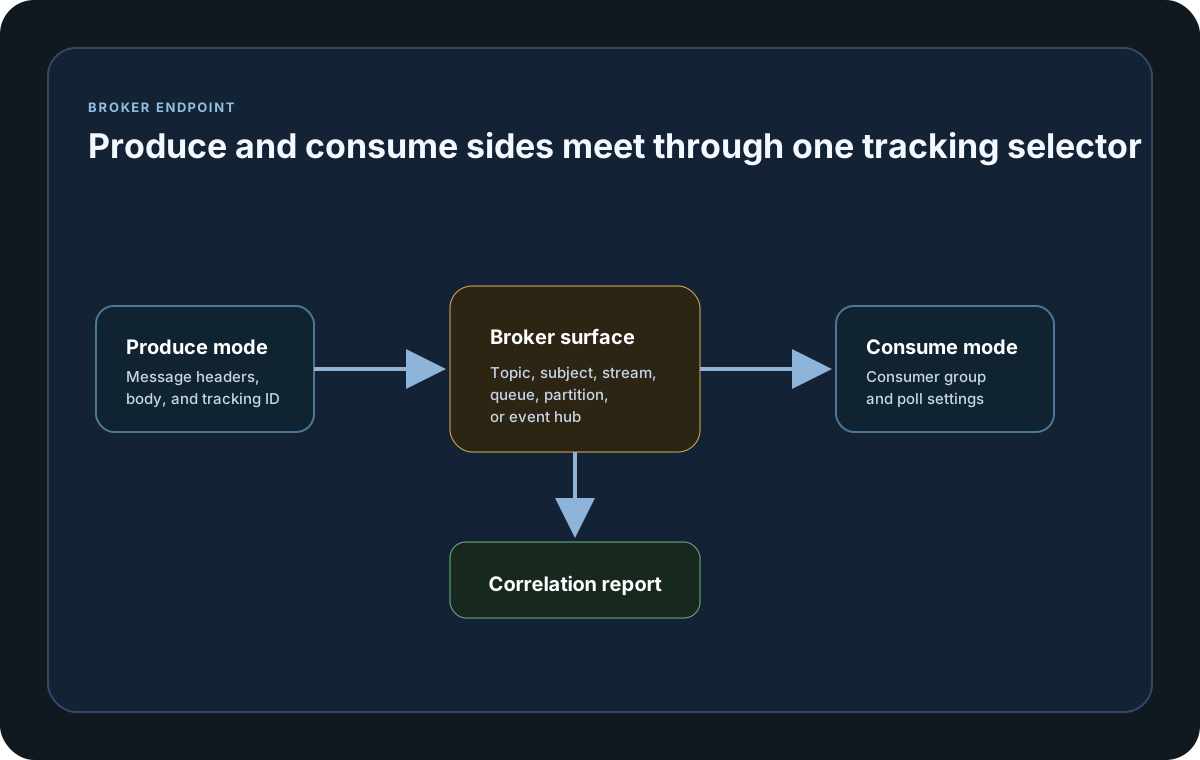
This guide explains how to use Kafka as a tracked source or destination so the same workflow can be measured from the first produced message to the downstream completion.
When Kafka works best in LoadStrike
Use Kafka tracking when the business workflow publishes into Kafka, completes through Kafka, or depends on topic-level fan-out and consumer lag behavior under load.
What must stay stable
Keep the tracking field in one stable header or JSON path and make sure the producer and consumer endpoints resolve the same value. Also use a real ConsumerGroupId for consume mode so offsets can be managed correctly.
Security and broker tuning
If the cluster uses TLS or SASL, populate SecurityProtocol and the Sasl object. Use ConfluentSettings only for advanced client properties that are not already represented by the dedicated fields.
Protocol setup samples
Use these samples to compare how Kafka publish and consume paths are wired into one correlated transaction across the supported SDKs.
If you run these examples locally, add a valid runner key before execution starts. Set it with WithRunnerKey("...") or the config key LoadStrike:RunnerKey.
Kafka Protocol Setup
using LoadStrike;

var source = new KafkaEndpointDefinition { Name = "in", Mode = TrafficEndpointMode.Produce, TrackingField = TrackingFieldSelector.Parse("json:$.trackingId"), BootstrapServers = "localhost:9092", Topic = "orders.in" };
var destination = new KafkaEndpointDefinition { Name = "out", Mode = TrafficEndpointMode.Consume, TrackingField = TrackingFieldSelector.Parse("json:$.trackingId"), BootstrapServers = "localhost:9092", Topic = "orders.out", ConsumerGroupId = "orders-tests" };
package main
import loadstrike "loadstrike.com/sdk/go"
func main() {
tracking := &loadstrike.TrackingConfigurationSpec{
RunMode: "GenerateAndCorrelate",
Source: &loadstrike.EndpointSpec{
Kind: "Kafka",
Name: "orders-in",
Mode: "Produce",
TrackingField: "header:X-Correlation-Id",
Kafka: &loadstrike.KafkaEndpointOptions{
BootstrapServers: "localhost:9092",
Topic: "orders.in",
SecurityProtocol: "SaslSsl",
SASL: &loadstrike.KafkaSASLOptions{
Mechanism: "Plain",
Username: "orders-user",
Password: "orders-password",
},
},
},
Destination: &loadstrike.EndpointSpec{
Kind: "Kafka",
Name: "orders-out",
Mode: "Consume",
TrackingField: "header:X-Correlation-Id",
Kafka: &loadstrike.KafkaEndpointOptions{
BootstrapServers: "localhost:9092",
Topic: "orders.completed",
ConsumerGroupID: "orders-tests",
},
},
}
loadstrike.RegisterScenarios(
loadstrike.Empty("kafka-tracking").WithTrackingConfiguration(tracking),
).Run()
}import com.loadstrike.runtime.CrossPlatformScenarioConfigurator;
import com.loadstrike.runtime.CrossPlatformTrackingConfiguration;
import com.loadstrike.runtime.KafkaEndpointDefinition;
import com.loadstrike.runtime.LoadStrikeCorrelation.TrackingFieldSelector;
import com.loadstrike.runtime.LoadStrikeRuntime.LoadStrikeRunner;
import com.loadstrike.runtime.LoadStrikeRuntime.LoadStrikeScenario;
import com.loadstrike.runtime.LoadStrikeRuntime.LoadStrikeSimulation;
import com.loadstrike.runtime.LoadStrikeTransports;
var source = new KafkaEndpointDefinition();
source.name = "orders-in";
source.mode = LoadStrikeTransports.TrafficEndpointMode.Produce;
source.trackingField = TrackingFieldSelector.parse("json:$.trackingId");
source.bootstrapServers = "localhost:9092";
source.topic = "orders.in";
var destination = new KafkaEndpointDefinition();
destination.name = "orders-out";
destination.mode = LoadStrikeTransports.TrafficEndpointMode.Consume;
destination.trackingField = TrackingFieldSelector.parse("json:$.trackingId");
destination.bootstrapServers = "localhost:9092";
destination.topic = "orders.out";
destination.consumerGroupId = "orders-tests";
var tracking = new CrossPlatformTrackingConfiguration();
tracking.source = source;
tracking.destination = destination;
tracking.runMode = LoadStrikeTransports.TrackingRunMode.GenerateAndCorrelate;
var scenario = CrossPlatformScenarioConfigurator.Configure(
LoadStrikeScenario.empty("orders-kafka-to-kafka"),
tracking
).withLoadSimulations(LoadStrikeSimulation.inject(10, 1d, 20d));
LoadStrikeRunner
.registerScenarios(scenario)
.withRunnerKey("rkl_your_local_runner_key")
.run();from loadstrike_sdk import CrossPlatformScenarioConfigurator, LoadStrikeRunner, LoadStrikeScenario, LoadStrikeSimulation
tracking = {
"RunMode": "GenerateAndCorrelate",
"Source": {
"Kind": "Kafka",
"Name": "orders-in",
"Mode": "Produce",
"TrackingField": "json:$.trackingId",
"BootstrapServers": "localhost:9092",
"Topic": "orders.in",
},
"Destination": {
"Kind": "Kafka",
"Name": "orders-out",
"Mode": "Consume",
"TrackingField": "json:$.trackingId",
"BootstrapServers": "localhost:9092",
"Topic": "orders.out",
"ConsumerGroupId": "orders-tests",
},
}
scenario = (
CrossPlatformScenarioConfigurator.Configure(
LoadStrikeScenario.empty("orders-kafka-to-kafka"),
tracking,
)
.with_load_simulations(LoadStrikeSimulation.inject(10, 1, 20))
)
LoadStrikeRunner.register_scenarios(scenario) \
.with_runner_key("rkl_your_local_runner_key") \
.run()import {
CrossPlatformScenarioConfigurator,
LoadStrikeRunner,
LoadStrikeScenario,
LoadStrikeSimulation
} from "@loadstrike/loadstrike-sdk";
const tracking = {
RunMode: "GenerateAndCorrelate",
Source: {
Kind: "Kafka",
Name: "orders-in",
Mode: "Produce",
TrackingField: "json:$.trackingId",
BootstrapServers: "localhost:9092",
Topic: "orders.in"
},
Destination: {
Kind: "Kafka",
Name: "orders-out",
Mode: "Consume",
TrackingField: "json:$.trackingId",
BootstrapServers: "localhost:9092",
Topic: "orders.out",
ConsumerGroupId: "orders-tests"
}
};
const scenario = CrossPlatformScenarioConfigurator
.Configure(LoadStrikeScenario.empty("orders-kafka-to-kafka"), tracking)
.withLoadSimulations(LoadStrikeSimulation.inject(10, 1, 20));
await LoadStrikeRunner
.registerScenarios(scenario)
.withRunnerKey("rkl_your_local_runner_key")
.run();const {
CrossPlatformScenarioConfigurator,
LoadStrikeRunner,
LoadStrikeScenario,
LoadStrikeSimulation
} = require("@loadstrike/loadstrike-sdk");
(async () => {
const tracking = {
RunMode: "GenerateAndCorrelate",
Source: {
Kind: "Kafka",
Name: "orders-in",
Mode: "Produce",
TrackingField: "json:$.trackingId",
BootstrapServers: "localhost:9092",
Topic: "orders.in"
},
Destination: {
Kind: "Kafka",
Name: "orders-out",
Mode: "Consume",
TrackingField: "json:$.trackingId",
BootstrapServers: "localhost:9092",
Topic: "orders.out",
ConsumerGroupId: "orders-tests"
}
};
const scenario = CrossPlatformScenarioConfigurator
.Configure(LoadStrikeScenario.empty("orders-kafka-to-kafka"), tracking)
.withLoadSimulations(LoadStrikeSimulation.inject(10, 1, 20));
await LoadStrikeRunner
.registerScenarios(scenario)
.withRunnerKey("rkl_your_local_runner_key")
.run();
})();Kafka protocol choices a beginner should make
Choose Produce for generated source traffic and Consume for observed downstream traffic.
Keep the correlation id in one stable header or JSON location across producer and consumer messages.
Always set this for consume mode so offsets are tracked predictably.
Only set these when the broker actually requires TLS or SASL auth.