
Run Modes
Run modes decide whether LoadStrike should generate the source traffic itself or only observe traffic that already exists.
Matching docs
Search across docs titles, summaries, groups, and section headings.
Use Up and Down Arrow to move through results, then press Enter to open the active page.
No indexed docs matched that search. Try a broader term or open the docs hub.
What this page helps you do
What this page helps you do
Run modes decide whether LoadStrike should generate the source traffic itself or only observe traffic that already exists.
Who this is for
Teams controlling runtime behavior, tracking, reporting, licensing, or policy from code, JSON, or CLI settings.
Prerequisites
- A scenario or run configuration that already works locally
By the end
The documented runtime setting or policy surface for this part of the product.
Use this page when
Use this page when runtime behavior changes because of configuration, policy, or execution settings rather than the scenario body itself.
Visual guide
Guide
GenerateAndCorrelate
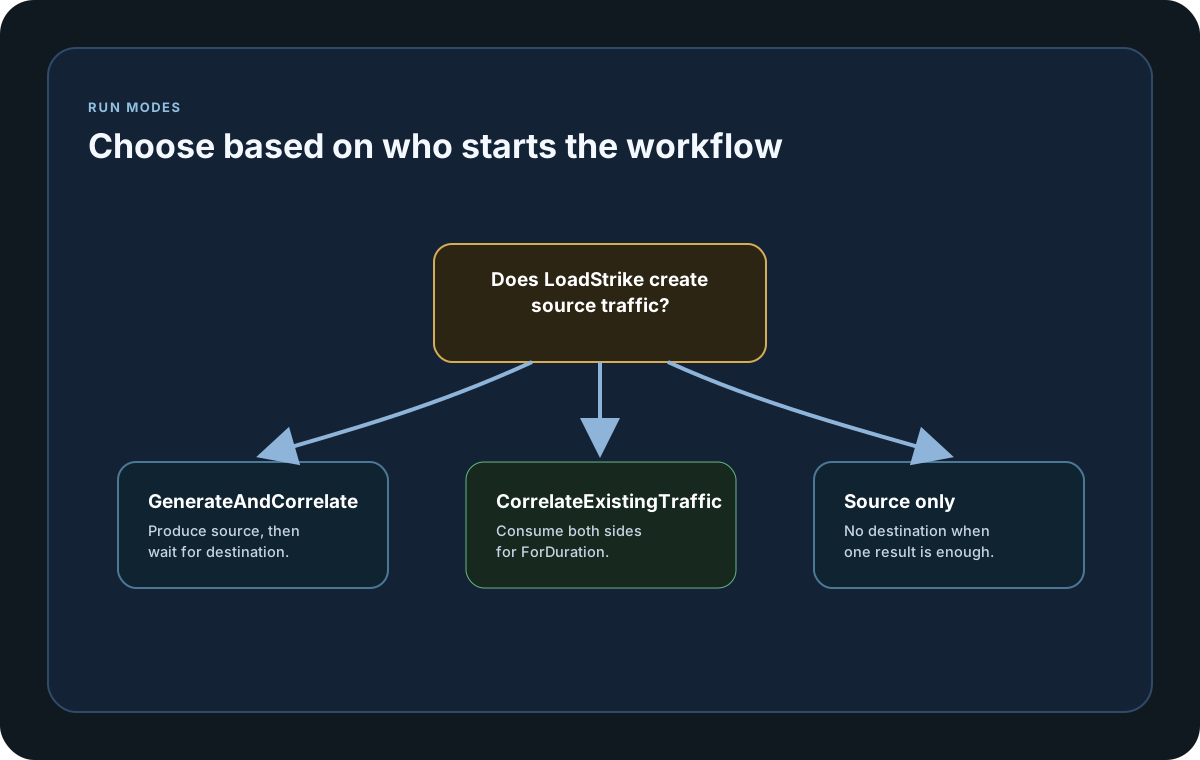
Use GenerateAndCorrelate when LoadStrike should send the source traffic and then wait for the downstream outcome. This is the normal choice when the test itself is responsible for starting the workflow.
CorrelateExistingTraffic
Use CorrelateExistingTraffic when both the source and destination already exist in the live flow and LoadStrike only needs to observe and correlate them for a ForDuration window. The SDKs also let your application stop that observation early with the optional cancellation parameter.
How To Choose
Choose the mode based on who starts the workflow. If the test should create the source event, use GenerateAndCorrelate. If another system already creates the traffic and you only need visibility, use CorrelateExistingTraffic.
Configuration samples
Use these samples to see how Run Modes is configured in code, JSON, or CLI surfaces where this page documents them.
If you run these examples locally, add a valid runner key before execution starts. Set it with WithRunnerKey("...") or the config key LoadStrike:RunnerKey.
Run Modes
using LoadStrike;

var generateAndCorrelate = new CrossPlatformTrackingConfiguration
{
    Source = new HttpEndpointDefinition
    {
        Name = "orders-api",
        Mode = TrafficEndpointMode.Produce,
        TrackingField = TrackingFieldSelector.Parse("header:X-Correlation-Id"),
        Url = "https://api.example.com/orders",
        Method = "POST"
    },
    Destination = new KafkaEndpointDefinition
    {
        Name = "orders-events",
        Mode = TrafficEndpointMode.Consume,
        TrackingField = TrackingFieldSelector.Parse("header:X-Correlation-Id"),
        BootstrapServers = "localhost:9092",
        Topic = "orders.completed",
        ConsumerGroupId = "orders-tests"
    },
    RunMode = TrackingRunMode.GenerateAndCorrelate
};

var correlateExistingTraffic = new CrossPlatformTrackingConfiguration
{
    Source = new KafkaEndpointDefinition
    {
        Name = "orders-inbound",
        Mode = TrafficEndpointMode.Consume,
        TrackingField = TrackingFieldSelector.Parse("json:$.trackingId"),
        BootstrapServers = "localhost:9092",
        Topic = "orders.inbound",
        ConsumerGroupId = "orders-inbound-tests"
    },
    Destination = new KafkaEndpointDefinition
    {
        Name = "orders-events",
        Mode = TrafficEndpointMode.Consume,
        TrackingField = TrackingFieldSelector.Parse("header:X-Correlation-Id"),
        BootstrapServers = "localhost:9092",
        Topic = "orders.completed",
        ConsumerGroupId = "orders-tests"
    },
    RunMode = TrackingRunMode.CorrelateExistingTraffic
}.ForDuration(TimeSpan.FromMinutes(10));

var scenario = CrossPlatformScenarioConfigurator
    .Configure(LoadStrikeScenario.Empty("orders-run-mode-demo"), generateAndCorrelate)
    .WithLoadSimulations(LoadStrikeSimulation.Inject(10, TimeSpan.FromSeconds(1), TimeSpan.FromSeconds(20)));

LoadStrikeRunner.RegisterScenarios(scenario)
    .WithRunnerKey("rkl_your_local_runner_key")
    .Run();
package main
import loadstrike "loadstrike.com/sdk/go"
var tracking = &loadstrike.TrackingConfigurationSpec{
RunMode: "GenerateAndCorrelate",
}import com.loadstrike.runtime.CrossPlatformScenarioConfigurator;
import com.loadstrike.runtime.CrossPlatformTrackingConfiguration;
import com.loadstrike.runtime.HttpEndpointDefinition;
import com.loadstrike.runtime.KafkaEndpointDefinition;
import com.loadstrike.runtime.LoadStrikeCorrelation.TrackingFieldSelector;
import com.loadstrike.runtime.LoadStrikeRuntime.LoadStrikeRunner;
import com.loadstrike.runtime.LoadStrikeRuntime.LoadStrikeScenario;
import com.loadstrike.runtime.LoadStrikeRuntime.LoadStrikeSimulation;
import com.loadstrike.runtime.LoadStrikeTransports;
import java.time.Duration;
var generateAndCorrelate = new CrossPlatformTrackingConfiguration();
var generateAndCorrelateSource = new HttpEndpointDefinition();
generateAndCorrelateSource.name = "orders-api";
generateAndCorrelateSource.mode = LoadStrikeTransports.TrafficEndpointMode.Produce;
generateAndCorrelateSource.trackingField = TrackingFieldSelector.parse("header:X-Correlation-Id");
generateAndCorrelateSource.url = "https://api.example.com/orders";
generateAndCorrelateSource.method = "POST";
generateAndCorrelate.source = generateAndCorrelateSource;
var generateAndCorrelateDestination = new KafkaEndpointDefinition();
generateAndCorrelateDestination.name = "orders-events";
generateAndCorrelateDestination.mode = LoadStrikeTransports.TrafficEndpointMode.Consume;
generateAndCorrelateDestination.trackingField = TrackingFieldSelector.parse("header:X-Correlation-Id");
generateAndCorrelateDestination.bootstrapServers = "localhost:9092";
generateAndCorrelateDestination.topic = "orders.completed";
generateAndCorrelateDestination.consumerGroupId = "orders-tests";
generateAndCorrelate.destination = generateAndCorrelateDestination;
generateAndCorrelate.runMode = LoadStrikeTransports.TrackingRunMode.GenerateAndCorrelate;
var correlateExistingTraffic = new CrossPlatformTrackingConfiguration();
var correlateExistingTrafficSource = new KafkaEndpointDefinition();
correlateExistingTrafficSource.name = "orders-inbound";
correlateExistingTrafficSource.mode = LoadStrikeTransports.TrafficEndpointMode.Consume;
correlateExistingTrafficSource.trackingField = TrackingFieldSelector.parse("json:$.trackingId");
correlateExistingTrafficSource.bootstrapServers = "localhost:9092";
correlateExistingTrafficSource.topic = "orders.inbound";
correlateExistingTrafficSource.consumerGroupId = "orders-inbound-tests";
correlateExistingTraffic.source = correlateExistingTrafficSource;
correlateExistingTraffic.destination = generateAndCorrelate.destination;
correlateExistingTraffic.runMode = LoadStrikeTransports.TrackingRunMode.CorrelateExistingTraffic;
correlateExistingTraffic.forDuration(Duration.ofMinutes(10));
var scenario = CrossPlatformScenarioConfigurator.Configure(
LoadStrikeScenario.empty("orders-run-mode-demo"),
generateAndCorrelate
).withLoadSimulations(LoadStrikeSimulation.inject(10, 1d, 20d));
LoadStrikeRunner
.registerScenarios(scenario)
.withRunnerKey("rkl_your_local_runner_key")
.run();from loadstrike_sdk import CrossPlatformScenarioConfigurator, LoadStrikeRunner, LoadStrikeScenario, LoadStrikeSimulation
generate_and_correlate = {
"Source": {
"Kind": "Http",
"Name": "orders-api",
"Mode": "Produce",
"TrackingField": "header:X-Correlation-Id",
"Url": "https://api.example.com/orders",
"Method": "POST",
},
"Destination": {
"Kind": "Kafka",
"Name": "orders-events",
"Mode": "Consume",
"TrackingField": "header:X-Correlation-Id",
"BootstrapServers": "localhost:9092",
"Topic": "orders.completed",
"ConsumerGroupId": "orders-tests",
},
"RunMode": "GenerateAndCorrelate",
}
correlate_existing_traffic = {
"Source": {
"Kind": "Kafka",
"Name": "orders-inbound",
"Mode": "Consume",
"TrackingField": "json:$.trackingId",
"BootstrapServers": "localhost:9092",
"Topic": "orders.inbound",
"ConsumerGroupId": "orders-inbound-tests",
},
"Destination": generate_and_correlate["Destination"],
"RunMode": "CorrelateExistingTraffic",
"ObservationDurationSeconds": 600,
}
scenario = (
CrossPlatformScenarioConfigurator.Configure(
LoadStrikeScenario.empty("orders-run-mode-demo"),
generate_and_correlate,
)
.with_load_simulations(LoadStrikeSimulation.inject(10, 1, 20))
)
LoadStrikeRunner.register_scenarios(scenario) \
.with_runner_key("rkl_your_local_runner_key") \
.run()import {
CrossPlatformTrackingConfiguration,
CrossPlatformScenarioConfigurator,
LoadStrikeRunner,
LoadStrikeScenario,
LoadStrikeSimulation
} from "@loadstrike/loadstrike-sdk";
const generateAndCorrelate = {
Source: {
Kind: "Http",
Name: "orders-api",
Mode: "Produce",
TrackingField: "header:X-Correlation-Id",
Url: "https://api.example.com/orders",
Method: "POST"
},
Destination: {
Kind: "Kafka",
Name: "orders-events",
Mode: "Consume",
TrackingField: "header:X-Correlation-Id",
BootstrapServers: "localhost:9092",
Topic: "orders.completed",
ConsumerGroupId: "orders-tests"
},
RunMode: "GenerateAndCorrelate"
};
const correlateExistingTraffic = CrossPlatformTrackingConfiguration.forDuration({
Source: {
Kind: "Kafka",
Name: "orders-inbound",
Mode: "Consume",
TrackingField: "json:$.trackingId",
BootstrapServers: "localhost:9092",
Topic: "orders.inbound",
ConsumerGroupId: "orders-inbound-tests"
},
Destination: generateAndCorrelate.Destination,
RunMode: "CorrelateExistingTraffic"
}, 600);
const scenario = CrossPlatformScenarioConfigurator
.Configure(LoadStrikeScenario.empty("orders-run-mode-demo"), generateAndCorrelate)
.withLoadSimulations(LoadStrikeSimulation.inject(10, 1, 20));
await LoadStrikeRunner
.registerScenarios(scenario)
.withRunnerKey("rkl_your_local_runner_key")
.run();const {
CrossPlatformTrackingConfiguration,
CrossPlatformScenarioConfigurator,
LoadStrikeRunner,
LoadStrikeScenario,
LoadStrikeSimulation
} = require("@loadstrike/loadstrike-sdk");
(async () => {
const generateAndCorrelate = {
Source: {
Kind: "Http",
Name: "orders-api",
Mode: "Produce",
TrackingField: "header:X-Correlation-Id",
Url: "https://api.example.com/orders",
Method: "POST"
},
Destination: {
Kind: "Kafka",
Name: "orders-events",
Mode: "Consume",
TrackingField: "header:X-Correlation-Id",
BootstrapServers: "localhost:9092",
Topic: "orders.completed",
ConsumerGroupId: "orders-tests"
},
RunMode: "GenerateAndCorrelate"
};
const correlateExistingTraffic = CrossPlatformTrackingConfiguration.forDuration({
Source: {
Kind: "Kafka",
Name: "orders-inbound",
Mode: "Consume",
TrackingField: "json:$.trackingId",
BootstrapServers: "localhost:9092",
Topic: "orders.inbound",
ConsumerGroupId: "orders-inbound-tests"
},
Destination: generateAndCorrelate.Destination,
RunMode: "CorrelateExistingTraffic"
}, 600);
const scenario = CrossPlatformScenarioConfigurator
.Configure(LoadStrikeScenario.empty("orders-run-mode-demo"), generateAndCorrelate)
.withLoadSimulations(LoadStrikeSimulation.inject(10, 1, 20));
await LoadStrikeRunner
.registerScenarios(scenario)
.withRunnerKey("rkl_your_local_runner_key")
.run();
})();Tracking run mode values
LoadStrike produces the source event itself, then waits for the destination match. Source must use Produce mode. Destination may be omitted for source-only measurement, but when present it must use Consume mode.
LoadStrike only observes traffic that another system is already producing. Both source and destination must use Consume mode, destination is required, and ForDuration defines the observation window. SDKs can also stop that observation early with the optional cancellation parameter.