
Agents And Coordinator
Learn how coordinator and agent nodes split, execute, and merge one clustered LoadStrike run.
Matching docs
Search across docs titles, summaries, groups, and section headings.
Use Up and Down Arrow to move through results, then press Enter to open the active page.
No indexed docs matched that search. Try a broader term or open the docs hub.
What this page helps you do
What this page helps you do
Learn how coordinator and agent nodes split, execute, and merge one clustered LoadStrike run.
Who this is for
Teams moving from one machine to coordinator-and-agent execution or tighter workload targeting.
Prerequisites
- A scenario that already works in a single-node run
By the end
A clearer cluster topology and the fields that must line up across nodes.
Use this page when
Use this page when execution topology, partitioning, or targeting changes how the run should be distributed.
Visual guide
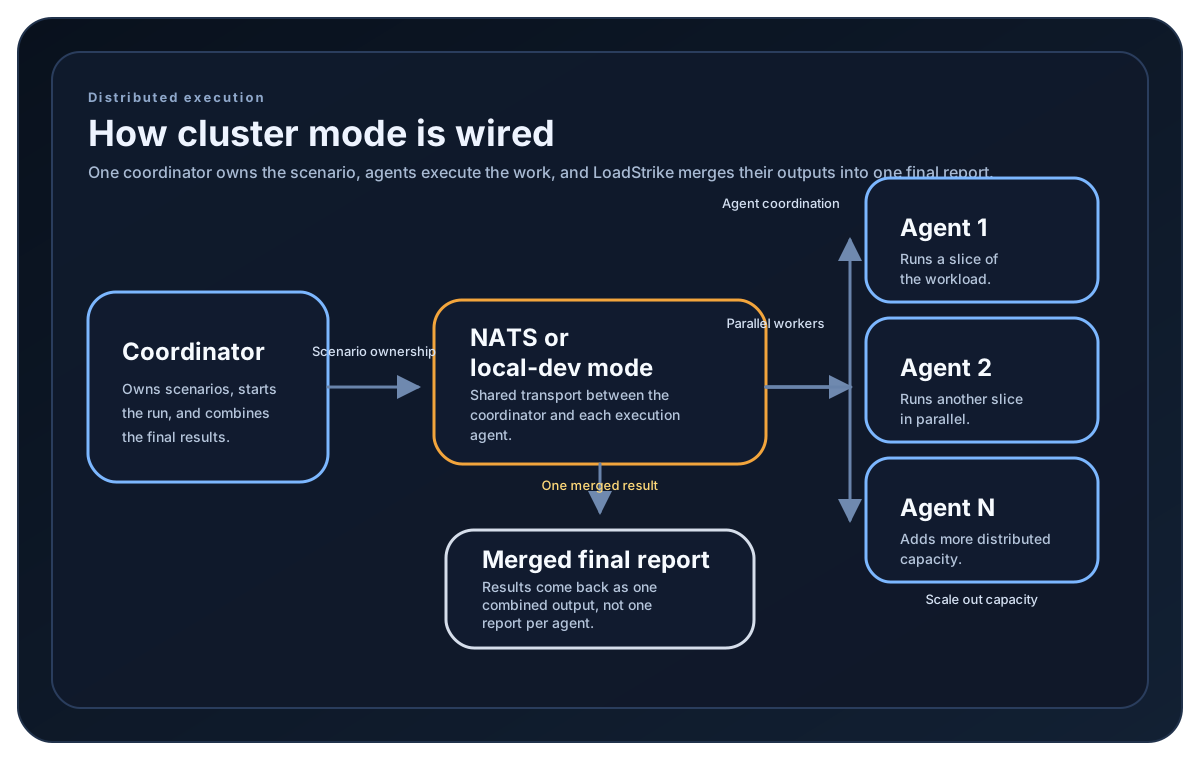
Guide
Two ways to run cluster mode
SDKs that support distributed mode use NodeType plus NatsServerUrl so separate coordinator and agent processes can communicate over NATS. EnableLocalDevCluster(true) starts coordinator-managed local child agents. The current Go release supports only that local coordinator path, still requires a reachable NatsServerUrl, and does not embed or start NATS; direct Agent and distributed Go runs are unavailable.
What the coordinator controls
The coordinator sets ClusterId, AgentGroup, AgentsCount, supported target lists, and ClusterCommandTimeout. It is also the node that produces the final merged report. Go V1 applies AgentTargetScenarios but not CoordinatorTargetScenarios. Clustered Go V2 requires local cluster mode and rejects both role-specific target lists; single-node Go V2 does not require cluster settings.
What agents need
In SDKs with distributed agents, agents need NodeType.Agent, the same ClusterId, the same AgentGroup if one is used, and the NATS server URL. Go does not currently support a direct Agent Run; its local children are created and identified by the coordinator.
How scenario targeting works
TargetScenarios applies a shared filter. AgentTargetScenarios and CoordinatorTargetScenarios split work by role only where the selected SDK and engine support them. In Go V1, AgentTargetScenarios applies but CoordinatorTargetScenarios is accepted without being applied; Go V2 rejects both role-specific lists.
Cluster setup samples
Distributed-capable SDK tabs can register scenarios in separate role processes. The Go tab uses one local coordinator: V1 can apply AgentTargetScenarios, CoordinatorTargetScenarios is not applied, and V2 rejects both role-specific lists.
If you run these examples locally, add a valid runner key before execution starts. Set it with WithRunnerKey("...") or the config key LoadStrike:RunnerKey.
Coordinator + Agent Configuration
using LoadStrike;

var clusterId = "orders-cluster";
var natsUrl = "nats://nats.example.internal:4222";

var publishOrdersScenario = LoadStrikeScenario.Create(
        "publish-orders",
        _ => Task.FromResult(LoadStrikeResponse.Ok(statusCode: "202")))
    .WithLoadSimulations(LoadStrikeSimulation.IterationsForConstant(1, 2));

var observeCompletionScenario = LoadStrikeScenario.Create(
        "observe-completion",
        _ => Task.FromResult(LoadStrikeResponse.Ok(statusCode: "200")))
    .WithLoadSimulations(LoadStrikeSimulation.IterationsForConstant(1, 2));

var agentContext = LoadStrikeRunner
    .RegisterScenarios(publishOrdersScenario, observeCompletionScenario)
    .WithNodeType(LoadStrikeNodeType.Agent)
    .WithClusterId(clusterId)
    .WithAgentTargetScenarios("observe-completion")
    .WithNatsServerUrl(natsUrl);

// Each agent process listens for the scenario names assigned to agents.
agentContext.Run();

var coordinatorContext = LoadStrikeRunner
    .RegisterScenarios(publishOrdersScenario, observeCompletionScenario)
    .WithNodeType(LoadStrikeNodeType.Coordinator)
    .WithClusterId(clusterId)
    .WithAgentsCount(2)
    .WithCoordinatorTargetScenarios("publish-orders")
    .WithAgentTargetScenarios("observe-completion")
    .WithNatsServerUrl(natsUrl)
    .WithRunnerKey("rkr_your_remote_runner_key");

// The coordinator triggers only its own scenarios and routes agent work by scenario name.
coordinatorContext.Run();
package main
import loadstrike "loadstrike.com/sdk/go"
func main() {
source := loadstrike.Empty("source")
destination := loadstrike.Empty("destination")
// V1 supports agent-specific targeting in local coordinator mode.
// CoordinatorTargetScenarios is not applied by the current Go release.
loadstrike.RegisterScenarios(source, destination).
WithRunnerKey("rkl_your_local_runner_key").
WithClusterId("cluster-orders-local").
WithNatsServerUrl("nats://127.0.0.1:4222"). // Start NATS locally first.
WithNodeType(loadstrike.NodeTypeCoordinator).
WithAgentsCount(2).
EnableLocalDevCluster(true).
WithTargetScenarios("source", "destination").
WithAgentTargetScenarios("destination").
Run()
}import com.loadstrike.runtime.LoadStrikeRuntime.LoadStrikeResponse;
import com.loadstrike.runtime.LoadStrikeRuntime.LoadStrikeNodeType;
import com.loadstrike.runtime.LoadStrikeRuntime.LoadStrikeRunner;
import com.loadstrike.runtime.LoadStrikeRuntime.LoadStrikeScenario;
import com.loadstrike.runtime.LoadStrikeRuntime.LoadStrikeSimulation;
String clusterId = "orders-cluster";
String natsUrl = "nats://nats.example.internal:4222";
var publishOrdersScenario = LoadStrikeScenario
.create("publish-orders", ignoredContext -> LoadStrikeResponse.ok("202"))
.withLoadSimulations(LoadStrikeSimulation.iterationsForConstant(1, 2));
var observeCompletionScenario = LoadStrikeScenario
.create("observe-completion", ignoredContext -> LoadStrikeResponse.ok("200"))
.withLoadSimulations(LoadStrikeSimulation.iterationsForConstant(1, 2));
var agentRunner = LoadStrikeRunner
.registerScenarios(publishOrdersScenario, observeCompletionScenario)
.withNodeType(LoadStrikeNodeType.Agent)
.buildContext()
.withClusterId(clusterId)
.withAgentTargetScenarios("observe-completion")
.withNatsServerUrl(natsUrl);
// Each agent process listens for the scenario names assigned to agents.
agentRunner.run();
var coordinatorRunner = LoadStrikeRunner
.registerScenarios(publishOrdersScenario, observeCompletionScenario)
.withNodeType(LoadStrikeNodeType.Coordinator)
.buildContext()
.withClusterId(clusterId)
.withAgentsCount(2)
.withCoordinatorTargetScenarios("publish-orders")
.withAgentTargetScenarios("observe-completion")
.withNatsServerUrl(natsUrl)
.withRunnerKey("rkr_your_remote_runner_key");
// The coordinator triggers only its own scenarios and routes agent work by scenario name.
coordinatorRunner.run();from loadstrike_sdk import LoadStrikeResponse, LoadStrikeRunner, LoadStrikeScenario, LoadStrikeSimulation
cluster_id = "orders-cluster"
nats_url = "nats://nats.example.internal:4222"
publish_orders_scenario = (
LoadStrikeScenario.create("publish-orders", lambda _: LoadStrikeResponse.ok("202"))
.with_load_simulations(LoadStrikeSimulation.iterations_for_constant(1, 2))
)
observe_completion_scenario = (
LoadStrikeScenario.create("observe-completion", lambda _: LoadStrikeResponse.ok("200"))
.with_load_simulations(LoadStrikeSimulation.iterations_for_constant(1, 2))
)
agent_runner = (
LoadStrikeRunner.register_scenarios(publish_orders_scenario, observe_completion_scenario)
.with_node_type("Agent")
.with_cluster_id(cluster_id)
.with_agent_target_scenarios("observe-completion")
.with_nats_server_url(nats_url)
)
# Each agent process listens for the scenario names assigned to agents.
agent_runner.run()
coordinator_runner = (
LoadStrikeRunner.register_scenarios(publish_orders_scenario, observe_completion_scenario)
.with_node_type("Coordinator")
.with_cluster_id(cluster_id)
.with_agents_count(2)
.with_coordinator_target_scenarios("publish-orders")
.with_agent_target_scenarios("observe-completion")
.with_nats_server_url(nats_url)
.with_runner_key("rkr_your_remote_runner_key")
)
# The coordinator triggers only its own scenarios and routes agent work by scenario name.
coordinator_runner.run()import {
LoadStrikeResponse,
LoadStrikeRunner,
LoadStrikeScenario,
LoadStrikeSimulation
} from "@loadstrike/loadstrike-sdk";
const clusterId = "orders-cluster";
const natsUrl = "nats://nats.example.internal:4222";
const publishOrdersScenario = LoadStrikeScenario
.create("publish-orders", async () => LoadStrikeResponse.ok("202"))
.withLoadSimulations(LoadStrikeSimulation.iterationsForConstant(1, 2));
const observeCompletionScenario = LoadStrikeScenario
.create("observe-completion", async () => LoadStrikeResponse.ok("200"))
.withLoadSimulations(LoadStrikeSimulation.iterationsForConstant(1, 2));
const agentRunner = LoadStrikeRunner
.registerScenarios(publishOrdersScenario, observeCompletionScenario)
.withNodeType("Agent")
.withClusterId(clusterId)
.withAgentTargetScenarios("observe-completion")
.withNatsServerUrl(natsUrl);
// Each agent process listens for the scenario names assigned to agents.
await agentRunner.run();
const coordinatorRunner = LoadStrikeRunner
.registerScenarios(publishOrdersScenario, observeCompletionScenario)
.withNodeType("Coordinator")
.withClusterId(clusterId)
.withAgentsCount(2)
.withCoordinatorTargetScenarios("publish-orders")
.withAgentTargetScenarios("observe-completion")
.withNatsServerUrl(natsUrl)
.withRunnerKey("rkr_your_remote_runner_key");
// The coordinator triggers only its own scenarios and routes agent work by scenario name.
await coordinatorRunner.run();const {
LoadStrikeResponse,
LoadStrikeRunner,
LoadStrikeScenario,
LoadStrikeSimulation
} = require("@loadstrike/loadstrike-sdk");
(async () => {
const clusterId = "orders-cluster";
const natsUrl = "nats://nats.example.internal:4222";
const publishOrdersScenario = LoadStrikeScenario
.create("publish-orders", async () => LoadStrikeResponse.ok("202"))
.withLoadSimulations(LoadStrikeSimulation.iterationsForConstant(1, 2));
const observeCompletionScenario = LoadStrikeScenario
.create("observe-completion", async () => LoadStrikeResponse.ok("200"))
.withLoadSimulations(LoadStrikeSimulation.iterationsForConstant(1, 2));
const agentRunner = LoadStrikeRunner
.registerScenarios(publishOrdersScenario, observeCompletionScenario)
.withNodeType("Agent")
.withClusterId(clusterId)
.withAgentTargetScenarios("observe-completion")
.withNatsServerUrl(natsUrl);
// Each agent process listens for the scenario names assigned to agents.
await agentRunner.run();
const coordinatorRunner = LoadStrikeRunner
.registerScenarios(publishOrdersScenario, observeCompletionScenario)
.withNodeType("Coordinator")
.withClusterId(clusterId)
.withAgentsCount(2)
.withCoordinatorTargetScenarios("publish-orders")
.withAgentTargetScenarios("observe-completion")
.withNatsServerUrl(natsUrl)
.withRunnerKey("rkr_your_remote_runner_key");
// The coordinator triggers only its own scenarios and routes agent work by scenario name.
await coordinatorRunner.run();
})();Coordinator and agent settings
Coordinator merges results and assigns work. Agent executes assigned scenarios where separate agent processes are supported. Current Go cluster runs use a local Coordinator because direct Agent execution is unavailable.
Must line up between the participating processes so they join the same run and, optionally, the same agent pool.
Coordinator expectation for how many agents should participate.
Transport used for distributed coordinator-agent communication in SDKs that support separate agent processes.
TargetScenarios is the shared filter. Go V1 applies AgentTargetScenarios but not CoordinatorTargetScenarios; Go V2 rejects both role-specific lists. Other SDK tabs describe their supported role split.
Coordinator wait budget for cluster coordination commands and result collection.
Development-only convenience mode that removes the need for separately managed agent processes.
{
  "LoadStrike": {
    "NodeType": "Coordinator",
    "ClusterId": "orders-cluster",
    "AgentGroup": "perf-agents",
    "AgentsCount": 3,
    "RunnerKey": "rkr_your_remote_runner_key",
    "NatsServerUrl": "nats://localhost:4222",
    "TargetScenarios": "http-source,kafka-consumer",
    "AgentTargetScenarios": "kafka-consumer",
    "CoordinatorTargetScenarios": "http-source",
    "ClusterCommandTimeoutMs": 120000,
    "EnableLocalDevCluster": false
  }
}