
Overview
Learn what LoadStrike does and how it follows one transaction across systems. Start here if you are new to the product model.
Matching docs
Search across docs titles, summaries, groups, and section headings.
Use Up and Down Arrow to move through results, then press Enter to open the active page.
No indexed docs matched that search. Try a broader term or open the docs hub.
What this page helps you do
What this page helps you do
Learn what LoadStrike does and how it follows one transaction across systems. Start here if you are new to the product model.
Who this is for
Engineers starting a first LoadStrike evaluation or wiring the product into an existing test project.
Prerequisites
- A supported SDK and runtime for the path you plan to use
By the end
A clear next step in the first runnable LoadStrike workflow.
Use this page when
Use this page when you are still establishing the first runnable path and want the shortest correct next step.
Visual guide
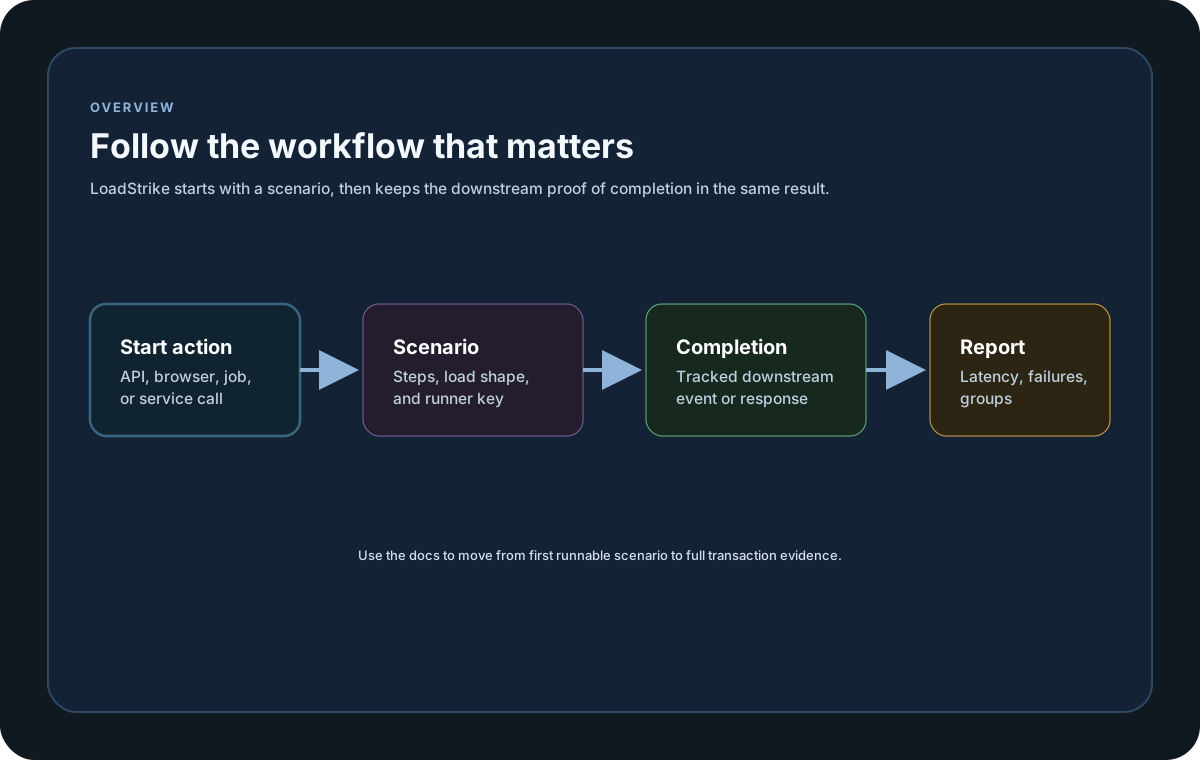
Guide
What It Solves
LoadStrike is built for workloads that do not end at the first request. It can follow work across HTTP, Kafka, NATS, Redis Streams, RabbitMQ, AWS SQS, Event Hubs, gRPC, WebSocket, Push Diffusion, and delegate-based custom streams.
How Correlation Works
LoadStrike looks for the same tracking ID at the start and end of the workflow. It can read that value from headers or body selectors, then match the first valid result, count duplicates, and enforce a timeout window.
Run Modes
Use GenerateAndCorrelate when LoadStrike should create the source traffic itself. Use CorrelateExistingTraffic when both sides of the workflow already exist and LoadStrike only needs to observe them. Source-only reporting is also supported when there is no destination.
Getting started samples
Use these samples to move from the shortest supported setup path into runnable scenario code without guessing what the SDK surface looks like.
If you run these examples locally, add a valid runner key before execution starts. Set it with WithRunnerKey("...") or the config key LoadStrike:RunnerKey.
Minimal Run
using LoadStrike;

var httpClient = new HttpClient
{
    BaseAddress = new Uri("https://api.example.com")
};

var scenario = LoadStrikeScenario.Create("read-order", async context =>
{
    var orderId = $"ord-{context.InvocationNumber}";

    var step = await LoadStrikeStep.Run<string>("GET /orders/{id}", context, async () =>
    {
        using var response = await httpClient.GetAsync($"/orders/{orderId}");

        return response.IsSuccessStatusCode
            ? LoadStrikeResponse.Ok<string>(statusCode: ((int)response.StatusCode).ToString())
            : LoadStrikeResponse.Fail<string>(
                statusCode: ((int)response.StatusCode).ToString(),
                message: "Order lookup failed");
    });

    return step.AsReply();
})
.WithLoadSimulations(
    LoadStrikeSimulation.Inject(10, TimeSpan.FromSeconds(1), TimeSpan.FromSeconds(20))
);

LoadStrikeRunner.RegisterScenarios(scenario)
    .WithRunnerKey("rkl_your_local_runner_key")
    .Run();
package main
import (
"io"
"net/http"
"strconv"
loadstrike "loadstrike.com/sdk/go"
)
func main() {
scenario := loadstrike.CreateScenario("read-order", func(ctx loadstrike.LoadStrikeScenarioContext) loadstrike.LoadStrikeReply {
return loadstrike.LoadStrikeStep.Run("GET /orders/{id}", ctx, func(loadstrike.LoadStrikeScenarioContext) loadstrike.LoadStrikeReply {
request, err := http.NewRequest(http.MethodGet, "https://api.example.com/orders/ord-1001", nil)
if err != nil {
return loadstrike.LoadStrikeResponse.Fail("request_build_failed", int64(0), err.Error())
}
response, err := http.DefaultClient.Do(request)
if err != nil {
return loadstrike.LoadStrikeResponse.Fail("http_request_failed", int64(0), err.Error())
}
defer response.Body.Close()
_, _ = io.Copy(io.Discard, response.Body)
if response.StatusCode < 400 {
return loadstrike.LoadStrikeResponse.Ok(strconv.Itoa(response.StatusCode), int64(0), "ok")
}
return loadstrike.LoadStrikeResponse.Fail(strconv.Itoa(response.StatusCode), int64(0), "Order lookup failed")
})
}).
WithLoadSimulations(loadstrike.LoadStrikeSimulation.Inject(10, loadstrike.DurationFromSeconds(1), loadstrike.DurationFromSeconds(20)))
loadstrike.RegisterScenarios(scenario).
WithRunnerKey("rkl_your_local_runner_key").
Run()
}import java.net.URI;
import java.net.http.HttpClient;
import java.net.http.HttpRequest;
import java.net.http.HttpResponse;
import com.loadstrike.runtime.LoadStrikeRuntime.LoadStrikeResponse;
import com.loadstrike.runtime.LoadStrikeRuntime.LoadStrikeRunner;
import com.loadstrike.runtime.LoadStrikeRuntime.LoadStrikeScenario;
import com.loadstrike.runtime.LoadStrikeRuntime.LoadStrikeSimulation;
import com.loadstrike.runtime.LoadStrikeRuntime.LoadStrikeStep;
var client = HttpClient.newHttpClient();
var scenario = LoadStrikeScenario
.create("read-order", context -> LoadStrikeStep.run("GET /orders/{id}", context, () -> {
String orderId = "ord-" + context.invocationNumber;
var request = HttpRequest.newBuilder(URI.create("https://api.example.com/orders/" + orderId))
.GET()
.build();
var response = client.sendAsync(request, HttpResponse.BodyHandlers.ofString()).join();
return response.statusCode() < 400
? LoadStrikeResponse.ok(Integer.toString(response.statusCode()))
: LoadStrikeResponse.fail(Integer.toString(response.statusCode()), "Order lookup failed");
}).asReply())
.withLoadSimulations(LoadStrikeSimulation.inject(10, 1d, 20d));
LoadStrikeRunner
.registerScenarios(scenario)
.withRunnerKey("rkl_your_local_runner_key")
.run();import requests
from loadstrike_sdk import (
LoadStrikeResponse,
LoadStrikeRunner,
LoadStrikeScenario,
LoadStrikeSimulation,
LoadStrikeStep,
)
def read_order(context):
def run_step():
order_id = f"ord-{context.invocation_number}"
response = requests.get(f"https://api.example.com/orders/{order_id}", timeout=15)
if response.ok:
return LoadStrikeResponse.ok(str(response.status_code))
return LoadStrikeResponse.fail(str(response.status_code), "Order lookup failed")
return LoadStrikeStep.run("GET /orders/{id}", context, run_step).as_reply()
scenario = (
LoadStrikeScenario.create("read-order", read_order)
.with_load_simulations(LoadStrikeSimulation.inject(10, 1, 20))
)
LoadStrikeRunner.register_scenarios(scenario) \
.with_runner_key("rkl_your_local_runner_key") \
.run()import {
LoadStrikeResponse,
LoadStrikeRunner,
LoadStrikeScenario,
LoadStrikeSimulation,
LoadStrikeStep
} from "@loadstrike/loadstrike-sdk";
const scenario = LoadStrikeScenario
.create("read-order", async (context) => {
return LoadStrikeStep.run("GET /orders/{id}", context, async () => {
const orderId = `ord-${context.invocationNumber}`;
const response = await fetch(`https://api.example.com/orders/${orderId}`);
return response.ok
? LoadStrikeResponse.ok(String(response.status))
: LoadStrikeResponse.fail(String(response.status), "Order lookup failed");
});
})
.withLoadSimulations(LoadStrikeSimulation.inject(10, 1, 20));
await LoadStrikeRunner
.registerScenarios(scenario)
.withRunnerKey("rkl_your_local_runner_key")
.run();const {
LoadStrikeResponse,
LoadStrikeRunner,
LoadStrikeScenario,
LoadStrikeSimulation,
LoadStrikeStep
} = require("@loadstrike/loadstrike-sdk");
(async () => {
const scenario = LoadStrikeScenario
.create("read-order", async (context) => {
return LoadStrikeStep.run("GET /orders/{id}", context, async () => {
const orderId = `ord-${context.invocationNumber}`;
const response = await fetch(`https://api.example.com/orders/${orderId}`);
return response.ok
? LoadStrikeResponse.ok(String(response.status))
: LoadStrikeResponse.fail(String(response.status), "Order lookup failed");
});
})
.withLoadSimulations(LoadStrikeSimulation.inject(10, 1, 20));
await LoadStrikeRunner
.registerScenarios(scenario)
.withRunnerKey("rkl_your_local_runner_key")
.run();
})();Flow
Define one runnable workload unit before you add any correlation or transport-specific behavior.
Wrap the HTTP call in a named step so reports show where the request spent time.
Register the scenario, provide a valid runner key, and execute to produce runtime stats and reports.
Paid self-service renewal eligibility is based on the account's local calendar date, from two calendar months before through two calendar months after the license expiry date, inclusive.