
HTTP Protocol Guide
This guide explains how to think about realistic API transaction tests in LoadStrike. Use it when HTTP is part of the business workflow you want to validate.
Matching docs
Search across docs titles, summaries, groups, and section headings.
Use Up and Down Arrow to move through results, then press Enter to open the active page.
No indexed docs matched that search. Try a broader term or open the docs hub.
What this page helps you do
What this page helps you do
Decide when plain HTTP steps are enough and when a tracked HTTP endpoint definition is the better fit.
Who this is for
Teams testing API-driven workflows where HTTP is the source, the destination, or both.
Prerequisites
- An HTTP-based workflow to model
- Clarity on whether the request itself or the downstream completion is the thing you care about
By the end
A clear protocol choice and an HTTP setup that matches the transaction you are trying to measure.
Choose this path when
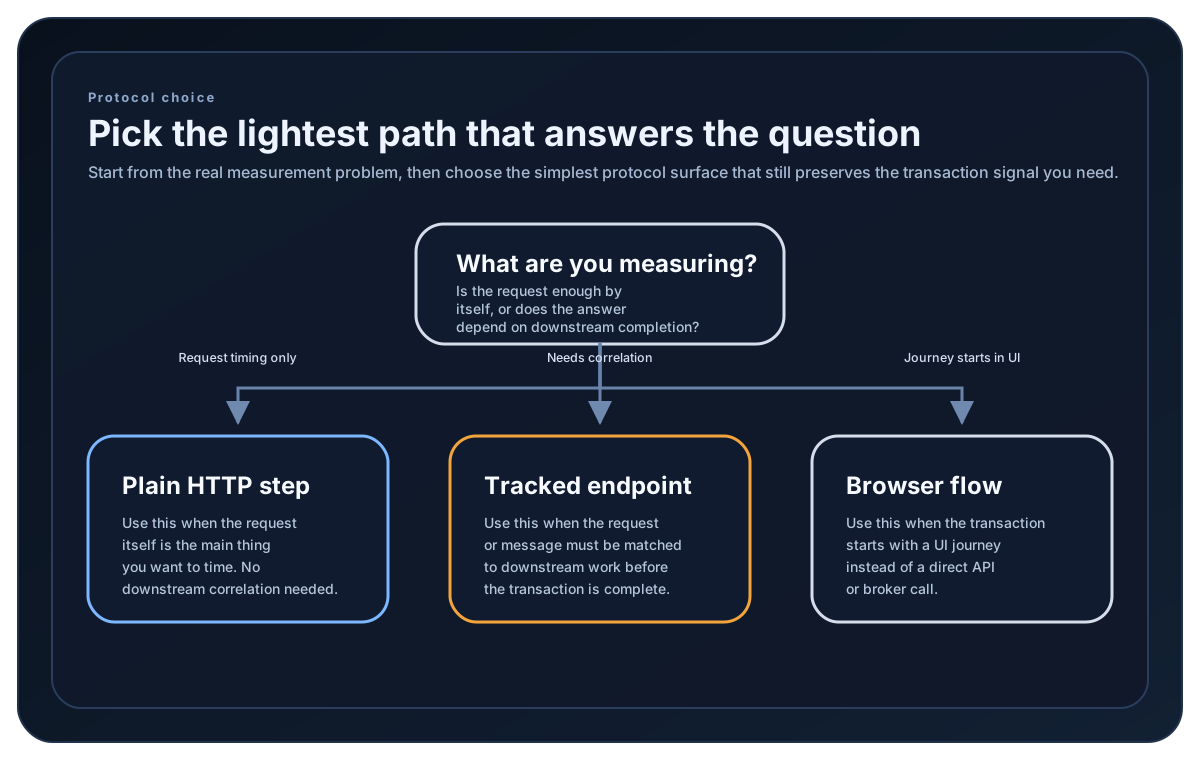
Use this guide when HTTP belongs inside the transaction story and you need to decide between a normal step and a tracked endpoint definition.
Visual guide
Guide
What the HTTP guide covers
This guide is about using ordinary HTTP client calls inside LoadStrike scenarios and steps, plus when to use the cross-platform HTTP endpoint definition for tracked workflows.
When plain step-based HTTP is enough
Use a normal HTTP client inside LoadStrikeStep when the important thing is the request latency, status code, and failure behavior of that one step.
When to switch to tracked HTTP endpoints
Use HttpEndpointDefinition when the HTTP call is the source or destination side of a correlated multi-system workflow and you want LoadStrike to manage tracking extraction and matching.
What to return from the step
Map successful HTTP outcomes to LoadStrikeResponse.Ok and failed outcomes to LoadStrikeResponse.Fail using the actual HTTP status code string. That keeps reports and sink exports readable for the team.
Protocol setup samples
Use these samples to compare plain HTTP steps with tracked endpoint definitions before you decide how HTTP belongs in the transaction.
If you run these examples locally, add a valid runner key before execution starts. Set it with WithRunnerKey("...") or the config key LoadStrike:RunnerKey.
HTTP Step
using LoadStrike;

var httpClient = new HttpClient
{
    BaseAddress = new Uri("https://api.example.com")
};

var scenario = LoadStrikeScenario.Create("read-order", async context =>
{
    var orderId = $"ord-{context.InvocationNumber}";

    var step = await LoadStrikeStep.Run<string>("GET /orders/{id}", context, async () =>
    {
        using var response = await httpClient.GetAsync($"/orders/{orderId}");

        return response.IsSuccessStatusCode
            ? LoadStrikeResponse.Ok<string>(statusCode: ((int)response.StatusCode).ToString())
            : LoadStrikeResponse.Fail<string>(
                statusCode: ((int)response.StatusCode).ToString(),
                message: "Order lookup failed");
    });

    return step.AsReply();
})
.WithLoadSimulations(
    LoadStrikeSimulation.Inject(10, TimeSpan.FromSeconds(1), TimeSpan.FromSeconds(20))
);

LoadStrikeRunner.RegisterScenarios(scenario)
    .WithRunnerKey("rkl_your_local_runner_key")
    .Run();
package main
import (
"io"
"net/http"
"strconv"
loadstrike "loadstrike.com/sdk/go"
)
func main() {
scenario := loadstrike.CreateScenario("read-order", func(ctx loadstrike.LoadStrikeScenarioContext) loadstrike.LoadStrikeReply {
return loadstrike.LoadStrikeStep.Run("GET /orders/{id}", ctx, func(loadstrike.LoadStrikeScenarioContext) loadstrike.LoadStrikeReply {
request, err := http.NewRequest(http.MethodGet, "https://api.example.com/orders/ord-1001", nil)
if err != nil {
return loadstrike.LoadStrikeResponse.Fail("request_build_failed", int64(0), err.Error())
}
response, err := http.DefaultClient.Do(request)
if err != nil {
return loadstrike.LoadStrikeResponse.Fail("http_request_failed", int64(0), err.Error())
}
defer response.Body.Close()
_, _ = io.Copy(io.Discard, response.Body)
if response.StatusCode < 400 {
return loadstrike.LoadStrikeResponse.Ok(strconv.Itoa(response.StatusCode), int64(0), "ok")
}
return loadstrike.LoadStrikeResponse.Fail(strconv.Itoa(response.StatusCode), int64(0), "Order lookup failed")
})
}).
WithLoadSimulations(loadstrike.LoadStrikeSimulation.Inject(10, loadstrike.DurationFromSeconds(1), loadstrike.DurationFromSeconds(20)))
loadstrike.RegisterScenarios(scenario).
WithRunnerKey("rkl_your_local_runner_key").
Run()
}import java.net.URI;
import java.net.http.HttpClient;
import java.net.http.HttpRequest;
import java.net.http.HttpResponse;
import com.loadstrike.runtime.LoadStrikeRuntime.LoadStrikeResponse;
import com.loadstrike.runtime.LoadStrikeRuntime.LoadStrikeRunner;
import com.loadstrike.runtime.LoadStrikeRuntime.LoadStrikeScenario;
import com.loadstrike.runtime.LoadStrikeRuntime.LoadStrikeSimulation;
import com.loadstrike.runtime.LoadStrikeRuntime.LoadStrikeStep;
var client = HttpClient.newHttpClient();
var scenario = LoadStrikeScenario
.create("read-order", context -> LoadStrikeStep.run("GET /orders/{id}", context, () -> {
String orderId = "ord-" + context.invocationNumber;
var request = HttpRequest.newBuilder(URI.create("https://api.example.com/orders/" + orderId))
.GET()
.build();
var response = client.sendAsync(request, HttpResponse.BodyHandlers.ofString()).join();
return response.statusCode() < 400
? LoadStrikeResponse.ok(Integer.toString(response.statusCode()))
: LoadStrikeResponse.fail(Integer.toString(response.statusCode()), "Order lookup failed");
}).asReply())
.withLoadSimulations(LoadStrikeSimulation.inject(10, 1d, 20d));
LoadStrikeRunner
.registerScenarios(scenario)
.withRunnerKey("rkl_your_local_runner_key")
.run();import requests
from loadstrike_sdk import (
LoadStrikeResponse,
LoadStrikeRunner,
LoadStrikeScenario,
LoadStrikeSimulation,
LoadStrikeStep,
)
def read_order(context):
def run_step():
order_id = f"ord-{context.invocation_number}"
response = requests.get(f"https://api.example.com/orders/{order_id}", timeout=15)
if response.ok:
return LoadStrikeResponse.ok(str(response.status_code))
return LoadStrikeResponse.fail(str(response.status_code), "Order lookup failed")
return LoadStrikeStep.run("GET /orders/{id}", context, run_step).as_reply()
scenario = (
LoadStrikeScenario.create("read-order", read_order)
.with_load_simulations(LoadStrikeSimulation.inject(10, 1, 20))
)
LoadStrikeRunner.register_scenarios(scenario) \
.with_runner_key("rkl_your_local_runner_key") \
.run()import {
LoadStrikeResponse,
LoadStrikeRunner,
LoadStrikeScenario,
LoadStrikeSimulation,
LoadStrikeStep
} from "@loadstrike/loadstrike-sdk";
const scenario = LoadStrikeScenario
.create("read-order", async (context) => {
return LoadStrikeStep.run("GET /orders/{id}", context, async () => {
const orderId = `ord-${context.invocationNumber}`;
const response = await fetch(`https://api.example.com/orders/${orderId}`);
return response.ok
? LoadStrikeResponse.ok(String(response.status))
: LoadStrikeResponse.fail(String(response.status), "Order lookup failed");
});
})
.withLoadSimulations(LoadStrikeSimulation.inject(10, 1, 20));
await LoadStrikeRunner
.registerScenarios(scenario)
.withRunnerKey("rkl_your_local_runner_key")
.run();const {
LoadStrikeResponse,
LoadStrikeRunner,
LoadStrikeScenario,
LoadStrikeSimulation,
LoadStrikeStep
} = require("@loadstrike/loadstrike-sdk");
(async () => {
const scenario = LoadStrikeScenario
.create("read-order", async (context) => {
return LoadStrikeStep.run("GET /orders/{id}", context, async () => {
const orderId = `ord-${context.invocationNumber}`;
const response = await fetch(`https://api.example.com/orders/${orderId}`);
return response.ok
? LoadStrikeResponse.ok(String(response.status))
: LoadStrikeResponse.fail(String(response.status), "Order lookup failed");
});
})
.withLoadSimulations(LoadStrikeSimulation.inject(10, 1, 20));
await LoadStrikeRunner
.registerScenarios(scenario)
.withRunnerKey("rkl_your_local_runner_key")
.run();
})();HTTP protocol choices a beginner should make
Use one shared HTTP client, session, or dispatcher for ordinary request-response testing when the step itself is the thing you want to measure. Avoid constructing a fresh transport object per request under load.
Return the actual HTTP status code string in LoadStrikeResponse so reports show familiar values such as 200, 404, or 500.
Build the same request shape the real client would send so latency and downstream behavior stay representative.
Dispose or close the shared HTTP transport when the run finishes so sockets, pools, and background resources are released cleanly.
Use the endpoint definition only when the HTTP call is part of a tracked cross-platform workflow.