
Load Simulation
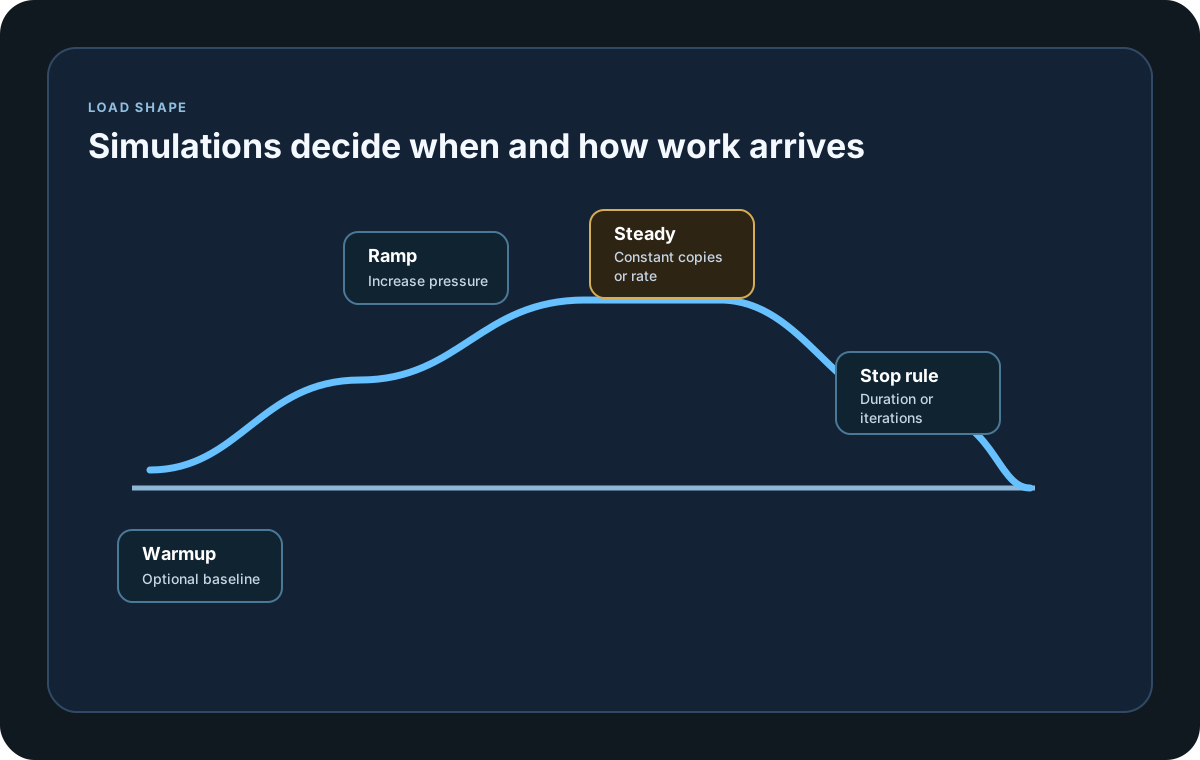
Load simulations describe how traffic should arrive over time. Use them to model the shape of the workload instead of only its peak.
Matching docs
Search across docs titles, summaries, groups, and section headings.
Use Up and Down Arrow to move through results, then press Enter to open the active page.
No indexed docs matched that search. Try a broader term or open the docs hub.
What this page helps you do
What this page helps you do
Load simulations describe how traffic should arrive over time. Use them to model the shape of the workload instead of only its peak.
Who this is for
Engineers writing or reviewing scenario code in one of the supported SDKs.
Prerequisites
- A scenario or runtime surface you want to wire correctly in code
By the end
The exact SDK surface you need for this part of the runtime.
Use this page when
Use this reference when you already know the workflow and need the exact Load Simulation API surface in code.
Visual guide
Guide
Time-Based Simulations
Use duration-based simulations when you want traffic to run for a period of time. Inject(rate, interval, during), InjectRandom(minRate, maxRate, interval, during), RampingInject(rate, interval, during), KeepConstant(copies, during), RampingConstant(copies, during), and Pause(during) all fit that model.
Iteration-Based Simulations
Use iteration-based simulations when you care about a fixed amount of work rather than a fixed duration. IterationsForInject(rate, interval, iterations) and IterationsForConstant(copies, iterations) stop after the configured number of execution cycles.
Traffic Mixes
When one total load profile needs to be split across different business paths, use the Traffic Mix page under Library Options. Keep this page for the primitive load shapes that a scenario or traffic mix can reuse.
Parameter Fields
rate, minRate, and maxRate control request emission intensity. copies controls concurrent virtual users. interval controls pacing, during controls time, and iterations controls total execution cycles. Helper APIs also expose IsInject, IsInjectRandom, IsIterationsForInject, IsIterationsForConstant, and related flags plus string formatting helpers on returned simulation definitions.
Explicit Load Engine V2
Call UseLoadEngineV2, useLoadEngineV2, or use_load_engine_v2 on the runner before Run when you want the versioned smooth-pacing and bounded-work contract. Existing runs that do not opt in keep their legacy behavior. In V2, registered scenarios run concurrently, a rate means scenario invocations per supplied interval, and arrivals are spread across that interval instead of being released as one interval-sized burst. Final scenario results remain in registration order. Weighted traffic mixes retain one global rank space across their lanes and agent shards.
V2 Compatibility Guardrails
Weighted traffic mixes are supported by V2. Cross-platform correlation and remote cluster execution depend on the documented SDK and execution-mode combination; an unsupported combination is rejected before traffic instead of silently falling back to partial scheduling or accounting.
Process Capacity
V2 uses a process-wide MaxInFlight ceiling shared by the scenarios and logical agents running in that process. The default is 10,000; tune it with WithMaxInFlight, withMaxInFlight, or with_max_in_flight only after measuring generator CPU, memory, connection pools, broker clients, and target limits. A local cluster still shares the same machine capacity.
Bounded Step Series
Declare statically known step names before a V2 run when you need empty report series for steps that receive no observations. An unexpected runtime step is folded into the bounded <other> series, preventing unbounded report cardinality while preserving its measurements.
Offered And Achieved Load
Offered load is the schedule the test asks the generator to deliver. Achieved load is the work that actually starts. When the generator is late or its in-flight ceiling is full, V2 drops that arrival and records a generator warning instead of adding an unbounded backlog or turning the event into an application failure. Review delivery percentage and scheduler lag beside response latency before treating an RPS target as achieved.
Generator Delivery Report
When scheduler delivery data, raw observation delivery statistics, generator or reporting warnings, or incomplete reporting are available, the HTML report adds a Generator Delivery tab. Use it to review scheduling and reporting health beside application results. If an older result does not include reporting-completeness status, the tab shows N/A instead of reporting loss. Application failures remain separate from generator and reporting warnings.
Observation Completion
Each sink receives its raw iteration batches before its own stream completion marker, and a healthy sink can complete independently while another sink is still draining. If a sink write is still active when the bounded drain period expires, reporting is marked incomplete and no completion marker is sent ahead of that write. The active write is not falsely reported as dropped.
Invocations Versus Transport Work
One scenario invocation is not automatically one wire request or one broker record. A scenario may contain several HTTP steps, publish several Kafka records, or drive a complete browser journey. For Kafka, report records per second and bytes per second alongside invocation rate. For Playwright, size copies for browser contexts and host capacity rather than API-style request rates.
Safe Capacity Runs
Capacity is specific to the generator hardware, runtime, topology, scenario code, and target environment. Start with a small smoke rate, use timeouts and reusable clients, increase gradually, and retain the run configuration and report artifacts. The canonical scheduler-noop/2 profile exercises each SDK's native asynchronous scheduler with a five-second warm-up and 30-second measurement, exact lifecycle accounting, bounded percentile evidence, final-artifact reconstruction, and an inclusive +/-2% offered-and-started-rate boundary. Scheduler-late and MaxInFlight drops are reported separately and prevent certification. Only run high-rate tests against systems you own or have explicit permission to test.
Runtime Stop Control
Load shape is not the only stop signal. Use context.StopScenario(...) when one scenario should end early after the runtime has observed enough data, or context.StopCurrentTest(...) when the whole run should stop because a critical runtime condition has been reached.
Composition
Attach multiple simulations in order with WithLoadSimulations when one scenario needs warm-up, ramp-up, steady-state, and cooldown phases in a single definition.
SDK reference samples
Use these SDK samples to compare how Load Simulation is exposed across the supported languages before you wire it into a full scenario.
If you run these examples locally, add a valid runner key before execution starts. Set it with WithRunnerKey("...") or the config key LoadStrike:RunnerKey.
Load Simulations
using LoadStrike;

var httpClient = new HttpClient
{
    BaseAddress = new Uri("https://api.example.com")
};

var scenario = LoadStrikeScenario.Create("submit-orders", async context =>
{
    var step = await LoadStrikeStep.Run<string>("POST /orders", context, async () =>
    {
        using var response = await httpClient.PostAsJsonAsync("/orders", new
        {
            orderId = $"ord-{context.InvocationNumber}",
            amount = 49.95m
        });

        return response.IsSuccessStatusCode
            ? LoadStrikeResponse.Ok<string>(statusCode: ((int)response.StatusCode).ToString())
            : LoadStrikeResponse.Fail<string>(statusCode: ((int)response.StatusCode).ToString());
    });

    return step.AsReply();
})
.WithLoadSimulations(
    LoadStrikeSimulation.Inject(5, TimeSpan.FromSeconds(1), TimeSpan.FromSeconds(20)),
    LoadStrikeSimulation.RampingInject(20, TimeSpan.FromSeconds(1), TimeSpan.FromSeconds(20)),
    LoadStrikeSimulation.KeepConstant(8, TimeSpan.FromSeconds(20))
);

LoadStrikeRunner.RegisterScenarios(scenario)
    .UseLoadEngineV2()
    .WithMaxInFlight(5000)
    .WithRunnerKey("rkl_your_local_runner_key")
    .Run();
package main
import loadstrike "loadstrike.com/sdk/go"
func main() {
scenario := loadstrike.CreateScenario("load-shapes", func(loadstrike.LoadStrikeScenarioContext) loadstrike.LoadStrikeReply {
return loadstrike.LoadStrikeResponse.Ok("200")
}).WithLoadSimulations(
loadstrike.LoadStrikeSimulation.Inject(10, loadstrike.DurationFromSeconds(1), loadstrike.DurationFromSeconds(20)),
loadstrike.LoadStrikeSimulation.InjectRandom(5, 15, loadstrike.DurationFromSeconds(1), loadstrike.DurationFromSeconds(20)),
loadstrike.LoadStrikeSimulation.RampingInject(20, loadstrike.DurationFromSeconds(1), loadstrike.DurationFromSeconds(20)),
loadstrike.LoadStrikeSimulation.KeepConstant(5, loadstrike.DurationFromSeconds(20)),
loadstrike.LoadStrikeSimulation.Pause(loadstrike.DurationFromSeconds(3)),
)
loadstrike.Create().
AddScenario(scenario).
UseLoadEngineV2().
WithMaxInFlight(5000).
WithRunnerKey("rkl_your_local_runner_key").
Run()
}import java.net.URI;
import java.net.http.HttpClient;
import java.net.http.HttpRequest;
import java.net.http.HttpResponse;
import com.loadstrike.runtime.LoadStrikeRuntime.LoadStrikeResponse;
import com.loadstrike.runtime.LoadStrikeRuntime.LoadStrikeRunner;
import com.loadstrike.runtime.LoadStrikeRuntime.LoadStrikeScenario;
import com.loadstrike.runtime.LoadStrikeRuntime.LoadStrikeSimulation;
import com.loadstrike.runtime.LoadStrikeRuntime.LoadStrikeStep;
var client = HttpClient.newHttpClient();
var scenario = LoadStrikeScenario.create("submit-orders", context -> {
var step = LoadStrikeStep.run("POST /orders", context, () -> {
String body = "{\"orderId\":\"ord-" + context.invocationNumber + "\",\"amount\":49.95}";
var request = HttpRequest.newBuilder(URI.create("https://api.example.com/orders"))
.header("Content-Type", "application/json")
.POST(HttpRequest.BodyPublishers.ofString(body))
.build();
var response = client.sendAsync(request, HttpResponse.BodyHandlers.ofString()).join();
return response.statusCode() < 400
? LoadStrikeResponse.ok(Integer.toString(response.statusCode()))
: LoadStrikeResponse.fail(Integer.toString(response.statusCode()));
});
return step.asReply();
})
.withLoadSimulations(
LoadStrikeSimulation.inject(5, 1d, 20d),
LoadStrikeSimulation.rampingInject(20, 1d, 20d),
LoadStrikeSimulation.keepConstant(8, 20d)
);
LoadStrikeRunner
.registerScenarios(scenario)
.useLoadEngineV2()
.withMaxInFlight(5000)
.withRunnerKey("rkl_your_local_runner_key")
.run();import requests
from loadstrike_sdk import (
LoadStrikeResponse,
LoadStrikeRunner,
LoadStrikeScenario,
LoadStrikeSimulation,
LoadStrikeStep,
)
def submit_orders(context):
step = LoadStrikeStep.run(
"POST /orders",
context,
lambda: (
lambda response: LoadStrikeResponse.ok(str(response.status_code))
if response.ok
else LoadStrikeResponse.fail(str(response.status_code))
)(
requests.post(
"https://api.example.com/orders",
json={"orderId": f"ord-{context.invocation_number}", "amount": 49.95},
timeout=15,
)
),
)
return step.as_reply()
scenario = (
LoadStrikeScenario.create("submit-orders", submit_orders)
.with_load_simulations(
LoadStrikeSimulation.inject(5, 1, 20),
LoadStrikeSimulation.ramping_inject(20, 1, 20),
LoadStrikeSimulation.keep_constant(8, 20),
)
)
LoadStrikeRunner.register_scenarios(scenario) \
.use_load_engine_v2() \
.with_max_in_flight(5000) \
.with_runner_key("rkl_your_local_runner_key") \
.run()import {
LoadStrikeResponse,
LoadStrikeRunner,
LoadStrikeScenario,
LoadStrikeSimulation,
LoadStrikeStep
} from "@loadstrike/loadstrike-sdk";
const scenario = LoadStrikeScenario.create("submit-orders", async (context) => {
const step = await LoadStrikeStep.run("POST /orders", context, async () => {
const response = await fetch("https://api.example.com/orders", {
method: "POST",
headers: { "content-type": "application/json" },
body: JSON.stringify({
orderId: `ord-${context.invocationNumber}`,
amount: 49.95
})
});
return response.ok
? LoadStrikeResponse.ok(String(response.status))
: LoadStrikeResponse.fail(String(response.status));
});
return step.asReply();
}).withLoadSimulations(
LoadStrikeSimulation.inject(5, 1, 20),
LoadStrikeSimulation.rampingInject(20, 1, 20),
LoadStrikeSimulation.keepConstant(8, 20)
);
await LoadStrikeRunner
.registerScenarios(scenario)
.useLoadEngineV2()
.withMaxInFlight(5000)
.withRunnerKey("rkl_your_local_runner_key")
.run();const {
LoadStrikeResponse,
LoadStrikeRunner,
LoadStrikeScenario,
LoadStrikeSimulation,
LoadStrikeStep
} = require("@loadstrike/loadstrike-sdk");
(async () => {
const scenario = LoadStrikeScenario.create("submit-orders", async (context) => {
const step = await LoadStrikeStep.run("POST /orders", context, async () => {
const response = await fetch("https://api.example.com/orders", {
method: "POST",
headers: { "content-type": "application/json" },
body: JSON.stringify({
orderId: `ord-${context.invocationNumber}`,
amount: 49.95
})
});
return response.ok
? LoadStrikeResponse.ok(String(response.status))
: LoadStrikeResponse.fail(String(response.status));
});
return step.asReply();
}).withLoadSimulations(
LoadStrikeSimulation.inject(5, 1, 20),
LoadStrikeSimulation.rampingInject(20, 1, 20),
LoadStrikeSimulation.keepConstant(8, 20)
);
await LoadStrikeRunner
.registerScenarios(scenario)
.useLoadEngineV2()
.withMaxInFlight(5000)
.withRunnerKey("rkl_your_local_runner_key")
.run();
})();Supported Simulations
Emit requests at a fixed rate per interval for a fixed duration.
Vary the request rate between a minimum and maximum value each interval to simulate uneven live traffic.
Increase the request rate progressively over time instead of keeping it flat from the start.
Run a fixed number of concurrent copies for the requested duration.
Increase the number of concurrent copies gradually until the target steady-state concurrency is reached.
Insert a quiet gap between simulation phases without ending the scenario definition.
Run an inject-style rate pattern for a fixed number of iterations instead of a time window.
Run a fixed concurrency pattern for a fixed number of iterations instead of a duration.
Explicitly selects the versioned smooth-pacing and bounded-work contract. Registered scenarios run concurrently and final results retain registration order. Runs that do not opt in retain their legacy scheduling behavior.
Sets the process-wide in-flight ceiling after V2 is selected. The V2 default is 10,000 and valid values are 1 through 1,000,000.
Freeze statically known V2 step series before the run. Declared steps remain visible with zero observations, while an unexpected runtime step is folded into the bounded <other> series.
A late or capacity-blocked arrival is dropped and disclosed as generator under-delivery. It does not become a response failure from the system under test.
Warm-up invocations continue for the configured duration and are excluded from measured scenario request, success, and failure totals.
An exception from one scenario invocation is retained as a failed final observation instead of disappearing from the run. Cleanup failures are isolated so later scenarios can still execute.
Each sink receives its raw batches before its own stream completion marker. A healthy sink can complete independently while another sink is still draining. A raw-batch sink must implement the completion callback to prove complete delivery; a missing callback or a write that exceeds the bounded drain period marks that delivery incomplete with a warning.
Appears in HTML reports when scheduler delivery data, raw observation delivery statistics, generator or reporting warnings, or incomplete reporting are available. Results without reporting-completeness status show N/A rather than reporting loss. Application failures remain separate from generator and reporting warnings.
The repository capacity runner exercises each SDK's native asynchronous scheduler with a five-second warm-up and 30-second measurement. It verifies exact lifecycle accounting, bounded percentile evidence, final-artifact reconstruction, and an inclusive +/-2% offered-and-started-rate boundary. Scheduler-late and MaxInFlight drops are shown separately and prevent certification.
Use runtime stop helpers when the workload should end because the scenario observed enough evidence or because the whole test must stop early for a critical condition.
Choose rate-based simulations when you care about scenario invocations per interval and copy-based simulations when you care about concurrent workload copies. One invocation can issue multiple HTTP requests, Kafka records, or browser operations, so compare offered load with achieved transport throughput. Use the Traffic Mix page when one shared total load should be distributed across multiple business paths.