
Asserts And Thresholds
Thresholds are the pass or fail rules for a run. Use them when the test needs to decide whether the observed behavior was acceptable.
Matching docs
Search across docs titles, summaries, groups, and section headings.
Use Up and Down Arrow to move through results, then press Enter to open the active page.
No indexed docs matched that search. Try a broader term or open the docs hub.
What this page helps you do
What this page helps you do
Thresholds are the pass or fail rules for a run. Use them when the test needs to decide whether the observed behavior was acceptable.
Who this is for
Engineers writing or reviewing scenario code in one of the supported SDKs.
Prerequisites
- A scenario or runtime surface you want to wire correctly in code
By the end
The exact SDK surface you need for this part of the runtime.
Use this page when
Use this reference when you already know the workflow and need the exact Asserts And Thresholds API surface in code.
Visual guide
Guide
Scenario Threshold
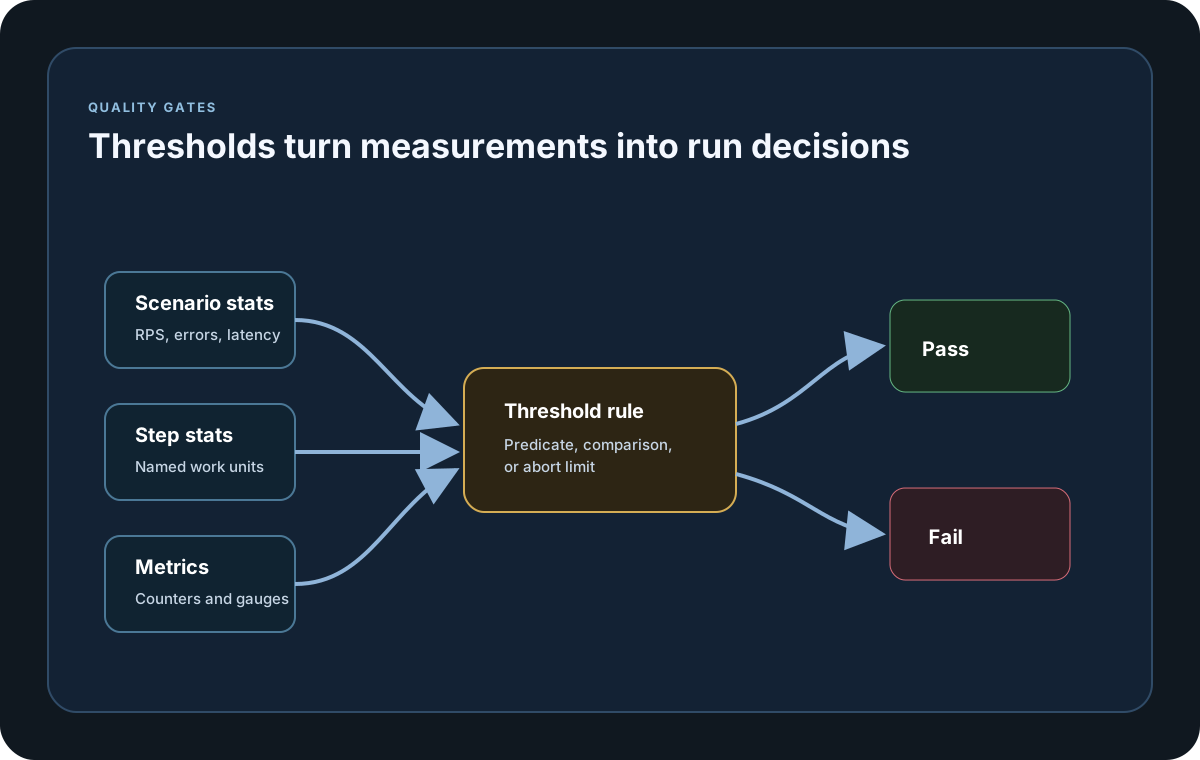
Use the scenario-threshold helper when the rule should evaluate the overall scenario, such as RPS, error rate, or latency percentiles. Go now exposes the same `.NET`-named helper through LoadStrikeThreshold{}.CreateScenario(...), and the older package-level CreateScenarioThreshold(...) helper remains a valid alias over the same underlying threshold contract.
Step Threshold
Use the step-threshold helper when one named step needs its own quality gate separate from the rest of the scenario. Go now exposes LoadStrikeThreshold{}.CreateStep(stepName, ...), and the older package-level CreateStepThreshold(stepName, ...) helper still maps to the same threshold builder logic.
Metric Threshold
Use the metric-threshold helper when the decision should be based on collected counters or gauges rather than scenario or step aggregates. Go now exposes LoadStrikeThreshold{}.CreateMetric(...), and the older package-level CreateMetricThreshold(...) helper still maps to the same metric-threshold contract.
Predicate Helper Parity
Predicate threshold helpers are available across the public SDKs now. `.NET` exposes ScenarioPredicate, StepPredicate, and MetricPredicate as aliases over its predicate builders, Go exposes the same `.NET`-named methods on LoadStrikeThreshold{}, and Java exposes scenarioPredicate, stepPredicate, and metricPredicate plus matching Pascal-case aliases.
Predicate Contract
Threshold callbacks are predicates over scenario, step, or metric stats. Return true when the rule passes and false when it fails. Go invokes the registered predicate with the final stats for its scope; false becomes a failed threshold, while a panic or callback failure becomes a failed threshold result with the bounded callback error instead of being treated as a pass.
Threshold Fields
All threshold creators support abortWhenErrorCount and startCheckAfter when you need controlled evaluation timing or an early-stop rule once enough failures have accumulated.
Threshold Result Surface
Final results keep every evaluation in thresholdResults or ThresholdResults, while failedThresholds exposes the top-level failed count for quick automation checks. The HTML report also renders a Thresholds tab when threshold evaluations were recorded, so the same pass or fail evidence is visible in both CI and report review.
SDK reference samples
Use these SDK samples to compare how Asserts And Thresholds is exposed across the supported languages before you wire it into a full scenario.
If you run these examples locally, add a valid runner key before execution starts. Set it with WithRunnerKey("...") or the config key LoadStrike:RunnerKey.
Thresholds
using LoadStrike;

var scenario = LoadStrikeScenario.Create("submit-orders", async context =>
    {
        var step = await LoadStrikeStep.Run<string>(
            "POST /orders",
            context,
            () => Task.FromResult(LoadStrikeResponse.Ok<string>(statusCode: "200")));

        return step.AsReply();
    })
    .WithThresholds(
        LoadStrikeThreshold.CreateScenario(stats => stats.Fail.Request.Percent < 2),
        LoadStrikeThreshold.CreateStep("POST /orders", stats => stats.Ok.Latency.Percent95 < 500)
    )
    .WithLoadSimulations(LoadStrikeSimulation.Inject(10, TimeSpan.FromSeconds(1), TimeSpan.FromSeconds(20)));

LoadStrikeRunner.RegisterScenarios(scenario)
    .WithRunnerKey("rkl_your_local_runner_key")
    .Run();
package main
import loadstrike "loadstrike.com/sdk/go"
var thresholds = []loadstrike.LoadStrikeThreshold{
loadstrike.LoadStrikeThreshold{}.CreateScenario("LatencyP95Ms", "<=", 500),
loadstrike.LoadStrikeThreshold{}.CreateStep("POST /orders", "AllFailCount", "==", 0),
loadstrike.LoadStrikeThreshold{}.CreateMetric("orders.created", ">=", 100),
loadstrike.LoadStrikeThreshold{}.ScenarioPredicate(func(stats loadstrike.LoadStrikeScenarioStats) bool {
return stats.AllRequestCount >= 100
}),
}import com.loadstrike.runtime.LoadStrikeRuntime.LoadStrikeResponse;
import com.loadstrike.runtime.LoadStrikeRuntime.LoadStrikeRunner;
import com.loadstrike.runtime.LoadStrikeRuntime.LoadStrikeScenario;
import com.loadstrike.runtime.LoadStrikeRuntime.LoadStrikeSimulation;
import com.loadstrike.runtime.LoadStrikeRuntime.LoadStrikeStep;
import com.loadstrike.runtime.LoadStrikeRuntime.LoadStrikeThreshold;
var scenario = LoadStrikeScenario.create(
"submit-orders",
context -> LoadStrikeStep.run(
"POST /orders",
context,
() -> LoadStrikeResponse.ok("200")
).asReply()
)
.withThresholds(
LoadStrikeThreshold.scenario("allFailPercent", "lt", 2d),
LoadStrikeThreshold.step("POST /orders", "okLatencyP95Ms", "lt", 500d)
)
.withLoadSimulations(LoadStrikeSimulation.inject(10, 1d, 20d));
LoadStrikeRunner
.registerScenarios(scenario)
.withRunnerKey("rkl_your_local_runner_key")
.run();from loadstrike_sdk import (
LoadStrikeResponse,
LoadStrikeRunner,
LoadStrikeScenario,
LoadStrikeSimulation,
LoadStrikeStep,
LoadStrikeThreshold,
)
scenario = (
LoadStrikeScenario.create(
"submit-orders",
lambda context: LoadStrikeStep.run(
"POST /orders",
context,
lambda: LoadStrikeResponse.ok("200"),
).as_reply(),
)
.with_thresholds(
LoadStrikeThreshold.scenario("allfailpercent", "lt", 2),
LoadStrikeThreshold.step("POST /orders", "oklatencyp95ms", "lt", 500),
)
.with_load_simulations(LoadStrikeSimulation.inject(10, 1, 20))
)
LoadStrikeRunner.register_scenarios(scenario) \
.with_runner_key("rkl_your_local_runner_key") \
.run()import {
LoadStrikeResponse,
LoadStrikeRunner,
LoadStrikeScenario,
LoadStrikeSimulation,
LoadStrikeStep,
LoadStrikeThreshold
} from "@loadstrike/loadstrike-sdk";
const scenario = LoadStrikeScenario.create("submit-orders", async (context) => {
const step = await LoadStrikeStep.run("POST /orders", context, async () =>
LoadStrikeResponse.ok("200")
);
return step.asReply();
}).withThresholds(
LoadStrikeThreshold.scenario("allFailPercent", "lt", 2),
LoadStrikeThreshold.step("POST /orders", "okLatencyP95Ms", "lt", 500)
).withLoadSimulations(LoadStrikeSimulation.inject(10, 1, 20));
await LoadStrikeRunner
.registerScenarios(scenario)
.withRunnerKey("rkl_your_local_runner_key")
.run();const {
LoadStrikeResponse,
LoadStrikeRunner,
LoadStrikeScenario,
LoadStrikeSimulation,
LoadStrikeStep,
LoadStrikeThreshold
} = require("@loadstrike/loadstrike-sdk");
(async () => {
const scenario = LoadStrikeScenario.create("submit-orders", async (context) => {
const step = await LoadStrikeStep.run("POST /orders", context, async () =>
LoadStrikeResponse.ok("200")
);
return step.asReply();
}).withThresholds(
LoadStrikeThreshold.scenario("allFailPercent", "lt", 2),
LoadStrikeThreshold.step("POST /orders", "okLatencyP95Ms", "lt", 500)
).withLoadSimulations(LoadStrikeSimulation.inject(10, 1, 20));
await LoadStrikeRunner
.registerScenarios(scenario)
.withRunnerKey("rkl_your_local_runner_key")
.run();
})();Threshold builders and threshold parameters
Evaluates whole-scenario stats. Use it for latency, request rate, or fail-percent rules that apply to the overall workload.
Evaluates one named step. stepName must match the exact step name used in LoadStrikeStep.Run.
Evaluates custom counters and gauges that were registered during scenario initialization.
Threshold delegates are predicates. Return true when the rule passes and false when it fails. Go invokes the registered scenario, step, or metric predicate with the final stats for that scope. False or a callback failure becomes a failed final threshold row instead of being treated as a pass.
Optional early-stop control. Use it when a repeated threshold failure should abort quickly instead of letting the run continue indefinitely.
Optional delay before threshold evaluation begins. This is useful when you want to ignore warmup or early transient behavior.
The final result keeps the full threshold evaluation rows plus the aggregate failed-threshold count, so CI and human report review can read the same pass or fail evidence.
Register custom metrics in WithInit so threshold evaluation, reports, and sinks all observe the same metric set.