
The response is just the beginning.
Follow the request into the downstream event that proves the work actually finished.
Transaction testingAPIs, queues, services, and browser steps. One self-hosted platform to see when the whole transaction actually finishes.
POST /checkoutorders.createdConfirmation visibleIllustrative workflow · animation is a demo, not live traffic.
LoadStrike is a self-hosted load testing, performance testing, and stress testing tool for real transactions.
Use one code-first runtime across APIs, queues, services, and browser steps.
Build tests around the outcome that matters. Keep the source action and downstream result in the same measured path.
Follow the request into the downstream event that proves the work actually finished.
Transaction testingConnect a shared tracking value across APIs, queues, and services to measure completion.
Event-driven systemsConnect a browser action to the backend outcome, alongside the steps a user sees.
Browser journeysInspect latency, failed rows, and threshold outcomes together. Follow the trace through to completion.
From trigger to observed outcome
Start with the SDK you already use.
using LoadStrike;

var httpClient = new HttpClient
{
    BaseAddress = new Uri("https://api.example.com")
};

var scenario = LoadStrikeScenario.Create("read-order", async context =>
{
    var orderId = $"ord-{context.InvocationNumber}";

    var step = await LoadStrikeStep.Run<string>("GET /orders/{id}", context, async () =>
    {
        using var response = await httpClient.GetAsync($"/orders/{orderId}");

        return response.IsSuccessStatusCode
            ? LoadStrikeResponse.Ok<string>(statusCode: ((int)response.StatusCode).ToString())
            : LoadStrikeResponse.Fail<string>(
                statusCode: ((int)response.StatusCode).ToString(),
                message: "Order lookup failed");
    });

    return step.AsReply();
})
.WithLoadSimulations(
    LoadStrikeSimulation.Inject(10, TimeSpan.FromSeconds(1), TimeSpan.FromSeconds(20))
);

LoadStrikeRunner.RegisterScenarios(scenario)
    .WithRunnerKey("rkl_your_local_runner_key")
.Run();checkout_013timeout2.01sIllustrative report with simulated telemetry. Results depend on your workload, configuration, SDK, and plan.
Bring a HAR, OpenTelemetry trace, browser recording, or message sample. Trace-To-Test Autopilot creates a starter scenario for you to review before replay.
Explore Trace-To-TestLoadStrike is a self-hosted load testing, performance testing, and stress testing tool for teams that test full workflows, not only single endpoints.
It is strongest when a run must explain API traffic, event streams, browser journeys, and downstream completion in one report.
Use existing evidence to create a safer first test draft.
Use a HAR, OpenTelemetry trace, browser recording, or message pair.
Autopilot hides secrets and asks for review before replay.
Get endpoints, selectors, thresholds, and a starter scenario.
Best for workloads that cross more than one system.
Measure the request that starts the workflow and the downstream event or service that proves it actually finished.
Measure publish, lag, and completion in one run.
Run Playwright or Selenium journeys and still connect the UI action to backend completion.
Spread load across machines and keep one result.
Most teams only need four concepts to understand what LoadStrike is doing.
Define the request, message, or browser action that begins the transaction.
Use the same tracking selector across source and destination so the workflow can be matched correctly.
Keep APIs, brokers, services, and browser steps inside one measured path.
Review summary, failures, thresholds, and latency in one place.
Use it to see whether a transaction completed, timed out, duplicated, or failed.
Start with the report model, then use the quick start and protocol guides.
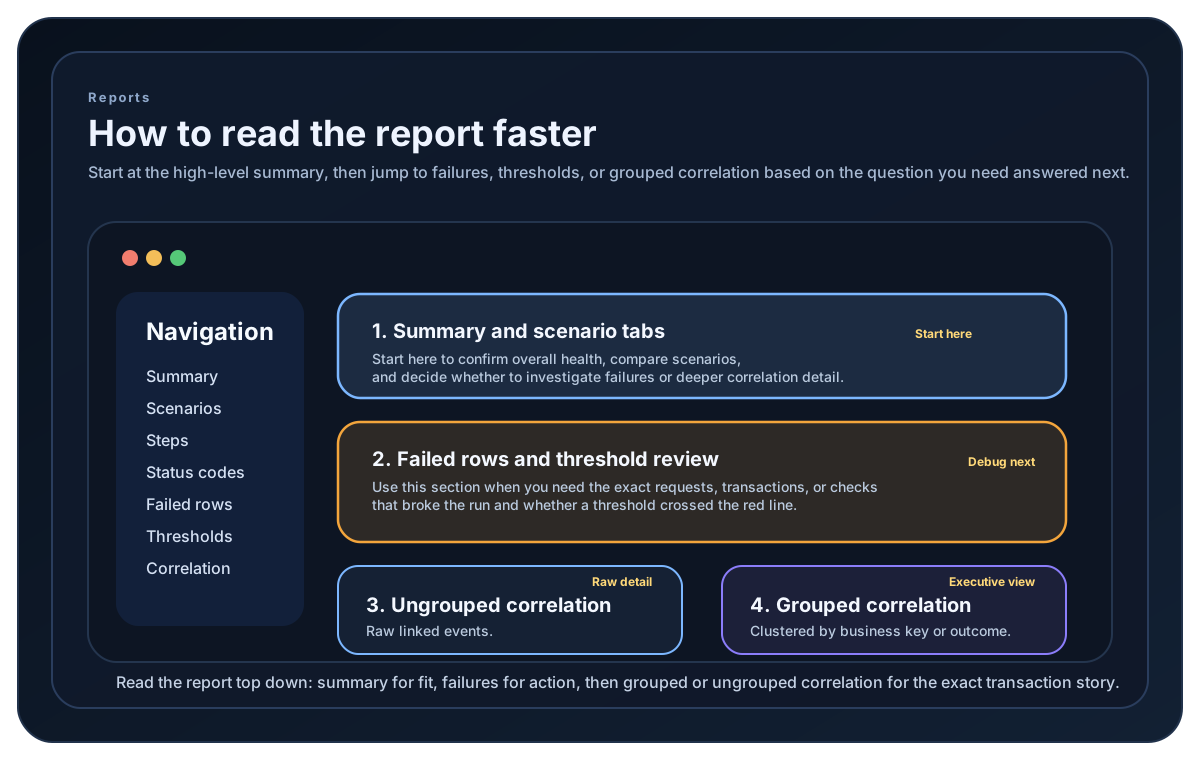
These answers keep the evaluation short before you step into the quick start, report guide, or comparison pages.
It is both. LoadStrike is a code-first load testing and performance testing tool that also supports stress testing when teams need to validate complete software transactions under pressure.
Trace-To-Test Autopilot turns HARs, OpenTelemetry traces, browser recordings, or message samples into a safer starter scenario that engineers can review carefully before running real load.
It means measuring the full workflow that matters to the business, including the request, the async handoff, the downstream service, and the final completion signal.
Use LoadStrike when success is visible only after another system, queue, browser step, or service finishes its work, and the report needs to explain that full path.
LoadStrike keeps one model across C#, Go, Java, Python, TypeScript, and JavaScript so teams can test API traffic, browser journeys, stream transports, reports, and supported cluster execution in their preferred language.
Yes. A scenario can include browser actions, API calls, and async tracking so the report shows where the full journey passed, slowed down, or failed.
Choose the shortest route for your role.
Run one real transaction and read the result.
See when request testing is enough and when it is not.
Check flat pricing before rollout.
One end-to-end result tells you more than another request-only benchmark.
Define the trigger. Track the outcome. See the full path.