
Data
These data surfaces help a scenario keep track of state while it runs. Use them when payloads, resources, or partitions need to stay organized.
Matching docs
Search across docs titles, summaries, groups, and section headings.
Use Up and Down Arrow to move through results, then press Enter to open the active page.
No indexed docs matched that search. Try a broader term or open the docs hub.
What this page helps you do
What this page helps you do
These data surfaces help a scenario keep track of state while it runs. Use them when payloads, resources, or partitions need to stay organized.
Who this is for
Engineers writing or reviewing scenario code in one of the supported SDKs.
Prerequisites
- A scenario or runtime surface you want to wire correctly in code
By the end
The exact SDK surface you need for this part of the runtime.
Use this page when
Use this reference when you already know the workflow and need the exact Data API surface in code.
Visual guide
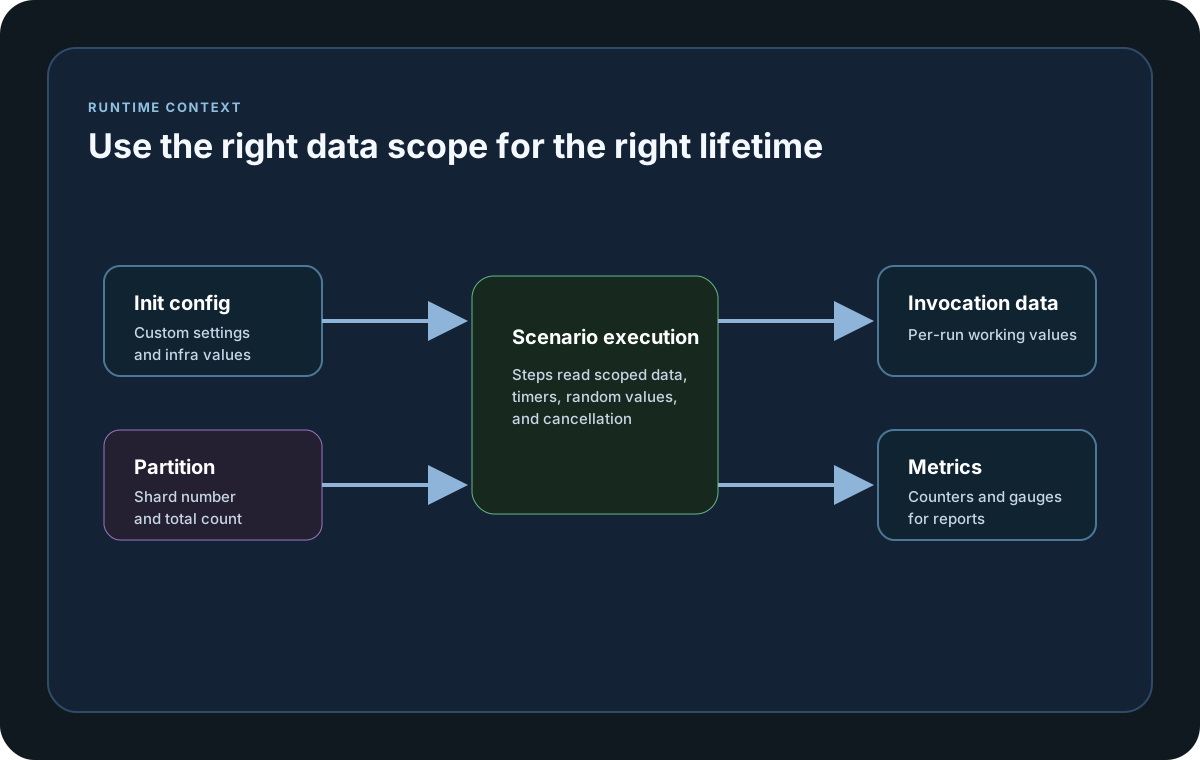
Guide
Invocation Data
LoadStrikeScenarioContext.Data is the per-invocation dictionary. Use it when one execution of the scenario needs to pass state from one part of the workflow to another.
Scenario Instance Data
LoadStrikeScenarioContext.ScenarioInstanceData stores shared objects for one scenario instance. It is the right place for resources that need to be reused across multiple invocations of the same scenario copy. Go keeps this data isolated by run, node, partition, scenario, and instance and releases it after scenario cleanup.
Random Helper
LoadStrikeScenarioContext.Random exposes Next, NextDouble, NextBytes, and Sample helpers when the workload needs controlled variation or deterministic sharding. TypeScript and JavaScript expose the same helper names in PascalCase on the public docs surface.
Cancellation Token
LoadStrikeScenarioContext.ScenarioCancellationToken exposes cancellation to active scenario work. In Go, use Done, Err, Deadline, and Value so long-running work can exit when request or run cancellation signals the token. StopScenario records the named stop intent and reason but does not itself signal this token.
Partition Data
LoadStrikeScenarioInitContext.ScenarioPartition exposes Number and Count so datasets can be split deterministically across clustered runs or multiple copies of the same scenario.
Init Configuration
LoadStrikeScenarioInitContext.CustomSettings and GlobalCustomSettings expose two distinct inputs. In Go, CustomSettings contains the decoded document supplied through LoadConfig, while GlobalCustomSettings is empty unless the application explicitly supplies global values. Use Get, Lookup, Len, or Values to read either set from init and cleanup hooks.
Go Callback Outcomes
Go init and cleanup callbacks receive custom and global settings plus current test, node, scenario, and partition metadata. Step callbacks receive those values plus ScenarioInstanceData for their scenario instance. Successful callback logs enter the configured run logger once. Active scenario callbacks can observe ScenarioCancellationToken when request or run cancellation signals it. StopScenario separately preserves the supplied scenario name and reason without signaling that token, and StopCurrentTest preserves its supplied reason.
Init Metrics
LoadStrikeScenarioInitContext.RegisterMetric(IMetric) lets you register custom counters and gauges during scenario initialization so thresholds, reports, and sinks all see the same metric set across supported SDKs.
SDK reference samples
Use these SDK samples to compare how Data is exposed across the supported languages before you wire it into a full scenario.
If you run these examples locally, add a valid runner key before execution starts. Set it with WithRunnerKey("...") or the config key LoadStrike:RunnerKey.
Context Data
using LoadStrike;

private static readonly HttpClient SharedHttpClient = CreateHttpClient();

private static HttpClient CreateHttpClient()
{
    var handler = new SocketsHttpHandler
    {
        PooledConnectionLifetime = TimeSpan.FromMinutes(5),
        PooledConnectionIdleTimeout = TimeSpan.FromMinutes(2),
        MaxConnectionsPerServer = 1000,
        AutomaticDecompression = DecompressionMethods.GZip | DecompressionMethods.Deflate
    };

    return new HttpClient(handler)
    {
        BaseAddress = new Uri("https://api.example.com"),
        Timeout = TimeSpan.FromSeconds(15)
    };
}

var scenario = LoadStrikeScenario.Create("submit-orders", async context =>
{
    context.ScenarioInstanceData["tenantId"] ??= "tenant-a";
    context.Data["orderId"] = $"ord-{context.InvocationNumber}";

    var step = await LoadStrikeStep.Run<string>("POST /orders", context, async () =>
    {
        var payload = new
        {
            orderId = (string)context.Data["orderId"],
            tenantId = (string)context.ScenarioInstanceData["tenantId"],
            amount = 49.95m
        };

        using var response = await SharedHttpClient.PostAsJsonAsync("/orders", payload);
        return response.IsSuccessStatusCode
            ? LoadStrikeResponse.Ok<string>(statusCode: ((int)response.StatusCode).ToString())
            : LoadStrikeResponse.Fail<string>(statusCode: ((int)response.StatusCode).ToString());
    });

    return step.AsReply();
})
.WithLoadSimulations(LoadStrikeSimulation.Inject(10, TimeSpan.FromSeconds(1), TimeSpan.FromSeconds(20)));

LoadStrikeRunner.RegisterScenarios(scenario)
    .WithRunnerKey("rkl_your_local_runner_key")
    .Run();

SharedHttpClient.Dispose();
package main
import loadstrike "loadstrike.com/sdk/go"
func main() {
scenario := loadstrike.CreateScenario("data-demo", func(ctx loadstrike.LoadStrikeScenarioContext) loadstrike.LoadStrikeReply {
ctx.Data()["orderId"] = "ord-1001"
if _, ok := ctx.ScenarioInstanceData()["tenantId"]; !ok {
ctx.ScenarioInstanceData()["tenantId"] = "tenant-a"
}
return loadstrike.OK()
}).
WithLoadSimulations(loadstrike.LoadStrikeSimulation.Inject(10, loadstrike.DurationFromSeconds(1), loadstrike.DurationFromSeconds(20)))
loadstrike.RegisterScenarios(scenario).Run()
}import java.net.URI;
import java.net.http.HttpClient;
import java.net.http.HttpRequest;
import java.net.http.HttpResponse;
import java.time.Duration;
import java.util.concurrent.Executors;
import com.loadstrike.runtime.LoadStrikeRuntime.LoadStrikeResponse;
import com.loadstrike.runtime.LoadStrikeRuntime.LoadStrikeRunner;
import com.loadstrike.runtime.LoadStrikeRuntime.LoadStrikeScenario;
import com.loadstrike.runtime.LoadStrikeRuntime.LoadStrikeSimulation;
import com.loadstrike.runtime.LoadStrikeRuntime.LoadStrikeStep;
var sharedHttpExecutor = Executors.newFixedThreadPool(64);
var client = HttpClient.newBuilder()
.connectTimeout(Duration.ofSeconds(15))
.executor(sharedHttpExecutor)
.version(HttpClient.Version.HTTP_1_1)
.build();
var scenario = LoadStrikeScenario.create("submit-orders", context -> {
context.scenarioInstanceData.putIfAbsent("tenantId", "tenant-a");
context.data.put("orderId", "ord-" + context.invocationNumber);
return LoadStrikeStep.run("POST /orders", context, () -> {
String body = "{\"orderId\":\"" + context.data.get("orderId") + "\",\"tenantId\":\""
+ context.scenarioInstanceData.get("tenantId") + "\",\"amount\":49.95}";
var request = HttpRequest.newBuilder(URI.create("https://api.example.com/orders"))
.timeout(Duration.ofSeconds(15))
.header("Content-Type", "application/json")
.header("Accept-Encoding", "gzip, deflate")
.POST(HttpRequest.BodyPublishers.ofString(body))
.build();
var response = client.sendAsync(request, HttpResponse.BodyHandlers.ofString()).join();
return response.statusCode() < 400
? LoadStrikeResponse.ok(Integer.toString(response.statusCode()))
: LoadStrikeResponse.fail(Integer.toString(response.statusCode()));
}).asReply();
}).withLoadSimulations(LoadStrikeSimulation.inject(10, 1d, 20d));
LoadStrikeRunner
.registerScenarios(scenario)
.withRunnerKey("rkl_your_local_runner_key")
.run();
sharedHttpExecutor.shutdownNow();import requests
from requests.adapters import HTTPAdapter
from loadstrike_sdk import LoadStrikeResponse, LoadStrikeRunner, LoadStrikeScenario, LoadStrikeSimulation, LoadStrikeStep
shared_session = requests.Session()
shared_adapter = HTTPAdapter(pool_connections=128, pool_maxsize=1000, max_retries=0)
shared_session.mount("https://", shared_adapter)
shared_session.mount("http://", shared_adapter)
shared_session.headers.update({"Accept-Encoding": "gzip, deflate"})
def submit_orders(context):
context.scenario_instance_data.setdefault("tenantId", "tenant-a")
context.data["orderId"] = f"ord-{context.invocation_number}"
def run_step():
payload = {
"orderId": context.data["orderId"],
"tenantId": context.scenario_instance_data["tenantId"],
"amount": 49.95,
}
response = shared_session.post("https://api.example.com/orders", json=payload, timeout=15)
if response.ok:
return LoadStrikeResponse.ok(str(response.status_code))
return LoadStrikeResponse.fail(str(response.status_code))
return LoadStrikeStep.run("POST /orders", context, run_step).as_reply()
scenario = (
LoadStrikeScenario.create("submit-orders", submit_orders)
.with_load_simulations(LoadStrikeSimulation.inject(10, 1, 20))
)
LoadStrikeRunner.register_scenarios(scenario) \
.with_runner_key("rkl_your_local_runner_key") \
.run()
shared_session.close()import { Agent, fetch } from "undici";
import {
LoadStrikeResponse,
LoadStrikeRunner,
LoadStrikeScenario,
LoadStrikeSimulation,
LoadStrikeStep
} from "@loadstrike/loadstrike-sdk";
const sharedHttpClient = new Agent({
connections: 1000,
keepAliveTimeout: 120000,
keepAliveMaxTimeout: 300000,
connectTimeout: 15000,
pipelining: 1
});
const scenario = LoadStrikeScenario.create("submit-orders", async (context) => {
context.scenarioInstanceData.tenantId ??= "tenant-a";
context.data.orderId = `ord-${context.invocationNumber}`;
const step = await LoadStrikeStep.run("POST /orders", context, async () => {
const response = await fetch("https://api.example.com/orders", {
method: "POST",
headers: {
"content-type": "application/json",
"accept-encoding": "gzip, deflate"
},
dispatcher: sharedHttpClient,
body: JSON.stringify({
orderId: context.data.orderId,
tenantId: context.scenarioInstanceData.tenantId,
amount: 49.95
})
});
return response.ok
? LoadStrikeResponse.ok(String(response.status))
: LoadStrikeResponse.fail(String(response.status));
});
return step.asReply();
}).withLoadSimulations(LoadStrikeSimulation.inject(10, 1, 20));
await LoadStrikeRunner
.registerScenarios(scenario)
.withRunnerKey("rkl_your_local_runner_key")
.run();
await sharedHttpClient.close();const { Agent, fetch } = require("undici");
const {
LoadStrikeResponse,
LoadStrikeRunner,
LoadStrikeScenario,
LoadStrikeSimulation,
LoadStrikeStep
} = require("@loadstrike/loadstrike-sdk");
const sharedHttpClient = new Agent({
connections: 1000,
keepAliveTimeout: 120000,
keepAliveMaxTimeout: 300000,
connectTimeout: 15000,
pipelining: 1
});
(async () => {
const scenario = LoadStrikeScenario.create("submit-orders", async (context) => {
context.scenarioInstanceData.tenantId ??= "tenant-a";
context.data.orderId = `ord-${context.invocationNumber}`;
const step = await LoadStrikeStep.run("POST /orders", context, async () => {
const response = await fetch("https://api.example.com/orders", {
method: "POST",
headers: {
"content-type": "application/json",
"accept-encoding": "gzip, deflate"
},
dispatcher: sharedHttpClient,
body: JSON.stringify({
orderId: context.data.orderId,
tenantId: context.scenarioInstanceData.tenantId,
amount: 49.95
})
});
return response.ok
? LoadStrikeResponse.ok(String(response.status))
: LoadStrikeResponse.fail(String(response.status));
});
return step.asReply();
}).withLoadSimulations(LoadStrikeSimulation.inject(10, 1, 20));
await LoadStrikeRunner
.registerScenarios(scenario)
.withRunnerKey("rkl_your_local_runner_key")
.run();
await sharedHttpClient.close();
})();Context fields a basic user should know
Invocation-scoped dictionary. Use it for values that only need to live for the current execution of the scenario.
Per-scenario-instance dictionary. Use it for shared clients, seeded data, or caches that must survive across multiple invocations of the same scenario copy. Go isolates the dictionary by run, node, partition, scenario, and instance and releases it after cleanup. For HTTP load steps, keep one shared client, session, or dispatcher here instead of constructing a fresh transport per request.
Monotonic invocation counter for the current scenario. It is a simple way to generate unique ids or branching behavior.
Random generator provided by the runtime for payload variation or deterministic sharding.
Dispose or close the shared HTTP client, session, executor, or dispatcher when the run ends so pooled sockets are released cleanly.
Read-only metadata objects that describe where the scenario is running and what run it belongs to. Go init and cleanup callbacks receive these values plus partition metadata; step callbacks receive the same values for their actual work.
Cancellation token available to active scenario callbacks. Request or run cancellation signals it so long-running work can exit. StopScenario records its named stop intent and reason but does not itself signal this token. The token is not part of the init or cleanup context.
Returns the elapsed scenario time seen by the current invocation.
Use these helpers when runtime conditions should end a single scenario or the entire test early. Go preserves the supplied scenario name and reason for StopScenario and the supplied reason for StopCurrentTest.
Distinct configuration surfaces available during initialization and cleanup. In Go, CustomSettings holds the LoadConfig document, while GlobalCustomSettings stays empty unless the application explicitly supplies global values.
Partition metadata for deterministic dataset sharding across copies or nodes.