
Report Overview
This page explains how to read a LoadStrike report. Use it when you want to know what each section means and where to look first.
Matching docs
Search across docs titles, summaries, groups, and section headings.
Use Up and Down Arrow to move through results, then press Enter to open the active page.
No indexed docs matched that search. Try a broader term or open the docs hub.
What this page helps you do
What this page helps you do
Read a LoadStrike report faster by knowing where to start, what each tab means, and where failures show up.
Who this is for
Anyone reviewing a run result for the first time, including QA, platform, SRE, and engineering teams.
Prerequisites
- A completed run or sample report output
By the end
A repeatable way to move from summary to detailed diagnosis without guessing which tab matters first.
Choose this path when
Use report overview when you already have a run result and need to understand which sections answer summary, failure, threshold, and correlation questions fastest.
Visual guide
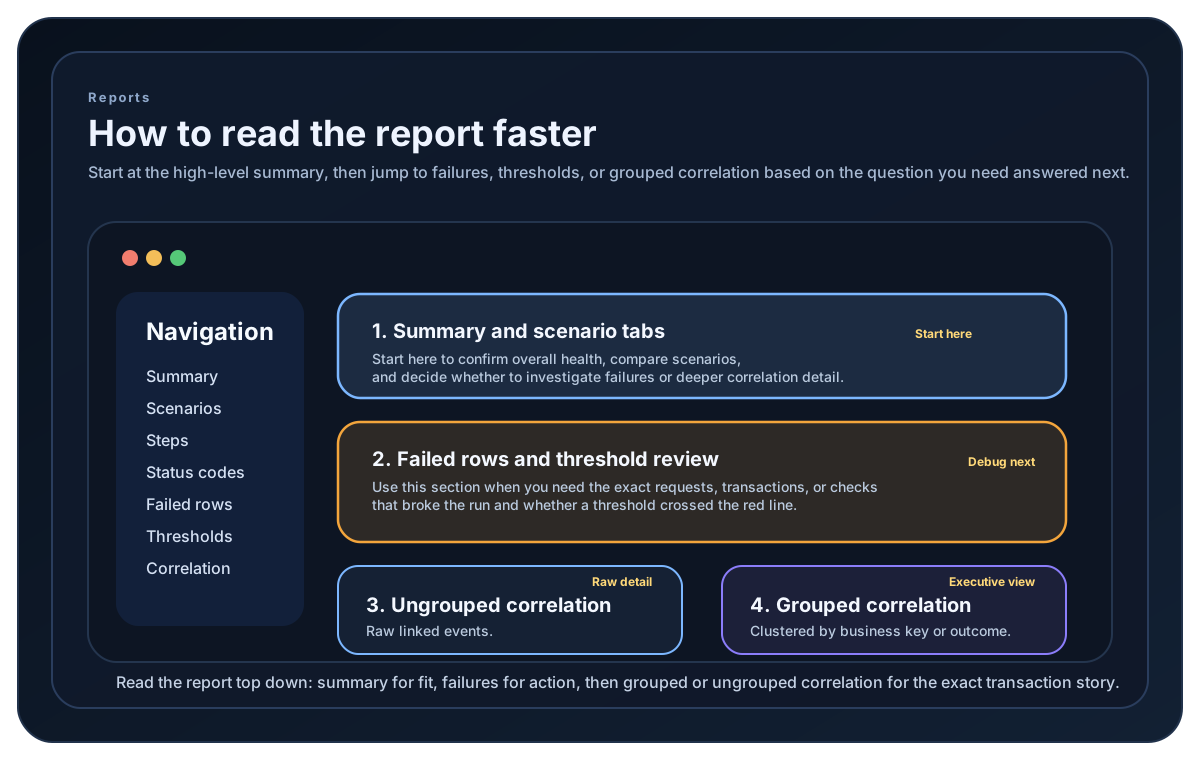
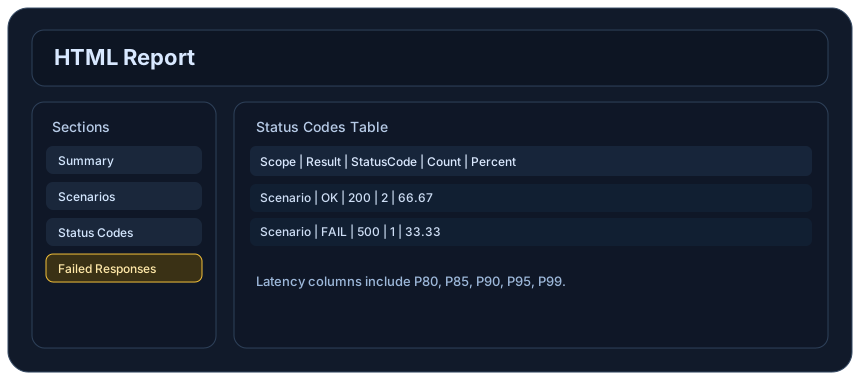
Sample Report Data Rows
Scenario demo OK Count=120 P50=18ms P95=45ms
FailureRate demo 1.67%
Bytes demo 524288
StatusClass 2xx 98.3%
Grouped tenant-a Success=58 Failure=2
Guide
Report Navigation
The HTML report uses fixed left-side tabs so you can move between sections without losing context. It also includes the icon-only Light or Dark toggle at the top-right.
Brand Header
Every HTML report includes the theme-specific LoadStrike logo. The logo switches with the selected theme while keeping the same position and visual size.
Summary and Scenario Sections
Start with Summary when you want the quickest run-level view. It shows totals and renders latency tables, latency graphs, failure-rate charts, bytes charts, and status-class charts only when those datasets are populated. Scenarios and Scenario Measurements appear only when scenario rows exist and then show count, RPS, and latency percentiles by scenario. Empty OK or FAIL measurement rows are skipped so the measurement table only shows results that have recorded request, latency, byte, or status-code data.
All-Outcome Measurements
Combined scenario and step percentiles come from the complete latency distribution across successful and failed observations. The ALL measurement row shows that durable combined view when the run provides it, while the OK and FAIL rows preserve the outcome-specific detail used for troubleshooting.
Step Sections
Steps and Step Measurements break the run down to named step level so it is easier to see where time and failures happened inside the workflow. These tabs are omitted when the run does not produce step-level rows, and each step measurement row is shown only when that specific OK or FAIL measurement contains data.
Status Codes and Failed Responses
Status Codes shows Percent when status rows exist. Failed Responses only appears when there are failed status rows or failed and timed out detail rows worth investigating.
Correlation Sections
Ungrouped Correlation Summary keeps its matched rows and identifies plotted series by scenario, destination, and status. Grouped Correlation Summary keeps every populated GatherBy selector and value distinct. Both retain every available P50, P75, P80, P85, P90, P95, P99, and Max point rather than averaging percentile rows. Empty correlation tabs and charts are omitted.
Cumulative Progress
When available, cumulative history charts show completed requests, achieved request rate, transferred bytes, and separate All, OK, and Failed latency progress for each scenario. The final partial interval is included, while the completed snapshot remains the authoritative end-of-run view.
Thresholds and Metrics
Thresholds shows pass or fail quality gates when threshold evaluations were recorded. Metrics shows runtime counters and gauges such as matched, timeout, duplicates, and inflight counts when those metrics are present. SDK result objects also expose FindScenarioStats or GetScenarioStats and scenario-level FindStepStats or GetStepStats helper lookups for source-derived stats navigation. In Go, detailed step stats use the names OkCount and FailCount. Go results and statistics also round-trip through standard JSON while preserving nested node, scenario, step, and test metadata.
Automatic Result Flow
Run() returns the full LoadStrikeRunResult directly. Local reports and final sink callbacks are generated automatically from that completed result.
Report and output samples
Use these samples to compare report-format setup and output handling across the supported SDKs before you choose what the team will review.
If you run these examples locally, add a valid runner key before execution starts. Set it with WithRunnerKey("...") or the config key LoadStrike:RunnerKey.
HTML reports include a top-right Light/Dark theme toggle and responsive offline SVG charts. Use exact-value tooltips, legends, zoom, pan, reset, the accessible expanded view, chart-title search, and grid-density controls to inspect dense results. Light is the default report theme.
Report Generation
using LoadStrike;

LoadStrikeRunner.RegisterScenarios(scenario)
    .WithReportFolder("./reports")
    .WithReportFormats(LoadStrikeReportFormat.Html, LoadStrikeReportFormat.Csv, LoadStrikeReportFormat.Txt, LoadStrikeReportFormat.Md)
    .WithRunnerKey("rkl_your_local_runner_key")
    .Run();
package main
import (
"time"
loadstrike "loadstrike.com/sdk/go"
)
func main() {
loadstrike.RegisterScenarios(loadstrike.Empty("reports-demo")).
WithReportFolder("./reports").
WithReportFileName("loadstrike-report").
WithReportFormats(
loadstrike.ReportFormatHTML,
loadstrike.ReportFormatCSV,
loadstrike.ReportFormatTXT,
loadstrike.ReportFormatMD,
).
WithReportingInterval(loadstrike.TimeSpan(5 * time.Second)).
Run()
}import com.loadstrike.runtime.LoadStrikeRuntime.LoadStrikeResponse;
import com.loadstrike.runtime.LoadStrikeRuntime.LoadStrikeRunner;
import com.loadstrike.runtime.LoadStrikeRuntime.LoadStrikeScenario;
import com.loadstrike.runtime.LoadStrikeRuntime.LoadStrikeSimulation;
var scenario = LoadStrikeScenario
.create("submit-orders", ignoredContext -> LoadStrikeResponse.ok("200"))
.withLoadSimulations(LoadStrikeSimulation.inject(10, 1d, 20d));
LoadStrikeRunner
.registerScenarios(scenario)
.withReportFolder("./reports")
.withReportFormats("html", "csv", "txt", "md")
.withReportingInterval(5d)
.withRunnerKey("rkl_your_local_runner_key")
.run();from loadstrike_sdk import LoadStrikeResponse, LoadStrikeRunner, LoadStrikeScenario, LoadStrikeSimulation
scenario = (
LoadStrikeScenario.create("submit-orders", lambda _: LoadStrikeResponse.ok("200"))
.with_load_simulations(LoadStrikeSimulation.inject(10, 1, 20))
)
LoadStrikeRunner.register_scenarios(scenario) \
.with_report_folder("./reports") \
.with_report_formats("html", "csv", "txt", "md") \
.with_reporting_interval(5) \
.with_runner_key("rkl_your_local_runner_key") \
.run()import {
LoadStrikeResponse,
LoadStrikeRunner,
LoadStrikeScenario,
LoadStrikeSimulation
} from "@loadstrike/loadstrike-sdk";
const scenario = LoadStrikeScenario
.create("submit-orders", async () => LoadStrikeResponse.ok("200"))
.withLoadSimulations(LoadStrikeSimulation.inject(10, 1, 20));
await LoadStrikeRunner
.registerScenarios(scenario)
.withReportFolder("./reports")
.withReportFormats("html", "csv", "txt", "md")
.withReportingInterval(5)
.withRunnerKey("rkl_your_local_runner_key")
.run();const {
LoadStrikeResponse,
LoadStrikeRunner,
LoadStrikeScenario,
LoadStrikeSimulation
} = require("@loadstrike/loadstrike-sdk");
(async () => {
const scenario = LoadStrikeScenario
.create("submit-orders", async () => LoadStrikeResponse.ok("200"))
.withLoadSimulations(LoadStrikeSimulation.inject(10, 1, 20));
await LoadStrikeRunner
.registerScenarios(scenario)
.withReportFolder("./reports")
.withReportFormats("html", "csv", "txt", "md")
.withReportingInterval(5)
.withRunnerKey("rkl_your_local_runner_key")
.run();
})();Tabs
Shows the top-level run totals, latency views, failure rate, bytes, and the main scenario charts when those datasets are populated for the current run.
Summary and scenario charts keep OK and FAIL latency separate. An ALL series is shown only when the completed run provides a genuine combined distribution; the report never manufactures one from outcome percentile values.
Scenario Measurements and Step Measurements show an ALL row for the combined distribution when it is available, alongside populated OK and FAIL rows for outcome-specific diagnosis. Empty result buckets do not create all-zero rows.
Shows completed requests, achieved request rate, transferred bytes, and per-scenario latency progress when temporal history is available. A terminal point includes a short run or partial final reporting interval.
Breaks results down by status code and overall percent share.
Combines failed status-code summaries with the detailed failed and timed out row table, and the tab is omitted when there are no failed rows to show.
Keeps the matched correlation table and identifies every plotted series by scenario, destination, and status.
Keeps every populated scenario, destination, GatherBy selector, and GatherBy value distinct, including every available P50, P75, P80, P85, P90, P95, P99, and Max point.
Shows the detailed threshold evaluation rows when thresholdResults were recorded, while failedThresholds keeps the quick aggregate count.
Plugin-produced hints and named report sections remain available through pluginsData or PluginsData and also feed the HTML plugin tabs when those sections have rows to show.
SDK result objects can expose compatibility aliases such as ThresholdResults, MetricStats, ScenarioDurationsMs, and PluginsData over the same underlying final artifact.
Java and Python HTML output also includes the same failure-rate, bytes, and status-code-class summary chart surfaces, and those chart cards are hidden when their datasets are empty.
Local reports and final sink callbacks are generated from the full LoadStrikeRunResult artifact automatically. Run() returns that same payload directly in code.