
Push Diffusion Endpoint
Use the Push Diffusion endpoint when delegate-based publish and subscribe flows should still participate in LoadStrike correlation.
Matching docs
Search across docs titles, summaries, groups, and section headings.
Use Up and Down Arrow to move through results, then press Enter to open the active page.
No indexed docs matched that search. Try a broader term or open the docs hub.
What this page helps you do
What this page helps you do
Use the Push Diffusion endpoint when delegate-based publish and subscribe flows should still participate in LoadStrike correlation.
Who this is for
Teams defining the transport-specific source or destination side of a correlated transaction.
Prerequisites
- A stable tracking field shared between the producer side and the consumer or completion side
By the end
A transport definition that matches the transaction you need to measure.
Use this page when
Use this page when Push Diffusion Endpoint is the source or destination side of the transaction and you need the documented endpoint fields before wiring the scenario.
Visual guide
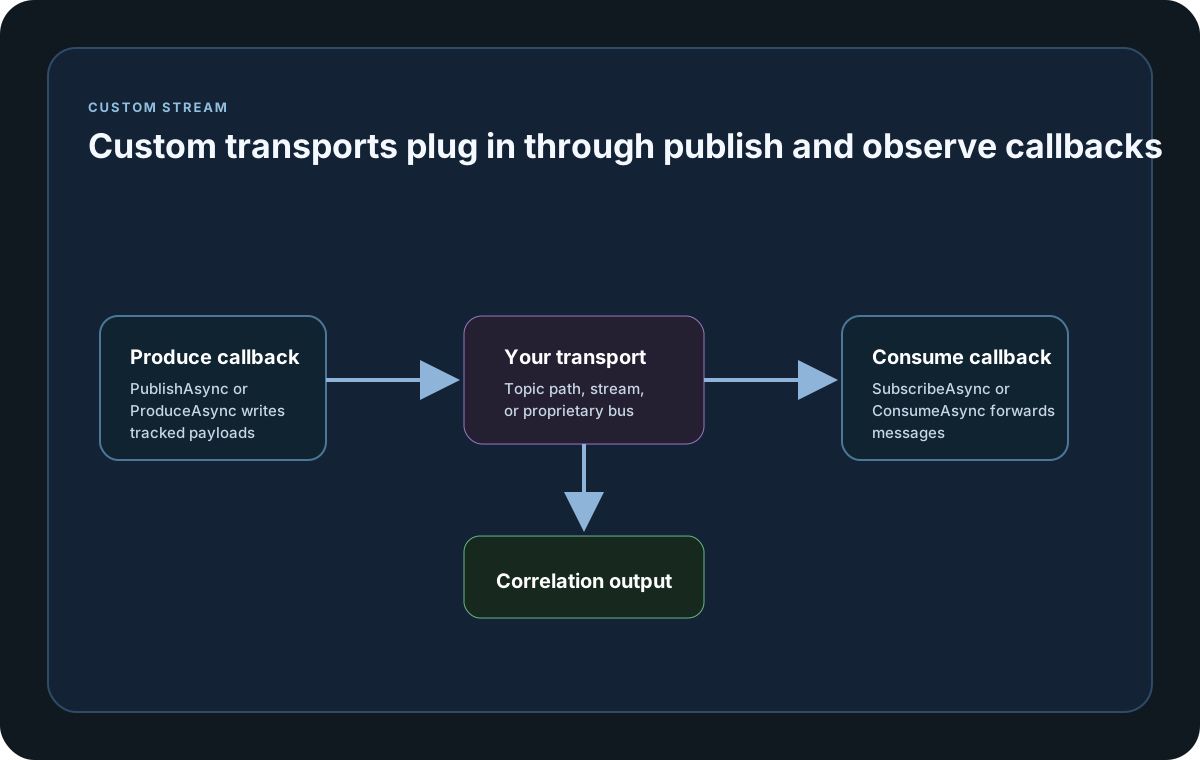
Guide
When To Use Push Diffusion
Use this endpoint when publish and subscribe behavior should stay inside the normal LoadStrike correlation model, but the integration is delegate-based instead of a built-in protocol adapter.
Delegates
Provide publish and subscribe delegates when your Push Diffusion integration needs custom transport behavior but should still participate in the normal LoadStrike scenario flow.
Connection And Tracking
Use the ConnectionProperties dictionary for broker-specific connection metadata and diagnostics that do not have dedicated top-level fields. Tracking still depends on the normal header or body selector contract, so the publish and subscribe sides must preserve the same business identifier.
Endpoint definition samples
Use these samples to see how Push Diffusion Endpoint is represented as a source or destination endpoint before you attach it to a correlated scenario.
If you run these examples locally, add a valid runner key before execution starts. Set it with WithRunnerKey("...") or the config key LoadStrike:RunnerKey.
Push Diffusion Endpoint
using LoadStrike;

var tracking = new CrossPlatformTrackingConfiguration
{
    Source = new PushDiffusionEndpointDefinition
    {
        Name = "diffusion",
        Mode = TrafficEndpointMode.Produce,
        TrackingField = TrackingFieldSelector.Parse("json:$.trackingId"),
        ServerUrl = "ws://localhost:8080",
        TopicPath = "/orders/in",
        PublishAsync = (request, _) => Task.FromResult(new ProducedMessageResult { IsSuccess = true })
    },
    Destination = new KafkaEndpointDefinition
    {
        Name = "orders-events",
        Mode = TrafficEndpointMode.Consume,
        TrackingField = TrackingFieldSelector.Parse("json:$.trackingId"),
        BootstrapServers = "localhost:9092",
        Topic = "orders.completed",
        ConsumerGroupId = "orders-tests"
    }
};

var scenario = CrossPlatformScenarioConfigurator
    .Configure(LoadStrikeScenario.Empty("orders-push-diffusion-to-kafka"), tracking)
    .WithLoadSimulations(LoadStrikeSimulation.Inject(10, TimeSpan.FromSeconds(1), TimeSpan.FromSeconds(20)));

LoadStrikeRunner.RegisterScenarios(scenario)
    .WithRunnerKey("rkl_your_local_runner_key")
    .Run();
package main
import (
"context"
"time"
loadstrike "loadstrike.com/sdk/go"
)
var pushDiffusionEndpoint = &loadstrike.EndpointSpec{
Kind: "PushDiffusion",
Name: "orders-topic",
Mode: "Produce",
TrackingField: "header:X-Correlation-Id",
PushDiffusion: &loadstrike.PushDiffusionEndpointOptions{
Publish: func(_ context.Context, payload loadstrike.TrackingPayload) (loadstrike.EndpointProduceResult, error) {
return loadstrike.EndpointProduceResult{
IsSuccess: true,
TrackingID: payload.Headers["X-Correlation-Id"],
TimestampMS: time.Now().UnixMilli(),
Payload: payload,
}, nil
},
},
}import com.loadstrike.runtime.CrossPlatformScenarioConfigurator;
import com.loadstrike.runtime.CrossPlatformTrackingConfiguration;
import com.loadstrike.runtime.KafkaEndpointDefinition;
import com.loadstrike.runtime.LoadStrikeCorrelation.TrackingFieldSelector;
import com.loadstrike.runtime.LoadStrikeRuntime.LoadStrikeRunner;
import com.loadstrike.runtime.LoadStrikeRuntime.LoadStrikeScenario;
import com.loadstrike.runtime.LoadStrikeRuntime.LoadStrikeSimulation;
import com.loadstrike.runtime.LoadStrikeTransports;
import com.loadstrike.runtime.PushDiffusionEndpointDefinition;
var source = new PushDiffusionEndpointDefinition();
source.name = "diffusion";
source.mode = LoadStrikeTransports.TrafficEndpointMode.Produce;
source.trackingField = TrackingFieldSelector.parse("json:$.trackingId");
source.serverUrl = "ws://localhost:8080";
source.topicPath = "/orders/in";
source.publishAsync = request -> {
var result = new LoadStrikeTransports.ProducedMessageResult();
result.isSuccess = true;
return result;
};
var destination = new KafkaEndpointDefinition();
destination.name = "orders-events";
destination.mode = LoadStrikeTransports.TrafficEndpointMode.Consume;
destination.trackingField = TrackingFieldSelector.parse("json:$.trackingId");
destination.bootstrapServers = "localhost:9092";
destination.topic = "orders.completed";
destination.consumerGroupId = "orders-tests";
var tracking = new CrossPlatformTrackingConfiguration();
tracking.source = source;
tracking.destination = destination;
var scenario = CrossPlatformScenarioConfigurator.Configure(
LoadStrikeScenario.empty("orders-push-diffusion-to-kafka"),
tracking
).withLoadSimulations(LoadStrikeSimulation.inject(10, 1d, 20d));
LoadStrikeRunner
.registerScenarios(scenario)
.withRunnerKey("rkl_your_local_runner_key")
.run();from loadstrike_sdk import (
CrossPlatformScenarioConfigurator,
LoadStrikeRunner,
LoadStrikeScenario,
LoadStrikeSimulation,
)
tracking = {
"Source": {
"Kind": "PushDiffusion",
"Name": "diffusion",
"Mode": "Produce",
"TrackingField": "json:$.trackingId",
"ServerUrl": "ws://localhost:8080",
"TopicPath": "/orders/in",
"PublishAsync": lambda request: {"IsSuccess": True},
},
"Destination": {
"Kind": "Kafka",
"Name": "orders-events",
"Mode": "Consume",
"TrackingField": "json:$.trackingId",
"BootstrapServers": "localhost:9092",
"Topic": "orders.completed",
"ConsumerGroupId": "orders-tests",
},
}
scenario = (
CrossPlatformScenarioConfigurator.Configure(
LoadStrikeScenario.empty("orders-push-diffusion-to-kafka"),
tracking,
)
.with_load_simulations(LoadStrikeSimulation.inject(10, 1, 20))
)
LoadStrikeRunner.register_scenarios(scenario) \
.with_runner_key("rkl_your_local_runner_key") \
.run()import {
CrossPlatformScenarioConfigurator,
LoadStrikeRunner,
LoadStrikeScenario,
LoadStrikeSimulation
} from "@loadstrike/loadstrike-sdk";
const tracking = {
Source: {
Kind: "PushDiffusion",
Name: "diffusion",
Mode: "Produce",
TrackingField: "json:$.trackingId",
ServerUrl: "ws://localhost:8080",
TopicPath: "/orders/in",
PublishAsync: async () => ({ isSuccess: true })
},
Destination: {
Kind: "Kafka",
Name: "orders-events",
Mode: "Consume",
TrackingField: "json:$.trackingId",
BootstrapServers: "localhost:9092",
Topic: "orders.completed",
ConsumerGroupId: "orders-tests"
}
};
const scenario = CrossPlatformScenarioConfigurator
.Configure(LoadStrikeScenario.empty("orders-push-diffusion-to-kafka"), tracking)
.withLoadSimulations(LoadStrikeSimulation.inject(10, 1, 20));
await LoadStrikeRunner
.registerScenarios(scenario)
.withRunnerKey("rkl_your_local_runner_key")
.run();const {
CrossPlatformScenarioConfigurator,
LoadStrikeRunner,
LoadStrikeScenario,
LoadStrikeSimulation
} = require("@loadstrike/loadstrike-sdk");
(async () => {
const tracking = {
Source: {
Kind: "PushDiffusion",
Name: "diffusion",
Mode: "Produce",
TrackingField: "json:$.trackingId",
ServerUrl: "ws://localhost:8080",
TopicPath: "/orders/in",
PublishAsync: async () => ({ isSuccess: true })
},
Destination: {
Kind: "Kafka",
Name: "orders-events",
Mode: "Consume",
TrackingField: "json:$.trackingId",
BootstrapServers: "localhost:9092",
Topic: "orders.completed",
ConsumerGroupId: "orders-tests"
}
};
const scenario = CrossPlatformScenarioConfigurator
.Configure(LoadStrikeScenario.empty("orders-push-diffusion-to-kafka"), tracking)
.withLoadSimulations(LoadStrikeSimulation.inject(10, 1, 20));
await LoadStrikeRunner
.registerScenarios(scenario)
.withRunnerKey("rkl_your_local_runner_key")
.run();
})();Push Diffusion endpoint fields and parameters
Required endpoint identifier. It appears in correlation tables, sink exports, and troubleshooting messages, so choose a stable descriptive name.
Choose Produce when LoadStrike should create traffic, or Consume when it should listen for downstream traffic. Run mode validation checks that the selected mode matches the source or destination role.
Selector that extracts the correlation id from a header or JSON body. It is normally required, but can be omitted when UseLoadStrikeTraceIdHeader is true so LoadStrike uses header:loadstrike-trace-id for generated source traffic. Selector prefixes such as header: and json: are parsed case-insensitively, but the header name or JSON path segments after the prefix must match exact casing. The extracted value is matched case-sensitively by default unless TrackingFieldValueCaseSensitive is turned off on the tracking configuration.
Optional destination-only selector used for grouped correlation reports. It follows the same selector-casing rules as TrackingField. Group values are grouped case-sensitively by default unless GatherByFieldValueCaseSensitive is turned off on the tracking configuration.
Defaults to true. When the source payload does not already contain the tracked id, LoadStrike can inject one so the generated traffic still produces a correlation key.
Defaults to false. When true and TrackingField is omitted, produced source messages receive a loadstrike-trace-id header with a GUID value. Consume-mode source endpoints and CorrelateExistingTraffic runs do not inject this header; they only observe it if the existing traffic already contains it.
Controls how often a consumer-style endpoint polls for new messages. The value must stay greater than zero whenever you set it explicitly.
Optional headers that are written with produced traffic and also influence tracking extraction when the selector targets headers. Header names are preserved exactly as you set them, and header selectors later match using that same exact casing.
Optional object or body value sent by producer-style endpoints. This is the payload your scenario is actually placing on the wire.
Optional type hint used when JSON selectors need typed parsing. Leave it unset when dynamic JSON parsing is enough.
Optional serializer settings for System.Text.Json or Newtonsoft.Json. Use them only when the payload shape or naming strategy requires custom parsing behavior.
Optional explicit content type for custom payload handling. This is most helpful for delegate-style transports or non-default HTTP body shapes.
Required Push Diffusion server URL.
Required topic path used for publish or subscribe behavior.
Optional credentials for authenticated Push Diffusion connections.
Optional connection-level dictionary for Push Diffusion-specific connection metadata.
Required for produce mode. This delegate receives the tracked payload request and must return a ProducedMessageResult.
Required for consume mode. This delegate subscribes and forwards consumed tracked messages back into LoadStrike.