
Dynamic Workloads
Use dynamic workloads when the traffic should change over time instead of staying flat. This is how you model ramps, bursts, uneven demand, or runtime-driven stops.
Matching docs
Search across docs titles, summaries, groups, and section headings.
Use Up and Down Arrow to move through results, then press Enter to open the active page.
No indexed docs matched that search. Try a broader term or open the docs hub.
What this page helps you do
What this page helps you do
Use dynamic workloads when the traffic should change over time instead of staying flat. This is how you model ramps, bursts, uneven demand, or runtime-driven stops.
Who this is for
Engineers writing or reviewing scenario code in one of the supported SDKs.
Prerequisites
- A scenario or runtime surface you want to wire correctly in code
By the end
The exact SDK surface you need for this part of the runtime.
Use this page when
Use this reference when you already know the workflow and need the exact Dynamic Workloads API surface in code.
Visual guide
Guide
Adaptive Traffic Shape
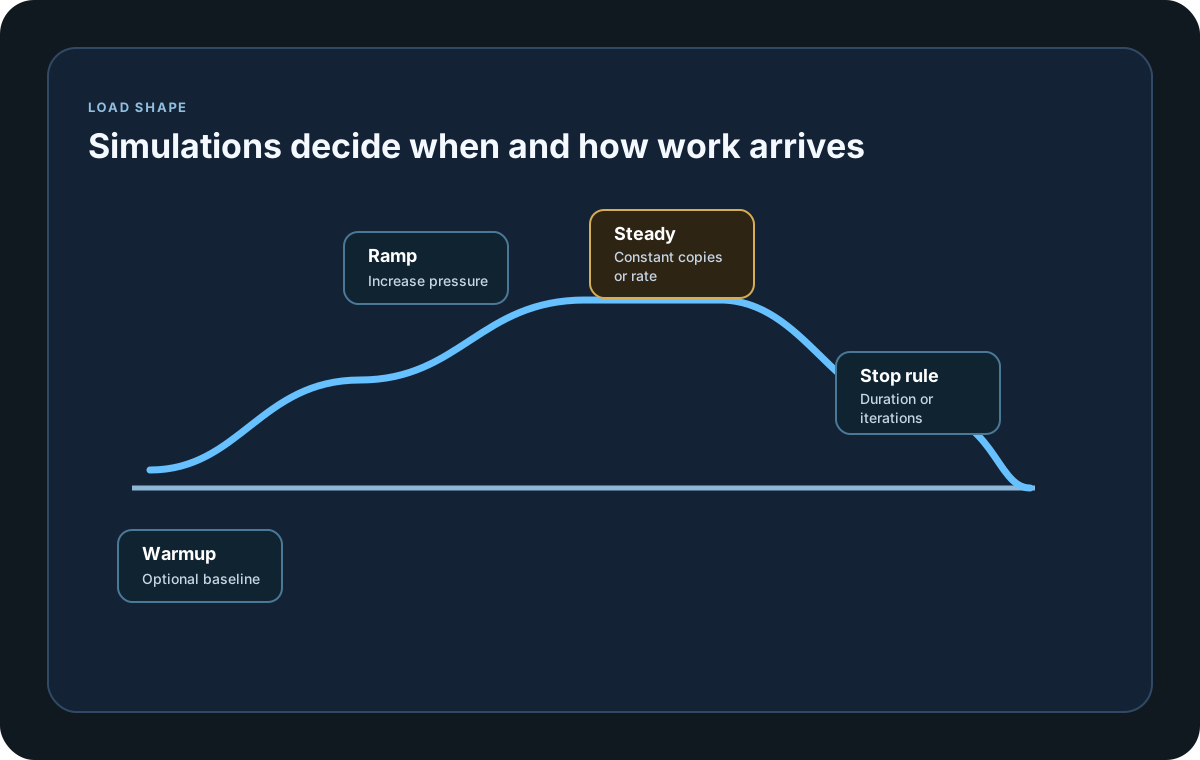
Use InjectRandom and the Ramping* simulations when the workload should rise, fall, or vary over time instead of holding one steady shape from start to finish.
Workload Mix
Use traffic mixes when the total workload is known but individual business paths should receive different shares of that traffic. This is different from steps: steps remain measurement points inside one scenario, while traffic mix lanes are separate scenarios that each receive a weighted share of the total load profile.
Scenario Weighting
Use WithWeight when clustered runs should give some scenarios a larger share of assignment or throughput than others.
Runtime Control
Use context.StopScenario or context.StopCurrentTest when the scenario itself needs to stop because of a runtime signal, not just because the original load profile ended.
SDK reference samples
Use these SDK samples to compare how Dynamic Workloads is exposed across the supported languages before you wire it into a full scenario.
If you run these examples locally, add a valid runner key before execution starts. Set it with WithRunnerKey("...") or the config key LoadStrike:RunnerKey.
Dynamic Workload
using LoadStrike;

var httpClient = new HttpClient
{
    BaseAddress = new Uri("https://api.example.com")
};

var scenario = LoadStrikeScenario.Create("submit-orders", async context =>
{
    if (context.InvocationNumber >= 500)
    {
        context.StopScenario("submit-orders", "enough-orders");
    }

    var step = await LoadStrikeStep.Run<string>("POST /orders", context, async () =>
    {
        using var response = await httpClient.PostAsJsonAsync("/orders", new
        {
            orderId = $"ord-{context.InvocationNumber}",
            amount = 49.95m
        });

        return response.IsSuccessStatusCode
            ? LoadStrikeResponse.Ok<string>(statusCode: ((int)response.StatusCode).ToString())
            : LoadStrikeResponse.Fail<string>(statusCode: ((int)response.StatusCode).ToString());
    });

    return step.AsReply();
})
.WithLoadSimulations(
    LoadStrikeSimulation.InjectRandom(5, 15, TimeSpan.FromSeconds(1), TimeSpan.FromSeconds(20)),
    LoadStrikeSimulation.RampingConstant(6, TimeSpan.FromSeconds(20))
);

LoadStrikeRunner.RegisterScenarios(scenario)
    .WithRunnerKey("rkl_your_local_runner_key")
    .Run();
package main
import loadstrike "loadstrike.com/sdk/go"
func main() {
scenario := loadstrike.CreateScenario("dynamic-workload", func(loadstrike.LoadStrikeScenarioContext) loadstrike.LoadStrikeReply {
return loadstrike.OK()
}).
WithWeight(3).
WithLoadSimulations(
loadstrike.LoadStrikeSimulation.Inject(10, loadstrike.DurationFromSeconds(1), loadstrike.DurationFromSeconds(15)),
loadstrike.LoadStrikeSimulation.RampingInject(25, loadstrike.DurationFromSeconds(1), loadstrike.DurationFromSeconds(30)),
loadstrike.LoadStrikeSimulation.KeepConstant(5, loadstrike.DurationFromSeconds(10)),
)
loadstrike.RegisterScenarios(scenario).Run()
}import java.net.URI;
import java.net.http.HttpClient;
import java.net.http.HttpRequest;
import java.net.http.HttpResponse;
import com.loadstrike.runtime.LoadStrikeRuntime.LoadStrikeResponse;
import com.loadstrike.runtime.LoadStrikeRuntime.LoadStrikeRunner;
import com.loadstrike.runtime.LoadStrikeRuntime.LoadStrikeScenario;
import com.loadstrike.runtime.LoadStrikeRuntime.LoadStrikeSimulation;
import com.loadstrike.runtime.LoadStrikeRuntime.LoadStrikeStep;
var client = HttpClient.newHttpClient();
var scenario = LoadStrikeScenario.create("submit-orders", context -> {
if (context.invocationNumber >= 500) {
context.stopScenario("submit-orders", "enough-orders");
}
return LoadStrikeStep.run("POST /orders", context, () -> {
String body = "{\"orderId\":\"ord-" + context.invocationNumber + "\",\"amount\":49.95}";
var request = HttpRequest.newBuilder(URI.create("https://api.example.com/orders"))
.header("Content-Type", "application/json")
.POST(HttpRequest.BodyPublishers.ofString(body))
.build();
var response = client.sendAsync(request, HttpResponse.BodyHandlers.ofString()).join();
return response.statusCode() < 400
? LoadStrikeResponse.ok(Integer.toString(response.statusCode()))
: LoadStrikeResponse.fail(Integer.toString(response.statusCode()));
}).asReply();
})
.withLoadSimulations(
LoadStrikeSimulation.injectRandom(5, 15, 1d, 20d),
LoadStrikeSimulation.rampingConstant(6, 20d));
LoadStrikeRunner
.registerScenarios(scenario)
.withRunnerKey("rkl_your_local_runner_key")
.run();import requests
from loadstrike_sdk import LoadStrikeResponse, LoadStrikeRunner, LoadStrikeScenario, LoadStrikeSimulation, LoadStrikeStep
scenario = (
LoadStrikeScenario.create(
"submit-orders",
lambda context: (
context.stop_scenario("submit-orders", "enough-orders")
if context.invocation_number >= 500
else None,
LoadStrikeStep.run(
"POST /orders",
context,
lambda: (
lambda response: LoadStrikeResponse.ok(str(response.status_code))
if response.ok
else LoadStrikeResponse.fail(str(response.status_code))
)(
requests.post(
"https://api.example.com/orders",
json={"orderId": f"ord-{context.invocation_number}", "amount": 49.95},
timeout=15,
)
),
).as_reply(),
)[-1],
)
.with_load_simulations(
LoadStrikeSimulation.inject_random(5, 15, 1, 20),
LoadStrikeSimulation.ramping_constant(6, 20),
)
)
LoadStrikeRunner.register_scenarios(scenario) \
.with_runner_key("rkl_your_local_runner_key") \
.run()import {
LoadStrikeResponse,
LoadStrikeRunner,
LoadStrikeScenario,
LoadStrikeSimulation,
LoadStrikeStep
} from "@loadstrike/loadstrike-sdk";
const scenario = LoadStrikeScenario
.create("submit-orders", async (context) => {
if (context.invocationNumber >= 500) {
context.stopScenario("submit-orders", "enough-orders");
}
const step = await LoadStrikeStep.run("POST /orders", context, async () => {
const response = await fetch("https://api.example.com/orders", {
method: "POST",
headers: { "content-type": "application/json" },
body: JSON.stringify({
orderId: `ord-${context.invocationNumber}`,
amount: 49.95
})
});
return response.ok
? LoadStrikeResponse.ok(String(response.status))
: LoadStrikeResponse.fail(String(response.status));
});
return step.asReply();
})
.withLoadSimulations(
LoadStrikeSimulation.injectRandom(5, 15, 1, 20),
LoadStrikeSimulation.rampingConstant(6, 20)
);
await LoadStrikeRunner
.registerScenarios(scenario)
.withRunnerKey("rkl_your_local_runner_key")
.run();const {
LoadStrikeResponse,
LoadStrikeRunner,
LoadStrikeScenario,
LoadStrikeSimulation,
LoadStrikeStep
} = require("@loadstrike/loadstrike-sdk");
;(async () => {
const scenario = LoadStrikeScenario
.create("submit-orders", async (context) => {
if (context.invocationNumber >= 500) {
context.stopScenario("submit-orders", "enough-orders");
}
const step = await LoadStrikeStep.run("POST /orders", context, async () => {
const response = await fetch("https://api.example.com/orders", {
method: "POST",
headers: { "content-type": "application/json" },
body: JSON.stringify({
orderId: `ord-${context.invocationNumber}`,
amount: 49.95
})
});
return response.ok
? LoadStrikeResponse.ok(String(response.status))
: LoadStrikeResponse.fail(String(response.status));
});
return step.asReply();
});
await LoadStrikeRunner
.registerScenarios(
scenario.withLoadSimulations(
LoadStrikeSimulation.injectRandom(5, 15, 1, 20),
LoadStrikeSimulation.rampingConstant(6, 20)
)
)
.withRunnerKey("rkl_your_local_runner_key")
.run();
})();Dynamic workload tools
Use this when the workload should fluctuate inside a bounded range instead of staying flat.
Use this when request rate should climb gradually toward a target value.
Use this when concurrent copies should rise gradually instead of starting at the full steady-state count immediately.
Pass multiple simulation definitions to WithLoadSimulations when the scenario should move through warmup, ramp, steady load, and cooldown phases.
Selects the opt-in V2 scheduling contract. Rate-based arrivals are paced smoothly from their planned times, while runs without the opt-in keep legacy behavior.
Overrides the V2 process-wide in-flight ceiling. Start from the 10,000 default and tune from measured generator capacity instead of assuming every target can sustain the same value.
Offered load is the planned schedule; achieved load is what actually starts. Generator drops are warnings and should be reviewed separately from application failures.
When the workload issues HTTP requests, reuse one shared client, session, or dispatcher so connection pooling survives burst traffic without socket churn.
Useful for dynamic in-code branching, such as stopping after a certain number of executions or changing payload behavior later in the run.
Lets the scenario react to runtime conditions instead of waiting only for the original load-shape duration to finish.