
Step
A step is a named part of a scenario. Use steps when you want reports to show where time and failures happened inside the workflow.
Matching docs
Search across docs titles, summaries, groups, and section headings.
Use Up and Down Arrow to move through results, then press Enter to open the active page.
No indexed docs matched that search. Try a broader term or open the docs hub.
What this page helps you do
What this page helps you do
A step is a named part of a scenario. Use steps when you want reports to show where time and failures happened inside the workflow.
Who this is for
Engineers writing or reviewing scenario code in one of the supported SDKs.
Prerequisites
- A scenario or runtime surface you want to wire correctly in code
By the end
The exact SDK surface you need for this part of the runtime.
Use this page when
Use this reference when you already know the workflow and need the exact Step API surface in code.
Visual guide
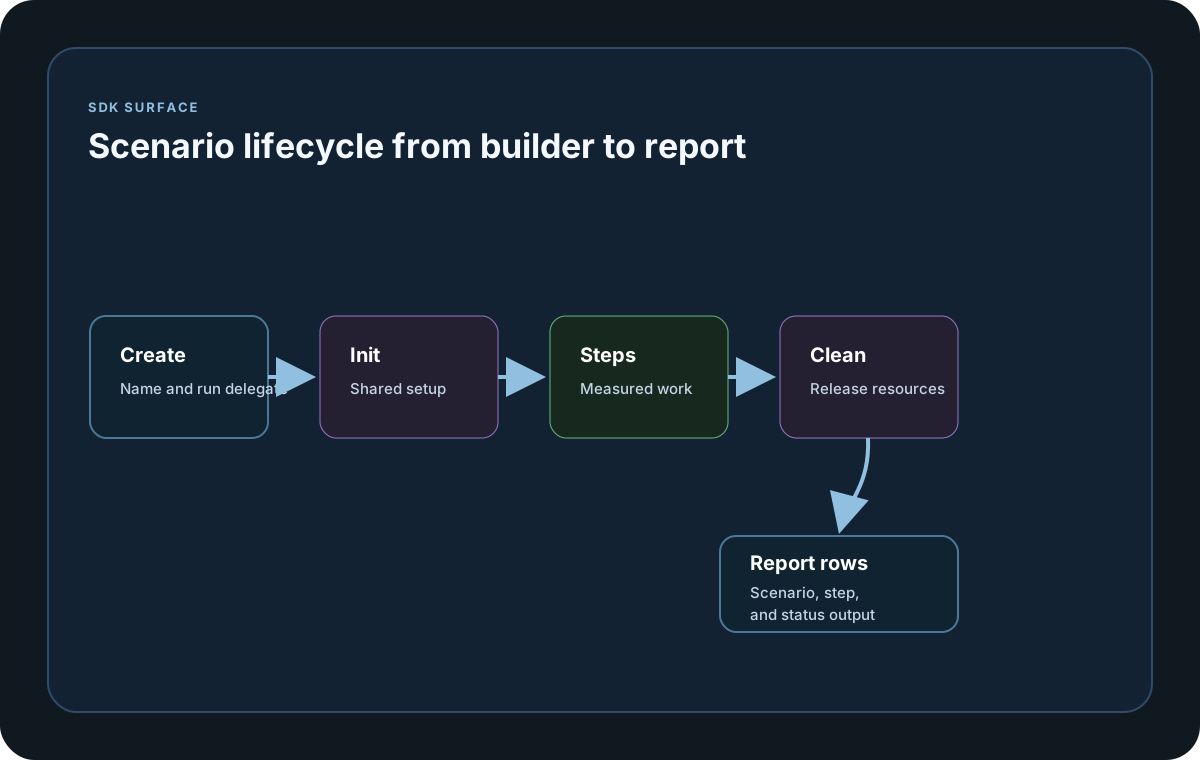
Guide
Step Contract
LoadStrikeStep.Run<T>(stepName, context, run) executes one logical unit and records its timing and status. The step name is required because it appears in step-level report tables, and all supported SDKs now return the same LoadStrikeReply<TPayload>-style result for that work. Every supported SDK also exposes an explicit async-named alias for readability on the public surface: RunAsync in C# and Go, runAsync in Java, TypeScript, and JavaScript, and run_async in Python.
Return Types
Use LoadStrikeResponse.Ok(...) for success and LoadStrikeResponse.Fail(...) for failure. Those helpers let you record statusCode, sizeBytes, message, customLatencyMs, and optional typed payloads. When customLatencyMs is omitted, including with parameterless Ok()/Fail(), LoadStrike records the observed step or scenario elapsed time. Provide customLatencyMs only when you intentionally want to report an externally measured latency value. In Go, the non-generic reply exposes status accessors plus an idempotent AsReply() projection. Typed replies expose Payload() and AsReply() on LoadStrikeResponse.OkWith(...) and FailWith(...), while the package-level helpers OKWith(...), FailWith(...), and RunStep(...) remain available for generic typed flows.
Scenario Reply
If you want the scenario result to reflect the same outcome as the step, return Step.AsReply(), step.asReply(), or step.as_reply() from the scenario delegate. In Go, typed reply flows still project through LoadStrikeResponse.OkWith(...) / FailWith(...).AsReply(), while the untyped LoadStrikeReply now also exposes AsReply() so shared scenario-return call sites can stay uniform across SDKs.
Runtime Controls in Step
Use context.GetScenarioTimerTime() when the step needs elapsed-time checks, context.StopScenario(...) when one scenario should stop, and context.StopCurrentTest(...) when the entire run should end because a critical condition has been reached.
SDK reference samples
Use these SDK samples to compare how Step is exposed across the supported languages before you wire it into a full scenario.
If you run these examples locally, add a valid runner key before execution starts. Set it with WithRunnerKey("...") or the config key LoadStrike:RunnerKey.
Step
using LoadStrike;

var httpClient = new HttpClient
{
    BaseAddress = new Uri("https://api.example.com")
};

var scenario = LoadStrikeScenario.Create("submit-orders", async context =>
{
    var step = await LoadStrikeStep.Run<string>("POST /orders", context, async () =>
    {
        using var response = await httpClient.PostAsJsonAsync("/orders", new
        {
            orderId = $"ord-{context.InvocationNumber}",
            amount = 49.95m
        });

        return response.IsSuccessStatusCode
            ? LoadStrikeResponse.Ok<string>(statusCode: ((int)response.StatusCode).ToString())
            : LoadStrikeResponse.Fail<string>(statusCode: ((int)response.StatusCode).ToString());
    });

    return step.AsReply();
})
.WithLoadSimulations(LoadStrikeSimulation.Inject(10, TimeSpan.FromSeconds(1), TimeSpan.FromSeconds(20)));

LoadStrikeRunner.RegisterScenarios(scenario)
    .WithRunnerKey("rkl_your_local_runner_key")
    .Run();
package main
import loadstrike "loadstrike.com/sdk/go"
func main() {
scenario := loadstrike.CreateScenario("step-demo", func(ctx loadstrike.LoadStrikeScenarioContext) loadstrike.LoadStrikeReply {
return loadstrike.LoadStrikeStep.Run("GET /health", ctx, func(loadstrike.LoadStrikeScenarioContext) loadstrike.LoadStrikeReply {
return loadstrike.LoadStrikeResponse.OkWith("ok", "200", int64(0), "healthy").AsReply()
})
}).
WithLoadSimulations(loadstrike.LoadStrikeSimulation.IterationsForConstant(1, 1))
loadstrike.RegisterScenarios(scenario).Run()
}import java.net.URI;
import java.net.http.HttpClient;
import java.net.http.HttpRequest;
import java.net.http.HttpResponse;
import com.loadstrike.runtime.LoadStrikeRuntime.LoadStrikeResponse;
import com.loadstrike.runtime.LoadStrikeRuntime.LoadStrikeRunner;
import com.loadstrike.runtime.LoadStrikeRuntime.LoadStrikeScenario;
import com.loadstrike.runtime.LoadStrikeRuntime.LoadStrikeSimulation;
import com.loadstrike.runtime.LoadStrikeRuntime.LoadStrikeStep;
var client = HttpClient.newHttpClient();
var scenario = LoadStrikeScenario.create(
"submit-orders",
context -> {
var step = LoadStrikeStep.run(
"POST /orders",
context,
() -> {
String body = "{\"orderId\":\"ord-" + context.invocationNumber + "\",\"amount\":49.95}";
var request = HttpRequest.newBuilder(URI.create("https://api.example.com/orders"))
.header("Content-Type", "application/json")
.POST(HttpRequest.BodyPublishers.ofString(body))
.build();
var response = client.sendAsync(request, HttpResponse.BodyHandlers.ofString()).join();
return response.statusCode() < 400
? LoadStrikeResponse.ok(Integer.toString(response.statusCode()))
: LoadStrikeResponse.fail(Integer.toString(response.statusCode()));
}
);
return step.asReply();
}
);
scenario = scenario.withLoadSimulations(LoadStrikeSimulation.inject(10, 1d, 20d));
LoadStrikeRunner
.registerScenarios(scenario)
.withRunnerKey("rkl_your_local_runner_key")
.run();import requests
from loadstrike_sdk import LoadStrikeResponse, LoadStrikeRunner, LoadStrikeScenario, LoadStrikeSimulation, LoadStrikeStep
def run_orders(context):
step = LoadStrikeStep.run(
"POST /orders",
context,
lambda: (
lambda response: LoadStrikeResponse.ok(str(response.status_code))
if response.ok
else LoadStrikeResponse.fail(str(response.status_code))
)(
requests.post(
"https://api.example.com/orders",
json={"orderId": f"ord-{context.invocation_number}", "amount": 49.95},
timeout=15,
)
),
)
return step.as_reply()
scenario = (
LoadStrikeScenario.create("submit-orders", run_orders)
.with_load_simulations(LoadStrikeSimulation.inject(10, 1, 20))
)
LoadStrikeRunner.register_scenarios(scenario) \
.with_runner_key("rkl_your_local_runner_key") \
.run()import {
LoadStrikeResponse,
LoadStrikeRunner,
LoadStrikeScenario,
LoadStrikeSimulation,
LoadStrikeStep
} from "@loadstrike/loadstrike-sdk";
const scenario = LoadStrikeScenario.create("submit-orders", async (context) => {
const step = await LoadStrikeStep.run("POST /orders", context, async () => {
const response = await fetch("https://api.example.com/orders", {
method: "POST",
headers: { "content-type": "application/json" },
body: JSON.stringify({
orderId: `ord-${context.invocationNumber}`,
amount: 49.95
})
});
return response.ok
? LoadStrikeResponse.ok(String(response.status))
: LoadStrikeResponse.fail(String(response.status));
});
return step.asReply();
}).withLoadSimulations(LoadStrikeSimulation.inject(10, 1, 20));
await LoadStrikeRunner
.registerScenarios(scenario)
.withRunnerKey("rkl_your_local_runner_key")
.run();const {
LoadStrikeResponse,
LoadStrikeRunner,
LoadStrikeScenario,
LoadStrikeSimulation,
LoadStrikeStep
} = require("@loadstrike/loadstrike-sdk");
(async () => {
const scenario = LoadStrikeScenario.create("submit-orders", async (context) => {
const step = await LoadStrikeStep.run("POST /orders", context, async () => {
const response = await fetch("https://api.example.com/orders", {
method: "POST",
headers: { "content-type": "application/json" },
body: JSON.stringify({
orderId: `ord-${context.invocationNumber}`,
amount: 49.95
})
});
return response.ok
? LoadStrikeResponse.ok(String(response.status))
: LoadStrikeResponse.fail(String(response.status));
});
return step.asReply();
}).withLoadSimulations(LoadStrikeSimulation.inject(10, 1, 20));
await LoadStrikeRunner
.registerScenarios(scenario)
.withRunnerKey("rkl_your_local_runner_key")
.run();
})();Step parameters and reply behavior
name is the report-visible step name, context is the active scenario context, and run is the delegate that returns a LoadStrike reply.
Required readable step name. This exact value is what users see in step tables, threshold targeting, and sink exports.
Gives the step access to invocation data, scenario timers, stop helpers, random values, node info, and test metadata.
This is where the real business operation happens, such as an HTTP call, browser action, or broker publish.
Use these helpers to map the actual business outcome into a status code, optional message, optional payload, optional size, and optional custom latency.
Returns the step result back to the scenario so the scenario status reflects the same success or failure state.