
Tracking Payload Builder
TrackingPayloadBuilder helps you create payloads for delegate and custom transport integrations. Use it when LoadStrike is not building the envelope for you.
Matching docs
Search across docs titles, summaries, groups, and section headings.
Use Up and Down Arrow to move through results, then press Enter to open the active page.
No indexed docs matched that search. Try a broader term or open the docs hub.
What this page helps you do
What this page helps you do
TrackingPayloadBuilder helps you create payloads for delegate and custom transport integrations. Use it when LoadStrike is not building the envelope for you.
Who this is for
Engineers writing or reviewing scenario code in one of the supported SDKs.
Prerequisites
- A scenario or runtime surface you want to wire correctly in code
By the end
The exact SDK surface you need for this part of the runtime.
Use this page when
Use this reference when you already know the workflow and need the exact Tracking Payload Builder API surface in code.
Visual guide
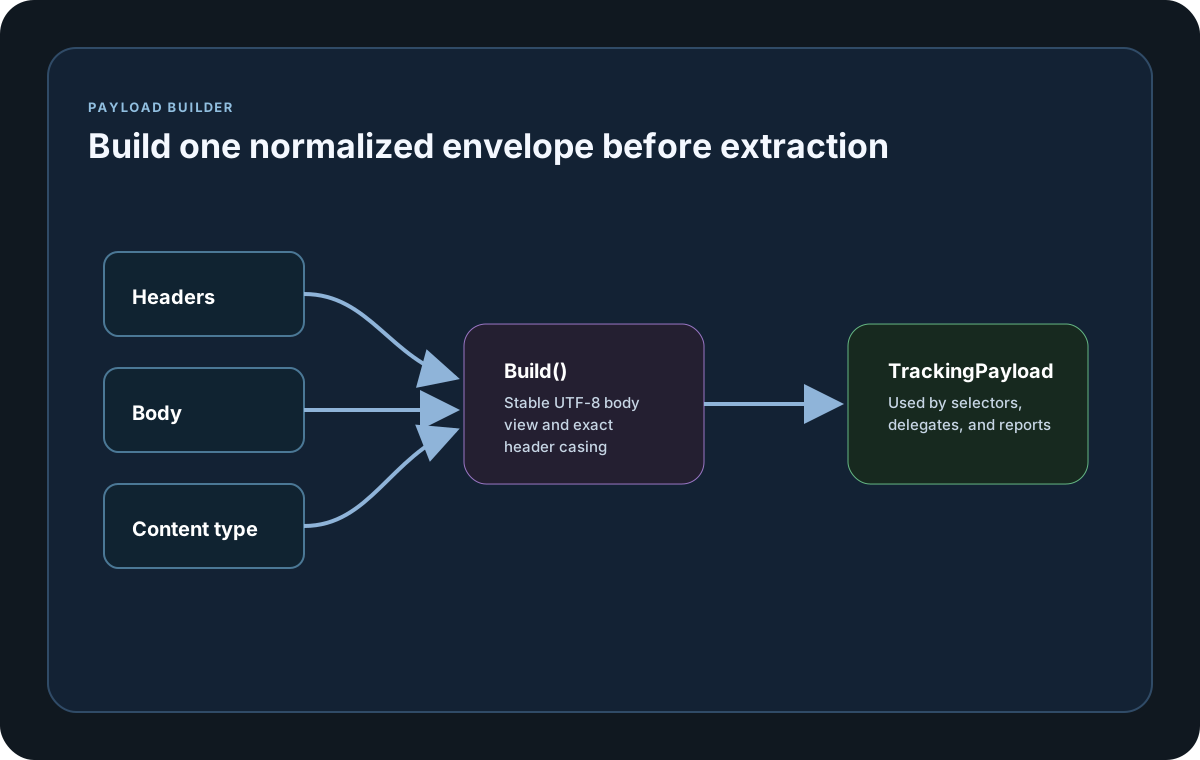
Guide
What It Builds
TrackingPayloadBuilder creates a TrackingPayload with headers, body, content type, MessagePayloadType, JsonSettings, and JsonConvertSettings. It is the helper to reach for when a custom or delegate transport still needs to follow the normal tracking rules. Go now exposes the same builder-style SetBody(...) and Build() surface, Java exposes setBody(...) and build(), and Python now publishes the final TrackingPayload body reader directly through get_body_as_utf8() plus the Pascal-case alias GetBodyAsUtf8().
Body Input Modes
Use SetBody(string) for text payloads and SetBody(ReadOnlyMemory<byte>) for binary payloads such as protobuf or compressed formats. After Build(), the resulting payload helper surfaces also expose GetBodyAsUtf8(), getBodyAsUtf8(), or get_body_as_utf8() where that public method exists so selector and delegate code can read the normalized UTF-8 body back out consistently.
Where To Use
This builder is most useful inside delegate-based endpoint callbacks: Produce and Consume in Go, or ProduceAsync and ConsumeAsync in async-named SDKs. Use it when you need to construct the payload envelope yourself and keep tracking ID extraction consistent.
SDK reference samples
Use these SDK samples to compare how Tracking Payload Builder is exposed across the supported languages before you wire it into a full scenario.
If you run these examples locally, add a valid runner key before execution starts. Set it with WithRunnerKey("...") or the config key LoadStrike:RunnerKey.
TrackingPayloadBuilder
using LoadStrike;

var httpClient = new HttpClient
{
    BaseAddress = new Uri("https://api.example.com")
};

var scenario = LoadStrikeScenario.Create("submit-orders", async context =>
{
    var builder = new TrackingPayloadBuilder
    {
        ContentType = "application/json",
        MessagePayloadType = typeof(object)
    };

    builder.Headers["X-Correlation-Id"] = $"ord-{context.InvocationNumber}";
    builder.SetBody($$"""{"orderId":"ord-{{context.InvocationNumber}}","amount":49.95}""");

    var payload = builder.Build();
    using var request = new HttpRequestMessage(HttpMethod.Post, "/orders")
    {
        Content = new StringContent(payload.GetBodyAsUtf8(), Encoding.UTF8)
    };
    request.Content.Headers.ContentType = new System.Net.Http.Headers.MediaTypeHeaderValue(payload.ContentType);

    foreach (var header in payload.Headers)
    {
        request.Headers.TryAddWithoutValidation(header.Key, header.Value?.ToString());
    }

    using var response = await httpClient.SendAsync(request);
    return response.IsSuccessStatusCode
        ? LoadStrikeResponse.Ok(statusCode: ((int)response.StatusCode).ToString())
        : LoadStrikeResponse.Fail(statusCode: ((int)response.StatusCode).ToString());
})
.WithLoadSimulations(LoadStrikeSimulation.Inject(10, TimeSpan.FromSeconds(1), TimeSpan.FromSeconds(20)));

LoadStrikeRunner.RegisterScenarios(scenario)
    .WithRunnerKey("rkl_your_local_runner_key")
    .Run();
package main
import loadstrike "loadstrike.com/sdk/go"
func main() {
builder := loadstrike.TrackingPayloadBuilder{
Headers: map[string]string{"X-Correlation-Id": "trk-1001"},
ContentType: "application/json",
MessagePayloadType: "json",
}
builder.SetBody(map[string]any{
"trackingId": "trk-1001",
"tenant": "tenant-a",
"status": "created",
})
payload := builder.Build()
messagePayload := loadstrike.RawPayload(payload.GetBodyAsUtf8())
endpoint := &loadstrike.EndpointSpec{
Kind: "Http",
Name: "orders-api",
Mode: "Produce",
TrackingField: "json:$.trackingId",
GatherByField: "json:$.tenant",
MessagePayload: messagePayload,
}
_ = endpoint
}import java.net.URI;
import java.net.http.HttpClient;
import java.net.http.HttpRequest;
import java.net.http.HttpResponse;
import com.loadstrike.runtime.LoadStrikeCorrelation.TrackingPayloadBuilder;
import com.loadstrike.runtime.LoadStrikeRuntime.LoadStrikeResponse;
import com.loadstrike.runtime.LoadStrikeRuntime.LoadStrikeRunner;
import com.loadstrike.runtime.LoadStrikeRuntime.LoadStrikeScenario;
import com.loadstrike.runtime.LoadStrikeRuntime.LoadStrikeSimulation;
var client = HttpClient.newHttpClient();
var scenario = LoadStrikeScenario.create("submit-orders", context -> {
var builder = new TrackingPayloadBuilder();
builder.contentType = "application/json";
builder.messagePayloadType = Object.class;
builder.headers.put("X-Correlation-Id", "ord-" + context.invocationNumber);
builder.setBody("{\"orderId\":\"ord-" + context.invocationNumber + "\",\"amount\":49.95}");
var payload = builder.build();
var request = HttpRequest.newBuilder(URI.create("https://api.example.com/orders"))
.header("Content-Type", payload.contentType)
.header("X-Correlation-Id", String.valueOf(payload.headers.get("X-Correlation-Id")))
.POST(HttpRequest.BodyPublishers.ofString(payload.getBodyAsUtf8()))
.build();
var response = client.sendAsync(request, HttpResponse.BodyHandlers.ofString()).join();
return response.statusCode() < 400
? LoadStrikeResponse.ok(Integer.toString(response.statusCode()))
: LoadStrikeResponse.fail(Integer.toString(response.statusCode()));
}).withLoadSimulations(LoadStrikeSimulation.inject(10, 1d, 20d));
LoadStrikeRunner
.registerScenarios(scenario)
.withRunnerKey("rkl_your_local_runner_key")
.run();import requests
from loadstrike_sdk import (
LoadStrikeResponse,
LoadStrikeRunner,
LoadStrikeScenario,
LoadStrikeSimulation,
TrackingPayloadBuilder,
)
def submit_orders(context):
builder = TrackingPayloadBuilder()
builder.ContentType = "application/json"
builder.MessagePayloadType = "OrdersPayload"
builder.Headers["X-Correlation-Id"] = f"ord-{context.invocation_number}"
builder.set_body(f'{{"orderId":"ord-{context.invocation_number}","amount":49.95}}')
payload = builder.build()
response = requests.post(
"https://api.example.com/orders",
data=payload["getBodyAsUtf8"](),
headers={
"Content-Type": payload["contentType"],
"X-Correlation-Id": payload["headers"]["X-Correlation-Id"],
},
timeout=15,
)
if response.ok:
return LoadStrikeResponse.ok(str(response.status_code))
return LoadStrikeResponse.fail(str(response.status_code))
scenario = (
LoadStrikeScenario.create("submit-orders", submit_orders)
.with_load_simulations(LoadStrikeSimulation.inject(10, 1, 20))
)
LoadStrikeRunner.register_scenarios(scenario) \
.with_runner_key("rkl_your_local_runner_key") \
.run()import {
LoadStrikeResponse,
LoadStrikeRunner,
LoadStrikeScenario,
LoadStrikeSimulation,
TrackingPayloadBuilder
} from "@loadstrike/loadstrike-sdk";
const scenario = LoadStrikeScenario.create("submit-orders", async (context) => {
const builder = new TrackingPayloadBuilder();
builder.ContentType = "application/json";
builder.MessagePayloadType = "OrdersPayload";
builder.Headers["X-Correlation-Id"] = `ord-${context.invocationNumber}`;
builder.setBody(JSON.stringify({ orderId: `ord-${context.invocationNumber}`, amount: 49.95 }));
const payload = builder.build();
const response = await fetch("https://api.example.com/orders", {
method: "POST",
headers: {
"content-type": payload.contentType,
"X-Correlation-Id": String(payload.headers?.["X-Correlation-Id"] ?? "")
},
body: payload.getBodyAsUtf8 ? payload.getBodyAsUtf8() : ""
});
return response.ok
? LoadStrikeResponse.ok(String(response.status))
: LoadStrikeResponse.fail(String(response.status));
}).withLoadSimulations(LoadStrikeSimulation.inject(10, 1, 20));
await LoadStrikeRunner
.registerScenarios(scenario)
.withRunnerKey("rkl_your_local_runner_key")
.run();const {
LoadStrikeResponse,
LoadStrikeRunner,
LoadStrikeScenario,
LoadStrikeSimulation,
TrackingPayloadBuilder
} = require("@loadstrike/loadstrike-sdk");
(async () => {
const scenario = LoadStrikeScenario.create("submit-orders", async (context) => {
const builder = new TrackingPayloadBuilder();
builder.ContentType = "application/json";
builder.MessagePayloadType = "OrdersPayload";
builder.Headers["X-Correlation-Id"] = `ord-${context.invocationNumber}`;
builder.setBody(JSON.stringify({ orderId: `ord-${context.invocationNumber}`, amount: 49.95 }));
const payload = builder.build();
const response = await fetch("https://api.example.com/orders", {
method: "POST",
headers: {
"content-type": payload.contentType,
"X-Correlation-Id": String(payload.headers?.["X-Correlation-Id"] ?? "")
},
body: payload.getBodyAsUtf8 ? payload.getBodyAsUtf8() : ""
});
return response.ok
? LoadStrikeResponse.ok(String(response.status))
: LoadStrikeResponse.fail(String(response.status));
}).withLoadSimulations(LoadStrikeSimulation.inject(10, 1, 20));
await LoadStrikeRunner
.registerScenarios(scenario)
.withRunnerKey("rkl_your_local_runner_key")
.run();
})();TrackingPayloadBuilder fields and methods
Header collection used when building the final TrackingPayload. Header names are preserved exactly as added so exact-case header selectors can match them later.
Optional content type carried into the built payload.
Optional type hint for typed JSON parsing by tracking selectors.
Optional serializer settings used when payload parsing needs a custom JSON configuration.
Read-only byte view of the currently configured body content.
Stores UTF-8 text as the payload body.
Stores raw binary content as the payload body.
If the tracking payload feeds an HTTP step under load, execute the request through one shared client, session, or dispatcher and dispose or close it after the run.
Creates the immutable TrackingPayload instance passed into parsers and delegate-based adapters.