
Charts And Analytics
These charts help you spot patterns faster than raw tables alone. Use this page when you want to understand what each chart is trying to show.
Matching docs
Search across docs titles, summaries, groups, and section headings.
Use Up and Down Arrow to move through results, then press Enter to open the active page.
No indexed docs matched that search. Try a broader term or open the docs hub.
What this page helps you do
What this page helps you do
These charts help you spot patterns faster than raw tables alone. Use this page when you want to understand what each chart is trying to show.
Who this is for
Teams reading run output or deciding how local reports and exported results should be consumed.
Prerequisites
- A completed run or a report format you want to enable
By the end
A clearer way to read, choose, or extend the report surface for the workload.
Use this page when
Use this page when you already have run output and need to decide where to start reading or extending the report surface.
Visual guide
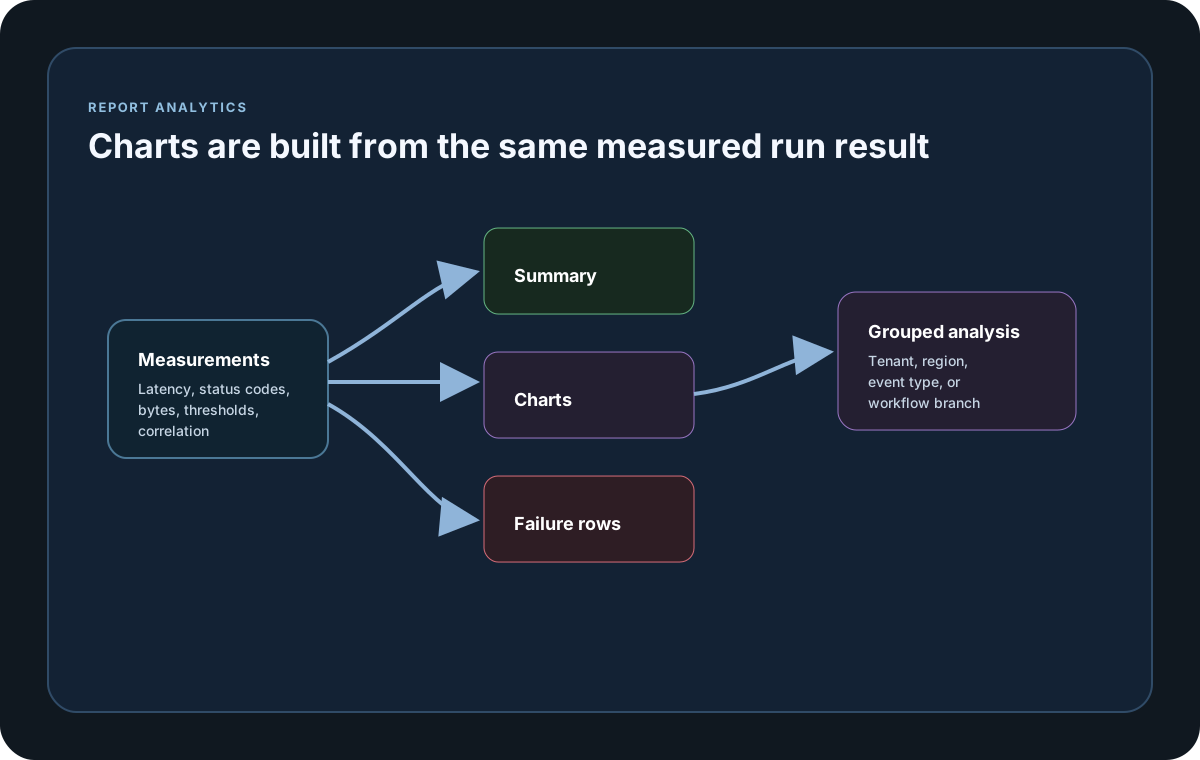
Sample Chart Inputs
ScenarioA Requests=600 FailRate=0.50% Bytes=1280000
ScenarioB Requests=420 FailRate=2.14% Bytes=910000
StatusClass 2xx=96.8 4xx=1.1 5xx=2.1
Ungrouped P50=18 P75=22 P80=24 P85=27 P90=31 P95=38 P99=52 Max=81
Grouped tenant-a P50=16 P75=20 P80=21 P85=24 P90=28 P95=34 P99=46 Max=73
Guide
Summary Charts
The Summary tab renders outcome totals, requests, successful and failed latency, request rate, failure rate, transferred bytes, status-code classes, and scenario percentile profiles only when those datasets are populated. An All latency series is shown only when a genuine all-outcome distribution is available.
Cumulative History Charts
Longer runs can show cumulative completed requests, achieved request rate, transferred bytes, and per-scenario latency progress over time. The history includes the terminal partial interval and keeps All, OK, and Failed percentile series visibly separate.
Correlation Charts
Ungrouped charts identify each scenario, destination, and status. Grouped charts preserve every scenario, destination, GatherBy selector, and GatherBy value. Available P50, P75, P80, P85, P90, P95, P99, and Max points remain distinct and are not averaged across groups.
Chart Interaction
Responsive SVG charts stay sharp at any size and expose exact values through pointer, touch, and keyboard tooltips. Outcome and status legends include counts and percentages, including zero-count outcomes, while one-sided results still render a complete visible ring. Use the legend to focus on individual series, zoom or pan dense domains, reset the view, expand a chart, filter cards by title, or switch among compact, comfortable, and spacious grids.
Offline And Accessible
Every chart, style, and interaction is embedded in the single HTML file. Reports make no chart-related network request, keep readable tables as a fallback, support keyboard navigation and an accessible expanded view, and print charts at their full domain.
When To Use Them
Use summary charts for quick run-level comparisons. Use correlation charts when you need to isolate latency shifts by tenant, region, event type, or any other GatherBy selector value.
Report and output samples
Use these samples to connect the reporting surface on this page back to the run result your team will review or export.
If you run these examples locally, add a valid runner key before execution starts. Set it with WithRunnerKey("...") or the config key LoadStrike:RunnerKey.
HTML reports include a top-right Light/Dark theme toggle and responsive offline SVG charts. Use exact-value tooltips, legends, zoom, pan, reset, the accessible expanded view, chart-title search, and grid-density controls to inspect dense results. Light is the default report theme.
HTML Analytics Charts
using LoadStrike;

LoadStrikeRunner.RegisterScenarios(scenarioA, scenarioB)
    .WithReportFolder("./reports")
    .WithReportFormats(LoadStrikeReportFormat.Html)
    .WithRunnerKey("rkl_your_local_runner_key")
    .Run();
package main
import (
"time"
loadstrike "loadstrike.com/sdk/go"
)
func main() {
loadstrike.RegisterScenarios(loadstrike.Empty("reports-demo")).
WithReportFolder("./reports").
WithReportFileName("loadstrike-report").
WithReportFormats(
loadstrike.ReportFormatHTML,
loadstrike.ReportFormatCSV,
loadstrike.ReportFormatTXT,
loadstrike.ReportFormatMD,
).
WithReportingInterval(loadstrike.TimeSpan(5 * time.Second)).
Run()
}import com.loadstrike.runtime.LoadStrikeRuntime.LoadStrikeResponse;
import com.loadstrike.runtime.LoadStrikeRuntime.LoadStrikeRunner;
import com.loadstrike.runtime.LoadStrikeRuntime.LoadStrikeScenario;
import com.loadstrike.runtime.LoadStrikeRuntime.LoadStrikeSimulation;
var scenario = LoadStrikeScenario
.create("submit-orders", ignoredContext -> LoadStrikeResponse.ok("200"))
.withLoadSimulations(LoadStrikeSimulation.inject(10, 1d, 20d));
LoadStrikeRunner
.registerScenarios(scenario)
.withReportFolder("./reports")
.withReportFormats("html", "csv", "txt", "md")
.withReportingInterval(5d)
.withRunnerKey("rkl_your_local_runner_key")
.run();from loadstrike_sdk import LoadStrikeResponse, LoadStrikeRunner, LoadStrikeScenario, LoadStrikeSimulation
scenario = (
LoadStrikeScenario.create("submit-orders", lambda _: LoadStrikeResponse.ok("200"))
.with_load_simulations(LoadStrikeSimulation.inject(10, 1, 20))
)
LoadStrikeRunner.register_scenarios(scenario) \
.with_report_folder("./reports") \
.with_report_formats("html", "csv", "txt", "md") \
.with_reporting_interval(5) \
.with_runner_key("rkl_your_local_runner_key") \
.run()import {
LoadStrikeResponse,
LoadStrikeRunner,
LoadStrikeScenario,
LoadStrikeSimulation
} from "@loadstrike/loadstrike-sdk";
const scenario = LoadStrikeScenario
.create("submit-orders", async () => LoadStrikeResponse.ok("200"))
.withLoadSimulations(LoadStrikeSimulation.inject(10, 1, 20));
await LoadStrikeRunner
.registerScenarios(scenario)
.withReportFolder("./reports")
.withReportFormats("html", "csv", "txt", "md")
.withReportingInterval(5)
.withRunnerKey("rkl_your_local_runner_key")
.run();const {
LoadStrikeResponse,
LoadStrikeRunner,
LoadStrikeScenario,
LoadStrikeSimulation
} = require("@loadstrike/loadstrike-sdk");
(async () => {
const scenario = LoadStrikeScenario
.create("submit-orders", async () => LoadStrikeResponse.ok("200"))
.withLoadSimulations(LoadStrikeSimulation.inject(10, 1, 20));
await LoadStrikeRunner
.registerScenarios(scenario)
.withReportFolder("./reports")
.withReportFormats("html", "csv", "txt", "md")
.withReportingInterval(5)
.withRunnerKey("rkl_your_local_runner_key")
.run();
})();Charts Rendered
Compares separate OK and FAIL latency profiles across scenarios. ALL appears only when a genuine combined distribution exists.
Shows completed requests, achieved request rate, transferred bytes, and scenario latency progress over time, including the terminal partial interval when history is available.
Shows which scenarios are contributing the most error volume and is hidden when the run produced no scenario totals.
Shows the traffic volume generated or processed per scenario and is hidden when byte totals are absent.
Summarizes the share of 2xx, 4xx, 5xx, and other classes where applicable, and is hidden when no status-class totals exist.
Keeps the matched-row table and renders distinct scenario, destination, and status series when percentile values exist.
Keeps every populated scenario, destination, GatherBy selector, and GatherBy value distinct instead of averaging already calculated percentile rows.
Use exact-value tooltips, legends, zoom, pan, reset, an accessible expanded view, chart-title search, and compact, comfortable, or spacious grids. Outcome and status legends include counts and percentages, zero-count outcomes remain explicit, and one-sided results retain a visible ring. Charts remain sharp when resized or printed.