
Realtime Reporting
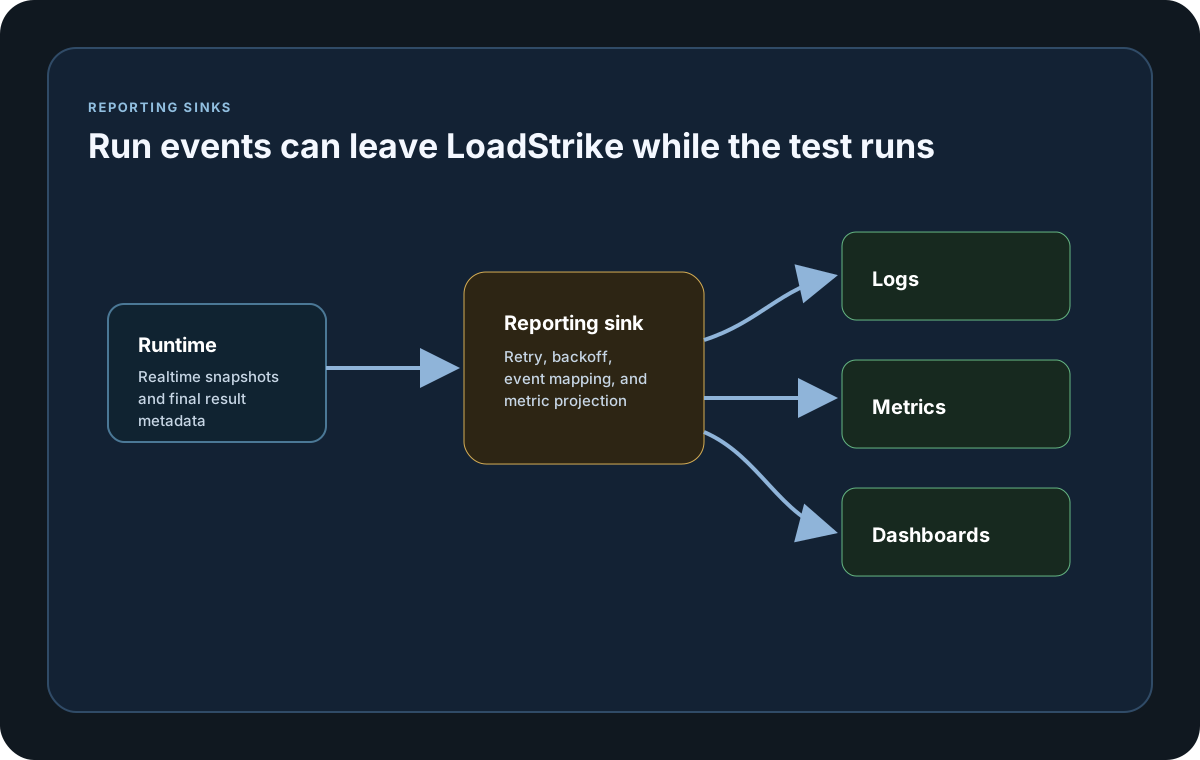
Realtime reporting streams LoadStrike data to the customer portal or external backends during the run and again when the run finishes.
Matching docs
Search across docs titles, summaries, groups, and section headings.
Use Up and Down Arrow to move through results, then press Enter to open the active page.
No indexed docs matched that search. Try a broader term or open the docs hub.
What this page helps you do
What this page helps you do
Realtime reporting streams LoadStrike data to the customer portal or external backends during the run and again when the run finishes.
Who this is for
Teams exporting final run data and realtime metrics into supported observability backends.
Prerequisites
- A run result or sink destination you want to wire into the wider observability stack
By the end
A sink-specific setup path that stays tied to the same LoadStrike report model.
Use this page when
Use this page when the local report is not the only destination and you need to wire realtime or final export into a supported sink.
Visual guide
Sample Report Data Rows
Scope    Scenario     Result Count RPS  LatencyP50Ms LatencyP80Ms LatencyP85Ms LatencyP90Ms LatencyP95Ms LatencyP99Ms
Scenario reports-demo OK     675   15.0 21.4         30.2         33.0         36.8         48.6         72.1

LatencyTable Scenario     Result Count LatencyP50Ms LatencyP95Ms
LatencyTable reports-demo OK     675   21.4         48.6
LatencyTable reports-demo FAIL   12    35.9         79.2

StatusCode Result Percent
200        OK     97.48
500        FAIL   2.52

FailedStatus Scope     Scenario     Step StatusCode Count Percent
FailedStatus Scenario  reports-demo      500       12    1.75
Reporting
Realtime reporting
Choose Portal Reporting when users should review runs in the customer portal, pick the built-in sink page that matches the backend your team already runs, or open Custom Reporting when you need to implement your own destination. Each tab opens a dedicated page with the settings, behavior, and lifecycle details for that reporting path.
Use the expanded sink set when LoadStrike run data should flow into supported observability platforms, databases, message streams, StatsD collectors, JSONL files, or a generic webhook receiver.
Open pageUse Portal Reporting when Enterprise users should review run history, scenario trends, latency percentiles, and byte metrics from the customer portal.
Open pageUse custom reporting when you need a sink that is not built in and still want the normal LoadStrike sink lifecycle.
Open pageUse the Datadog sink when your team already reads events and metrics in Datadog. This page explains what LoadStrike sends there and how to configure it.
Open pageUse the InfluxDB sink when your team wants LoadStrike events and metrics stored in an Influx bucket. This page explains the data flow and the optional metrics split.
Open pageUse the TimescaleDB sink when you want LoadStrike reporting data in PostgreSQL-compatible tables with optional metrics splits.
Open pageUse the Grafana Loki sink when you want log-style LoadStrike events in Loki and projected metrics through a companion OTLP path.
Open pageUse the Splunk HEC sink when you want LoadStrike reporting events and projected metrics delivered through Splunk.
Open pageUse the OTEL Collector sink when the team already standardizes on OpenTelemetry collector pipelines. This page explains the OTLP/HTTP path that LoadStrike uses.
Open pageGuide
What Built-In Sinks Export
Built-in sinks publish bounded per-attempt observation batches where the destination supports event records, plus reporting events and metric projections. Each completed correlation outcome is also exported as its own final event with source, destination, status, latency, tracking, and GatherBy values, so a destination can retain grouped and ungrouped evidence without accepting SDK percentile aggregates. Metric-only destinations receive the closest supported projection and disclose the reduced shape with a warning. Final export also includes final metric snapshots, started and completed timestamps, report-file metadata, observation delivery counts, disabled sink names, sink error counts, and detailed report rows such as failed responses.
Portal, Built-In, Or Custom
Use Portal Reporting when users should review run history from the LoadStrike customer portal. Use a built-in sink page when your team already runs Prometheus, CloudWatch, Dynatrace, New Relic, Datadog, InfluxDB, TimescaleDB, Grafana Loki, Splunk HEC, OTEL Collector, Elasticsearch or OpenSearch, Kafka, a StatsD-compatible collector, a JSONL file stream, or a webhook receiver that accepts generic LoadStrike JSON. Open Custom Reporting when you need to implement another destination but still want the same realtime and final sink lifecycle.
Configuration Model
Each sink accepts the options documented for that SDK. Sink pages identify when LoadStrike:ReportingSinks:* infra config can supply missing values and when a Java publisher or another executable delegate must be supplied in code. Realtime writes follow the configured reporting interval, and final export writes the run summary plus artifact metadata when the run completes.
Raw Observation Delivery
SDKs retain each attempt and nested step as an individual observation, then normally flush bounded batches every five seconds, at 50,000 observations, or at 8 MiB, whichever comes first. Finite reported latencies above the signed 64-bit microsecond range are retained at the maximum representable value. Receiving systems own percentile aggregation from those observations. The observation envelope excludes request and message payloads, bodies, and headers.
Failure Behavior
Every reporting-sink callback receives three retries by default after the initial attempt, with delays of 250 ms, 500 ms, and 1 second. The configured policy covers initialization, start, realtime statistics and metrics, final statistics and metrics, raw-observation batches, completion, stop, and dispose. Recovered callbacks add no final sink error or warning. Only exhausted raw-observation delivery counts as dropped observations; other exhausted callbacks are reported against that sink. Exception details remain in sanitized local logs rather than portable reports, and shutdown stays best effort. Load generation remains the priority: oversized observations and full bounded buffers or sink queues are not retried, can produce delivery warnings, and do not fail the scenario or stop the load generator.
Plan Gate And Extensibility
Enterprise includes portal reporting, supported built-in sinks for observability platforms, databases, message streams, file streaming, and generic webhook receivers, plus custom reporting sink implementations when a project-specific destination is required. Prometheus Remote Write, CloudWatch, Dynatrace, and New Relic use their provider-specific protocols in every SDK.
Realtime reporting setup
Start by registering the sink you want, set the reporting interval, and optionally load the sink settings from infra config.
If you run these examples locally, add a valid runner key before execution starts. Set it with WithRunnerKey("...") or the config key LoadStrike:RunnerKey.
HTML reports include a top-right Light/Dark theme toggle and responsive offline SVG charts. Use exact-value tooltips, legends, zoom, pan, reset, the accessible expanded view, chart-title search, and grid-density controls to inspect dense results. Light is the default report theme.
Realtime Reporting Setup
using LoadStrike;

var scenario = LoadStrikeScenario.Empty("orders-realtime-reporting")
    .WithLoadSimulations(
        LoadStrikeSimulation.Inject(rate: 20, interval: TimeSpan.FromSeconds(1), during: TimeSpan.FromMinutes(2))
    );

LoadStrikeRunner.RegisterScenarios(scenario)
    .WithReportingInterval(TimeSpan.FromSeconds(5))
    .LoadInfraConfig("./observability/loadstrike-datadog-reporting-sink.json")
    .WithReportingSinks(new DatadogReportingSink())
    .WithRunnerKey("rkl_your_local_runner_key")
    .Run();
package main
import loadstrike "loadstrike.com/sdk/go"
func main() {
result := loadstrike.RegisterScenarios(loadstrike.Empty("report-assets")).
WithReportFolder("./reports").
WithReportFileName("report-assets").
Run()
_ = result.ReportFiles()
}import com.loadstrike.runtime.LoadStrikeRuntime.LoadStrikeRunner;
import com.loadstrike.runtime.LoadStrikeRuntime.LoadStrikeScenario;
import com.loadstrike.runtime.LoadStrikeRuntime.LoadStrikeSimulation;
import com.loadstrike.runtime.LoadStrikeSinks.DatadogReportingSink;
var scenario = LoadStrikeScenario.empty("orders-realtime-reporting")
.withLoadSimulations(
LoadStrikeSimulation.inject(20, 1d, 120d)
);
LoadStrikeRunner.registerScenarios(scenario)
.withReportingInterval(5d)
.loadInfraConfig("./observability/loadstrike-datadog-reporting-sink.json")
.withReportingSinks(new DatadogReportingSink())
.withRunnerKey("rkl_your_local_runner_key")
.run();from loadstrike_sdk import (
DatadogReportingSink,
LoadStrikeRunner,
LoadStrikeScenario,
LoadStrikeSimulation,
)
scenario = (
LoadStrikeScenario.empty("orders-realtime-reporting")
.with_load_simulations(
LoadStrikeSimulation.inject(20, 1, 120)
)
)
LoadStrikeRunner.register_scenarios(scenario) \
.with_reporting_interval(5) \
.load_infra_config("./observability/loadstrike-datadog-reporting-sink.json") \
.with_reporting_sinks(DatadogReportingSink()) \
.with_runner_key("rkl_your_local_runner_key") \
.run()import {
DatadogReportingSink,
LoadStrikeRunner,
LoadStrikeScenario,
LoadStrikeSimulation
} from "@loadstrike/loadstrike-sdk";
const scenario = LoadStrikeScenario
.empty("orders-realtime-reporting")
.withLoadSimulations(
LoadStrikeSimulation.inject(20, 1, 120)
);
await LoadStrikeRunner
.registerScenarios(scenario)
.withReportingInterval(5)
.loadInfraConfig("./observability/loadstrike-datadog-reporting-sink.json")
.withReportingSinks(new DatadogReportingSink())
.withRunnerKey("rkl_your_local_runner_key")
.run();const {
DatadogReportingSink,
LoadStrikeRunner,
LoadStrikeScenario,
LoadStrikeSimulation
} = require("@loadstrike/loadstrike-sdk");
(async () => {
const scenario = LoadStrikeScenario
.empty("orders-realtime-reporting")
.withLoadSimulations(
LoadStrikeSimulation.inject(20, 1, 120)
);
await LoadStrikeRunner
.registerScenarios(scenario)
.withReportingInterval(5)
.loadInfraConfig("./observability/loadstrike-datadog-reporting-sink.json")
.withReportingSinks(new DatadogReportingSink())
.withRunnerKey("rkl_your_local_runner_key")
.run();
})();Realtime reporting fields and lifecycle
Controls how often realtime scenario statistics and projected metrics are emitted during the run.
Registers one or more sink instances in code.
Loads sink configuration from a separate infra-config file so secrets and backend-specific settings stay outside the test code.
Every sink uses a stable sink identifier so disabledSinks and sinkErrors can point back to the correct destination.
Sink init, start, realtime export, raw batches, completion, final export, stop, and dispose use the configured retry and backoff policy. Recovered callbacks add no final sink error. Persistent sink failure disables only that sink for the run instead of aborting the workload.
Every built-in sink also receives final metric snapshots, started/completed timestamps, report-file metadata, disabled sink names, sink errors, and detailed report rows when the run completes.
Realtime callbacks happen during execution. Final export receives the completed LoadStrikeRunResult before Stop and Dispose run, so threshold results, plugin-produced report sections, and report file metadata are already available.
Runs after Stop as the final sink cleanup hook. Use it to close files, sockets, HTTP clients, or other owned resources. Dispose uses the configured bounded retry policy. Only final exhaustion is recorded in sinkErrors with phase=dispose, and cleanup failure does not abort shutdown.
{
  "LoadStrike": {
    "ReportingIntervalMs": 5000,
    "SinkRetryCount": 3,
    "SinkRetryBackoffMs": 250,
    "ReportingSinks": {
      "Datadog": {
        "BaseUrl": "https://api.datadoghq.com",
        "ApiKey": "dd-api-key",
        "ApplicationKey": "dd-app-key"
      },
      "InfluxDb": {
        "BaseUrl": "https://influx.example.com",
        "Bucket": "loadstrike-runs",
        "MeasurementName": "loadstrike_events"
      }
    }
  }
}
Shared Downloads
Use these shared assets when you need the combined guide or the common Grafana dashboard-provider file.
Observability asset guide
A single guide that brings together the built-in sink templates and Grafana starter assets.
Download fileDashboard provider YAML
The shared Grafana dashboard-provider file used by the InfluxDB, TimescaleDB, and Grafana Loki starter dashboards.
Download file