
Worker Plugins
Worker plugins let you add your own runtime-side reporting or table output. Use them when the built-in plugin data is not enough for your workflow.
Matching docs
Search across docs titles, summaries, groups, and section headings.
Use Up and Down Arrow to move through results, then press Enter to open the active page.
No indexed docs matched that search. Try a broader term or open the docs hub.
What this page helps you do
What this page helps you do
Worker plugins let you add your own runtime-side reporting or table output. Use them when the built-in plugin data is not enough for your workflow.
Who this is for
Teams reading run output or deciding how local reports and exported results should be consumed.
Prerequisites
- A completed run or a report format you want to enable
By the end
A clearer way to read, choose, or extend the report surface for the workload.
Use this page when
Use this page when you already have run output and need to decide where to start reading or extending the report surface.
Visual guide
Sample Report Data Rows
Scope    Scenario     Result Count RPS  LatencyP50Ms LatencyP80Ms LatencyP85Ms LatencyP90Ms LatencyP95Ms LatencyP99Ms
Scenario reports-demo OK     675   15.0 21.4         30.2         33.0         36.8         48.6         72.1

LatencyTable Scenario     Result Count LatencyP50Ms LatencyP95Ms
LatencyTable reports-demo OK     675   21.4         48.6
LatencyTable reports-demo FAIL   12    35.9         79.2

StatusCode Result Percent
200        OK     97.48
500        FAIL   2.52

FailedStatus Scope     Scenario     Step StatusCode Count Percent
FailedStatus Scenario  reports-demo      500       12    1.75
Guide
What worker plugins are
Worker plugins let you extend the runtime lifecycle with custom collection or final-report behavior. They are the right place for extra result tables, domain-specific summaries, or custom final artifacts.
What the runtime already includes
LoadStrike automatically registers the built-in failed-response and correlation report worker plugins. You do not need to add those yourself.
How the lifecycle works
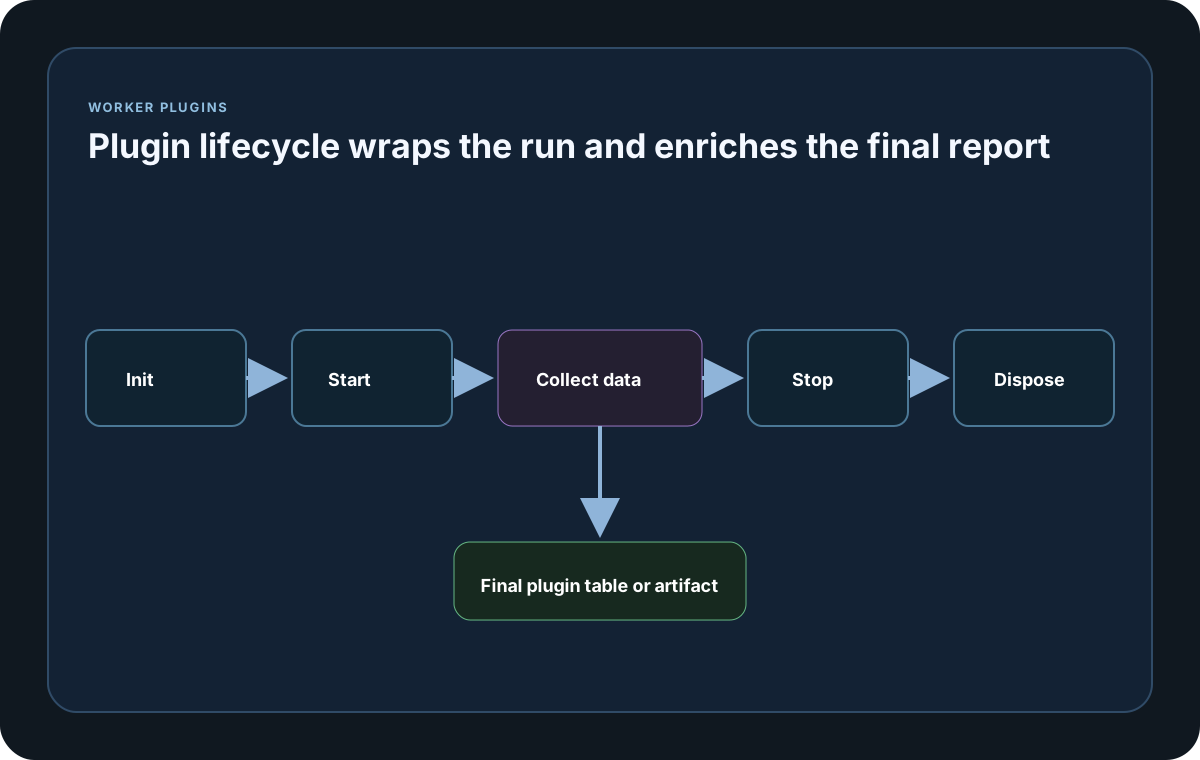
Custom plugins receive Init, Start, GetData, Stop, and Dispose callbacks. Use Init for configuration, Start for run information, GetData for final plugin output, Stop to halt background work, and Dispose for final cleanup.
Why GetData comes before shutdown
LoadStrike calls GetData before Stop and Dispose so your plugin can still read the state it collected during the run. After that, Stop and Dispose can safely release background workers, sockets, timers, writers, or cached clients.
Dispose failure behavior
Dispose is best-effort cleanup. If it throws, LoadStrike logs or records the error and continues the rest of the shutdown path so the finished run result and report artifacts are still produced.
Report and output samples
Use these samples to connect the reporting surface on this page back to the run result your team will review or export.
If you run these examples locally, add a valid runner key before execution starts. Set it with WithRunnerKey("...") or the config key LoadStrike:RunnerKey.
HTML reports include a top-right Light/Dark theme toggle and responsive offline SVG charts. Use exact-value tooltips, legends, zoom, pan, reset, the accessible expanded view, chart-title search, and grid-density controls to inspect dense results. Light is the default report theme.
Worker Plugin
using LoadStrike;

public sealed class SimplePlugin : ILoadStrikeWorkerPlugin
{
    private string? _lastSessionId;

    public string PluginName => "simple";

    public Task Init(LoadStrikeBaseContext context, Microsoft.Extensions.Configuration.IConfiguration infraConfig) => Task.CompletedTask;

    public Task Start(LoadStrikeSessionStartInfo sessionInfo)
    {
        _lastSessionId = string.Join(",", sessionInfo.Scenarios.Select(x => x.ScenarioName));
        return Task.CompletedTask;
    }

    public Task<LoadStrikePluginData> GetData(LoadStrikeRunResult result)
    {
        var table = LoadStrikePluginDataTable.Create("summary");
        table.Rows.Add(new Dictionary<string, object> { ["name"] = "requests", ["value"] = result.AllRequestCount });

        var data = LoadStrikePluginData.Create(PluginName);
        data.Hints.Add("Adds a custom report table.");
        data.Tables.Add(table);
        return Task.FromResult(data);
    }

    public Task Stop() => Task.CompletedTask;

    public Task Dispose()
    {
        _lastSessionId = null;
        return Task.CompletedTask;
    }
}

var plugin = new SimplePlugin();
var scenario = LoadStrikeScenario.Empty("plugin-demo")
    .WithLoadSimulations(LoadStrikeSimulation.KeepConstant(1, TimeSpan.FromSeconds(20)));

LoadStrikeRunner.RegisterScenarios(scenario)
    .WithWorkerPlugins(plugin)
    .WithRunnerKey("rkl_your_local_runner_key")
    .Run();
package main
import loadstrike "loadstrike.com/sdk/go"
type inventorySummaryPlugin struct{}
func (inventorySummaryPlugin) PluginName() string { return "inventory-summary" }
func (inventorySummaryPlugin) Init(loadstrike.LoadStrikeBaseContext, loadstrike.IConfiguration) loadstrike.LoadStrikeTask {
return loadstrike.CompletedTask()
}
func (inventorySummaryPlugin) Start(loadstrike.LoadStrikeSessionStartInfo) loadstrike.LoadStrikeTask {
return loadstrike.CompletedTask()
}
func (inventorySummaryPlugin) GetData(loadstrike.LoadStrikeRunResult) loadstrike.LoadStrikeValueTask[loadstrike.LoadStrikePluginData] {
return loadstrike.TaskFromResult(loadstrike.LoadStrikePluginData{
PluginName: "inventory-summary",
Tables: []loadstrike.LoadStrikePluginDataTable{
{
TableName: "summary",
Rows: []map[string]any{
{"status": "ok"},
},
},
},
})
}
func (inventorySummaryPlugin) Stop() loadstrike.LoadStrikeTask { return loadstrike.CompletedTask() }
func (inventorySummaryPlugin) Dispose() loadstrike.LoadStrikeTask { return loadstrike.CompletedTask() }
func main() {
loadstrike.RegisterScenarios(loadstrike.Empty("plugins-demo")).
WithWorkerPlugins(inventorySummaryPlugin{}).
Run()
}import java.util.ArrayList;
import java.util.LinkedHashMap;
import java.util.List;
import java.util.Map;
import com.loadstrike.runtime.LoadStrikeRuntime.LoadStrikeBaseContext;
import com.loadstrike.runtime.LoadStrikeRuntime.LoadStrikePluginData;
import com.loadstrike.runtime.LoadStrikeRuntime.LoadStrikePluginDataTable;
import com.loadstrike.runtime.LoadStrikeRuntime.LoadStrikeResponse;
import com.loadstrike.runtime.LoadStrikeRuntime.LoadStrikeRunResult;
import com.loadstrike.runtime.LoadStrikeRuntime.LoadStrikeRunner;
import com.loadstrike.runtime.LoadStrikeRuntime.LoadStrikeScenario;
import com.loadstrike.runtime.LoadStrikeRuntime.LoadStrikeSessionStartInfo;
import com.loadstrike.runtime.LoadStrikeRuntime.LoadStrikeSimulation;
import com.loadstrike.runtime.LoadStrikeRuntime.LoadStrikeWorkerPlugin;
final class SimplePlugin implements LoadStrikeWorkerPlugin {
private String lastSessionId;
@Override
public String pluginName() {
return "simple";
}
@Override
public void init(LoadStrikeBaseContext context, Map<String, Object> infraConfig) {}
@Override
public void start(LoadStrikeSessionStartInfo sessionInfo) {
lastSessionId = sessionInfo.testInfo == null ? null : sessionInfo.testInfo.getSessionId();
}
@Override
public LoadStrikePluginData getData(LoadStrikeRunResult result) {
var table = LoadStrikePluginDataTable.create("summary");
table.headers = List.of("name", "value");
table.rows = new ArrayList<>();
table.rows.add(new LinkedHashMap<>(Map.of("name", "requests", "value", result.allRequestCount)));
var data = LoadStrikePluginData.create(pluginName());
data.hints = new ArrayList<>(List.of("Adds a custom report table."));
data.tables = new ArrayList<>(List.of(table));
return data;
}
@Override
public void stop() {}
@Override
public void dispose() {
lastSessionId = null;
}
}
var plugin = new SimplePlugin();
var scenario = LoadStrikeScenario
.create("plugin-demo", ignoredContext -> LoadStrikeResponse.ok("200"))
.withLoadSimulations(LoadStrikeSimulation.keepConstant(1, 20d));
LoadStrikeRunner
.registerScenarios(scenario)
.withWorkerPlugins(plugin)
.withRunnerKey("rkl_your_local_runner_key")
.run();from loadstrike_sdk import (
LoadStrikePluginData,
LoadStrikePluginDataTable,
LoadStrikeResponse,
LoadStrikeRunner,
LoadStrikeScenario,
LoadStrikeSimulation,
)
class SimplePlugin:
plugin_name = "simple"
PluginName = "simple"
def __init__(self) -> None:
self._last_session_id = None
def init(self, context, infra_config):
return None
def start(self, session):
self._last_session_id = session.test_info.session_id
return None
def get_data(self, result):
table = LoadStrikePluginDataTable.create("summary")
table.headers.extend(["name", "value"])
table.rows.append({"name": "requests", "value": result.all_request_count})
data = LoadStrikePluginData(self.plugin_name, tables=[table.to_dict()])
data.hints.append("Adds a custom report table.")
return data
def stop(self):
return None
def dispose(self):
self._last_session_id = None
plugin = SimplePlugin()
scenario = (
LoadStrikeScenario.create("plugin-demo", lambda _: LoadStrikeResponse.ok("200"))
.with_load_simulations(LoadStrikeSimulation.keep_constant(1, 20))
)
LoadStrikeRunner.register_scenarios(scenario) \
.with_worker_plugins(plugin) \
.with_runner_key("rkl_your_local_runner_key") \
.run()import {
LoadStrikePluginData,
LoadStrikePluginDataTable,
LoadStrikeResponse,
LoadStrikeRunner,
LoadStrikeScenario,
LoadStrikeSimulation
} from "@loadstrike/loadstrike-sdk";
const plugin = {
pluginName: "simple",
lastSessionId: undefined,
init() {},
start(session) {
this.lastSessionId = session.testInfo.sessionId;
},
getData(result) {
const table = LoadStrikePluginDataTable.create("summary");
table.headers.push("name", "value");
table.rows.push({ name: "requests", value: result.allRequestCount });
const data = LoadStrikePluginData.create("simple");
data.hints.push("Adds a custom report table.");
data.tables.push(table);
return data;
},
stop() {},
dispose() {
this.lastSessionId = undefined;
}
};
const scenario = LoadStrikeScenario
.create("plugin-demo", async () => LoadStrikeResponse.ok("200"))
.withLoadSimulations(LoadStrikeSimulation.keepConstant(1, 20));
await LoadStrikeRunner
.registerScenarios(scenario)
.withWorkerPlugins(plugin)
.withRunnerKey("rkl_your_local_runner_key")
.run();const {
LoadStrikePluginData,
LoadStrikePluginDataTable,
LoadStrikeResponse,
LoadStrikeRunner,
LoadStrikeScenario,
LoadStrikeSimulation
} = require("@loadstrike/loadstrike-sdk");
const plugin = {
pluginName: "simple",
lastSessionId: undefined,
init() {},
start(session) {
this.lastSessionId = session.testInfo.sessionId;
},
getData(result) {
const table = LoadStrikePluginDataTable.create("summary");
table.headers.push("name", "value");
table.rows.push({ name: "requests", value: result.allRequestCount });
const data = LoadStrikePluginData.create("simple");
data.hints.push("Adds a custom report table.");
data.tables.push(table);
return data;
},
stop() {},
dispose() {
this.lastSessionId = undefined;
}
};
(async () => {
const scenario = LoadStrikeScenario
.create("plugin-demo", async () => LoadStrikeResponse.ok("200"))
.withLoadSimulations(LoadStrikeSimulation.keepConstant(1, 20));
await LoadStrikeRunner
.registerScenarios(scenario)
.withWorkerPlugins(plugin)
.withRunnerKey("rkl_your_local_runner_key")
.run();
})();Worker plugin contract and methods
Required stable plugin identifier used in licensing checks and output tables.
LoadStrike adds the built-in failed-response and correlation plugins automatically when those result surfaces have data. Do not register those built-in plugin names manually.
Initializes the plugin with typed runtime metadata and infra-config access.
Called when the run session starts and session metadata becomes available.
Builds the final plugin output from the base LoadStrikeRunResult before reports include those plugin-produced sections.
Called after GetData so the plugin can stop background work cleanly.
Final best-effort cleanup phase for releasing resources such as timers, writers, or client objects.
The final result artifact keeps every plugin row with its hints and tables, and those same tables feed the HTML plugin tabs plus final sink export.
Typed output helpers used for plugin sections and tables in the final report.