
Runner Builder
The runner builder is the fluent API for registering scenarios, applying runtime settings, and executing a LoadStrike run.
Matching docs
Search across docs titles, summaries, groups, and section headings.
Use Up and Down Arrow to move through results, then press Enter to open the active page.
No indexed docs matched that search. Try a broader term or open the docs hub.
What this page helps you do
What this page helps you do
The runner builder is the fluent API for registering scenarios, applying runtime settings, and executing a LoadStrike run.
Who this is for
Engineers writing or reviewing scenario code in one of the supported SDKs.
Prerequisites
- A scenario or runtime surface you want to wire correctly in code
By the end
The exact SDK surface you need for this part of the runtime.
Use this page when
Use this reference when you already know the workflow and need the exact Runner Builder API surface in code.
Visual guide
Guide
Builder Pattern
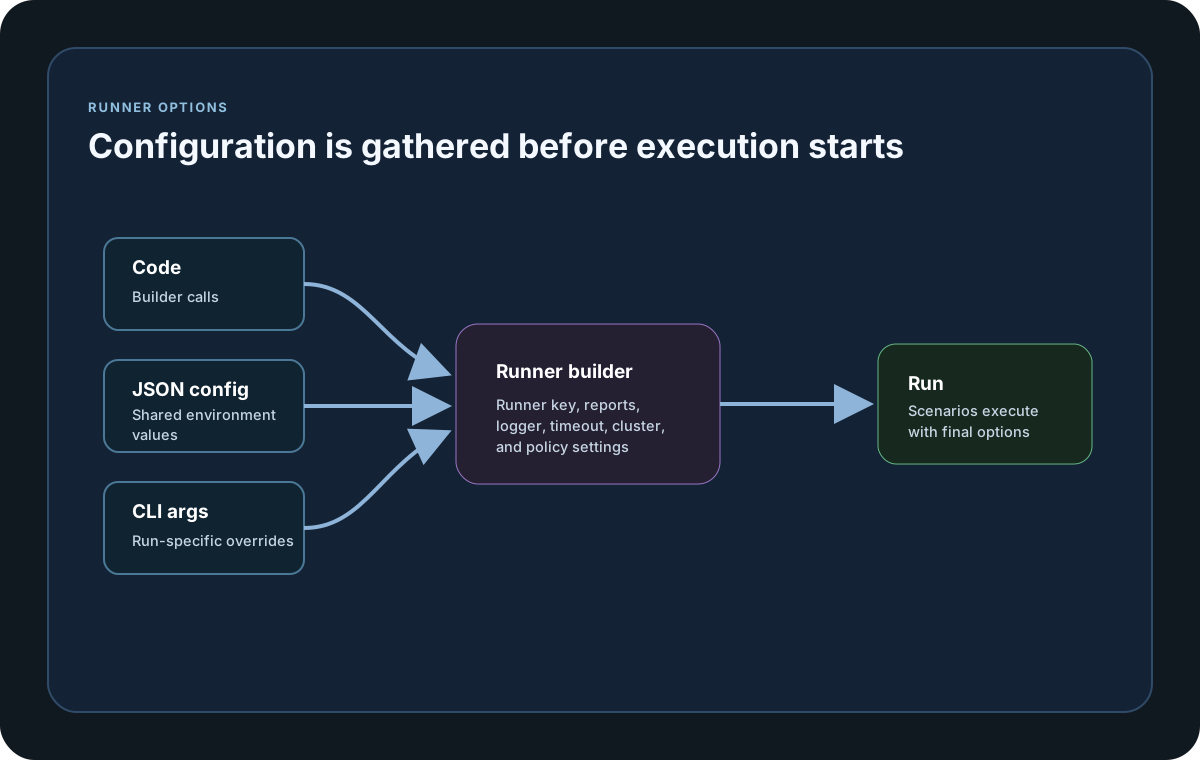
Use LoadStrikeRunner.Create() to start fluent composition, then AddScenario, AddScenarios, or AddTrafficMix and Configure(...) to apply context options before Run(). Go, Java, Python, and TypeScript or JavaScript all offer fluent runner or context builders. In Go, Configure uses `Configure(func(ctx loadstrike.LoadStrikeContext) loadstrike.LoadStrikeContext)`, Create() is the preferred builder entry point, and NewRunner() is also available. When you already have a reusable context, ConfigureContext(context) merges that context back into the builder without dropping its registered scenarios.
Traffic Mix Registration
Use RegisterTrafficMix or AddTrafficMix when a single total load profile should be distributed across weighted scenarios. Use RegisterScenarios or AddScenario when each scenario already owns its own load profile.
BuildContext
Use BuildContext() when you want one configured LoadStrikeContext that can be reused for multiple runs. C#, Go, Java, Python, TypeScript, and JavaScript all keep the registered scenario set so LoadStrikeContext.Run() and LoadStrikeRunner.Run(context) can execute directly from that reusable context. The various Configure flows, including ConfigureContext(context), add context changes without dropping the registered scenarios. In Go, Run() returns LoadStrikeRunResult directly.
Configure Merge Behavior
Chained Configure(...) calls merge into the same LoadStrikeContext. Omitted values stay intact, while later calls replace only the fields they actually set. That makes it safe to layer identity, report, cluster, sink, and plugin options in separate builder steps instead of rebuilding the context from scratch.
Validation Session Handoff
Official SDKs normally provide a session value during runner validation. A direct caller that omits it or sends blank text receives an effective sessionId in the allowed response; a supplied value is trimmed. Direct callers should reuse the returned sessionId for heartbeat, stop, and a safe retry of the same validation request. On the Free plan, the returned sessionId plus unchanged execution intent makes an accepted retry consume monthly usage only once: the same run is not charged twice. Changing the session or execution shape is a new accepted run and consumes usage again. A caller that initially leaves sessionId blank must reuse the returned value to retry the same run.
Safe Mutation Retries
A direct caller may send exactly one stable Idempotency-Key containing 64 lowercase hexadecimal characters with a supported mutation. Reuse that key only for the same operation, account, and payload. The completed JSON response remains available for replay for 30 days. Reusing the key for a different request returns JSON HTTP 409 with code idempotency_conflict; a request that is still processing returns JSON HTTP 409 with code idempotency_in_progress and Retry-After: 2; an uncertain prior outcome returns JSON HTTP 409 with code idempotency_indeterminate. After an in-progress response, wait for the returned delay and retry the unchanged request with the same key. After a conflict or indeterminate response, do not repeat the action; correct the request or contact support as directed by the response. Official clients handle supported retries automatically.
Request Limits
Invalid or policy-exceeding metadata is rejected before workload traffic starts. Public credential, contact, and validation endpoints can return JSON HTTP 429 with code rate_limited and a positive Retry-After value. Wait for that interval before a bounded retry.
History Availability
Customer-visible general license audit history is available for 180 days and high-volume validation history for 30 days.
Builder Guardrails
The builder validates that at least one scenario is registered before BuildContext() or Run() can succeed. Empty builder state and empty target resolution both fail fast instead of silently producing a no-op run.
Run Overloads
Use Run() for normal execution and Run(string[] args) or Run(params string[] args) when launch-time overrides should be applied. Across all SDKs, Run() returns the full LoadStrikeRunResult with startedUtc, completedUtc, reportFiles, disabledSinks, sinkErrors, metrics, scenarioStats, flattened stepStats, scenarioDurationsMs, correlationRows, and failedCorrelationRows. It also fails fast when no scenarios are registered or when target selection resolves to none. Reusable LoadStrikeContext instances keep CLI-applied overrides after Run(args), while runner-level Run(args) calls remain one-shot per execution. Go supports variadic Run override flows for launch-time settings, and TypeScript or JavaScript also support array or variadic Run override flows, case-insensitive keys, malformed-token ignoring, numeric NodeType enum tokens, and execution-time `--config` or `--infraconfig` file loading. Go exposes integer ScenarioDurationsMs values on the final result and keeps node type on NodeInfo rather than duplicating it at the top level of LoadStrikeRunResult.
Language Differences
The core model stays the same across SDKs, but a few helpers and result shapes use language-specific names. Check these notes when you switch languages or compare samples.
C#, Go, Java, Python, TypeScript, and JavaScript all expose Run() on the runner and reusable context surfaces. Run() returns the full LoadStrikeRunResult payload with reportFiles, disabledSinks, sinkErrors, metrics, flattened stepStats, scenarioDurationsMs, correlationRows, and failedCorrelationRows. Reports and sink exports are built from that same result automatically.
SDK reference samples
Use these SDK samples to compare how Runner Builder is exposed across the supported languages before you wire it into a full scenario.
If you run these examples locally, add a valid runner key before execution starts. Set it with WithRunnerKey("...") or the config key LoadStrike:RunnerKey.
Runner Builder
using LoadStrike;

var scenario = LoadStrikeScenario.Empty("submit-orders")
    .WithLoadSimulations(LoadStrikeSimulation.KeepConstant(1, TimeSpan.FromSeconds(20)));

var runner = LoadStrikeRunner.Create()
    .AddScenario(scenario)
    .Configure(ctx => ctx.WithReportFolder("./reports").WithRunnerKey("rkl_your_local_runner_key"));

var context = runner.BuildContext();
var stats = context.Run("--testsuite=orders-smoke --testname=submit-orders");
package main
import loadstrike "loadstrike.com/sdk/go"
func main() {
runner := loadstrike.Create().
AddScenario(loadstrike.CreateScenario("orders", func(loadstrike.LoadStrikeScenarioContext) loadstrike.LoadStrikeReply {
return loadstrike.OK()
})).
Configure(func(ctx loadstrike.LoadStrikeContext) loadstrike.LoadStrikeContext {
return ctx.
WithRunnerKey("rkl_your_local_runner_key").
WithTestSuite("docs")
})
context := runner.BuildContext()
context.Run("--restartiterationmaxattempts=2")
}import com.loadstrike.runtime.LoadStrikeRuntime.LoadStrikeRunner;
import com.loadstrike.runtime.LoadStrikeRuntime.LoadStrikeScenario;
import com.loadstrike.runtime.LoadStrikeRuntime.LoadStrikeSimulation;
var scenario = LoadStrikeScenario
.empty("submit-orders")
.withLoadSimulations(LoadStrikeSimulation.keepConstant(1, 20d));
var runner = LoadStrikeRunner.create()
.addScenario(scenario)
.configure(context -> context
.withReportFolder("./reports")
.withRunnerKey("rkl_your_local_runner_key"));
var context = runner.buildContext();
var stats = context.run("--testsuite=orders-smoke --testname=submit-orders");from loadstrike_sdk import LoadStrikeRunner, LoadStrikeScenario, LoadStrikeSimulation
scenario = (
LoadStrikeScenario.empty("submit-orders")
.with_load_simulations(LoadStrikeSimulation.keep_constant(1, 20))
)
runner = (
LoadStrikeRunner.create()
.add_scenario(scenario)
.configure(lambda context: context.with_report_folder("./reports").with_runner_key("rkl_your_local_runner_key"))
)
context = runner.build_context()
stats = context.run("--testsuite=orders-smoke --testname=submit-orders")import { LoadStrikeRunner, LoadStrikeScenario, LoadStrikeSimulation } from "@loadstrike/loadstrike-sdk";
const scenario = LoadStrikeScenario
.empty("submit-orders")
.withLoadSimulations(LoadStrikeSimulation.keepConstant(1, 20));
const runner = LoadStrikeRunner
.create()
.addScenario(scenario)
.Configure((context) => context.withReportFolder("./reports").withRunnerKey("rkl_your_local_runner_key"));
const context = runner.BuildContext();
const stats = await context.run("--testsuite=orders-smoke --testname=submit-orders");const { LoadStrikeRunner, LoadStrikeScenario, LoadStrikeSimulation } = require("@loadstrike/loadstrike-sdk");
(async () => {
const scenario = LoadStrikeScenario
.empty("submit-orders")
.withLoadSimulations(LoadStrikeSimulation.keepConstant(1, 20));
const runner = LoadStrikeRunner
.create()
.addScenario(scenario)
.Configure((context) => context.withReportFolder("./reports").withRunnerKey("rkl_your_local_runner_key"));
const context = runner.BuildContext();
const stats = await context.run("--testsuite=orders-smoke --testname=submit-orders");
})();Runner builder methods
Official SDKs normally provide a session value automatically. Direct API callers should read the effective sessionId from an allowed validation response and reuse that exact value for heartbeat, stop, and a safe validation retry. On the Free plan, an unchanged retry using that returned sessionId consumes monthly usage only once, so the same run is not charged twice. A different session or execution shape is a new accepted run and consumes usage again; callers that initially omit sessionId or send it blank must reuse the returned value to retry the same run. Invalid or policy-exceeding metadata is rejected before workload traffic starts.
Starts an empty fluent builder.
Adds one or more scenarios to the builder. At least one scenario must exist before BuildContext or Run can succeed.
Applies any LoadStrikeContext configuration such as runner key, report output, cluster settings, sinks, or plugins.
Chained Configure calls merge into the same context. Later calls replace only the fields they set, while omitted settings stay intact.
Shortcut builder methods for the most common run identity fields.
Official SDKs normally submit a session value. For direct validation calls, omitted or blank text receives an effective sessionId and supplied text is trimmed. Reuse the returned value for heartbeat, stop, and a safe retry of the same validation request.
Reuse the returned sessionId with unchanged execution intent when retrying an accepted Free run, so the same run is not charged twice. Invalid or policy-exceeding metadata is rejected before workload traffic starts.
A direct caller may attach exactly one stable key of 64 lowercase hexadecimal characters to a supported mutation. Reuse it only for the same operation, account, and payload. A completed JSON response remains replayable for 30 days.
A conflicting, still-processing, or indeterminate key reuse returns JSON HTTP 409 without repeating the action. Wait for Retry-After: 2 before retrying the unchanged in-progress request; do not repeat a conflicting or indeterminate action.
Shortcut builder methods for common report-output behavior.
Shortcut builder methods for two frequently adjusted runtime controls.
Materializes a reusable LoadStrikeContext after validating that at least one scenario was added. Empty builder state and empty target resolution both fail fast.
Builds the context and executes it immediately. Run(args) applies one-shot CLI-style overrides.
{
  "isValid": true,
  "sessionId": "6c65ca2b4f3a4bcf90a97db51fb0cdd1",
  "denialCode": "",
  "message": "Runner key is valid.",
  "heartbeatIntervalSeconds": 10
}
The builder behaves the same across C#, Go, Java, Python, TypeScript, and JavaScript. It keeps registered scenarios in the reusable context, fails fast when the selected scenario set is empty, preserves omitted settings during partial configure merges, and always returns the full LoadStrikeRunResult from Run().
Public API response example
These selected fields show the public response contracts without including credentials.
Safe mutation with Idempotency-Key
Generate one stable key for this operation, account, and payload. Reuse it only when retrying this unchanged request.
POST /api/v1/contact/messages HTTP/1.1
Content-Type: application/json
Idempotency-Key: 0123456789abcdef0123456789abcdef0123456789abcdef0123456789abcdef

{
  "name": "Performance Team",
  "email": "[email protected]",
  "message": "Please contact us about an Enterprise evaluation."
}
JSON 409 conflict response
Do not repeat the action with a key that was already used for a different request.
HTTP/1.1 409 Conflict
Content-Type: application/json

{
  "code": "idempotency_conflict",
  "message": "This idempotency key was already used for a different request."
}
JSON 409 in-progress response
Wait two seconds, then retry the unchanged request with the same key.
HTTP/1.1 409 Conflict
Content-Type: application/json
Retry-After: 2

{
  "code": "idempotency_in_progress",
  "message": "This operation is still processing. Retry later."
}
JSON 409 indeterminate response
Do not repeat the action while the prior outcome is uncertain; contact support.
HTTP/1.1 409 Conflict
Content-Type: application/json

{
  "code": "idempotency_indeterminate",
  "message": "The previous operation needs reconciliation before it can be retried."
}
JSON 429 response
Wait for the positive Retry-After interval before making a bounded retry.
HTTP/1.1 429 Too Many Requests
Content-Type: application/json
Retry-After: 30

{
  "code": "rate_limited",
  "message": "Too many requests. Retry later."
}