
Trace-To-Test Autopilot
Trace-to-test Autopilot turns a captured HAR, OpenTelemetry trace JSON, normalized browser recording, or source and destination message pair into a safe starter scenario plan.
Matching docs
Search across docs titles, summaries, groups, and section headings.
Use Up and Down Arrow to move through results, then press Enter to open the active page.
No indexed docs matched that search. Try a broader term or open the docs hub.
What this page helps you do
What this page helps you do
Trace-to-test Autopilot turns a captured HAR, OpenTelemetry trace JSON, normalized browser recording, or source and destination message pair into a safe starter scenario plan.
Who this is for
Engineers writing or reviewing scenario code in one of the supported SDKs.
Prerequisites
- A scenario or runtime surface you want to wire correctly in code
By the end
The exact SDK surface you need for this part of the runtime.
Use this page when
Use this reference when you already know the workflow and need the exact Trace-To-Test Autopilot API surface in code.
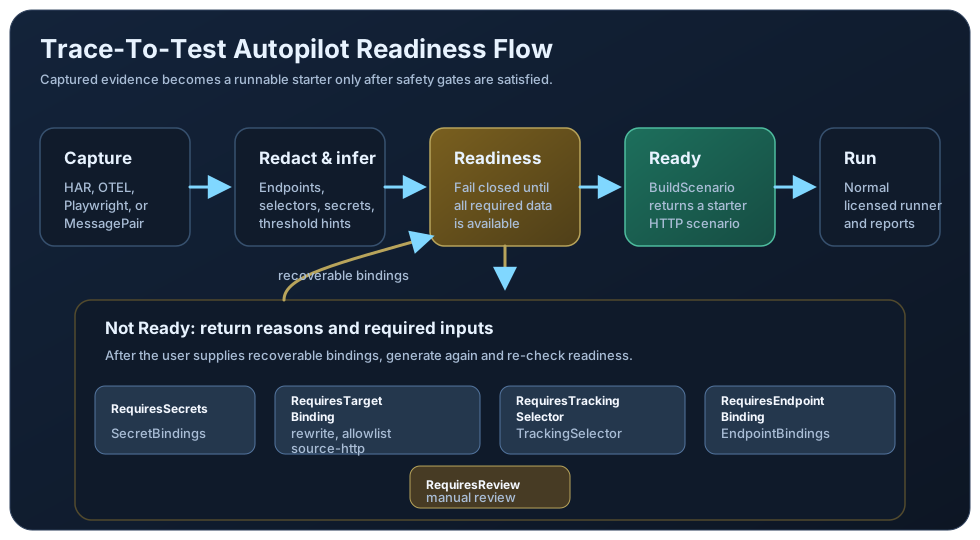
Visual guide
Guide
Supported Inputs
Generate an Autopilot result from Kind values `Har`, `OtelTrace`, `PlaywrightRecording`, or `MessagePair`. FilePath and Content are supported for file-based artifacts, while MessagePair uses explicit source and destination message samples. The result includes a plan, endpoint summary, tracking selector suggestions, threshold suggestions, redactions, warnings, confidence, and optional preview report evidence.
Plan Gate
Trace-To-Test Autopilot generation is available on Pro and above through the autopilot.trace_to_test entitlement. Supply a valid runner key on the Autopilot options when generating the starter plan. Generated scenarios still run through normal runner validation, so any endpoint, sink, cluster, tracking, threshold, or extension features used by the scenario must also be included in the active plan.
Safety Gates
Autopilot is fail-closed. BuildScenario only succeeds when Readiness is `Ready`. Captured secrets, missing endpoint bindings, unsafe replay targets, missing target rewrites, or weak tracking selectors return readiness states such as RequiresSecrets, RequiresEndpointBinding, RequiresTargetBinding, RequiresTrackingSelector, or RequiresReview instead of producing a runnable scenario.
Readiness Failure Reasons
`ReadinessFailures` lists every active gate with Readiness, Reason, RequiredInput, and Locations so callers know exactly what to provide next. `RequiresSecrets` means secret-like header, query, or body values were redacted and need SecretBindings that point to environment variables. `RequiresTargetBinding` means the captured HTTP target is not safe to replay until it is loopback, listed in AllowedReplayHosts, rewritten with BaseUrlRewrite, or bound through EndpointBindings as source-http. `RequiresTrackingSelector` means Autopilot could not infer a stable tracking selector and needs TrackingSelector. `RequiresEndpointBinding` means a MessagePair artifact is missing source or destination endpoint metadata and needs EndpointBindings. `RequiresReview` means the artifact is empty, malformed, missing runnable evidence, uses an unsupported replay shape, or represents a bound non-HTTP MessagePair that must still be authored manually today. When a user supplies the required setup, that failure is removed from ReadinessFailures and no longer blocks readiness.
Binding Inputs
Use SecretBindings to bind each redaction location to an environment variable, TrackingSelector to provide a selector when one cannot be inferred, and EndpointBindings to bind named endpoints such as source-http. Secret bindings store environment variable references in the generated plan and resolve the values only when the scenario executes.
Replay Target Binding
HTTP replay is only considered ready when the captured host is loopback, is listed in AllowedReplayHosts, is rewritten with BaseUrlRewrite, or is bound through an EndpointBindings entry for source-http. This prevents a recorded production host from being replayed by accident. Secret headers, query values, and body fields are redacted unless they are explicitly bound from environment variables.
Starter Scenario Shape
A ready Autopilot result builds a small starter scenario with warmup disabled, IterationsForConstant(1, 1), the inferred HTTP replay step, and conservative threshold suggestions such as zero failures and observed latency bounds. Treat it as the first runnable draft before you scale load or add richer assertions.
Preview Is Not Execution
IncludePreviewReport returns evidence about inferred endpoints, selectors, redactions, and warnings. It is separate from normal run reports; executed reports are produced only after BuildScenario returns a scenario and the normal licensed runner executes it.
Go SDK Boundary
Go workloads should use the documented `loadstrike.com/sdk/go` package and the same runner flow as other scenarios. Autopilot stays behind the same public SDK surface as the rest of LoadStrike.
SDK reference samples
Use these samples to generate a safe starter scenario from a captured artifact with a valid runner key, bind any required secrets, targets, endpoints, or tracking selector, and only execute after Autopilot reports Ready.
If you run these examples locally, add a valid runner key before execution starts. Set it with WithRunnerKey("...") or the config key LoadStrike:RunnerKey.
Autopilot From HAR
using LoadStrike;

var result = LoadStrikeAutopilot.Generate(new LoadStrikeAutopilotRequest
{
    Kind = "Har",
    Content = File.ReadAllText("orders.har.json"),
    Options = new LoadStrikeAutopilotOptions
    {
        ScenarioName = "orders-autopilot",
        BaseUrlRewrite = "http://127.0.0.1:5080",
        IncludePreviewReport = true,
        TrackingSelector = "header:x-correlation-id",
        RunnerKey = "rkl_your_local_runner_key",
        SecretBindings =
        [
            new LoadStrikeAutopilotSecretBinding
            {
                Location = "header:Authorization",
                ValueFromEnv = "ORDERS_AUTH_HEADER"
            }
        ]
    }
});

if (result.Readiness != LoadStrikeAutopilotReadiness.Ready)
{
    throw new InvalidOperationException(string.Join("; ", result.Warnings));
}

var scenario = result.BuildScenario();

LoadStrikeRunner.RegisterScenarios(scenario)
    .WithRunnerKey("rkl_your_local_runner_key")
    .Run();
package main
import (
"fmt"
"os"
"strings"
loadstrike "loadstrike.com/sdk/go"
)
func main() {
artifact, err := os.ReadFile("orders.har.json")
if err != nil {
panic(err)
}
result, err := loadstrike.GenerateAutopilot(loadstrike.LoadStrikeAutopilotRequest{
Kind: "Har",
Content: string(artifact),
Options: loadstrike.LoadStrikeAutopilotOptions{
ScenarioName: "orders-autopilot",
BaseURLRewrite: "http://127.0.0.1:5080",
IncludePreviewReport: true,
TrackingSelector: "header:x-correlation-id",
SecretBindings: []loadstrike.LoadStrikeAutopilotSecretBinding{
{
Location: "header:Authorization",
ValueFromEnv: "ORDERS_AUTH_HEADER",
},
},
RunnerKey: "rkl_your_local_runner_key",
},
})
if err != nil {
panic(err)
}
if result.Readiness != loadstrike.LoadStrikeAutopilotReady {
panic(fmt.Sprintf("autopilot is not ready: %s %s", result.Readiness, strings.Join(result.Warnings, "; ")))
}
scenario := result.BuildScenario()
loadstrike.RegisterScenarios(scenario).
WithRunnerKey("rkl_your_local_runner_key").
Run()
}import com.loadstrike.runtime.LoadStrikeAutopilot;
import com.loadstrike.runtime.LoadStrikeAutopilot.LoadStrikeAutopilotOptions;
import com.loadstrike.runtime.LoadStrikeAutopilot.LoadStrikeAutopilotReadiness;
import com.loadstrike.runtime.LoadStrikeAutopilot.LoadStrikeAutopilotRequest;
import com.loadstrike.runtime.LoadStrikeAutopilot.LoadStrikeAutopilotSecretBinding;
import com.loadstrike.runtime.LoadStrikeRuntime.LoadStrikeRunner;
import com.loadstrike.runtime.LoadStrikeRuntime.LoadStrikeScenario;
import java.nio.file.Files;
import java.nio.file.Path;
var result = LoadStrikeAutopilot.generate(
LoadStrikeAutopilotRequest
.content("Har", Files.readString(Path.of("orders.har.json")))
.withOptions(new LoadStrikeAutopilotOptions()
.withScenarioName("orders-autopilot")
.withBaseUrlRewrite("http://127.0.0.1:5080")
.withTrackingSelector("header:x-correlation-id")
.withRunnerKey("rkl_your_local_runner_key")
.withSecretBindings(new LoadStrikeAutopilotSecretBinding(
"header:Authorization",
"ORDERS_AUTH_HEADER"))
.includePreviewReport(true)));
if (!LoadStrikeAutopilotReadiness.Ready.equals(result.Readiness)) {
throw new IllegalStateException(String.join("; ", result.Warnings));
}
var scenario = result.buildScenario();
LoadStrikeRunner
.registerScenarios(scenario)
.withRunnerKey("rkl_your_local_runner_key")
.run();from loadstrike_sdk import (
LoadStrikeAutopilot,
LoadStrikeAutopilotReadiness,
LoadStrikeRunner,
)
artifact = """
{
"log": {
"entries": [
{
"startedDateTime": "2026-04-24T12:00:00Z",
"time": 42,
"request": {
"method": "GET",
"url": "https://api.example.com/orders/ord-1001",
"headers": [{"name": "X-Correlation-Id", "value": "trk-1001"}],
"queryString": []
},
"response": {
"status": 200,
"headers": [],
"content": {"mimeType": "application/json", "text": "{}"}
}
}
]
}
}
"""
result = LoadStrikeAutopilot.generate({
"Kind": "Har",
"Content": artifact,
"Options": {
"ScenarioName": "orders-autopilot",
"BaseUrlRewrite": "http://127.0.0.1:5080",
"IncludePreviewReport": True,
"TrackingSelector": "header:x-correlation-id",
"RunnerKey": "rkl_your_local_runner_key",
"SecretBindings": [
{
"Location": "header:Authorization",
"ValueFromEnv": "ORDERS_AUTH_HEADER",
}
],
},
})
if result.Readiness != LoadStrikeAutopilotReadiness.Ready:
raise RuntimeError("; ".join(result.Warnings))
scenario = result.build_scenario()
LoadStrikeRunner.register_scenarios(scenario) \
.with_runner_key("rkl_your_local_runner_key") \
.run()import fs from "node:fs";
import {
LoadStrikeAutopilot,
LoadStrikeAutopilotReadiness,
LoadStrikeRunner
} from "@loadstrike/loadstrike-sdk";
const result = await LoadStrikeAutopilot.generate({
Kind: "Har",
Content: fs.readFileSync("orders.har.json", "utf8"),
Options: {
ScenarioName: "orders-autopilot",
BaseUrlRewrite: "http://127.0.0.1:5080",
IncludePreviewReport: true,
TrackingSelector: "header:x-correlation-id",
RunnerKey: "rkl_your_local_runner_key",
SecretBindings: [
{
Location: "header:Authorization",
ValueFromEnv: "ORDERS_AUTH_HEADER"
}
]
}
});
if (result.Readiness !== LoadStrikeAutopilotReadiness.Ready) {
throw new Error(result.Warnings.join("; "));
}
const scenario = result.buildScenario();
await LoadStrikeRunner
.registerScenarios(scenario)
.withRunnerKey("rkl_your_local_runner_key")
.run();const fs = require("node:fs");
const {
LoadStrikeAutopilot,
LoadStrikeAutopilotReadiness,
LoadStrikeRunner
} = require("@loadstrike/loadstrike-sdk");
(async () => {
const result = await LoadStrikeAutopilot.generate({
Kind: "Har",
Content: fs.readFileSync("orders.har.json", "utf8"),
Options: {
ScenarioName: "orders-autopilot",
BaseUrlRewrite: "http://127.0.0.1:5080",
IncludePreviewReport: true,
TrackingSelector: "header:x-correlation-id",
RunnerKey: "rkl_your_local_runner_key",
SecretBindings: [
{
Location: "header:Authorization",
ValueFromEnv: "ORDERS_AUTH_HEADER"
}
]
}
});
if (result.Readiness !== LoadStrikeAutopilotReadiness.Ready) {
throw new Error(result.Warnings.join("; "));
}
const scenario = result.buildScenario();
await LoadStrikeRunner
.registerScenarios(scenario)
.withRunnerKey("rkl_your_local_runner_key")
.run();
})();Autopilot Flow
Use Har, OtelTrace, PlaywrightRecording, or MessagePair depending on the artifact you captured.
BuildScenario is available only when Readiness is Ready. Other states explain what must be bound or reviewed first.
ReadinessFailures reports every active gate with the required input and affected locations. RequiresSecrets needs SecretBindings, RequiresTargetBinding needs BaseUrlRewrite, AllowedReplayHosts, or a source-http EndpointBindings entry, RequiresTrackingSelector needs TrackingSelector, RequiresEndpointBinding needs MessagePair EndpointBindings, and RequiresReview means the artifact still needs manual review or cannot yet produce a runnable non-HTTP starter.
Use BaseUrlRewrite, AllowedReplayHosts, or an EndpointBindings entry for source-http before replaying a captured non-loopback host.
Use SecretBindings to map returned redaction locations such as header:Authorization or body:$.client_secret to environment variables. Secret values are resolved at execution time, not written into the generated plan.
Use TrackingSelector when the artifact does not contain a stable inferred selector.
Review the returned redactions and warnings before committing the generated scenario to a longer test.
IncludePreviewReport produces inference evidence only; executed LoadStrike reports still come from the normal runner.
Start with the generated one-iteration scenario, then raise load, add assertions, and commit the final scenario only after the captured workflow is safe to replay locally or in your test environment.