
Runtime Policy Controls
Runtime policies let your test code inspect or influence scenario and step execution when normal scenario logic is not enough.
Matching docs
Search across docs titles, summaries, groups, and section headings.
Use Up and Down Arrow to move through results, then press Enter to open the active page.
No indexed docs matched that search. Try a broader term or open the docs hub.
What this page helps you do
What this page helps you do
Runtime policies let your test code inspect or influence scenario and step execution when normal scenario logic is not enough.
Who this is for
Teams controlling runtime behavior, tracking, reporting, licensing, or policy from code, JSON, or CLI settings.
Prerequisites
- A scenario or run configuration that already works locally
By the end
The documented runtime setting or policy surface for this part of the product.
Use this page when
Use this page when runtime behavior changes because of configuration, policy, or execution settings rather than the scenario body itself.
Visual guide
Guide
What It Does
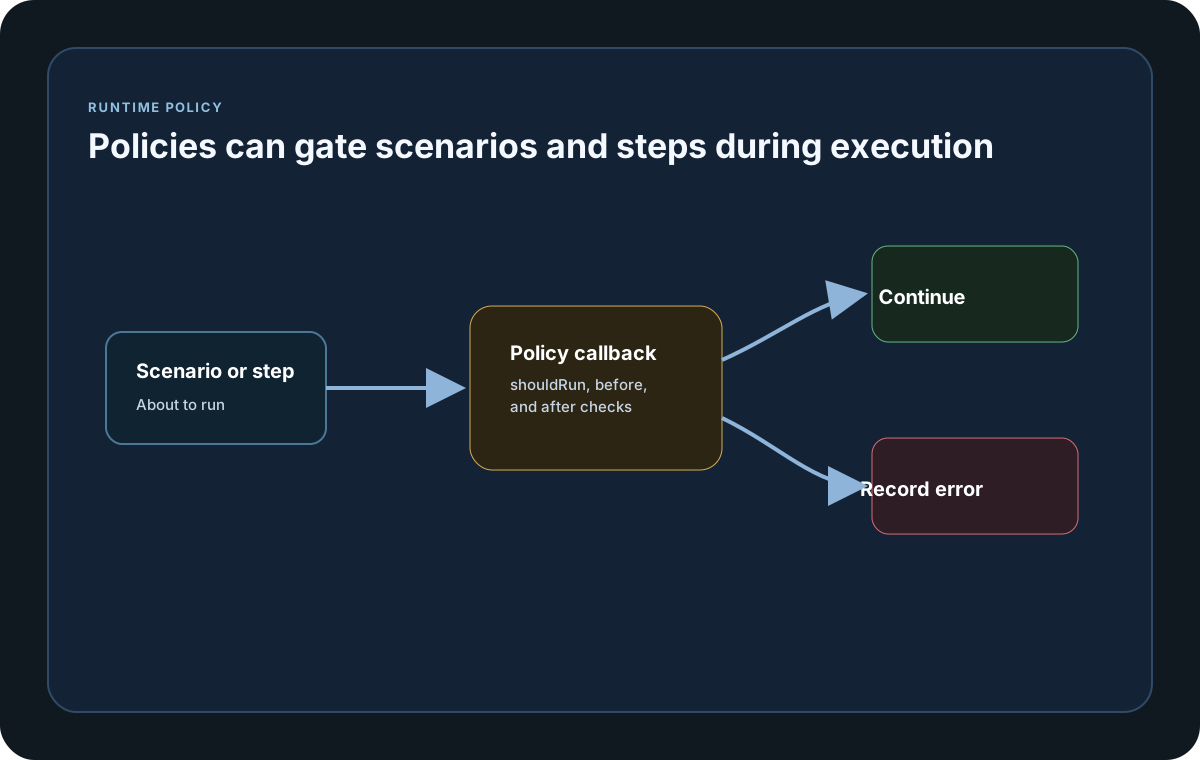
Runtime policies are user-defined callbacks that LoadStrike runs before and after scenarios and steps. Use them when you need last-mile execution rules such as skipping a scenario, tracing step boundaries, or recording custom control-flow decisions during a run.
Hooks Available
Every SDK supports the same logical hooks: shouldRunScenario, beforeScenario, afterScenario, beforeStep, and afterStep. All of them support async callbacks, and Java exposes the async forms with Async suffixes.
Error Handling
WithRuntimePolicyErrorMode defaults to Fail. Switch it to Continue when policy callback failures should be recorded in the run result but should not stop scenario or step execution. In Continue mode, a shouldRunScenario error still allows the scenario to run. If a Fail-mode callback fails after an attempt begins, observation-capable sinks receive one final sanitized runtime_policy_error attempt before the run stops; the callback error text is not included in that observation.
Run Result Output
Policy callback failures are written into LoadStrikeRunResult.PolicyErrors or policyErrors with the policy name, callback name, scenario name, step name, and message. That gives the team one place to review what the policy decided or where it failed.
What This Is Not
This page covers runtime callback hooks in your test code. Plan-enforced limits such as agent counts or timeout ceilings are separate from runtime policy hooks.
Configuration samples
Use these samples to see how Runtime Policy Controls is configured in code, JSON, or CLI surfaces where this page documents them.
If you run these examples locally, add a valid runner key before execution starts. Set it with WithRunnerKey("...") or the config key LoadStrike:RunnerKey.
Runtime Policy Hooks
using LoadStrike;

sealed class OrdersRuntimePolicy : ILoadStrikeRuntimePolicy
{
    public Task<bool> ShouldRunScenario(string scenarioName) =>
        Task.FromResult(scenarioName != "health-check");

    public Task BeforeScenario(string scenarioName)
    {
        Console.WriteLine($"Starting {scenarioName}");
        return Task.CompletedTask;
    }

    public Task AfterScenario(string scenarioName, LoadStrikeScenarioRuntime _stats)
    {
        Console.WriteLine($"Finished {scenarioName}");
        return Task.CompletedTask;
    }

    public Task BeforeStep(string scenarioName, string stepName)
    {
        Console.WriteLine($"Before step {scenarioName}/{stepName}");
        return Task.CompletedTask;
    }

    public Task AfterStep(string scenarioName, string stepName, LoadStrikeReply _reply)
    {
        Console.WriteLine($"After step {scenarioName}/{stepName}");
        return Task.CompletedTask;
    }
}

var ordersScenario = LoadStrikeScenario.Create(
        "submit-orders",
        async context =>
        {
            var step = await LoadStrikeStep.Run<string>(
                "post-order",
                context,
                () => Task.FromResult(LoadStrikeResponse.Ok<string>(statusCode: "200")));

            return step.AsReply();
        })
    .WithLoadSimulations(LoadStrikeSimulation.IterationsForConstant(1, 5));

var healthScenario = LoadStrikeScenario.Create(
        "health-check",
        _ => Task.FromResult(LoadStrikeResponse.Ok(statusCode: "200")))
    .WithLoadSimulations(LoadStrikeSimulation.IterationsForConstant(1, 1));

var result = LoadStrikeRunner.RegisterScenarios(ordersScenario, healthScenario)
    .WithRuntimePolicies(new OrdersRuntimePolicy())
    .WithRuntimePolicyErrorMode(LoadStrikeRuntimePolicyErrorMode.Continue)
    .WithRunnerKey("rkl_your_local_runner_key")
    .Run();

Console.WriteLine(result.PolicyErrors.Count);
package main
import loadstrike "loadstrike.com/sdk/go"
type denyNamedScenarioPolicy struct{}
func (denyNamedScenarioPolicy) ShouldRunScenario(scenarioName string) loadstrike.LoadStrikeBoolTask {
return loadstrike.TaskFromBool(scenarioName != "skip-me")
}
func (denyNamedScenarioPolicy) BeforeScenario(string) loadstrike.LoadStrikeTask {
return loadstrike.CompletedTask()
}
func (denyNamedScenarioPolicy) AfterScenario(string, loadstrike.LoadStrikeScenarioRuntime) loadstrike.LoadStrikeTask {
return loadstrike.CompletedTask()
}
func (denyNamedScenarioPolicy) BeforeStep(string, string) loadstrike.LoadStrikeTask {
return loadstrike.CompletedTask()
}
func (denyNamedScenarioPolicy) AfterStep(string, string, loadstrike.LoadStrikeReply) loadstrike.LoadStrikeTask {
return loadstrike.CompletedTask()
}
func main() {
loadstrike.RegisterScenarios(loadstrike.Empty("policy-demo")).
WithRuntimePolicies(denyNamedScenarioPolicy{}).
WithRuntimePolicyErrorMode(loadstrike.RuntimePolicyErrorModeContinue).
Run()
}import com.loadstrike.runtime.LoadStrikeRuntime.LoadStrikeReply;
import com.loadstrike.runtime.LoadStrikeRuntime.LoadStrikeRunner;
import com.loadstrike.runtime.LoadStrikeRuntime.LoadStrikeResponse;
import com.loadstrike.runtime.LoadStrikeRuntime.LoadStrikeRuntimePolicy;
import com.loadstrike.runtime.LoadStrikeRuntime.LoadStrikeRuntimePolicyErrorMode;
import com.loadstrike.runtime.LoadStrikeRuntime.LoadStrikeScenario;
import com.loadstrike.runtime.LoadStrikeRuntime.LoadStrikeScenarioRuntime;
import com.loadstrike.runtime.LoadStrikeRuntime.LoadStrikeSimulation;
import com.loadstrike.runtime.LoadStrikeRuntime.LoadStrikeStep;
import java.util.concurrent.CompletableFuture;
import java.util.concurrent.CompletionStage;
LoadStrikeRuntimePolicy policy = new LoadStrikeRuntimePolicy() {
@Override
public CompletionStage<Boolean> shouldRunScenarioAsync(String scenarioName) {
return CompletableFuture.completedFuture(!"health-check".equals(scenarioName));
}
@Override
public CompletionStage<Void> beforeScenarioAsync(String scenarioName) {
System.out.println("Starting " + scenarioName);
return CompletableFuture.completedFuture(null);
}
@Override
public CompletionStage<Void> afterScenarioAsync(String scenarioName, LoadStrikeScenarioRuntime stats) {
System.out.println("Finished " + scenarioName);
return CompletableFuture.completedFuture(null);
}
@Override
public CompletionStage<Void> beforeStepAsync(String scenarioName, String stepName) {
System.out.println("Before step " + scenarioName + "/" + stepName);
return CompletableFuture.completedFuture(null);
}
@Override
public CompletionStage<Void> afterStepAsync(String scenarioName, String stepName, LoadStrikeReply<?> reply) {
System.out.println("After step " + scenarioName + "/" + stepName);
return CompletableFuture.completedFuture(null);
}
};
var ordersScenario = LoadStrikeScenario
.create(
"submit-orders",
context -> LoadStrikeStep.run(
"post-order",
context,
() -> LoadStrikeResponse.ok("200"))
.asReply())
.withLoadSimulations(LoadStrikeSimulation.iterationsForConstant(1, 5));
var healthScenario = LoadStrikeScenario
.create("health-check", ignoredContext -> LoadStrikeResponse.ok("200"))
.withLoadSimulations(LoadStrikeSimulation.iterationsForConstant(1, 1));
var result = LoadStrikeRunner.registerScenarios(ordersScenario, healthScenario)
.withRuntimePolicies(policy)
.withRuntimePolicyErrorMode(LoadStrikeRuntimePolicyErrorMode.Continue)
.withRunnerKey("rkl_your_local_runner_key")
.run();
System.out.println(result.policyErrors.size());from loadstrike_sdk import (
LoadStrikeResponse,
LoadStrikeRunner,
LoadStrikeRuntimePolicyErrorMode,
LoadStrikeScenario,
LoadStrikeSimulation,
LoadStrikeStep,
)
class OrdersRuntimePolicy:
async def should_run_scenario(self, scenario_name: str) -> bool:
return scenario_name != "health-check"
async def before_scenario(self, scenario_name: str) -> None:
print(f"Starting {scenario_name}")
async def after_scenario(self, scenario_name: str, _stats) -> None:
print(f"Finished {scenario_name}")
async def before_step(self, scenario_name: str, step_name: str) -> None:
print(f"Before step {scenario_name}/{step_name}")
async def after_step(self, scenario_name: str, step_name: str, _reply) -> None:
print(f"After step {scenario_name}/{step_name}")
orders_scenario = (
LoadStrikeScenario.create(
"submit-orders",
lambda context: LoadStrikeStep.run(
"post-order",
context,
lambda: LoadStrikeResponse.ok("200"),
)["as_reply"](),
)
.with_load_simulations(LoadStrikeSimulation.iterations_for_constant(1, 5))
)
health_scenario = (
LoadStrikeScenario.create("health-check", lambda _context: LoadStrikeResponse.ok("200"))
.with_load_simulations(LoadStrikeSimulation.iterations_for_constant(1, 1))
)
result = (
LoadStrikeRunner.register_scenarios(orders_scenario, health_scenario)
.with_runtime_policies(OrdersRuntimePolicy())
.with_runtime_policy_error_mode(LoadStrikeRuntimePolicyErrorMode.Continue)
.with_runner_key("rkl_your_local_runner_key")
.run()
)
print(len(result["policyErrors"]))import {
LoadStrikeResponse,
LoadStrikeRunner,
LoadStrikeScenario,
LoadStrikeSimulation,
LoadStrikeStep
} from "@loadstrike/loadstrike-sdk";
const policy = {
policyName: "orders-runtime-policy",
shouldRunScenario: async (scenarioName: string) => scenarioName !== "health-check",
beforeScenario: async (scenarioName: string) => {
console.log(`Starting ${scenarioName}`);
},
afterScenario: async (scenarioName: string) => {
console.log(`Finished ${scenarioName}`);
},
beforeStep: async (scenarioName: string, stepName: string) => {
console.log(`Before step ${scenarioName}/${stepName}`);
},
afterStep: async (scenarioName: string, stepName: string) => {
console.log(`After step ${scenarioName}/${stepName}`);
}
};
const ordersScenario = LoadStrikeScenario
.create("submit-orders", async (context) => {
const step = await LoadStrikeStep.run(
"post-order",
context,
async () => LoadStrikeResponse.ok("200")
);
return step.asReply();
})
.withLoadSimulations(LoadStrikeSimulation.iterationsForConstant(1, 5));
const healthScenario = LoadStrikeScenario
.create("health-check", async () => LoadStrikeResponse.ok("200"))
.withLoadSimulations(LoadStrikeSimulation.iterationsForConstant(1, 1));
const result = await LoadStrikeRunner
.registerScenarios(ordersScenario, healthScenario)
.withRuntimePolicies(policy)
.withRuntimePolicyErrorMode("continue")
.withRunnerKey("rkl_your_local_runner_key")
.run();
console.log(result.policyErrors.length);const {
LoadStrikeResponse,
LoadStrikeRunner,
LoadStrikeScenario,
LoadStrikeSimulation,
LoadStrikeStep
} = require("@loadstrike/loadstrike-sdk");
(async () => {
const policy = {
policyName: "orders-runtime-policy",
shouldRunScenario: async (scenarioName) => scenarioName !== "health-check",
beforeScenario: async (scenarioName) => {
console.log(`Starting ${scenarioName}`);
},
afterScenario: async (scenarioName) => {
console.log(`Finished ${scenarioName}`);
},
beforeStep: async (scenarioName, stepName) => {
console.log(`Before step ${scenarioName}/${stepName}`);
},
afterStep: async (scenarioName, stepName) => {
console.log(`After step ${scenarioName}/${stepName}`);
}
};
const ordersScenario = LoadStrikeScenario
.create("submit-orders", async (context) => {
const step = await LoadStrikeStep.run(
"post-order",
context,
async () => LoadStrikeResponse.ok("200")
);
return step.asReply();
})
.withLoadSimulations(LoadStrikeSimulation.iterationsForConstant(1, 5));
const healthScenario = LoadStrikeScenario
.create("health-check", async () => LoadStrikeResponse.ok("200"))
.withLoadSimulations(LoadStrikeSimulation.iterationsForConstant(1, 1));
const result = await LoadStrikeRunner
.registerScenarios(ordersScenario, healthScenario)
.withRuntimePolicies(policy)
.withRuntimePolicyErrorMode("continue")
.withRunnerKey("rkl_your_local_runner_key")
.run();
console.log(result.policyErrors.length);
})();Runtime policy hooks, settings, and result fields
Registers one or more runtime policy objects on the runner or context. Each object can decide whether a scenario should run and can react before and after scenarios and steps.
Controls what happens when a runtime policy callback throws. Fail stops the run. Continue records the error in the run result and lets the scenario or step continue.
Runs before a scenario starts and returns true or false. Return false to skip that scenario. If this callback throws while error mode is Continue, LoadStrike records the error and still allows the scenario to run.
Runs once before scenario execution begins. Use it for setup checks, tracing, or custom guard rails.
Runs after the scenario completes and receives the scenario runtime stats for that scenario. Use it when you want scenario-level post-processing.
Runs before a step executes. Use it for lightweight timing markers, extra logging, or step-level allowlists.
Runs after a step executes and receives the final reply object for that step. Use it when you need to inspect pass/fail status, status code, payload, or latency after the step finishes.
Contains one row per runtime policy callback failure. Each row includes policyName, callbackName, scenarioName, stepName, and message so the final run result explains what happened.
All SDKs support async runtime policy callbacks. Java exposes the async variants with Async suffixes such as shouldRunScenarioAsync and beforeStepAsync.
Runtime policy hooks are callbacks from your own test code. They are separate from licensing checks, which still validate plan limits such as agents or timeout ceilings before the run begins.