
Types Of Reports
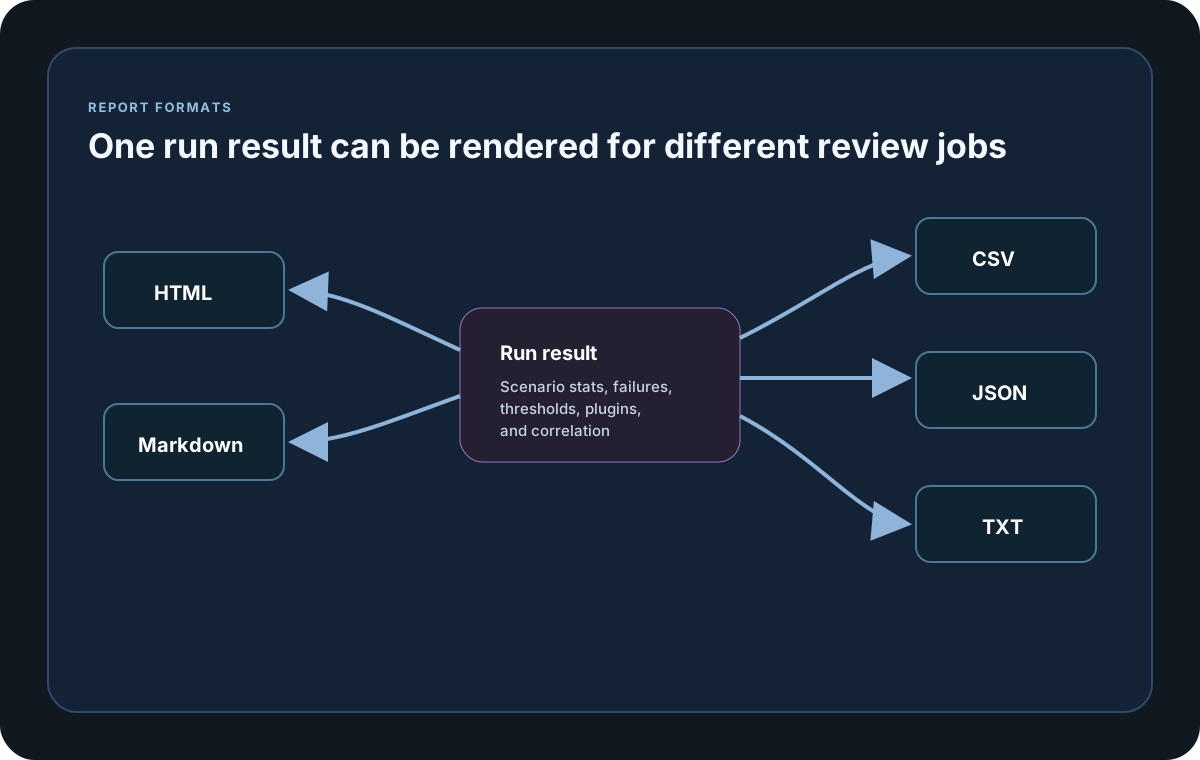
LoadStrike can write the same run into several output formats. Choose the one that best fits how your team reads, shares, or processes results.
Matching docs
Search across docs titles, summaries, groups, and section headings.
Use Up and Down Arrow to move through results, then press Enter to open the active page.
No indexed docs matched that search. Try a broader term or open the docs hub.
What this page helps you do
What this page helps you do
LoadStrike can write the same run into several output formats. Choose the one that best fits how your team reads, shares, or processes results.
Who this is for
Teams reading run output or deciding how local reports and exported results should be consumed.
Prerequisites
- A completed run or a report format you want to enable
By the end
A clearer way to read, choose, or extend the report surface for the workload.
Use this page when
Use this page when you already have run output and need to decide where to start reading or extending the report surface.
Visual guide
Sample Report Data Rows
Scope    Scenario     Result Count RPS  LatencyP50Ms LatencyP80Ms LatencyP85Ms LatencyP90Ms LatencyP95Ms LatencyP99Ms
Scenario reports-demo OK     675   15.0 21.4         30.2         33.0         36.8         48.6         72.1

LatencyTable Scenario     Result Count LatencyP50Ms LatencyP95Ms
LatencyTable reports-demo OK     675   21.4         48.6
LatencyTable reports-demo FAIL   12    35.9         79.2

StatusCode Result Percent
200        OK     97.48
500        FAIL   2.52

FailedStatus Scope     Scenario     Step StatusCode Count Percent
FailedStatus Scenario  reports-demo      500       12    1.75
Guide
HTML Report
Use the HTML report for the richest local reading experience. It is a self-contained offline file with responsive SVG charts, exact-value tooltips, legends, zoom and pan controls, an accessible expanded view, chart-title search, grid-density choices, light and dark themes, complete tables, cumulative progress where available, and distinct successful, failed, and genuine all-outcome latency views. Tabs, tables, and charts render only when they have data.
CSV Report
Use CSV when the run needs to feed ETL jobs, dashboards, spreadsheets, or custom analytics pipelines.
TXT Report
Use TXT when the result needs to stay easy to read in terminals, CI artifacts, or quick side-by-side run comparisons.
Markdown Report
Use Markdown when the result needs to be shared in pull requests, internal wikis, or release notes.
Report Options
Use WithReportFormats, WithReportFolder, WithReportFileName, WithReportingInterval, and WithoutReports to control local output behavior. Run() returns the same full LoadStrikeRunResult artifact that powers local report generation and final sink callbacks. If the report file name is omitted or blank, runtime uses {TestSuite}_{TestName}_{yyyyMMdd_HHmmss}, where the timestamp comes from the run's created UTC time. Explicit report file names preserve spaces and dots, only invalid filename characters are sanitized to underscores, and generated local report files use LF line endings across SDKs.
Report and output samples
Use these samples to connect the reporting surface on this page back to the run result your team will review or export.
If you run these examples locally, add a valid runner key before execution starts. Set it with WithRunnerKey("...") or the config key LoadStrike:RunnerKey.
HTML reports include a top-right Light/Dark theme toggle and responsive offline SVG charts. Use exact-value tooltips, legends, zoom, pan, reset, the accessible expanded view, chart-title search, and grid-density controls to inspect dense results. Light is the default report theme.
Report Formats
using LoadStrike;

LoadStrikeRunner.RegisterScenarios(scenario).WithReportFormats(LoadStrikeReportFormat.Html, LoadStrikeReportFormat.Csv, LoadStrikeReportFormat.Txt, LoadStrikeReportFormat.Md).Run();
package main
import (
"time"
loadstrike "loadstrike.com/sdk/go"
)
func main() {
loadstrike.RegisterScenarios(loadstrike.Empty("reports-demo")).
WithReportFolder("./reports").
WithReportFileName("loadstrike-report").
WithReportFormats(
loadstrike.ReportFormatHTML,
loadstrike.ReportFormatCSV,
loadstrike.ReportFormatTXT,
loadstrike.ReportFormatMD,
).
WithReportingInterval(loadstrike.TimeSpan(5 * time.Second)).
Run()
}import com.loadstrike.runtime.LoadStrikeRuntime.LoadStrikeResponse;
import com.loadstrike.runtime.LoadStrikeRuntime.LoadStrikeRunner;
import com.loadstrike.runtime.LoadStrikeRuntime.LoadStrikeScenario;
import com.loadstrike.runtime.LoadStrikeRuntime.LoadStrikeSimulation;
var scenario = LoadStrikeScenario
.create("submit-orders", ignoredContext -> LoadStrikeResponse.ok("200"))
.withLoadSimulations(LoadStrikeSimulation.inject(10, 1d, 20d));
LoadStrikeRunner
.registerScenarios(scenario)
.withReportFolder("./reports")
.withReportFormats("html", "csv", "txt", "md")
.withReportingInterval(5d)
.withRunnerKey("rkl_your_local_runner_key")
.run();from loadstrike_sdk import LoadStrikeResponse, LoadStrikeRunner, LoadStrikeScenario, LoadStrikeSimulation
scenario = (
LoadStrikeScenario.create("submit-orders", lambda _: LoadStrikeResponse.ok("200"))
.with_load_simulations(LoadStrikeSimulation.inject(10, 1, 20))
)
LoadStrikeRunner.register_scenarios(scenario) \
.with_report_folder("./reports") \
.with_report_formats("html", "csv", "txt", "md") \
.with_reporting_interval(5) \
.with_runner_key("rkl_your_local_runner_key") \
.run()import {
LoadStrikeResponse,
LoadStrikeRunner,
LoadStrikeScenario,
LoadStrikeSimulation
} from "@loadstrike/loadstrike-sdk";
const scenario = LoadStrikeScenario
.create("submit-orders", async () => LoadStrikeResponse.ok("200"))
.withLoadSimulations(LoadStrikeSimulation.inject(10, 1, 20));
await LoadStrikeRunner
.registerScenarios(scenario)
.withReportFolder("./reports")
.withReportFormats("html", "csv", "txt", "md")
.withReportingInterval(5)
.withRunnerKey("rkl_your_local_runner_key")
.run();const {
LoadStrikeResponse,
LoadStrikeRunner,
LoadStrikeScenario,
LoadStrikeSimulation
} = require("@loadstrike/loadstrike-sdk");
(async () => {
const scenario = LoadStrikeScenario
.create("submit-orders", async () => LoadStrikeResponse.ok("200"))
.withLoadSimulations(LoadStrikeSimulation.inject(10, 1, 20));
await LoadStrikeRunner
.registerScenarios(scenario)
.withReportFolder("./reports")
.withReportFormats("html", "csv", "txt", "md")
.withReportingInterval(5)
.withRunnerKey("rkl_your_local_runner_key")
.run();
})();Formats
Self-contained offline report with tabs, tables, light and dark themes, responsive SVG charts, exact-value tooltips, legends, zoom and pan, an accessible expanded view, title search, grid-density choices, and cumulative progress where available. Empty sections are omitted.
Structured rows for BI pipelines, spreadsheet work, or downstream processing.
Plain-text output suited to terminal logs, CI artifacts, and quick sharing.
Markdown output suited to wikis, pull requests, and lightweight documentation.