
Reporting Sinks
Reporting sinks send LoadStrike data to the customer portal or supported observability backends for dashboards, alerts, search, and longer-term review.
Matching docs
Search across docs titles, summaries, groups, and section headings.
Use Up and Down Arrow to move through results, then press Enter to open the active page.
No indexed docs matched that search. Try a broader term or open the docs hub.
What this page helps you do
What this page helps you do
Reporting sinks send LoadStrike data to the customer portal or supported observability backends for dashboards, alerts, search, and longer-term review.
Who this is for
Engineers writing or reviewing scenario code in one of the supported SDKs.
Prerequisites
- A scenario or runtime surface you want to wire correctly in code
By the end
The exact SDK surface you need for this part of the runtime.
Use this page when
Use this reference when you already know the workflow and need the exact Reporting Sinks API surface in code.
Visual guide
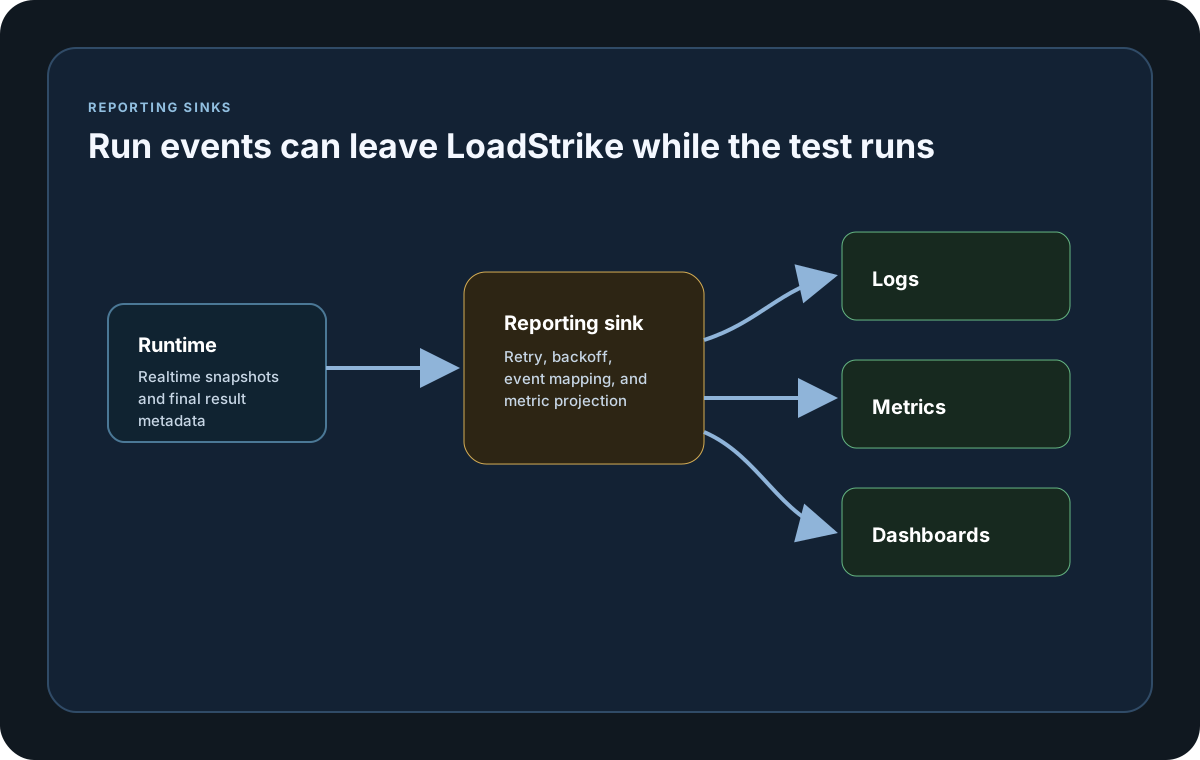
Guide
Built-In Reporting Destinations
LoadStrike supports Prometheus Remote Write, Amazon CloudWatch, Dynatrace, New Relic, InfluxDB, TimescaleDB, Grafana Loki, Datadog, Splunk HEC, OTEL Collector, Elasticsearch, OpenSearch, Kafka, StatsD, DogStatsD, Netdata-compatible StatsD, JSONL file streaming, and generic webhooks. Some destinations require the SDK-specific publisher or sender delegate shown in their examples. GenericWebhook intentionally sends generic LoadStrike JSON and is not a direct vendor-protocol adapter.
Customer Portal Reports
Use WithPortalReporting when a run should appear in the customer portal Run Reports tab. Portal reports are meant for account-level review: parallel and repeated runs are listed separately with their run timestamp, and users can plot one or more scenarios over 1D, 1W, 15D, 30D, or a custom period. Users can also choose a run to graph the historical metrics for all scenarios in that run, write focused report queries, save recurring views, export visible trends, share filtered links, and open scenario detail views.
High-Volume Counters
Run, scenario, measurement, latency-band, and status results expose authoritative decimal-string Count64 fields for high-volume tests. Existing 32-bit count properties remain available for compatibility and stop at 2,147,483,647 instead of wrapping. Use the Count64 values when exporting or calculating totals that could exceed that range.
Configuration Model
Each sink is selected in code and accepts an options object. Where the SDK supports expanded binding, the matching LoadStrike:ReportingSinks:* infra-config section fills only missing values: explicit code wins, dormant sections are ignored, and unknown selected keys fail with their complete configuration path. TypeScript and JavaScript also expose named option constructors alongside object-literal inputs.
Expanded Configuration Keys
Canonical expanded sections are PrometheusRemoteWrite, CloudWatch, Dynatrace, Elasticsearch, OpenSearch, NewRelic, Webhook, Kafka, StatsD, Netdata, DogStatsD, and Jsonl. HTTP sections use BaseUrl, EndpointPath, TimeoutSeconds, Headers, and StaticTags where exposed. Provider fields include BearerToken; CloudWatch EndpointUrl, Namespace, Region, AccessKeyId, SecretAccessKey, and SessionToken; Dynatrace ApiToken; Elasticsearch IndexName and ApiKey; OpenSearch IndexName, Username, and Password; New Relic LicenseKey or ApiKey; Webhook Url and Secret; Kafka BootstrapServers, Topic, and StaticTags; StatsD-family Prefix, Host, Port, and Tags or StaticTags; and JSONL FilePath. Java uses explicit constructor options and calls its file option Path.
Secret-Safe Validation
Selected-section diagnostics preserve the complete path, for example `LoadStrike:ReportingSinks:CloudWatch:Unexpected is not supported.` Credential values are not included in errors or logs. API keys, access keys, secrets, tokens, passwords, and sensitive authorization-header values remain redacted.
Sink Identity
Each sink exposes a stable SinkName or equivalent sink identifier. LoadStrike uses that name for registration, licensing checks, disabled sink tracking, and sinkErrors output, so choose a descriptive name that stays stable across runs when you implement a custom sink.
Raw Attempt Batches
Each scenario attempt, including retries and nested step timings, is captured as an individual observation. LoadStrike normally groups those observations for up to five seconds and limits a batch to 50,000 observations or 8 MiB before sending it. Finite reported latencies above the signed 64-bit microsecond range are retained at the maximum representable value. Request and message payloads, bodies, and headers are not included. Percentiles are calculated later by the receiving platform from the observations instead of being pre-aggregated by the SDK.
Retry Before Observation Loss
Every reporting-sink callback, from initialization and start through realtime statistics and metrics, final statistics and metrics, raw batches, completion, stop, and dispose, is attempted once and then receives up to three retries by default. The retry delays are 250 ms, 500 ms, and 1 second, and SinkRetryCount can select zero through 100 retries. A recovered callback adds no final sink error or delivery warning. Only an exhausted raw-observation delivery counts as dropped observations; other exhausted callbacks are reported against that sink without becoming a system-under-test failure. SinkRetryBackoffMs changes the first delay. Stop and dispose remain best-effort cleanup, and an exhausted stop callback does not prevent dispose. Exception details remain in sanitized local logs rather than portable reports. Load generation remains the priority, so an oversized observation or a full bounded buffer or sink queue is not retried and does not become a system-under-test failure.
Export Ordering
Realtime sink callbacks happen during execution. When the run ends, LoadStrike builds the final LoadStrikeRunResult artifact, writes any local reports that are still enabled, sends SaveRunResult to the sink with that finished artifact, and then calls Stop followed by Dispose. That ordering means final sink export sees completed threshold, detailed report, report-file, disabled-sink, and sink-error data.
Grafana Starter Assets
The documentation downloads area includes datasource YAML files, a shared dashboard-provider YAML file, and starter dashboard JSON files so teams can wire Grafana to Loki, InfluxDB, or TimescaleDB without pulling the source repository.
Custom Sink Contract
If you need a destination that LoadStrike does not ship out of the box, implement the reporting-sink contract for your SDK and register it through WithReportingSinks, withReportingSinks, or with_reporting_sinks. The shared lifecycle is Init, Start, SaveRealtimeStats, SaveRealtimeMetrics, SaveRunResult, Stop, and Dispose. To retain every attempt, also implement the optional iteration-batch capability for that SDK; it receives bounded raw batches during the run and one completion record with captured, delivered, and dropped counts. SaveRunResult receives the full run artifact, including report file paths, disabled sink names, sink error details, correlation rows, scenario durations, and started and completed timestamps.
Plan Gate
Portal reporting, built-in vendor sinks, and custom reporting sinks are available on Enterprise.
SDK reference samples
Use these SDK samples to compare how Reporting Sinks is exposed across the supported languages before you wire it into a full scenario.
If you run these examples locally, add a valid runner key before execution starts. Set it with WithRunnerKey("...") or the config key LoadStrike:RunnerKey.
Reporting Sink
using LoadStrike;

var scenario = LoadStrikeScenario
    .Create("submit-orders", _ => Task.FromResult(LoadStrikeResponse.Ok(statusCode: "200")))
    .WithLoadSimulations(LoadStrikeSimulation.Inject(10, TimeSpan.FromSeconds(1), TimeSpan.FromSeconds(20)));

var sink = new DatadogReportingSink(new DatadogReportingSinkOptions
{
    BaseUrl = "https://api.datadoghq.com",
    ApiKey = "dd-api-key",
    ApplicationKey = "dd-app-key",
    StaticTags =
    {
        ["environment"] = "staging"
    },
    StaticAttributes =
    {
        ["team"] = "perf"
    }
});

LoadStrikeRunner.RegisterScenarios(scenario)
    .WithReportingSinks(sink)
    .WithRunnerKey("rkl_your_local_runner_key")
    .Run();
package main
import loadstrike "loadstrike.com/sdk/go"
func main() {
sink := loadstrike.DatadogReportingSink{
Options: loadstrike.DatadogSinkOptions{
BaseURL: "https://http-intake.logs.datadoghq.com",
APIKey: "dd-api-key",
ApplicationKey: "dd-app-key",
Service: "orders-api",
},
}
loadstrike.RegisterScenarios(loadstrike.Empty("sink-demo")).
WithReportingSinks(sink).
LoadInfraConfig("./appsettings.infra.json").
Run()
}import com.loadstrike.runtime.LoadStrikeRuntime.LoadStrikeRunner;
import com.loadstrike.runtime.LoadStrikeRuntime.LoadStrikeResponse;
import com.loadstrike.runtime.LoadStrikeRuntime.LoadStrikeScenario;
import com.loadstrike.runtime.LoadStrikeRuntime.LoadStrikeSimulation;
import com.loadstrike.runtime.LoadStrikeSinks.DatadogReportingSink;
import com.loadstrike.runtime.LoadStrikeSinks.DatadogSinkOptions;
var scenario = LoadStrikeScenario
.create("submit-orders", ignoredContext -> LoadStrikeResponse.ok("200"))
.withLoadSimulations(LoadStrikeSimulation.inject(10, 1d, 20d));
var options = new DatadogSinkOptions();
options.baseUrl = "https://api.datadoghq.com";
options.apiKey = "dd-api-key";
options.applicationKey = "dd-app-key";
options.staticTags.put("environment", "staging");
var sink = new DatadogReportingSink(options);
LoadStrikeRunner.registerScenarios(scenario)
.withReportingSinks(sink)
.withRunnerKey("rkl_your_local_runner_key")
.run();from loadstrike_sdk import DatadogReportingSink, LoadStrikeResponse, LoadStrikeRunner, LoadStrikeScenario, LoadStrikeSimulation
scenario = (
LoadStrikeScenario.create("submit-orders", lambda _: LoadStrikeResponse.ok("200"))
.with_load_simulations(LoadStrikeSimulation.inject(10, 1, 20))
)
sink = DatadogReportingSink(
base_url="https://api.datadoghq.com",
api_key="dd-api-key",
application_key="dd-app-key",
static_tags={"environment": "staging"},
static_attributes={"team": "perf"},
)
LoadStrikeRunner.register_scenarios(scenario) \
.with_reporting_sinks(sink) \
.with_runner_key("rkl_your_local_runner_key") \
.run()import {
DatadogReportingSink,
DatadogReportingSinkOptions,
LoadStrikeResponse,
LoadStrikeRunner,
LoadStrikeScenario,
LoadStrikeSimulation
} from "@loadstrike/loadstrike-sdk";
const scenario = LoadStrikeScenario
.create("submit-orders", async () => LoadStrikeResponse.ok("200"))
.withLoadSimulations(LoadStrikeSimulation.inject(10, 1, 20));
const sink = new DatadogReportingSink(new DatadogReportingSinkOptions({
BaseUrl: "https://api.datadoghq.com",
ApiKey: "dd-api-key",
ApplicationKey: "dd-app-key",
StaticTags: {
environment: "staging"
},
StaticAttributes: {
team: "perf"
}
}));
await LoadStrikeRunner
.registerScenarios(scenario)
.withReportingSinks(sink)
.withRunnerKey("rkl_your_local_runner_key")
.run();const {
DatadogReportingSink,
DatadogReportingSinkOptions,
LoadStrikeResponse,
LoadStrikeRunner,
LoadStrikeScenario,
LoadStrikeSimulation
} = require("@loadstrike/loadstrike-sdk");
(async () => {
const scenario = LoadStrikeScenario
.create("submit-orders", async () => LoadStrikeResponse.ok("200"))
.withLoadSimulations(LoadStrikeSimulation.inject(10, 1, 20));
const sink = new DatadogReportingSink(new DatadogReportingSinkOptions({
BaseUrl: "https://api.datadoghq.com",
ApiKey: "dd-api-key",
ApplicationKey: "dd-app-key",
StaticTags: {
environment: "staging"
},
StaticAttributes: {
team: "perf"
}
}));
await LoadStrikeRunner
.registerScenarios(scenario)
.withReportingSinks(sink)
.withRunnerKey("rkl_your_local_runner_key")
.run();
})();Built-In Sink Options
Sends run summaries and scenario trends to the LoadStrike customer portal Run Reports tab for Enterprise accounts.
Writes reporting events and metric projections into InfluxDB, with an optional separate metrics measurement.
Writes reporting events and projected metrics into PostgreSQL or TimescaleDB tables.
Writes log-style reporting events to Loki and can forward projected metrics through the OTLP metrics companion settings.
Sends reporting events to Datadog logs and projected metrics to Datadog metrics.
Sends both reporting events and metric projections through the Splunk HEC event endpoint.
Sends OTLP/HTTP logs and metrics to an OpenTelemetry collector pipeline.
The expanded sinks page covers Prometheus remote write, CloudWatch, Dynatrace, Elasticsearch, OpenSearch, New Relic, Webhook, Kafka, StatsD, DogStatsD, Netdata, and JSONL. In C#, select the sink in code and provide its connection settings either with options or through the documented infra-config section.
Every sink uses a stable sink identifier so disabledSinks and sinkErrors can point to the correct destination during troubleshooting.
Event-capable sinks receive individual attempts and nested step timings in batches that normally flush after five seconds, 50,000 observations, or 8 MiB. A Fail-mode runtime policy callback that fails after an attempt begins produces one final sanitized runtime_policy_error observation before the run stops. Finite reported latencies above the signed 64-bit microsecond range are retained at the maximum representable value. Payloads, bodies, headers, and callback error text are excluded, and the destination calculates percentiles from the observations.
Use the authoritative decimal-string Count64 fields when a run, scenario, measurement, latency band, or status total can exceed 2,147,483,647. Legacy integer count properties remain compatible and cap at that value instead of wrapping.
Every reporting-sink callback is attempted once, then receives three retries by default after 250 ms, 500 ms, and 1 second. Recovered callbacks add no final sink error or warning. Only exhausted raw-observation delivery counts as dropped observations; other exhausted callbacks are reported against that sink. Stop and dispose remain best-effort cleanup.
Exception details remain in sanitized local logs rather than portable reports. Oversized observations and full bounded buffers or sink queues are not retried, and reporting pressure never becomes a synthetic system-under-test failure.
SaveRunResult receives the completed LoadStrikeRunResult before Stop and Dispose run, so threshold rows, plugin-produced report sections, report files, and sink error metadata are already available.
Enterprise projects can also register a custom reporting sink implementation when a built-in destination is not enough.
{
  "LoadStrike": {
    "SinkRetryCount": 3,
    "SinkRetryBackoffMs": 250,
    "ReportingSinks": {
      "InfluxDb": {
        "BaseUrl": "https://influx.example.com",
        "Organization": "performance-team",
        "Bucket": "loadstrike-runs",
        "Token": "influx-token",
        "MeasurementName": "loadstrike_events",
        "MetricsMeasurementName": "loadstrike_metrics"
      },
      "TimescaleDb": {
        "ConnectionString": "Host=db.example.com;Port=5432;Database=loadstrike;Username=postgres;Password=postgres",
        "Schema": "observability",
        "TableName": "loadstrike_reporting_events",
        "MetricsTableName": "loadstrike_reporting_metrics"
      },
      "GrafanaLoki": {
        "BaseUrl": "https://loki.example.com",
        "BearerToken": "loki-token",
        "MetricsBaseUrl": "https://otel-gateway.example.com",
        "MetricsEndpointPath": "/v1/metrics",
        "MetricsHeaders": {
          "Authorization": "Bearer otlp-metrics-token"
        }
      },
      "Datadog": {
        "BaseUrl": "https://api.datadoghq.com",
        "ApiKey": "dd-api-key",
        "ApplicationKey": "dd-app-key"
      },
      "Splunk": {
        "BaseUrl": "https://splunk.example.com",
        "Token": "splunk-hec-token"
      },
      "OtelCollector": {
        "BaseUrl": "https://otel.example.com",
        "Headers": {
          "Authorization": "Bearer otel-token"
        }
      }
    }
  }
}
Individual Sink Samples
Pick Portal Reporting when users should review runs inside the customer portal, or choose the supported sink that matches the backend your team already uses. Event-capable built-in sinks send bounded batches of individual attempts plus reporting events and metric projections while the run is active; metric-only sinks expose the closest supported projection and disclose the reduced shape. Each completed correlation outcome is exported as an individual final event with its tracking and GatherBy dimensions, while the destination remains responsible for percentile aggregation. The final export also includes observation delivery counts, metric snapshots, timestamps, report-file metadata, disabled sink names, sink errors, and failed responses. Infra config supplies settings only for a sink selected in code, so dormant sink sections do not enable a destination or block another run. The expanded C# sinks accept the documented infra-config fields while callbacks and injected clients remain code-only.
Portal Reporting
Choose Portal Reporting when Enterprise users should review run history, trends, percentiles, and bytes from the customer portal.
var scenario = LoadStrikeScenario.Empty("orders-portal-reporting")
    .WithLoadSimulations(
        LoadStrikeSimulation.Inject(rate: 25, interval: TimeSpan.FromSeconds(1), during: TimeSpan.FromMinutes(2))
    );

LoadStrikeRunner.RegisterScenarios(scenario)
    .WithReportingInterval(TimeSpan.FromSeconds(5))
    .WithPortalReporting()
    .WithRunnerKey("rkl_your_enterprise_runner_key")
    .Run();
Datadog Sink
Choose Datadog when your team already reads events in Datadog Logs and metrics in Datadog Metrics.
var scenario = LoadStrikeScenario.Empty("orders-load")
    .WithLoadSimulations(
        LoadStrikeSimulation.Inject(rate: 25, interval: TimeSpan.FromSeconds(1), during: TimeSpan.FromMinutes(2))
    );

var datadogSink = new DatadogReportingSink(new DatadogReportingSinkOptions
{
    BaseUrl = "https://api.datadoghq.com",
    ApiKey = "dd-api-key",
    ApplicationKey = "dd-app-key",
    StaticTags =
    {
        ["environment"] = "staging",
        ["service"] = "orders-api"
    },
    StaticAttributes =
    {
        ["team"] = "performance"
    }
});

LoadStrikeRunner.RegisterScenarios(scenario)
    .WithReportingSinks(datadogSink)
    .WithRunnerKey("rkl_your_local_runner_key")
    .Run();
Splunk HEC Sink
Choose Splunk when your team already uses the HEC event endpoint and wants both reporting events and metric projections there.
var scenario = LoadStrikeScenario.Empty("checkout-load")
    .WithLoadSimulations(
        LoadStrikeSimulation.KeepConstant(copies: 12, during: TimeSpan.FromMinutes(5))
    );

var splunkSink = new SplunkReportingSink(new SplunkReportingSinkOptions
{
    BaseUrl = "https://splunk.example.com",
    Token = "splunk-hec-token",
    Source = "loadstrike",
    Sourcetype = "_json",
    Index = "observability",
    StaticFields =
    {
        ["environment"] = "preprod",
        ["service"] = "checkout"
    }
});

LoadStrikeRunner.RegisterScenarios(scenario)
    .WithReportingSinks(splunkSink)
    .WithRunnerKey("rkl_your_local_runner_key")
    .Run();
OTEL Collector Sink
Choose OTEL Collector when your team already sends telemetry through an OpenTelemetry collector or a compatible OTLP/HTTP pipeline.
var scenario = LoadStrikeScenario.Empty("payments-load")
    .WithLoadSimulations(
        LoadStrikeSimulation.Inject(rate: 10, interval: TimeSpan.FromSeconds(1), during: TimeSpan.FromMinutes(3))
    );

var otelSink = new OtelCollectorReportingSink(new OtelCollectorReportingSinkOptions
{
    BaseUrl = "https://otel.example.com",
    Headers =
    {
        ["Authorization"] = "Bearer otel-token"
    },
    StaticResourceAttributes =
    {
        ["deployment.environment"] = "production-like",
        ["service.name"] = "payments"
    }
});

LoadStrikeRunner.RegisterScenarios(scenario)
    .WithReportingSinks(otelSink)
    .WithRunnerKey("rkl_your_local_runner_key")
    .Run();
InfluxDB Sink
Choose InfluxDB when you want every raw attempt and nested step written as a separate point alongside events and projected metrics. Use MetricsMeasurementName if projected metrics should live in a separate measurement.
var scenario = LoadStrikeScenario.Empty("orders-load")
    .WithLoadSimulations(
        LoadStrikeSimulation.Inject(rate: 25, interval: TimeSpan.FromSeconds(1), during: TimeSpan.FromMinutes(2))
    );

var influxSink = new InfluxDbReportingSink(new InfluxDbReportingSinkOptions
{
    BaseUrl = "https://influx.example.com",
    Organization = "performance-team",
    Bucket = "loadstrike-runs",
    Token = "influx-token",
    MeasurementName = "loadstrike_orders",
    MetricsMeasurementName = "loadstrike_orders_metrics",
    StaticTags =
    {
        ["environment"] = "staging",
        ["service"] = "orders-api"
    }
});

LoadStrikeRunner.RegisterScenarios(scenario)
    .WithReportingSinks(influxSink)
    .WithRunnerKey("rkl_your_local_runner_key")
    .Run();
TimescaleDB Sink
Choose TimescaleDB when you want every raw attempt and nested step written as a separate PostgreSQL-compatible row alongside reporting events and a separate table for projected metrics.
var scenario = LoadStrikeScenario.Empty("checkout-load")
    .WithLoadSimulations(
        LoadStrikeSimulation.KeepConstant(copies: 12, during: TimeSpan.FromMinutes(5))
    );

var timescaleSink = new TimescaleDbReportingSink(new TimescaleDbReportingSinkOptions
{
    ConnectionString = "Host=db.example.com;Port=5432;Database=loadstrike;Username=postgres;Password=postgres",
    Schema = "observability",
    TableName = "loadstrike_reporting_events",
    MetricsTableName = "loadstrike_reporting_metrics",
    CreateSchemaIfMissing = true,
    EnableHypertableIfAvailable = true,
    StaticTags =
    {
        ["environment"] = "preprod",
        ["service"] = "checkout"
    }
});

LoadStrikeRunner.RegisterScenarios(scenario)
    .WithReportingSinks(timescaleSink)
    .WithRunnerKey("rkl_your_local_runner_key")
    .Run();
Grafana Loki Sink
Choose Grafana Loki when you want log-style reporting events in Loki and projected metrics sent through a companion OTLP/HTTP path for dashboards and alerts.
var scenario = LoadStrikeScenario.Empty("payments-load")
    .WithLoadSimulations(
        LoadStrikeSimulation.Inject(rate: 10, interval: TimeSpan.FromSeconds(1), during: TimeSpan.FromMinutes(3))
    );

var lokiSink = new GrafanaLokiReportingSink(new GrafanaLokiReportingSinkOptions
{
    BaseUrl = "https://loki.example.com",
    MetricsBaseUrl = "https://otel-gateway.example.com",
    MetricsEndpointPath = "/v1/metrics",
    MetricsHeaders =
    {
        ["Authorization"] = "Bearer otlp-metrics-token"
    },
    TenantId = "platform-team",
    BearerToken = "loki-token",
    StaticLabels =
    {
        ["environment"] = "production-like",
        ["service"] = "payments"
    }
});

LoadStrikeRunner.RegisterScenarios(scenario)
    .WithReportingSinks(lokiSink)
    .WithRunnerKey("rkl_your_local_runner_key")
    .Run();
Expanded Built-In Sinks
Choose this page for C# setup and infra-config fields for Prometheus remote write, CloudWatch, Dynatrace, Elasticsearch, OpenSearch, New Relic, Webhook, Kafka, StatsD, DogStatsD, Netdata, and JSONL.
LoadStrikeRunner.RegisterScenarios(scenario)
    .WithReportingSinks(
        new JsonlFileReportingSink(new JsonlFileReportingSinkOptions
        {
            FilePath = "./reports/loadstrike-events.jsonl"
        }),
        new GenericWebhookReportingSink(new GenericWebhookReportingSinkOptions
        {
            Url = "https://loadstrike-gateway.example.com/ingest"
        }))
    .WithRunnerKey("rkl_your_enterprise_runner_key")
    .Run();
Full Observability Asset Guide
Use these public downloads when you want the matching Grafana files or sink templates without pulling them from the source repository.
Public download paths:
- /downloads/grafana/provisioning/datasources/loadstrike-loki.yaml
- /downloads/grafana/provisioning/datasources/loadstrike-influxdb.yaml
- /downloads/grafana/provisioning/datasources/loadstrike-timescaledb.yaml
- /downloads/grafana/provisioning/dashboards/loadstrike.yaml
- /downloads/grafana/dashboards/loadstrike-loki-overview.json
- /downloads/grafana/dashboards/loadstrike-influxdb-overview.json
- /downloads/grafana/dashboards/loadstrike-timescaledb-overview.json
- /downloads/observability/sinks/loadstrike-datadog-reporting-sink.json
- /downloads/observability/sinks/loadstrike-splunk-reporting-sink.json
- /downloads/observability/sinks/loadstrike-otel-collector-reporting-sink.json
- /downloads/observability/loadstrike-observability-assets-guide.md