
Tracking Selectors
Tracking selectors tell LoadStrike where to find the ID that ties one workflow together. Use them when the source and destination need to be matched in the report.
Matching docs
Search across docs titles, summaries, groups, and section headings.
Use Up and Down Arrow to move through results, then press Enter to open the active page.
No indexed docs matched that search. Try a broader term or open the docs hub.
What this page helps you do
What this page helps you do
Tracking selectors tell LoadStrike where to find the ID that ties one workflow together. Use them when the source and destination need to be matched in the report.
Who this is for
Teams controlling runtime behavior, tracking, reporting, licensing, or policy from code, JSON, or CLI settings.
Prerequisites
- A scenario or run configuration that already works locally
By the end
The documented runtime setting or policy surface for this part of the product.
Use this page when
Use this page when runtime behavior changes because of configuration, policy, or execution settings rather than the scenario body itself.
Visual guide
Guide
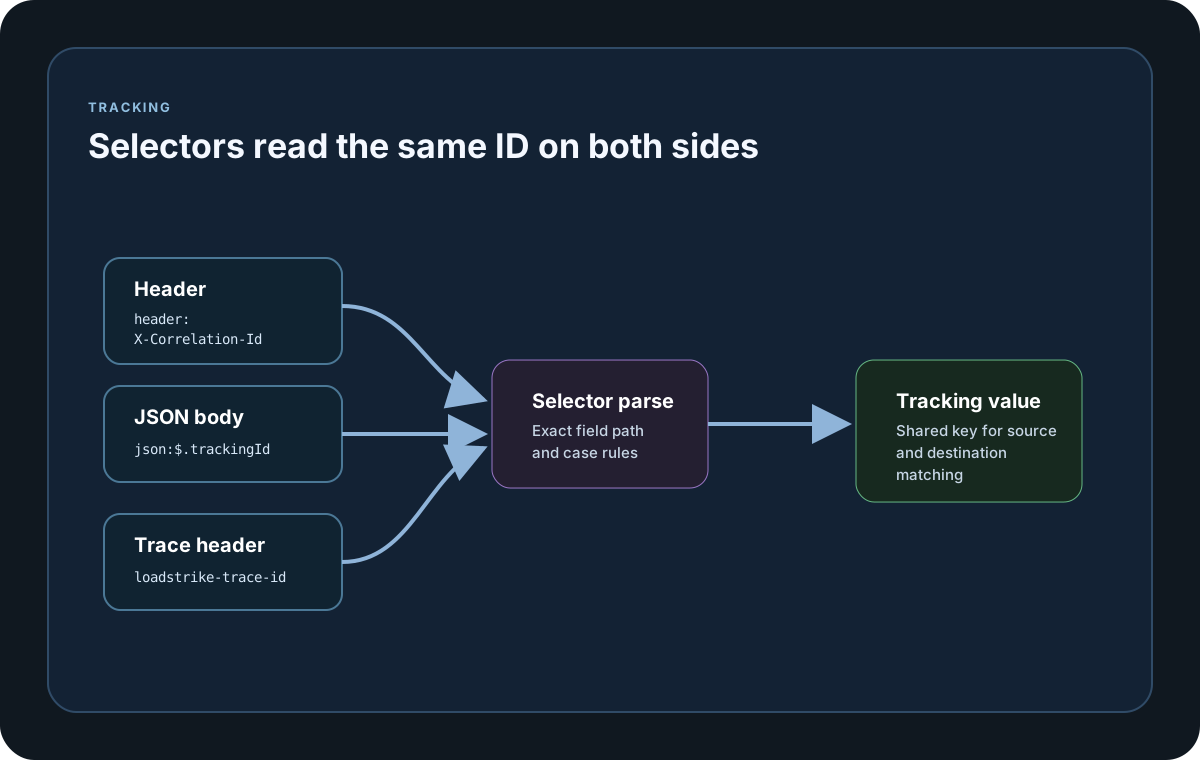
Header Selector
Use a header selector when the tracking ID travels as metadata, for example `header:X-Correlation-Id`. The selector prefix is case-insensitive, but the header name after the prefix is exact-case. Selector helper APIs also expose direct TrackingFieldSelector construction plus Parse, TryParse, Extract, and string formatting helpers across the public SDKs that publish selector helper methods.
LoadStrike Trace Header
Set UseLoadStrikeTraceIdHeader to true when generated source traffic does not already have a business tracking field. When TrackingField is omitted, LoadStrike uses `header:loadstrike-trace-id` and injects a GUID value into messages it produces. The header is not injected when the source endpoint is in Consume mode or RunMode is CorrelateExistingTraffic, because those modes observe existing traffic only.
Body Selector
Use a body selector when the tracking ID only exists inside the payload, for example `json:$.trackingId` or `json:$trackingId`. JSON property lookup is exact-case, so every property segment in the selector must match the payload exactly. MessagePayloadType can be supplied for typed parsing, and invalid selector expressions use the same helper error contract across SDKs.
Destination GatherByField
GatherByField is an optional destination selector that uses the same syntax as TrackingField. Use it when the report should group results by tenant, region, event type, or another business dimension. Grouping stays case-sensitive by default unless GatherByFieldValueCaseSensitive is turned off.
Endpoint Base Fields
TrafficEndpointDefinition also carries shared endpoint fields such as AutoGenerateTrackingIdWhenMissing, PollInterval, MessageHeaders, MessagePayload, MessagePayloadType, JsonSettings, JsonConvertSettings, and ContentType. These apply across endpoint adapters, and PollInterval must be positive when it is explicitly configured.
Configuration samples
Use these samples to see how Tracking Selectors is configured in code, JSON, or CLI surfaces where this page documents them.
If you run these examples locally, add a valid runner key before execution starts. Set it with WithRunnerKey("...") or the config key LoadStrike:RunnerKey.
Tracking Selectors
using LoadStrike;

var source = new HttpEndpointDefinition
{
    Name = "orders-api",
    Mode = TrafficEndpointMode.Produce,
    Url = "https://api.example.com/orders",
    Method = "POST",
    MessageHeaders =
    {
        ["X-Tenant-Id"] = "Tenant-A"
    },
    MessagePayload = new { orderId = "ORD-1001", amount = 49.95m }
};

var destination = new KafkaEndpointDefinition
{
    Name = "orders-events",
    Mode = TrafficEndpointMode.Consume,
    GatherByField = TrackingFieldSelector.Parse("header:X-Tenant-Id"),
    BootstrapServers = "localhost:9092",
    Topic = "orders.completed",
    ConsumerGroupId = "orders-tests"
};

var tracking = new CrossPlatformTrackingConfiguration
{
    Source = source,
    Destination = destination,
    UseLoadStrikeTraceIdHeader = true,
    TrackingFieldValueCaseSensitive = false,
    GatherByFieldValueCaseSensitive = false
};

var scenario = CrossPlatformScenarioConfigurator
    .Configure(LoadStrikeScenario.Empty("orders-selector-demo"), tracking)
    .WithLoadSimulations(LoadStrikeSimulation.Inject(10, TimeSpan.FromSeconds(1), TimeSpan.FromSeconds(20)));

LoadStrikeRunner.RegisterScenarios(scenario)
    .WithRunnerKey("rkl_your_local_runner_key")
    .Run();
package main
import loadstrike "loadstrike.com/sdk/go"
var selector = loadstrike.TrackingFieldSelector{}.Parse("header:X-Correlation-Id")
var parsed, parsedSelector = loadstrike.TrackingFieldSelector{}.TryParse("json:$.tenantId")
var trackingValue = loadstrike.TrackingFieldSelector{}.Parse("json:$.trackingId").Extract(
func() loadstrike.TrackingPayload {
builder := loadstrike.TrackingPayloadBuilder{}
builder.SetBody(map[string]any{"trackingId": "trk-1001", "tenantId": "tenant-a"})
return builder.Build()
}(),
)
var tracking = &loadstrike.TrackingConfigurationSpec{
RunMode: "GenerateAndCorrelate",
Source: &loadstrike.EndpointSpec{
Kind: "Http",
Name: "orders-api",
Mode: "Produce",
},
Destination: &loadstrike.EndpointSpec{
Kind: "Kafka",
Name: "orders-events",
Mode: "Consume",
GatherByField: "header:X-Tenant-Id",
},
UseLoadStrikeTraceIDHeader: true,
TrackingFieldValueCaseSensitive: false,
}
var _ = selector
var _ = parsed
var _ = parsedSelector
var _ = trackingValue
var _ = trackingimport com.loadstrike.runtime.CrossPlatformScenarioConfigurator;
import com.loadstrike.runtime.CrossPlatformTrackingConfiguration;
import com.loadstrike.runtime.HttpEndpointDefinition;
import com.loadstrike.runtime.KafkaEndpointDefinition;
import com.loadstrike.runtime.LoadStrikeCorrelation.TrackingFieldSelector;
import com.loadstrike.runtime.LoadStrikeRuntime.LoadStrikeRunner;
import com.loadstrike.runtime.LoadStrikeRuntime.LoadStrikeScenario;
import com.loadstrike.runtime.LoadStrikeRuntime.LoadStrikeSimulation;
import com.loadstrike.runtime.LoadStrikeTransports;
var source = new HttpEndpointDefinition();
source.name = "orders-api";
source.mode = LoadStrikeTransports.TrafficEndpointMode.Produce;
source.url = "https://api.example.com/orders";
source.method = "POST";
source.messageHeaders.put("X-Tenant-Id", "Tenant-A");
source.messagePayload = java.util.Map.of("orderId", "ORD-1001", "amount", 49.95);
var destination = new KafkaEndpointDefinition();
destination.name = "orders-events";
destination.mode = LoadStrikeTransports.TrafficEndpointMode.Consume;
destination.gatherByField = TrackingFieldSelector.parse("header:X-Tenant-Id");
destination.bootstrapServers = "localhost:9092";
destination.topic = "orders.completed";
destination.consumerGroupId = "orders-tests";
var tracking = new CrossPlatformTrackingConfiguration();
tracking.source = source;
tracking.destination = destination;
tracking.useLoadStrikeTraceIdHeader = true;
tracking.trackingFieldValueCaseSensitive = false;
tracking.gatherByFieldValueCaseSensitive = false;
var scenario = CrossPlatformScenarioConfigurator.Configure(
LoadStrikeScenario.empty("orders-selector-demo"),
tracking
).withLoadSimulations(LoadStrikeSimulation.inject(10, 1d, 20d));
LoadStrikeRunner
.registerScenarios(scenario)
.withRunnerKey("rkl_your_local_runner_key")
.run();from loadstrike_sdk import CrossPlatformScenarioConfigurator, LoadStrikeRunner, LoadStrikeScenario, LoadStrikeSimulation
tracking = {
"Source": {
"Kind": "Http",
"Name": "orders-api",
"Mode": "Produce",
"Url": "https://api.example.com/orders",
"Method": "POST",
"MessageHeaders": {
"X-Tenant-Id": "Tenant-A",
},
"MessagePayload": {
"orderId": "ORD-1001",
"amount": 49.95,
},
},
"Destination": {
"Kind": "Kafka",
"Name": "orders-events",
"Mode": "Consume",
"GatherByField": "header:X-Tenant-Id",
"BootstrapServers": "localhost:9092",
"Topic": "orders.completed",
"ConsumerGroupId": "orders-tests",
},
"UseLoadStrikeTraceIdHeader": True,
"TrackingFieldValueCaseSensitive": False,
"GatherByFieldValueCaseSensitive": False,
}
scenario = (
CrossPlatformScenarioConfigurator.Configure(
LoadStrikeScenario.empty("orders-selector-demo"),
tracking,
)
.with_load_simulations(LoadStrikeSimulation.inject(10, 1, 20))
)
LoadStrikeRunner.register_scenarios(scenario) \
.with_runner_key("rkl_your_local_runner_key") \
.run()import {
CrossPlatformScenarioConfigurator,
LoadStrikeRunner,
LoadStrikeScenario,
LoadStrikeSimulation,
TrackingFieldSelector
} from "@loadstrike/loadstrike-sdk";
const tracking = {
Source: {
Kind: "Http",
Name: "orders-api",
Mode: "Produce",
Url: "https://api.example.com/orders",
Method: "POST",
MessageHeaders: {
"X-Tenant-Id": "Tenant-A"
},
MessagePayload: {
orderId: "ORD-1001",
amount: 49.95
}
},
Destination: {
Kind: "Kafka",
Name: "orders-events",
Mode: "Consume",
GatherByField: new TrackingFieldSelector("Header", "X-Tenant-Id"),
BootstrapServers: "localhost:9092",
Topic: "orders.completed",
ConsumerGroupId: "orders-tests"
},
UseLoadStrikeTraceIdHeader: true,
TrackingFieldValueCaseSensitive: false,
GatherByFieldValueCaseSensitive: false
};
const scenario = CrossPlatformScenarioConfigurator
.Configure(LoadStrikeScenario.empty("orders-selector-demo"), tracking)
.withLoadSimulations(LoadStrikeSimulation.inject(10, 1, 20));
await LoadStrikeRunner
.registerScenarios(scenario)
.withRunnerKey("rkl_your_local_runner_key")
.run();const {
CrossPlatformScenarioConfigurator,
LoadStrikeRunner,
LoadStrikeScenario,
LoadStrikeSimulation,
TrackingFieldSelector
} = require("@loadstrike/loadstrike-sdk");
(async () => {
const tracking = {
Source: {
Kind: "Http",
Name: "orders-api",
Mode: "Produce",
Url: "https://api.example.com/orders",
Method: "POST",
MessageHeaders: {
"X-Tenant-Id": "Tenant-A"
},
MessagePayload: {
orderId: "ORD-1001",
amount: 49.95
}
},
Destination: {
Kind: "Kafka",
Name: "orders-events",
Mode: "Consume",
GatherByField: new TrackingFieldSelector("Header", "X-Tenant-Id"),
BootstrapServers: "localhost:9092",
Topic: "orders.completed",
ConsumerGroupId: "orders-tests"
},
UseLoadStrikeTraceIdHeader: true,
TrackingFieldValueCaseSensitive: false,
GatherByFieldValueCaseSensitive: false
};
const scenario = CrossPlatformScenarioConfigurator
.Configure(LoadStrikeScenario.empty("orders-selector-demo"), tracking)
.withLoadSimulations(LoadStrikeSimulation.inject(10, 1, 20));
await LoadStrikeRunner
.registerScenarios(scenario)
.withRunnerKey("rkl_your_local_runner_key")
.run();
})();Tracking selector fields and formats
Parses a selector string such as header:X-Correlation-Id or json:$.trackingId. The selector prefix is case-insensitive, but the header name or JSON path segments after the prefix must match exact casing.
Direct constructor value for header-based extraction.
Direct constructor value for JSON-path extraction.
Reads the correlation value from a message header or HTTP header. <name> is exact-case, so header:X-Correlation-Id and header:x-correlation-id are treated as different selectors.
Reads the correlation value from a JSON body path. Use it only when the payload is actually JSON, and keep every JSON property segment in its exact original casing.
Defaults to true on the tracking configuration. Set it to false when source and destination values may differ only by casing but should still match.
Safe parser when you want to validate external selector input before constructing the scenario.