
Playwright UI Load Guide
Use this guide when Playwright browser journeys should run inside the same LoadStrike scenario and reporting model.
Matching docs
Search across docs titles, summaries, groups, and section headings.
Use Up and Down Arrow to move through results, then press Enter to open the active page.
No indexed docs matched that search. Try a broader term or open the docs hub.
What this page helps you do
What this page helps you do
Run browser journeys inside LoadStrike so the UI path shares the same scenario, step, threshold, and report model as your backend workload.
Who this is for
Teams validating browser-driven workflows that still need transaction-level performance visibility.
Prerequisites
- A Playwright flow the team already trusts
- Host capacity sized for browser sessions rather than API-only traffic
By the end
A browser workload model that fits the same reporting and execution rules as the rest of your LoadStrike scenarios.
Supported SDK samples on this page
This page includes protocol-specific samples for C#, Java, Python, TypeScript, and JavaScript.
It does not include page-specific samples for Go.
Choose this path when
Use Playwright guidance when the user journey itself is the transaction entry point and you still want backend correlation, thresholds, and one report surface.
Visual guide
Guide
What this guide is for
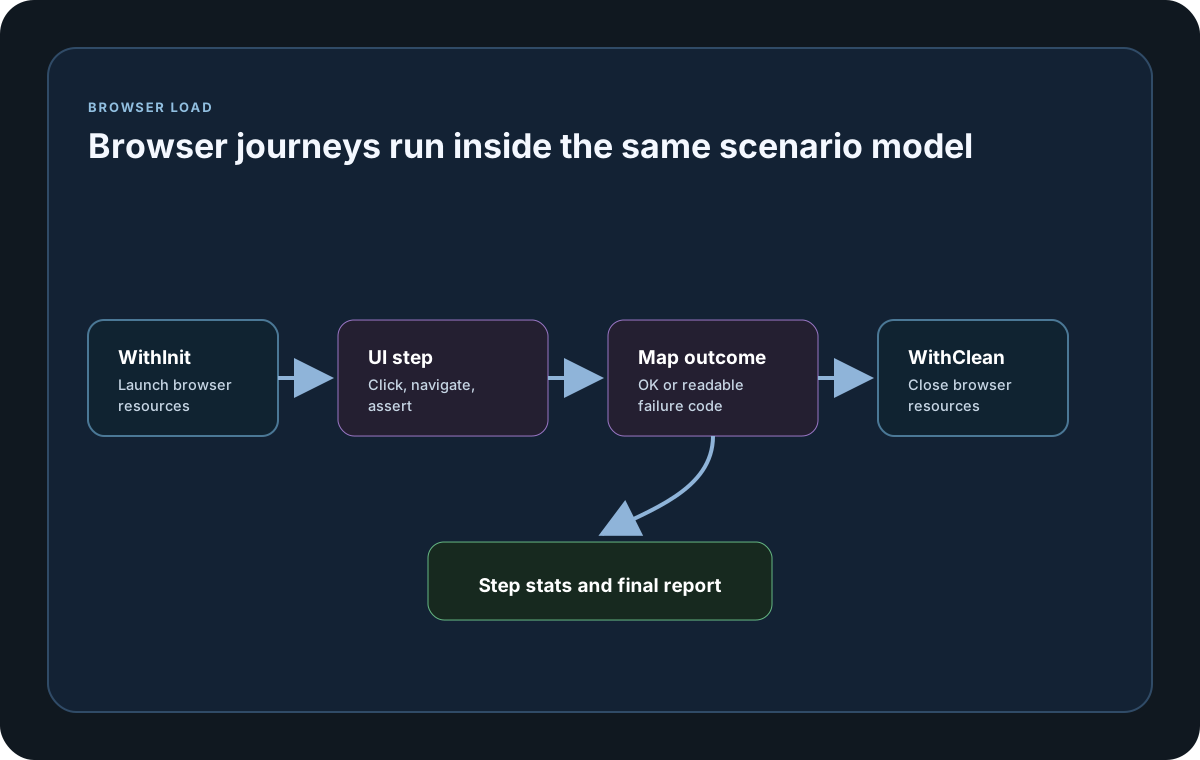
Use this guide when you want to execute real browser actions inside a LoadStrike scenario so the UI journey is measured with the same steps, stats, thresholds, and reports as API workflows.
Where browser setup belongs
Create long-lived Playwright resources in WithInit when they can be reused by the scenario instance, execute the actual page journey inside named steps, and release resources in WithClean.
How to think about load
Browser copies are much heavier than HTTP requests, so start with lower concurrency and shorter iterations. Tune copy count before you try to match API-scale throughput.
How to map UI outcomes
Return LoadStrikeResponse.Ok for successful browser flows and LoadStrikeResponse.Fail for assertion, navigation, or timeout failures. Use meaningful status-code strings so reports stay readable for non-framework specialists.
Protocol setup samples
Use these samples to see how browser actions fit into the same scenario, threshold, and report model as the rest of the workload.
If you run these examples locally, add a valid runner key before execution starts. Set it with WithRunnerKey("...") or the config key LoadStrike:RunnerKey.
Playwright UI Step
using LoadStrike;
using Microsoft.Playwright;

var scenario = LoadStrikeScenario.Create("playwright-login", async context =>
{
    var step = await LoadStrikeStep.Run<string>("login", context, async () =>
    {
        using var playwright = await Playwright.CreateAsync();
        await using var browser = await playwright.Chromium.LaunchAsync(new BrowserTypeLaunchOptions { Headless = true });
        var page = await browser.NewPageAsync();

        await page.GotoAsync("https://example.com/login");
        await page.FillAsync("#email", "[email protected]");
        await page.ClickAsync("button[type='submit']");

        return LoadStrikeResponse.Ok<string>(statusCode: "200");
    });

    return step.AsReply();
})
.WithLoadSimulations(LoadStrikeSimulation.Inject(5, TimeSpan.FromSeconds(1), TimeSpan.FromSeconds(20)));

LoadStrikeRunner.RegisterScenarios(scenario)
    .WithRunnerKey("rkl_your_local_runner_key")
    .Run();
import com.microsoft.playwright.Browser;
import com.microsoft.playwright.BrowserType;
import com.microsoft.playwright.Page;
import com.microsoft.playwright.Playwright;
import com.loadstrike.runtime.LoadStrikeRuntime.LoadStrikeResponse;
import com.loadstrike.runtime.LoadStrikeRuntime.LoadStrikeRunner;
import com.loadstrike.runtime.LoadStrikeRuntime.LoadStrikeScenario;
import com.loadstrike.runtime.LoadStrikeRuntime.LoadStrikeSimulation;
import com.loadstrike.runtime.LoadStrikeRuntime.LoadStrikeStep;
var scenario = LoadStrikeScenario.create("playwright-login", context ->
LoadStrikeStep.run("login", context, () -> {
try (Playwright playwright = Playwright.create()) {
Browser browser = playwright.chromium().launch(new BrowserType.LaunchOptions().setHeadless(true));
Page page = browser.newPage();
page.navigate("https://example.com/login");
page.fill("#email", "[email protected]");
page.click("button[type='submit']");
browser.close();
return LoadStrikeResponse.ok("200");
}
}).asReply()
).withLoadSimulations(LoadStrikeSimulation.inject(5, 1d, 20d));
LoadStrikeRunner
.registerScenarios(scenario)
.withRunnerKey("rkl_your_local_runner_key")
.run();from playwright.sync_api import sync_playwright
from loadstrike_sdk import LoadStrikeResponse, LoadStrikeRunner, LoadStrikeScenario, LoadStrikeSimulation, LoadStrikeStep
def run_login():
with sync_playwright() as playwright:
browser = playwright.chromium.launch(headless=True)
page = browser.new_page()
try:
page.goto("https://example.com/login")
page.fill("#email", "[email protected]")
page.click("button[type='submit']")
return LoadStrikeResponse.ok("200")
finally:
browser.close()
scenario = LoadStrikeScenario.create(
"playwright-login",
lambda context: LoadStrikeStep.run("login", context, run_login).as_reply(),
)
scenario = scenario.with_load_simulations(LoadStrikeSimulation.inject(5, 1, 20))
LoadStrikeRunner.register_scenarios(scenario) \
.with_runner_key("rkl_your_local_runner_key") \
.run()import { chromium } from "playwright";
import {
LoadStrikeResponse,
LoadStrikeRunner,
LoadStrikeScenario,
LoadStrikeSimulation,
LoadStrikeStep
} from "@loadstrike/loadstrike-sdk";
const scenario = LoadStrikeScenario.create("playwright-login", async (context) => {
const step = await LoadStrikeStep.run("login", context, async () => {
const browser = await chromium.launch({ headless: true });
const page = await browser.newPage();
try {
await page.goto("https://example.com/login");
await page.fill("#email", "[email protected]");
await page.click("button[type='submit']");
return LoadStrikeResponse.ok("200");
} finally {
await browser.close();
}
});
return step.asReply();
}).withLoadSimulations(LoadStrikeSimulation.inject(5, 1, 20));
await LoadStrikeRunner
.registerScenarios(scenario)
.withRunnerKey("rkl_your_local_runner_key")
.run();const { chromium } = require("playwright");
const {
LoadStrikeResponse,
LoadStrikeRunner,
LoadStrikeScenario,
LoadStrikeSimulation,
LoadStrikeStep
} = require("@loadstrike/loadstrike-sdk");
(async () => {
const scenario = LoadStrikeScenario.create("playwright-login", async (context) => {
const step = await LoadStrikeStep.run("login", context, async () => {
const browser = await chromium.launch({ headless: true });
const page = await browser.newPage();
try {
await page.goto("https://example.com/login");
await page.fill("#email", "[email protected]");
await page.click("button[type='submit']");
return LoadStrikeResponse.ok("200");
} finally {
await browser.close();
}
});
return step.asReply();
}).withLoadSimulations(LoadStrikeSimulation.inject(5, 1, 20));
await LoadStrikeRunner
.registerScenarios(scenario)
.withRunnerKey("rkl_your_local_runner_key")
.run();
})();Playwright workflow choices
Use these for browser or shared resource lifecycle instead of recreating heavyweight objects unnecessarily.
Wrap the actual browser journey in a named step so latency and failures appear in the same reporting model as other workloads.
Use readable status code strings such as 200, UI_TIMEOUT, or UI_ASSERTION_FAILED so failures are obvious in reports.
Start with lower concurrency than protocol-only tests because each browser context is expensive.