
Quick Start
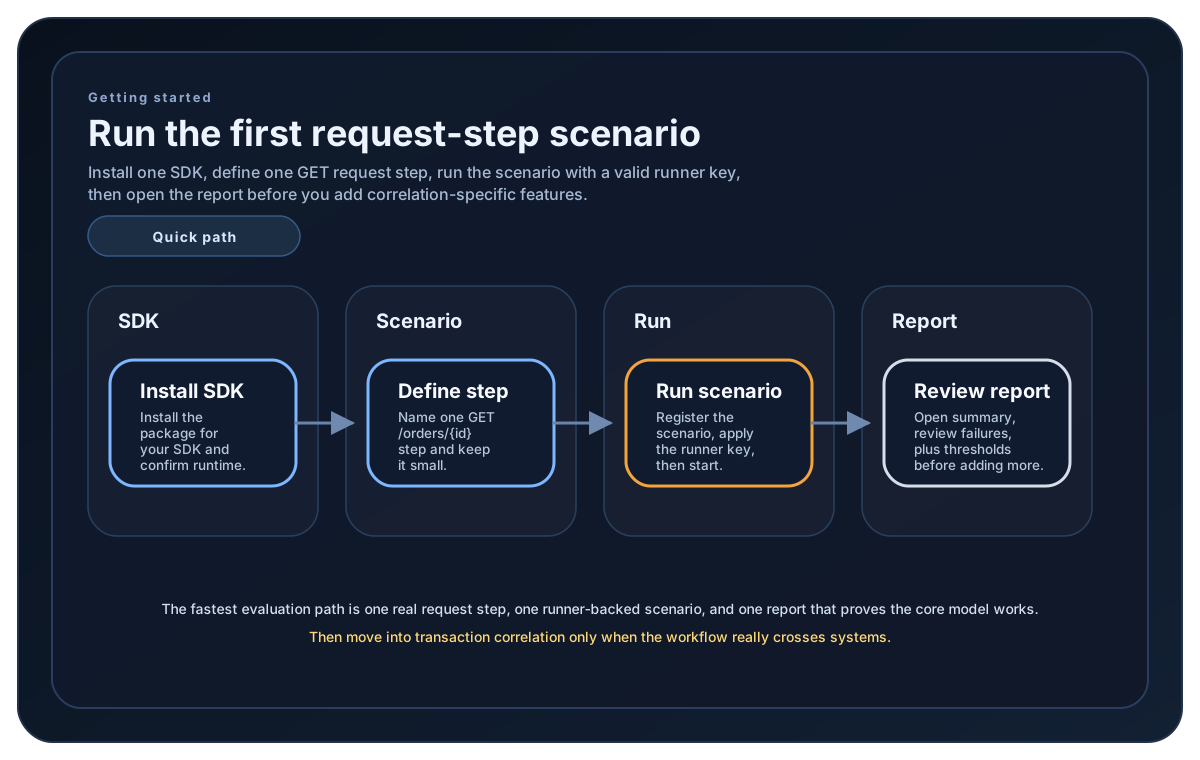
Build one runnable request-step scenario around GET /orders/{id}, run it, and confirm you can read the report before moving into correlation-specific features.
Matching docs
Search across docs titles, summaries, groups, and section headings.
Use Up and Down Arrow to move through results, then press Enter to open the active page.
No indexed docs matched that search. Try a broader term or open the docs hub.
What this page helps you do
What this page helps you do
Build one runnable request-step scenario, run it, and confirm that the report shows the first path clearly.
Who this is for
Evaluators and implementers who want the shortest route from install to a real LoadStrike result.
Prerequisites
- A supported SDK package installed
- A valid runner key before the run starts
- An HTTP endpoint you can call with a simple GET request
By the end
A runnable first scenario and a report you can inspect with confidence before adding more SDK surfaces.
Choose this path when
Use quick start when your goal is the smallest runnable LoadStrike scenario before you decide whether the workload needs correlation-specific modeling.
Visual guide
Guide
What this page helps you do
Use this quick start when you want the smallest LoadStrike setup that can call GET /orders/{id}, record the result as one named step, and produce a report you can inspect immediately.
When to use this path
This is the right starting point when you need to validate scenario shape, runner setup, and report reading before you add correlation-specific source and destination definitions.
What to keep simple
Start with one plain HTTP request, one named step, and one small load simulation. That keeps the first run focused on the core scenario model instead of transport-specific endpoint configuration.
How execution starts
Register the scenario, add a valid runner key in code or config, and run. Once that baseline works, move to the transaction concept page when the workload needs cross-system completion tracking.
Getting started samples
Use these samples to compare how each supported SDK wires one first request-step scenario around GET /orders/{id}, runner setup, and the first report output.
If you run these examples locally, add a valid runner key before execution starts. Set it with WithRunnerKey("...") or the config key LoadStrike:RunnerKey.
Quick Start
using LoadStrike;

var httpClient = new HttpClient
{
    BaseAddress = new Uri("https://api.example.com")
};

var scenario = LoadStrikeScenario.Create("read-order", async context =>
{
    var orderId = $"ord-{context.InvocationNumber}";

    var step = await LoadStrikeStep.Run<string>("GET /orders/{id}", context, async () =>
    {
        using var response = await httpClient.GetAsync($"/orders/{orderId}");

        return response.IsSuccessStatusCode
            ? LoadStrikeResponse.Ok<string>(statusCode: ((int)response.StatusCode).ToString())
            : LoadStrikeResponse.Fail<string>(
                statusCode: ((int)response.StatusCode).ToString(),
                message: "Order lookup failed");
    });

    return step.AsReply();
})
.WithLoadSimulations(
    LoadStrikeSimulation.Inject(10, TimeSpan.FromSeconds(1), TimeSpan.FromSeconds(20))
);

LoadStrikeRunner.RegisterScenarios(scenario)
    .WithRunnerKey("rkl_your_local_runner_key")
    .Run();
package main
import (
"io"
"net/http"
"strconv"
loadstrike "loadstrike.com/sdk/go"
)
func main() {
scenario := loadstrike.CreateScenario("read-order", func(ctx loadstrike.LoadStrikeScenarioContext) loadstrike.LoadStrikeReply {
return loadstrike.LoadStrikeStep.Run("GET /orders/{id}", ctx, func(loadstrike.LoadStrikeScenarioContext) loadstrike.LoadStrikeReply {
request, err := http.NewRequest(http.MethodGet, "https://api.example.com/orders/ord-1001", nil)
if err != nil {
return loadstrike.LoadStrikeResponse.Fail("request_build_failed", int64(0), err.Error())
}
response, err := http.DefaultClient.Do(request)
if err != nil {
return loadstrike.LoadStrikeResponse.Fail("http_request_failed", int64(0), err.Error())
}
defer response.Body.Close()
_, _ = io.Copy(io.Discard, response.Body)
if response.StatusCode < 400 {
return loadstrike.LoadStrikeResponse.Ok(strconv.Itoa(response.StatusCode), int64(0), "ok")
}
return loadstrike.LoadStrikeResponse.Fail(strconv.Itoa(response.StatusCode), int64(0), "Order lookup failed")
})
}).
WithLoadSimulations(loadstrike.LoadStrikeSimulation.Inject(10, loadstrike.DurationFromSeconds(1), loadstrike.DurationFromSeconds(20)))
loadstrike.RegisterScenarios(scenario).
WithRunnerKey("rkl_your_local_runner_key").
Run()
}import java.net.URI;
import java.net.http.HttpClient;
import java.net.http.HttpRequest;
import java.net.http.HttpResponse;
import com.loadstrike.runtime.LoadStrikeRuntime.LoadStrikeResponse;
import com.loadstrike.runtime.LoadStrikeRuntime.LoadStrikeRunner;
import com.loadstrike.runtime.LoadStrikeRuntime.LoadStrikeScenario;
import com.loadstrike.runtime.LoadStrikeRuntime.LoadStrikeSimulation;
import com.loadstrike.runtime.LoadStrikeRuntime.LoadStrikeStep;
var client = HttpClient.newHttpClient();
var scenario = LoadStrikeScenario
.create("read-order", context -> LoadStrikeStep.run("GET /orders/{id}", context, () -> {
String orderId = "ord-" + context.invocationNumber;
var request = HttpRequest.newBuilder(URI.create("https://api.example.com/orders/" + orderId))
.GET()
.build();
var response = client.sendAsync(request, HttpResponse.BodyHandlers.ofString()).join();
return response.statusCode() < 400
? LoadStrikeResponse.ok(Integer.toString(response.statusCode()))
: LoadStrikeResponse.fail(Integer.toString(response.statusCode()), "Order lookup failed");
}).asReply())
.withLoadSimulations(LoadStrikeSimulation.inject(10, 1d, 20d));
LoadStrikeRunner
.registerScenarios(scenario)
.withRunnerKey("rkl_your_local_runner_key")
.run();import requests
from loadstrike_sdk import (
LoadStrikeResponse,
LoadStrikeRunner,
LoadStrikeScenario,
LoadStrikeSimulation,
LoadStrikeStep,
)
def read_order(context):
def run_step():
order_id = f"ord-{context.invocation_number}"
response = requests.get(f"https://api.example.com/orders/{order_id}", timeout=15)
if response.ok:
return LoadStrikeResponse.ok(str(response.status_code))
return LoadStrikeResponse.fail(str(response.status_code), "Order lookup failed")
return LoadStrikeStep.run("GET /orders/{id}", context, run_step).as_reply()
scenario = (
LoadStrikeScenario.create("read-order", read_order)
.with_load_simulations(LoadStrikeSimulation.inject(10, 1, 20))
)
LoadStrikeRunner.register_scenarios(scenario) \
.with_runner_key("rkl_your_local_runner_key") \
.run()import {
LoadStrikeResponse,
LoadStrikeRunner,
LoadStrikeScenario,
LoadStrikeSimulation,
LoadStrikeStep
} from "@loadstrike/loadstrike-sdk";
const scenario = LoadStrikeScenario
.create("read-order", async (context) => {
return LoadStrikeStep.run("GET /orders/{id}", context, async () => {
const orderId = `ord-${context.invocationNumber}`;
const response = await fetch(`https://api.example.com/orders/${orderId}`);
return response.ok
? LoadStrikeResponse.ok(String(response.status))
: LoadStrikeResponse.fail(String(response.status), "Order lookup failed");
});
})
.withLoadSimulations(LoadStrikeSimulation.inject(10, 1, 20));
await LoadStrikeRunner
.registerScenarios(scenario)
.withRunnerKey("rkl_your_local_runner_key")
.run();const {
LoadStrikeResponse,
LoadStrikeRunner,
LoadStrikeScenario,
LoadStrikeSimulation,
LoadStrikeStep
} = require("@loadstrike/loadstrike-sdk");
(async () => {
const scenario = LoadStrikeScenario
.create("read-order", async (context) => {
return LoadStrikeStep.run("GET /orders/{id}", context, async () => {
const orderId = `ord-${context.invocationNumber}`;
const response = await fetch(`https://api.example.com/orders/${orderId}`);
return response.ok
? LoadStrikeResponse.ok(String(response.status))
: LoadStrikeResponse.fail(String(response.status), "Order lookup failed");
});
})
.withLoadSimulations(LoadStrikeSimulation.inject(10, 1, 20));
await LoadStrikeRunner
.registerScenarios(scenario)
.withRunnerKey("rkl_your_local_runner_key")
.run();
})();Quick Start Parts
Starts with one plain request-step scenario before you add transport-specific tracking surfaces.
Uses GET /orders/{id} so the first example stays focused on scenario shape, naming, and status handling.
Adds one small inject profile so the example is runnable without introducing a larger load plan first.
Registers the scenario, applies the runner key, and starts the run with reports enabled.