
Docker Images And EKS Deployment
This page explains the container build and deployment path for LoadStrike on EKS. Use it when the team wants repeatable images and repeatable cluster runs.
Matching docs
Search across docs titles, summaries, groups, and section headings.
Use Up and Down Arrow to move through results, then press Enter to open the active page.
No indexed docs matched that search. Try a broader term or open the docs hub.
What this page helps you do
What this page helps you do
This page explains the container build and deployment path for LoadStrike on EKS. Use it when the team wants repeatable images and repeatable cluster runs.
Who this is for
Teams moving from one machine to coordinator-and-agent execution or tighter workload targeting.
Prerequisites
- A scenario that already works in a single-node run
By the end
A clearer cluster topology and the fields that must line up across nodes.
Use this page when
Use this page when execution topology, partitioning, or targeting changes how the run should be distributed.
Visual guide
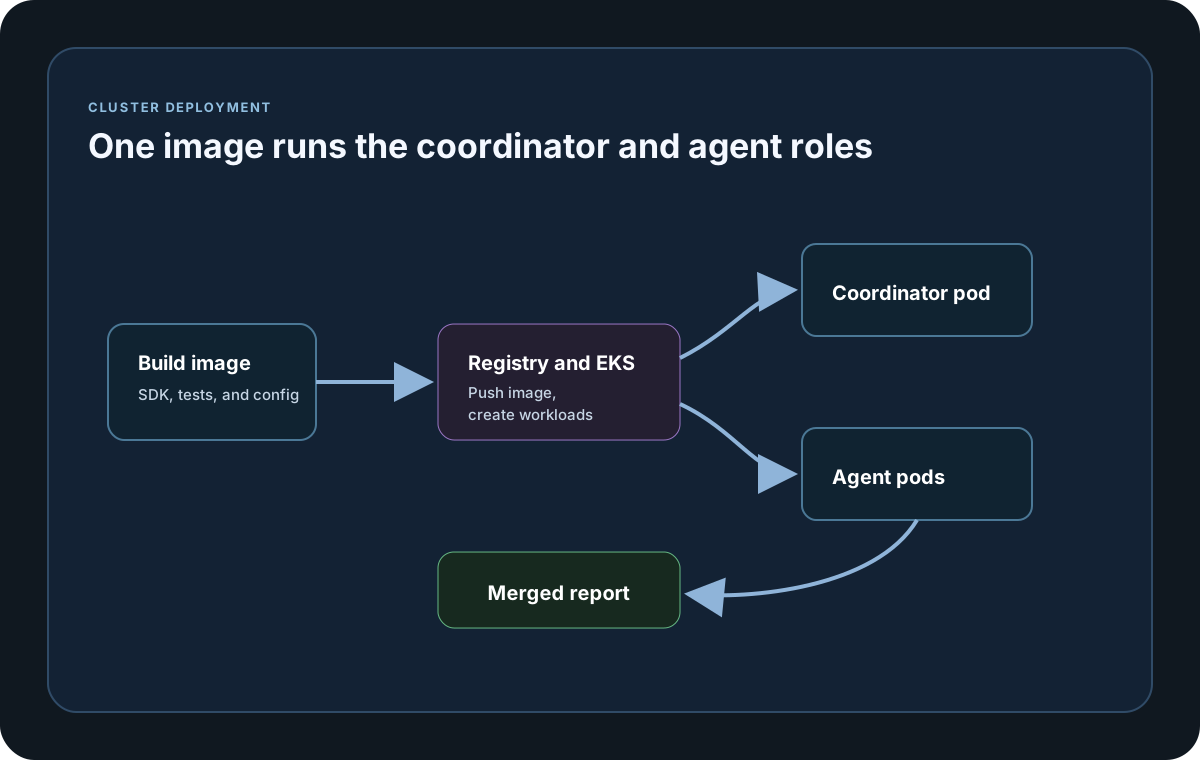
Guide
Goal
The goal of this workflow is to standardize image creation and distributed execution so every run uses the same runtime, dependencies, and test binaries.
Image Strategy
Package the test harness into one immutable image. Then use runtime settings such as NodeType, targets, group, and cluster ID to switch between coordinator and agent behavior without rebuilding that image.
Build Prerequisites
You need Docker, AWS CLI, kubectl, and access to ECR and EKS. Build against .NET 8 and keep image tags tied to a commit SHA or release version so the run is traceable.
Registry Flow
Build locally or in CI, tag for ECR, push the image, and deploy coordinator and agent manifests that all reference the same image tag.
Runtime Inputs
Configure NodeType, ClusterId, AgentGroup, AgentsCount, NatsServerUrl, AgentTargetScenarios, CoordinatorTargetScenarios, and ClusterCommandTimeoutMs through environment variables or appsettings.
Kubernetes Objects
Typical objects include Namespace, ConfigMap, Secret, an optional ServiceAccount plus IRSA setup, the agent Deployment, the coordinator Job, and an optional PVC for report output.
Rolling And Scale
Increase agent replicas gradually and keep coordinator AgentsCount aligned with the number of agents you expect to be active. Use versioned image tags to avoid mixed binary versions during one run.
Security Controls
Use imagePullSecrets or node IAM permissions for ECR pull, IRSA for AWS API access, and namespace-scoped RBAC and NetworkPolicy for least-privilege operation.
Artifacts
Store the final coordinator reports in /reports and then copy them to S3 or PVC storage. Keep metadata such as cluster ID, image tag, and commit SHA next to the artifacts for traceability.
Troubleshooting
If agents are not discovered, first check NATS DNS and service reachability, matching ClusterId and AgentGroup values, agent readiness, and coordinator timeout settings.
Cluster setup samples
This sample uses environment variables so the same deployment artifact can boot either as the coordinator or as an agent while still joining the same clusterId.
If you run these examples locally, add a valid runner key before execution starts. Set it with WithRunnerKey("...") or the config key LoadStrike:RunnerKey.
Docker Build, Push, and Runtime Settings
using LoadStrike;

var clusterId = Environment.GetEnvironmentVariable("LOADSTRIKE_CLUSTER_ID") ?? "orders-cluster";
var nodeRole = Environment.GetEnvironmentVariable("LOADSTRIKE_ROLE") ?? "agent";
var natsUrl = Environment.GetEnvironmentVariable("LOADSTRIKE_NATS_URL")
    ?? "nats://nats.loadstrike.svc.cluster.local:4222";
var agentGroup = "perf-agents";

var submitOrdersScenario = LoadStrikeScenario.Create(
        "submit-orders",
        _ => Task.FromResult(LoadStrikeResponse.Ok(statusCode: "202")))
    .WithLoadSimulations(LoadStrikeSimulation.IterationsForConstant(1, 2));

var waitForCompletionScenario = LoadStrikeScenario.Create(
        "wait-for-completion",
        _ => Task.FromResult(LoadStrikeResponse.Ok(statusCode: "200")))
    .WithLoadSimulations(LoadStrikeSimulation.IterationsForConstant(1, 2));

var runner = LoadStrikeRunner
    .RegisterScenarios(submitOrdersScenario, waitForCompletionScenario)
    .WithClusterId(clusterId)
    .WithAgentGroup(agentGroup)
    .WithNatsServerUrl(natsUrl);

if (string.Equals(nodeRole, "coordinator", StringComparison.OrdinalIgnoreCase))
{
    runner = runner
        .WithNodeType(LoadStrikeNodeType.Coordinator)
        .WithAgentsCount(3)
        .WithCoordinatorTargetScenarios("submit-orders")
        .WithAgentTargetScenarios("wait-for-completion")
        .WithReportFolder("/reports")
        .WithRunnerKey("rkr_your_remote_runner_key");
}
else
{
    runner = runner
        .WithNodeType(LoadStrikeNodeType.Agent)
        .WithAgentTargetScenarios("wait-for-completion");
}

runner.Run();
package main
import loadstrike "loadstrike.com/sdk/go"
func main() {
source := loadstrike.Empty("source")
destination := loadstrike.Empty("destination")
// Clustered Go V2 requires a local coordinator and rejects role-specific target lists.
// Distributed/direct-agent execution is unavailable in the current Go release.
loadstrike.RegisterScenarios(source, destination).
WithRunnerKey("rkl_your_local_runner_key").
WithClusterId("cluster-orders-v2-local").
WithNatsServerUrl("nats://127.0.0.1:4222"). // Start NATS locally first.
WithNodeType(loadstrike.NodeTypeCoordinator).
WithAgentsCount(4).
EnableLocalDevCluster(true).
UseLoadEngineV2().
WithTargetScenarios("source", "destination").
Run()
}import com.loadstrike.runtime.LoadStrikeRuntime.LoadStrikeResponse;
import com.loadstrike.runtime.LoadStrikeRuntime.LoadStrikeNodeType;
import com.loadstrike.runtime.LoadStrikeRuntime.LoadStrikeRunner;
import com.loadstrike.runtime.LoadStrikeRuntime.LoadStrikeScenario;
import com.loadstrike.runtime.LoadStrikeRuntime.LoadStrikeSimulation;
String clusterId = System.getenv().getOrDefault("LOADSTRIKE_CLUSTER_ID", "orders-cluster");
String nodeRole = System.getenv().getOrDefault("LOADSTRIKE_ROLE", "agent");
String natsUrl = System.getenv().getOrDefault(
"LOADSTRIKE_NATS_URL",
"nats://nats.loadstrike.svc.cluster.local:4222");
String agentGroup = "perf-agents";
var submitOrdersScenario = LoadStrikeScenario
.create("submit-orders", ignoredContext -> LoadStrikeResponse.ok("202"))
.withLoadSimulations(LoadStrikeSimulation.iterationsForConstant(1, 2));
var waitForCompletionScenario = LoadStrikeScenario
.create("wait-for-completion", ignoredContext -> LoadStrikeResponse.ok("200"))
.withLoadSimulations(LoadStrikeSimulation.iterationsForConstant(1, 2));
var runner = LoadStrikeRunner
.registerScenarios(submitOrdersScenario, waitForCompletionScenario)
.buildContext()
.withClusterId(clusterId)
.withAgentGroup(agentGroup)
.withNatsServerUrl(natsUrl);
if ("coordinator".equalsIgnoreCase(nodeRole)) {
runner = runner
.withNodeType(LoadStrikeNodeType.Coordinator)
.withAgentsCount(3)
.withCoordinatorTargetScenarios("submit-orders")
.withAgentTargetScenarios("wait-for-completion")
.withReportFolder("/reports")
.withRunnerKey("rkr_your_remote_runner_key");
} else {
runner = runner
.withNodeType(LoadStrikeNodeType.Agent)
.withAgentTargetScenarios("wait-for-completion");
}
runner.run();import os
from loadstrike_sdk import LoadStrikeResponse, LoadStrikeRunner, LoadStrikeScenario, LoadStrikeSimulation
cluster_id = os.getenv("LOADSTRIKE_CLUSTER_ID", "orders-cluster")
node_role = os.getenv("LOADSTRIKE_ROLE", "agent")
nats_url = os.getenv("LOADSTRIKE_NATS_URL", "nats://nats.loadstrike.svc.cluster.local:4222")
agent_group = "perf-agents"
submit_orders_scenario = (
LoadStrikeScenario.create("submit-orders", lambda _: LoadStrikeResponse.ok("202"))
.with_load_simulations(LoadStrikeSimulation.iterations_for_constant(1, 2))
)
wait_for_completion_scenario = (
LoadStrikeScenario.create("wait-for-completion", lambda _: LoadStrikeResponse.ok("200"))
.with_load_simulations(LoadStrikeSimulation.iterations_for_constant(1, 2))
)
runner = (
LoadStrikeRunner.register_scenarios(submit_orders_scenario, wait_for_completion_scenario)
.with_cluster_id(cluster_id)
.with_agent_group(agent_group)
.with_nats_server_url(nats_url)
)
if node_role.lower() == "coordinator":
runner = (
runner
.with_node_type("Coordinator")
.with_agents_count(3)
.with_coordinator_target_scenarios("submit-orders")
.with_agent_target_scenarios("wait-for-completion")
.with_report_folder("/reports")
.with_runner_key("rkr_your_remote_runner_key")
)
else:
runner = (
runner
.with_node_type("Agent")
.with_agent_target_scenarios("wait-for-completion")
)
runner.run()import {
LoadStrikeResponse,
LoadStrikeRunner,
LoadStrikeScenario,
LoadStrikeSimulation
} from "@loadstrike/loadstrike-sdk";
const clusterId = process.env.LOADSTRIKE_CLUSTER_ID ?? "orders-cluster";
const nodeRole = process.env.LOADSTRIKE_ROLE ?? "agent";
const natsUrl =
process.env.LOADSTRIKE_NATS_URL ?? "nats://nats.loadstrike.svc.cluster.local:4222";
const agentGroup = "perf-agents";
const submitOrdersScenario = LoadStrikeScenario
.create("submit-orders", async () => LoadStrikeResponse.ok("202"))
.withLoadSimulations(LoadStrikeSimulation.iterationsForConstant(1, 2));
const waitForCompletionScenario = LoadStrikeScenario
.create("wait-for-completion", async () => LoadStrikeResponse.ok("200"))
.withLoadSimulations(LoadStrikeSimulation.iterationsForConstant(1, 2));
let runner = LoadStrikeRunner
.registerScenarios(submitOrdersScenario, waitForCompletionScenario)
.withClusterId(clusterId)
.withAgentGroup(agentGroup)
.withNatsServerUrl(natsUrl);
if (nodeRole.toLowerCase() === "coordinator") {
runner = runner
.withNodeType("Coordinator")
.withAgentsCount(3)
.withCoordinatorTargetScenarios("submit-orders")
.withAgentTargetScenarios("wait-for-completion")
.withReportFolder("/reports")
.withRunnerKey("rkr_your_remote_runner_key");
} else {
runner = runner
.withNodeType("Agent")
.withAgentTargetScenarios("wait-for-completion");
}
await runner.run();const {
LoadStrikeResponse,
LoadStrikeRunner,
LoadStrikeScenario,
LoadStrikeSimulation
} = require("@loadstrike/loadstrike-sdk");
(async () => {
const clusterId = process.env.LOADSTRIKE_CLUSTER_ID ?? "orders-cluster";
const nodeRole = process.env.LOADSTRIKE_ROLE ?? "agent";
const natsUrl =
process.env.LOADSTRIKE_NATS_URL ?? "nats://nats.loadstrike.svc.cluster.local:4222";
const agentGroup = "perf-agents";
const submitOrdersScenario = LoadStrikeScenario
.create("submit-orders", async () => LoadStrikeResponse.ok("202"))
.withLoadSimulations(LoadStrikeSimulation.iterationsForConstant(1, 2));
const waitForCompletionScenario = LoadStrikeScenario
.create("wait-for-completion", async () => LoadStrikeResponse.ok("200"))
.withLoadSimulations(LoadStrikeSimulation.iterationsForConstant(1, 2));
let runner = LoadStrikeRunner
.registerScenarios(submitOrdersScenario, waitForCompletionScenario)
.withClusterId(clusterId)
.withAgentGroup(agentGroup)
.withNatsServerUrl(natsUrl);
if (nodeRole.toLowerCase() === "coordinator") {
runner = runner
.withNodeType("Coordinator")
.withAgentsCount(3)
.withCoordinatorTargetScenarios("submit-orders")
.withAgentTargetScenarios("wait-for-completion")
.withReportFolder("/reports")
.withRunnerKey("rkr_your_remote_runner_key");
} else {
runner = runner
.withNodeType("Agent")
.withAgentTargetScenarios("wait-for-completion");
}
await runner.run();
})();Kubernetes Manifests (Image Pull + Agents + Coordinator)
Build one immutable test image and switch behavior at runtime with NodeType and related settings.
Build, tag, and push the same image to ECR so coordinator and agents run the same binaries.
Configure pull credentials or IAM so the cluster can retrieve the image.
Deploy the coordinator as a job and the agents as a scalable deployment.
Use commit or release based tags so one distributed run does not mix binaries from different builds.
apiVersion: v1
kind: Secret
metadata:
  name: ecr-cred
  namespace: loadstrike
type: kubernetes.io/dockerconfigjson
data:
  .dockerconfigjson: <base64-docker-config>
---
apiVersion: v1
kind: ServiceAccount
metadata:
  name: loadstrike-runner
  namespace: loadstrike
  annotations:
    eks.amazonaws.com/role-arn: arn:aws:iam::<aws-account-id>:role/loadstrike-eks-runner
---
apiVersion: v1
kind: ConfigMap
metadata:
  name: loadstrike-runtime
  namespace: loadstrike
data:
  LoadStrike__ClusterId: orders-cluster
  LoadStrike__AgentGroup: perf-agents
  LoadStrike__NatsServerUrl: nats://nats.loadstrike.svc.cluster.local:4222
  LoadStrike__AgentTargetScenarios: kafka-consumer
  LoadStrike__CoordinatorTargetScenarios: http-source
  LoadStrike__ClusterCommandTimeoutMs: "180000"
---
apiVersion: apps/v1
kind: Deployment
metadata:
  name: loadstrike-agents
  namespace: loadstrike
spec:
  replicas: 4
  selector:
    matchLabels:
      app: loadstrike-agent
  template:
    metadata:
      labels:
        app: loadstrike-agent
    spec:
      serviceAccountName: loadstrike-runner
      imagePullSecrets:
      - name: ecr-cred
      containers:
      - name: agent
        image: <aws-account-id>.dkr.ecr.<region>.amazonaws.com/loadstrike-tests:v1.0.0
        envFrom:
        - configMapRef:
            name: loadstrike-runtime
        env:
        - name: LoadStrike__NodeType
          value: Agent
        - name: LoadStrike__TargetScenarios
          value: kafka-consumer
        resources:
          requests:
            cpu: "750m"
            memory: "768Mi"
          limits:
            cpu: "2"
            memory: "2Gi"
---
apiVersion: batch/v1
kind: Job
metadata:
  name: loadstrike-coordinator
  namespace: loadstrike
spec:
  backoffLimit: 0
  template:
    spec:
      restartPolicy: Never
      serviceAccountName: loadstrike-runner
      imagePullSecrets:
      - name: ecr-cred
      containers:
      - name: coordinator
        image: <aws-account-id>.dkr.ecr.<region>.amazonaws.com/loadstrike-tests:v1.0.0
        envFrom:
        - configMapRef:
            name: loadstrike-runtime
        env:
        - name: LoadStrike__NodeType
          value: Coordinator
        - name: LoadStrike__AgentsCount
          value: "4"
        - name: LoadStrike__RunnerKey
          value: rkr_your_remote_runner_key
        - name: LoadStrike__ReportFolder
          value: /reports
        volumeMounts:
        - name: reports
          mountPath: /reports
      volumes:
      - name: reports
        persistentVolumeClaim:
          claimName: loadstrike-reports-pvc