
Gather By Field
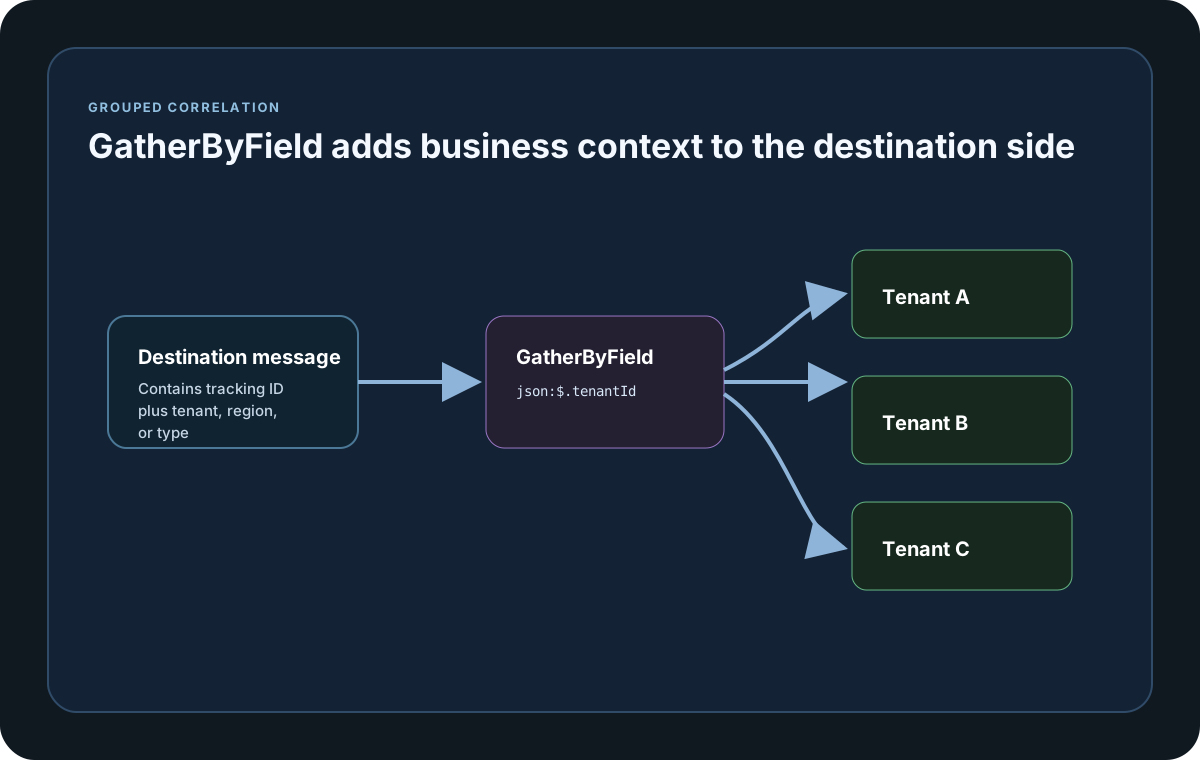
GatherByField groups correlated results by a destination value such as tenant, region, or event type so one run can be sliced meaningfully.
Matching docs
Search across docs titles, summaries, groups, and section headings.
Use Up and Down Arrow to move through results, then press Enter to open the active page.
No indexed docs matched that search. Try a broader term or open the docs hub.
What this page helps you do
What this page helps you do
GatherByField groups correlated results by a destination value such as tenant, region, or event type so one run can be sliced meaningfully.
Who this is for
Teams controlling runtime behavior, tracking, reporting, licensing, or policy from code, JSON, or CLI settings.
Prerequisites
- A scenario or run configuration that already works locally
By the end
The documented runtime setting or policy surface for this part of the product.
Use this page when
Use this page when runtime behavior changes because of configuration, policy, or execution settings rather than the scenario body itself.
Visual guide
Guide
Usage
Set Destination.GatherByField to `header:...` or `json:...` when report rows should be grouped by a business value such as tenant, region, or event type. The selector prefixes are case-insensitive, but header names and JSON path segments are exact-case.
Group Value Casing
GatherByFieldValueCaseSensitive defaults to true. Turn it off when values such as Tenant-A and tenant-a should land in the same report group while still showing the first-seen original casing.
Report Output
Grouped correlation summaries retain Total, Success, Failure, and latency columns for P50, P75, P80, P85, P90, P95, P99, and Max, plus a responsive vector trend chart for every populated GatherBy value. Scenario, destination, selector, and value identities remain distinct rather than being blended into an averaged percentile line.
Configuration samples
Use these samples to see how Gather By Field is configured in code, JSON, or CLI surfaces where this page documents them.
If you run these examples locally, add a valid runner key before execution starts. Set it with WithRunnerKey("...") or the config key LoadStrike:RunnerKey.
GatherByField
using LoadStrike;

var source = new HttpEndpointDefinition
{
    Name = "orders-api",
    Mode = TrafficEndpointMode.Produce,
    TrackingField = TrackingFieldSelector.Parse("json:$.trackingId"),
    Url = "https://api.example.com/orders",
    Method = "POST"
};

var destination = new KafkaEndpointDefinition
{
    Name = "orders-events",
    Mode = TrafficEndpointMode.Consume,
    TrackingField = TrackingFieldSelector.Parse("json:$.trackingId"),
    GatherByField = TrackingFieldSelector.Parse("json:$.tenantId"),
    BootstrapServers = "localhost:9092",
    Topic = "orders.completed",
    ConsumerGroupId = "orders-tests"
};

var tracking = new CrossPlatformTrackingConfiguration
{
    Source = source,
    Destination = destination,
    GatherByFieldValueCaseSensitive = false
};

var scenario = CrossPlatformScenarioConfigurator
    .Configure(LoadStrikeScenario.Empty("orders-gather-by-demo"), tracking)
    .WithLoadSimulations(LoadStrikeSimulation.Inject(10, TimeSpan.FromSeconds(1), TimeSpan.FromSeconds(20)));

LoadStrikeRunner.RegisterScenarios(scenario)
    .WithRunnerKey("rkl_your_local_runner_key")
    .Run();
package main
import loadstrike "loadstrike.com/sdk/go"
var destination = &loadstrike.EndpointSpec{
Kind: "Kafka",
Name: "orders-completed",
Mode: "Consume",
TrackingField: "header:X-Correlation-Id",
GatherByField: "header:X-Tenant-Id",
}import com.loadstrike.runtime.CrossPlatformScenarioConfigurator;
import com.loadstrike.runtime.HttpEndpointDefinition;
import com.loadstrike.runtime.KafkaEndpointDefinition;
import com.loadstrike.runtime.CrossPlatformTrackingConfiguration;
import com.loadstrike.runtime.LoadStrikeCorrelation.TrackingFieldSelector;
import com.loadstrike.runtime.LoadStrikeRuntime.LoadStrikeRunner;
import com.loadstrike.runtime.LoadStrikeRuntime.LoadStrikeScenario;
import com.loadstrike.runtime.LoadStrikeRuntime.LoadStrikeSimulation;
import com.loadstrike.runtime.LoadStrikeTransports;
var source = new HttpEndpointDefinition();
source.name = "orders-api";
source.mode = LoadStrikeTransports.TrafficEndpointMode.Produce;
source.trackingField = TrackingFieldSelector.parse("json:$.trackingId");
source.url = "https://api.example.com/orders";
source.method = "POST";
var destination = new KafkaEndpointDefinition();
destination.name = "orders-events";
destination.mode = LoadStrikeTransports.TrafficEndpointMode.Consume;
destination.trackingField = TrackingFieldSelector.parse("json:$.trackingId");
destination.gatherByField = TrackingFieldSelector.parse("json:$.tenantId");
destination.bootstrapServers = "localhost:9092";
destination.topic = "orders.completed";
destination.consumerGroupId = "orders-tests";
var tracking = new CrossPlatformTrackingConfiguration();
tracking.source = source;
tracking.destination = destination;
tracking.gatherByFieldValueCaseSensitive = false;
var scenario = CrossPlatformScenarioConfigurator.Configure(
LoadStrikeScenario.empty("orders-gather-by-demo"),
tracking
).withLoadSimulations(LoadStrikeSimulation.inject(10, 1d, 20d));
LoadStrikeRunner
.registerScenarios(scenario)
.withRunnerKey("rkl_your_local_runner_key")
.run();from loadstrike_sdk import CrossPlatformScenarioConfigurator, LoadStrikeRunner, LoadStrikeScenario, LoadStrikeSimulation
tracking = {
"Source": {
"Kind": "Http",
"Name": "orders-api",
"Mode": "Produce",
"TrackingField": "json:$.trackingId",
"Url": "https://api.example.com/orders",
"Method": "POST",
},
"Destination": {
"Kind": "Kafka",
"Name": "orders-events",
"Mode": "Consume",
"TrackingField": "json:$.trackingId",
"GatherByField": "json:$.tenantId",
"BootstrapServers": "localhost:9092",
"Topic": "orders.completed",
"ConsumerGroupId": "orders-tests",
},
"GatherByFieldValueCaseSensitive": False,
}
scenario = (
CrossPlatformScenarioConfigurator.Configure(
LoadStrikeScenario.empty("orders-gather-by-demo"),
tracking,
)
.with_load_simulations(LoadStrikeSimulation.inject(10, 1, 20))
)
LoadStrikeRunner.register_scenarios(scenario) \
.with_runner_key("rkl_your_local_runner_key") \
.run()import {
CrossPlatformScenarioConfigurator,
LoadStrikeRunner,
LoadStrikeScenario,
LoadStrikeSimulation,
TrackingFieldSelector
} from "@loadstrike/loadstrike-sdk";
const tracking = {
Source: {
Kind: "Http",
Name: "orders-api",
Mode: "Produce",
TrackingField: new TrackingFieldSelector("Json", "$.trackingId"),
Url: "https://api.example.com/orders",
Method: "POST"
},
Destination: {
Kind: "Kafka",
Name: "orders-events",
Mode: "Consume",
TrackingField: new TrackingFieldSelector("Json", "$.trackingId"),
GatherByField: new TrackingFieldSelector("Json", "$.tenantId"),
BootstrapServers: "localhost:9092",
Topic: "orders.completed",
ConsumerGroupId: "orders-tests"
},
GatherByFieldValueCaseSensitive: false
};
const scenario = CrossPlatformScenarioConfigurator
.Configure(LoadStrikeScenario.empty("orders-gather-by-demo"), tracking)
.withLoadSimulations(LoadStrikeSimulation.inject(10, 1, 20));
await LoadStrikeRunner
.registerScenarios(scenario)
.withRunnerKey("rkl_your_local_runner_key")
.run();const {
CrossPlatformScenarioConfigurator,
LoadStrikeRunner,
LoadStrikeScenario,
LoadStrikeSimulation,
TrackingFieldSelector
} = require("@loadstrike/loadstrike-sdk");
(async () => {
const tracking = {
Source: {
Kind: "Http",
Name: "orders-api",
Mode: "Produce",
TrackingField: new TrackingFieldSelector("Json", "$.trackingId"),
Url: "https://api.example.com/orders",
Method: "POST"
},
Destination: {
Kind: "Kafka",
Name: "orders-events",
Mode: "Consume",
TrackingField: new TrackingFieldSelector("Json", "$.trackingId"),
GatherByField: new TrackingFieldSelector("Json", "$.tenantId"),
BootstrapServers: "localhost:9092",
Topic: "orders.completed",
ConsumerGroupId: "orders-tests"
},
GatherByFieldValueCaseSensitive: false
};
const scenario = CrossPlatformScenarioConfigurator
.Configure(LoadStrikeScenario.empty("orders-gather-by-demo"), tracking)
.withLoadSimulations(LoadStrikeSimulation.inject(10, 1, 20));
await LoadStrikeRunner
.registerScenarios(scenario)
.withRunnerKey("rkl_your_local_runner_key")
.run();
})();GatherByField rules
GatherByField belongs on the destination endpoint. Putting it on the source endpoint is rejected by validation.
Use the same selector syntax as TrackingField: header:<name> or json:$.<path>. Prefixes are case-insensitive, but header names and JSON path segments are exact-case.
Common business grouping keys are tenant id, region, workflow branch, event type, or customer tier.
Defaults to true. Set it to false when group values such as Tenant-A and tenant-a should land in the same bucket while still displaying the first-seen original casing.
Adds grouped correlation tables and one P50-P99 chart per populated GatherBy value. When the tab opens, charts redraw at the visible card dimensions and display pixel density so the full groups and percentile series stay sharp without stretching.