
InfluxDB
Use the InfluxDB sink when your team wants LoadStrike events and metrics stored in an Influx bucket. This page explains the data flow and the optional metrics split.
Matching docs
Search across docs titles, summaries, groups, and section headings.
Use Up and Down Arrow to move through results, then press Enter to open the active page.
No indexed docs matched that search. Try a broader term or open the docs hub.
What this page helps you do
What this page helps you do
Use the InfluxDB sink when your team wants LoadStrike events and metrics stored in an Influx bucket. This page explains the data flow and the optional metrics split.
Who this is for
Teams exporting final run data and realtime metrics into supported observability backends.
Prerequisites
- A run result or sink destination you want to wire into the wider observability stack
By the end
A sink-specific setup path that stays tied to the same LoadStrike report model.
Use this page when
Use this page when the local report is not the only destination and you need to wire realtime or final export into a supported sink.
Visual guide
Sample Report Data Rows
Scope    Scenario     Result Count RPS  LatencyP50Ms LatencyP80Ms LatencyP85Ms LatencyP90Ms LatencyP95Ms LatencyP99Ms
Scenario reports-demo OK     675   15.0 21.4         30.2         33.0         36.8         48.6         72.1

LatencyTable Scenario     Result Count LatencyP50Ms LatencyP95Ms
LatencyTable reports-demo OK     675   21.4         48.6
LatencyTable reports-demo FAIL   12    35.9         79.2

StatusCode Result Percent
200        OK     97.48
500        FAIL   2.52

FailedStatus Scope     Scenario     Step StatusCode Count Percent
FailedStatus Scenario  reports-demo      500       12    1.75
Reporting
Realtime reporting
Choose Portal Reporting when users should review runs in the customer portal, pick the built-in sink page that matches the backend your team already runs, or open Custom Reporting when you need to implement your own destination. Each tab opens a dedicated page with the settings, behavior, and lifecycle details for that reporting path.
Guide
When To Use InfluxDB
Choose InfluxDB when the team wants queryable event and metric storage in Influx, often with Grafana dashboards layered on top.
What LoadStrike Sends
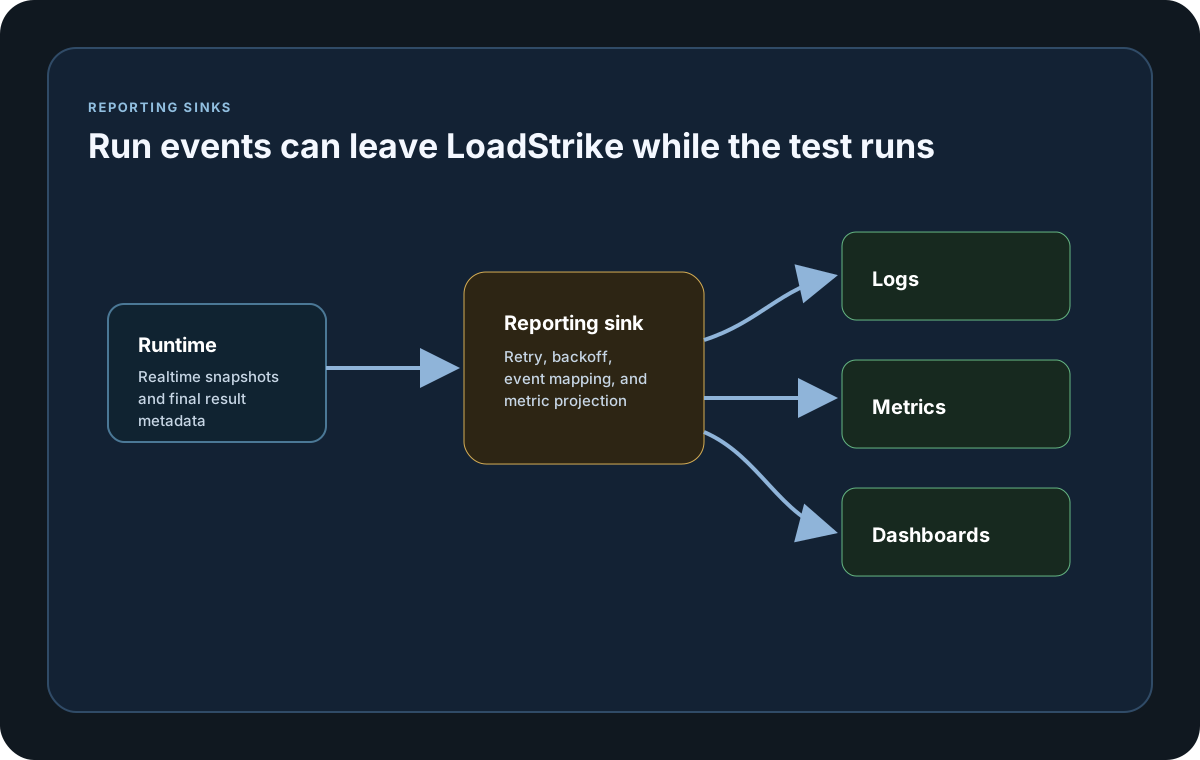
InfluxDbReportingSink writes each raw scenario attempt and each nested step as its own queryable point, alongside reporting events and projected metrics. You can keep projected metrics in a separate MetricsMeasurementName when event and metric series should be stored independently.
Configuration Surface
Configure the sink in code or through LoadStrike:ReportingSinks:InfluxDb. Common options include BaseUrl, Organization, Bucket, Token, MeasurementName, MetricsMeasurementName, and StaticTags.
Starter Assets
LoadStrike publishes an InfluxDB datasource YAML, the shared Grafana dashboard-provider YAML, and a matching InfluxDB overview dashboard JSON file.
InfluxDB realtime reporting
Use InfluxDbReportingSink when you want reporting events and projected metrics stored in InfluxDB.
If you run these examples locally, add a valid runner key before execution starts. Set it with WithRunnerKey("...") or the config key LoadStrike:RunnerKey.
HTML reports include a top-right Light/Dark theme toggle and responsive offline SVG charts. Use exact-value tooltips, legends, zoom, pan, reset, the accessible expanded view, chart-title search, and grid-density controls to inspect dense results. Light is the default report theme.
InfluxDB Sink
using LoadStrike;

var scenario = LoadStrikeScenario.Empty("orders-realtime-reporting")
    .WithLoadSimulations(LoadStrikeSimulation.Inject(20, TimeSpan.FromSeconds(1), TimeSpan.FromSeconds(120)));

var sink = new InfluxDbReportingSink(new InfluxDbReportingSinkOptions
{
    BaseUrl = "https://influx.example.com",
    Organization = "performance-team",
    Bucket = "loadstrike-runs",
    Token = "influx-token",
    MeasurementName = "loadstrike_orders",
    MetricsMeasurementName = "loadstrike_orders_metrics",
    StaticTags =
    {
        ["environment"] = "staging",
        ["service"] = "orders-api"
    }
});

LoadStrikeRunner.RegisterScenarios(scenario)
    .WithReportingSinks(sink)
    .WithRunnerKey("rkl_your_local_runner_key")
    .Run();
package main
import loadstrike "loadstrike.com/sdk/go"
var influxSink = loadstrike.InfluxDbReportingSink{
Options: loadstrike.InfluxDbReportingSinkOptions{
BaseURL: "http://127.0.0.1:8086",
Organization: "loadstrike",
Bucket: "performance",
Token: "influx-token",
MeasurementName: "loadstrike_run",
},
}import com.loadstrike.runtime.LoadStrikeRuntime.LoadStrikeRunner;
import com.loadstrike.runtime.LoadStrikeRuntime.LoadStrikeScenario;
import com.loadstrike.runtime.LoadStrikeRuntime.LoadStrikeSimulation;
import com.loadstrike.runtime.LoadStrikeSinks;
var scenario = LoadStrikeScenario.empty("orders-realtime-reporting")
.withLoadSimulations(LoadStrikeSimulation.inject(20, 1d, 120d));
var options = new LoadStrikeSinks.InfluxDbSinkOptions();
options.baseUrl = "https://influx.example.com";
options.organization = "performance-team";
options.bucket = "loadstrike-runs";
options.token = "influx-token";
options.measurementName = "loadstrike_orders";
options.metricsMeasurementName = "loadstrike_orders_metrics";
options.staticTags.put("environment", "staging");
options.staticTags.put("service", "orders-api");
var sink = new LoadStrikeSinks.InfluxDbReportingSink(options);
LoadStrikeRunner.registerScenarios(scenario)
.withReportingSinks(sink)
.withRunnerKey("rkl_your_local_runner_key")
.run();from loadstrike_sdk import InfluxDbReportingSink, LoadStrikeRunner, LoadStrikeScenario, LoadStrikeSimulation
scenario = (
LoadStrikeScenario.empty("orders-realtime-reporting")
.with_load_simulations(LoadStrikeSimulation.inject(20, 1, 120))
)
sink = InfluxDbReportingSink(
base_url="https://influx.example.com",
organization="performance-team",
bucket="loadstrike-runs",
token="influx-token",
measurement_name="loadstrike_orders",
metrics_measurement_name="loadstrike_orders_metrics",
static_tags={
"environment": "staging",
"service": "orders-api",
},
)
LoadStrikeRunner.register_scenarios(scenario) \
.with_reporting_sinks(sink) \
.with_runner_key("rkl_your_local_runner_key") \
.run()import {
InfluxDbReportingSink,
InfluxDbReportingSinkOptions,
LoadStrikeRunner,
LoadStrikeScenario,
LoadStrikeSimulation
} from "@loadstrike/loadstrike-sdk";
const scenario = LoadStrikeScenario
.empty("orders-realtime-reporting")
.withLoadSimulations(LoadStrikeSimulation.inject(20, 1, 120));
const sink = new InfluxDbReportingSink(new InfluxDbReportingSinkOptions({
BaseUrl: "https://influx.example.com",
Organization: "performance-team",
Bucket: "loadstrike-runs",
Token: "influx-token",
MeasurementName: "loadstrike_orders",
MetricsMeasurementName: "loadstrike_orders_metrics",
StaticTags: {
environment: "staging",
service: "orders-api"
}
}));
await LoadStrikeRunner
.registerScenarios(scenario)
.withReportingSinks(sink)
.withRunnerKey("rkl_your_local_runner_key")
.run();const {
InfluxDbReportingSink,
InfluxDbReportingSinkOptions,
LoadStrikeRunner,
LoadStrikeScenario,
LoadStrikeSimulation
} = require("@loadstrike/loadstrike-sdk");
(async () => {
const scenario = LoadStrikeScenario
.empty("orders-realtime-reporting")
.withLoadSimulations(LoadStrikeSimulation.inject(20, 1, 120));
const sink = new InfluxDbReportingSink(new InfluxDbReportingSinkOptions({
BaseUrl: "https://influx.example.com",
Organization: "performance-team",
Bucket: "loadstrike-runs",
Token: "influx-token",
MeasurementName: "loadstrike_orders",
MetricsMeasurementName: "loadstrike_orders_metrics",
StaticTags: {
environment: "staging",
service: "orders-api"
}
}));
await LoadStrikeRunner
.registerScenarios(scenario)
.withReportingSinks(sink)
.withRunnerKey("rkl_your_local_runner_key")
.run();
})();InfluxDbReportingSinkOptions fields
Defaults to LoadStrike:ReportingSinks:InfluxDb when binding from infra config.
Required Influx base URL.
Path used for line-protocol writes.
Required Influx write-target and auth fields.
Measurement used for reporting-event rows.
Separate measurement used for projected metrics.
HTTP timeout for Influx writes.
Tags applied to every exported event and metric point.
{
  "LoadStrike": {
    "ReportingSinks": {
      "InfluxDb": {
        "BaseUrl": "https://influx.example.com",
        "Organization": "performance-team",
        "Bucket": "loadstrike-runs",
        "Token": "influx-token",
        "MeasurementName": "loadstrike_events",
        "MetricsMeasurementName": "loadstrike_metrics"
      }
    }
  }
}
Downloads and starter assets
These downloads cover the public InfluxDB workflow that LoadStrike documents today.
InfluxDB datasource YAML
A Grafana datasource definition for an InfluxDB-backed LoadStrike dashboard setup.
Download fileDashboard provider YAML
The shared Grafana dashboard-provider file used by the published starter dashboards.
Download fileInfluxDB dashboard JSON
A starter dashboard already wired for the InfluxDB sink shape documented on this page.
Download file