
EKS Coordinator And Agents
Use this page when you want to run LoadStrike coordinator and agent nodes on Amazon EKS. It explains the cluster shape, dependencies, and deployment flow.
Matching docs
Search across docs titles, summaries, groups, and section headings.
Use Up and Down Arrow to move through results, then press Enter to open the active page.
No indexed docs matched that search. Try a broader term or open the docs hub.
What this page helps you do
What this page helps you do
Use this page when you want to run LoadStrike coordinator and agent nodes on Amazon EKS. It explains the cluster shape, dependencies, and deployment flow.
Who this is for
Teams moving from one machine to coordinator-and-agent execution or tighter workload targeting.
Prerequisites
- A scenario that already works in a single-node run
By the end
A clearer cluster topology and the fields that must line up across nodes.
Use this page when
Use this page when execution topology, partitioning, or targeting changes how the run should be distributed.
Visual guide
Guide
When To Use EKS
Use EKS when a single machine cannot generate enough load, when you need production-like multi-node traffic patterns, or when you want repeatable CI or CD load jobs.
Architecture
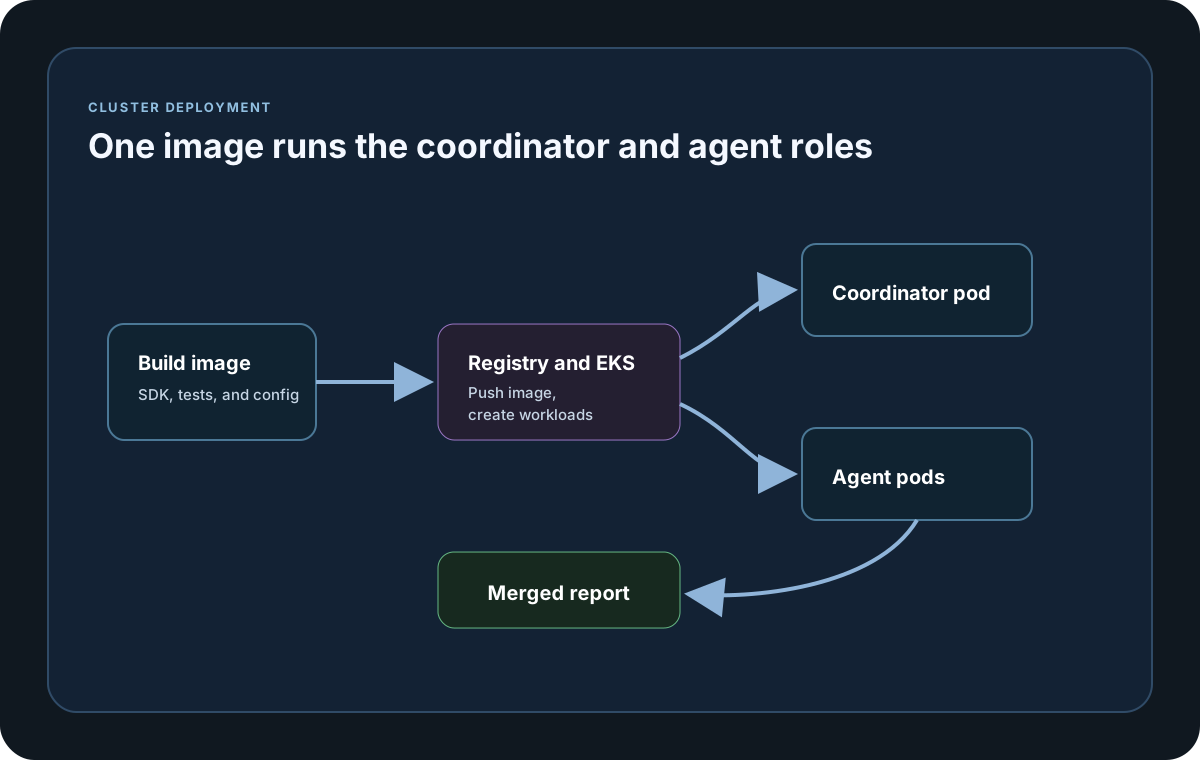
The common setup is one coordinator pod, usually as a Job, and multiple agent pods, usually as a Deployment. The coordinator orchestrates scenarios and merges metrics, while the agents execute their assigned workload and stream node stats back over NATS.
Dependencies
The required pieces are EKS, kubectl, AWS CLI, Docker, ECR, and a NATS endpoint reachable by all test pods. Optional pieces include Redis for correlation-store persistence and S3 or PVC storage for reports.
Container Image
Build a .NET 8 runtime image that contains your test project and LoadStrike setup. Push that image to ECR and reference the same image tag in both the coordinator and agent manifests.
Runtime Configuration
Set LoadStrike keys such as NodeType, ClusterId, AgentGroup, AgentsCount, NatsServerUrl, AgentTargetScenarios, CoordinatorTargetScenarios, and ClusterCommandTimeoutMs through appsettings, environment variables, or CLI args.
Kubernetes Manifests
The usual manifest set includes Namespace, Secret, ConfigMap, a NATS deployment and service, an agent deployment, and a coordinator job. Keep the same ClusterId and AgentGroup values across all pods in one run.
Scaling Strategy
Scale agents through Deployment replicas and keep AgentsCount in coordinator config aligned with the number of agents you expect to be active. Scale gradually and watch CPU, memory, and network saturation on the worker nodes.
Security And IAM
Use Kubernetes Secrets for credentials, IRSA for AWS access, restricted RBAC for the test namespace, and NetworkPolicies that only allow the broker and target-system paths the run really needs.
Reports And Artifacts
Write reports to /reports inside the container and then persist them through PVC or object storage after the coordinator finishes. Agent reports are disabled in distributed mode by design.
Operational Checks
If the coordinator waits too long, check NATS connectivity, agent readiness, ClusterCommandTimeout, scenario targeting alignment, and broker credentials first.
Cluster setup samples
This sample uses environment variables so the same deployment artifact can boot either as the coordinator or as an agent while still joining the same clusterId.
If you run these examples locally, add a valid runner key before execution starts. Set it with WithRunnerKey("...") or the config key LoadStrike:RunnerKey.
EKS Dependencies and Runtime Config
using LoadStrike;

var clusterId = Environment.GetEnvironmentVariable("LOADSTRIKE_CLUSTER_ID") ?? "orders-cluster";
var nodeRole = Environment.GetEnvironmentVariable("LOADSTRIKE_ROLE") ?? "agent";
var natsUrl = Environment.GetEnvironmentVariable("LOADSTRIKE_NATS_URL")
    ?? "nats://nats.loadstrike.svc.cluster.local:4222";
var agentGroup = "perf-agents";

var submitOrdersScenario = LoadStrikeScenario.Create(
        "submit-orders",
        _ => Task.FromResult(LoadStrikeResponse.Ok(statusCode: "202")))
    .WithLoadSimulations(LoadStrikeSimulation.IterationsForConstant(1, 2));

var waitForCompletionScenario = LoadStrikeScenario.Create(
        "wait-for-completion",
        _ => Task.FromResult(LoadStrikeResponse.Ok(statusCode: "200")))
    .WithLoadSimulations(LoadStrikeSimulation.IterationsForConstant(1, 2));

var runner = LoadStrikeRunner
    .RegisterScenarios(submitOrdersScenario, waitForCompletionScenario)
    .WithClusterId(clusterId)
    .WithAgentGroup(agentGroup)
    .WithNatsServerUrl(natsUrl);

if (string.Equals(nodeRole, "coordinator", StringComparison.OrdinalIgnoreCase))
{
    runner = runner
        .WithNodeType(LoadStrikeNodeType.Coordinator)
        .WithAgentsCount(3)
        .WithCoordinatorTargetScenarios("submit-orders")
        .WithAgentTargetScenarios("wait-for-completion")
        .WithReportFolder("/reports")
        .WithRunnerKey("rkr_your_remote_runner_key");
}
else
{
    runner = runner
        .WithNodeType(LoadStrikeNodeType.Agent)
        .WithAgentTargetScenarios("wait-for-completion");
}

runner.Run();
package main
import loadstrike "loadstrike.com/sdk/go"
func main() {
source := loadstrike.Empty("source")
destination := loadstrike.Empty("destination")
// Clustered Go V2 requires a local coordinator and rejects role-specific target lists.
// Distributed/direct-agent execution is unavailable in the current Go release.
loadstrike.RegisterScenarios(source, destination).
WithRunnerKey("rkl_your_local_runner_key").
WithClusterId("cluster-orders-v2-local").
WithNatsServerUrl("nats://127.0.0.1:4222"). // Start NATS locally first.
WithNodeType(loadstrike.NodeTypeCoordinator).
WithAgentsCount(4).
EnableLocalDevCluster(true).
UseLoadEngineV2().
WithTargetScenarios("source", "destination").
Run()
}import com.loadstrike.runtime.LoadStrikeRuntime.LoadStrikeResponse;
import com.loadstrike.runtime.LoadStrikeRuntime.LoadStrikeNodeType;
import com.loadstrike.runtime.LoadStrikeRuntime.LoadStrikeRunner;
import com.loadstrike.runtime.LoadStrikeRuntime.LoadStrikeScenario;
import com.loadstrike.runtime.LoadStrikeRuntime.LoadStrikeSimulation;
String clusterId = System.getenv().getOrDefault("LOADSTRIKE_CLUSTER_ID", "orders-cluster");
String nodeRole = System.getenv().getOrDefault("LOADSTRIKE_ROLE", "agent");
String natsUrl = System.getenv().getOrDefault(
"LOADSTRIKE_NATS_URL",
"nats://nats.loadstrike.svc.cluster.local:4222");
String agentGroup = "perf-agents";
var submitOrdersScenario = LoadStrikeScenario
.create("submit-orders", ignoredContext -> LoadStrikeResponse.ok("202"))
.withLoadSimulations(LoadStrikeSimulation.iterationsForConstant(1, 2));
var waitForCompletionScenario = LoadStrikeScenario
.create("wait-for-completion", ignoredContext -> LoadStrikeResponse.ok("200"))
.withLoadSimulations(LoadStrikeSimulation.iterationsForConstant(1, 2));
var runner = LoadStrikeRunner
.registerScenarios(submitOrdersScenario, waitForCompletionScenario)
.buildContext()
.withClusterId(clusterId)
.withAgentGroup(agentGroup)
.withNatsServerUrl(natsUrl);
if ("coordinator".equalsIgnoreCase(nodeRole)) {
runner = runner
.withNodeType(LoadStrikeNodeType.Coordinator)
.withAgentsCount(3)
.withCoordinatorTargetScenarios("submit-orders")
.withAgentTargetScenarios("wait-for-completion")
.withReportFolder("/reports")
.withRunnerKey("rkr_your_remote_runner_key");
} else {
runner = runner
.withNodeType(LoadStrikeNodeType.Agent)
.withAgentTargetScenarios("wait-for-completion");
}
runner.run();import os
from loadstrike_sdk import LoadStrikeResponse, LoadStrikeRunner, LoadStrikeScenario, LoadStrikeSimulation
cluster_id = os.getenv("LOADSTRIKE_CLUSTER_ID", "orders-cluster")
node_role = os.getenv("LOADSTRIKE_ROLE", "agent")
nats_url = os.getenv("LOADSTRIKE_NATS_URL", "nats://nats.loadstrike.svc.cluster.local:4222")
agent_group = "perf-agents"
submit_orders_scenario = (
LoadStrikeScenario.create("submit-orders", lambda _: LoadStrikeResponse.ok("202"))
.with_load_simulations(LoadStrikeSimulation.iterations_for_constant(1, 2))
)
wait_for_completion_scenario = (
LoadStrikeScenario.create("wait-for-completion", lambda _: LoadStrikeResponse.ok("200"))
.with_load_simulations(LoadStrikeSimulation.iterations_for_constant(1, 2))
)
runner = (
LoadStrikeRunner.register_scenarios(submit_orders_scenario, wait_for_completion_scenario)
.with_cluster_id(cluster_id)
.with_agent_group(agent_group)
.with_nats_server_url(nats_url)
)
if node_role.lower() == "coordinator":
runner = (
runner
.with_node_type("Coordinator")
.with_agents_count(3)
.with_coordinator_target_scenarios("submit-orders")
.with_agent_target_scenarios("wait-for-completion")
.with_report_folder("/reports")
.with_runner_key("rkr_your_remote_runner_key")
)
else:
runner = (
runner
.with_node_type("Agent")
.with_agent_target_scenarios("wait-for-completion")
)
runner.run()import {
LoadStrikeResponse,
LoadStrikeRunner,
LoadStrikeScenario,
LoadStrikeSimulation
} from "@loadstrike/loadstrike-sdk";
const clusterId = process.env.LOADSTRIKE_CLUSTER_ID ?? "orders-cluster";
const nodeRole = process.env.LOADSTRIKE_ROLE ?? "agent";
const natsUrl =
process.env.LOADSTRIKE_NATS_URL ?? "nats://nats.loadstrike.svc.cluster.local:4222";
const agentGroup = "perf-agents";
const submitOrdersScenario = LoadStrikeScenario
.create("submit-orders", async () => LoadStrikeResponse.ok("202"))
.withLoadSimulations(LoadStrikeSimulation.iterationsForConstant(1, 2));
const waitForCompletionScenario = LoadStrikeScenario
.create("wait-for-completion", async () => LoadStrikeResponse.ok("200"))
.withLoadSimulations(LoadStrikeSimulation.iterationsForConstant(1, 2));
let runner = LoadStrikeRunner
.registerScenarios(submitOrdersScenario, waitForCompletionScenario)
.withClusterId(clusterId)
.withAgentGroup(agentGroup)
.withNatsServerUrl(natsUrl);
if (nodeRole.toLowerCase() === "coordinator") {
runner = runner
.withNodeType("Coordinator")
.withAgentsCount(3)
.withCoordinatorTargetScenarios("submit-orders")
.withAgentTargetScenarios("wait-for-completion")
.withReportFolder("/reports")
.withRunnerKey("rkr_your_remote_runner_key");
} else {
runner = runner
.withNodeType("Agent")
.withAgentTargetScenarios("wait-for-completion");
}
await runner.run();const {
LoadStrikeResponse,
LoadStrikeRunner,
LoadStrikeScenario,
LoadStrikeSimulation
} = require("@loadstrike/loadstrike-sdk");
(async () => {
const clusterId = process.env.LOADSTRIKE_CLUSTER_ID ?? "orders-cluster";
const nodeRole = process.env.LOADSTRIKE_ROLE ?? "agent";
const natsUrl =
process.env.LOADSTRIKE_NATS_URL ?? "nats://nats.loadstrike.svc.cluster.local:4222";
const agentGroup = "perf-agents";
const submitOrdersScenario = LoadStrikeScenario
.create("submit-orders", async () => LoadStrikeResponse.ok("202"))
.withLoadSimulations(LoadStrikeSimulation.iterationsForConstant(1, 2));
const waitForCompletionScenario = LoadStrikeScenario
.create("wait-for-completion", async () => LoadStrikeResponse.ok("200"))
.withLoadSimulations(LoadStrikeSimulation.iterationsForConstant(1, 2));
let runner = LoadStrikeRunner
.registerScenarios(submitOrdersScenario, waitForCompletionScenario)
.withClusterId(clusterId)
.withAgentGroup(agentGroup)
.withNatsServerUrl(natsUrl);
if (nodeRole.toLowerCase() === "coordinator") {
runner = runner
.withNodeType("Coordinator")
.withAgentsCount(3)
.withCoordinatorTargetScenarios("submit-orders")
.withAgentTargetScenarios("wait-for-completion")
.withReportFolder("/reports")
.withRunnerKey("rkr_your_remote_runner_key");
} else {
runner = runner
.withNodeType("Agent")
.withAgentTargetScenarios("wait-for-completion");
}
await runner.run();
})();EKS Manifests (NATS, Agents, Coordinator)
Provides the Kubernetes control plane and worker capacity for coordinator and agent pods.
Provides the coordinator-agent messaging layer for distributed execution.
Adds durable correlation-store support when you do not want in-memory correlation only.
Starts the orchestrator that assigns work, merges stats, and writes final artifacts.
Starts the scalable workers that execute the assigned scenarios.
Keeps coordinator-generated reports and artifacts after the job has completed.
apiVersion: v1
kind: Namespace
metadata:
  name: loadstrike
---
apiVersion: apps/v1
kind: Deployment
metadata:
  name: nats
  namespace: loadstrike
spec:
  replicas: 1
  selector:
    matchLabels:
      app: nats
  template:
    metadata:
      labels:
        app: nats
    spec:
      containers:
      - name: nats
        image: nats:2.10-alpine
        args: ["-js"]
        ports:
        - containerPort: 4222
---
apiVersion: v1
kind: Service
metadata:
  name: nats
  namespace: loadstrike
spec:
  selector:
    app: nats
  ports:
  - name: client
    port: 4222
    targetPort: 4222
---
apiVersion: v1
kind: ConfigMap
metadata:
  name: loadstrike-cluster
  namespace: loadstrike
data:
  LoadStrike__ClusterId: orders-cluster
  LoadStrike__AgentGroup: perf-agents
  LoadStrike__NatsServerUrl: nats://nats.loadstrike.svc.cluster.local:4222
  LoadStrike__AgentTargetScenarios: kafka-consumer
  LoadStrike__CoordinatorTargetScenarios: http-source
  LoadStrike__ClusterCommandTimeoutMs: "180000"
---
apiVersion: apps/v1
kind: Deployment
metadata:
  name: loadstrike-agent
  namespace: loadstrike
spec:
  replicas: 3
  selector:
    matchLabels:
      app: loadstrike-agent
  template:
    metadata:
      labels:
        app: loadstrike-agent
    spec:
      containers:
      - name: agent
        image: <aws-account-id>.dkr.ecr.<region>.amazonaws.com/loadstrike-tests:latest
        envFrom:
        - configMapRef:
            name: loadstrike-cluster
        env:
        - name: LoadStrike__NodeType
          value: Agent
        - name: LoadStrike__TargetScenarios
          value: kafka-consumer
        resources:
          requests:
            cpu: "500m"
            memory: "512Mi"
          limits:
            cpu: "2"
            memory: "2Gi"
---
apiVersion: batch/v1
kind: Job
metadata:
  name: loadstrike-coordinator
  namespace: loadstrike
spec:
  backoffLimit: 0
  template:
    spec:
      restartPolicy: Never
      containers:
      - name: coordinator
        image: <aws-account-id>.dkr.ecr.<region>.amazonaws.com/loadstrike-tests:latest
        envFrom:
        - configMapRef:
            name: loadstrike-cluster
        env:
        - name: LoadStrike__NodeType
          value: Coordinator
        - name: LoadStrike__AgentsCount
          value: "3"
        - name: LoadStrike__RunnerKey
          value: rkr_your_remote_runner_key
        - name: LoadStrike__ReportFolder
          value: /reports
        volumeMounts:
        - name: reports
          mountPath: /reports
      volumes:
      - name: reports
        persistentVolumeClaim:
          claimName: loadstrike-reports-pvc