
Cluster Overview
Cluster mode lets one LoadStrike run spread across multiple nodes. Use it when a single machine is not enough or when topology matters.
Matching docs
Search across docs titles, summaries, groups, and section headings.
Use Up and Down Arrow to move through results, then press Enter to open the active page.
No indexed docs matched that search. Try a broader term or open the docs hub.
What this page helps you do
What this page helps you do
Understand when to move from one machine to coordinator-and-agent execution and what each node is responsible for.
Who this is for
Teams scaling beyond a single host or modeling separated source and destination roles.
Prerequisites
- A working single-node scenario
- A topology that benefits from multiple nodes or roles
By the end
A clear cluster mental model and the fields that must align across coordinator and agents.
Choose this path when
Move to cluster mode when one machine is not enough, when browser sessions need to be spread out, or when topology itself changes the result you care about.
Visual guide
Guide
What cluster mode does
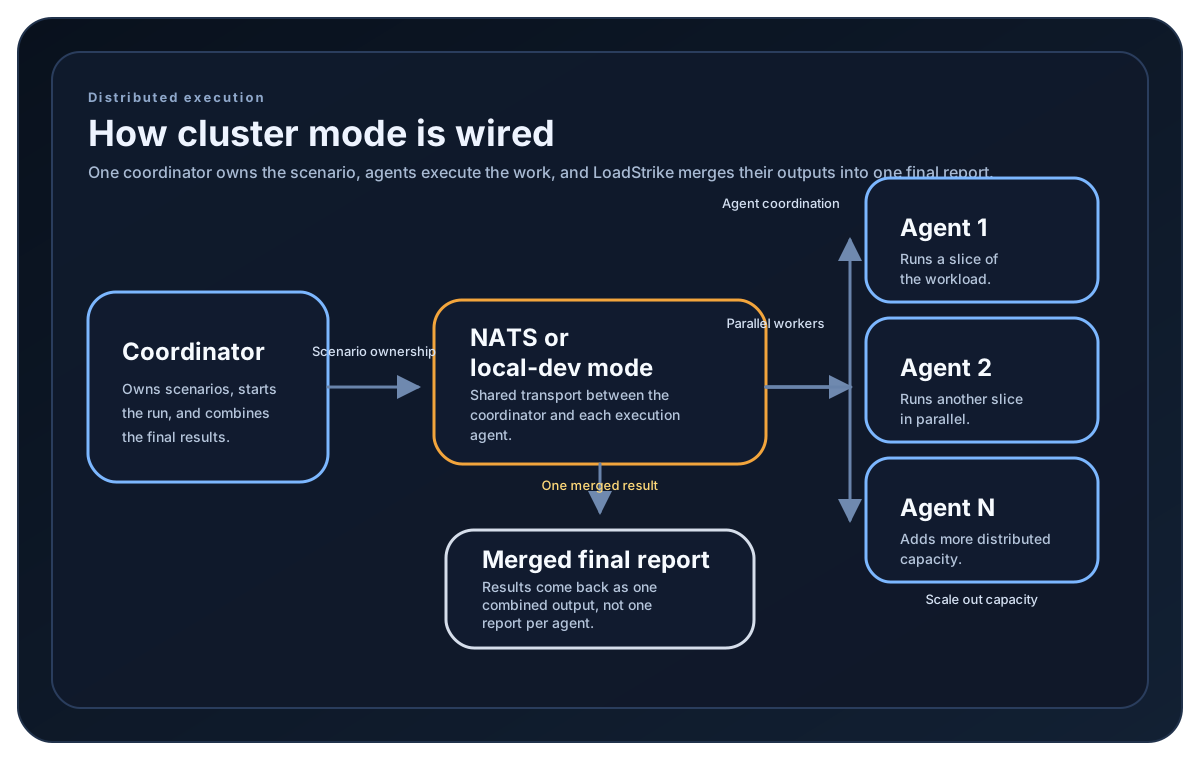
Cluster mode lets one coordinator orchestrate the run while one or more agents execute the assigned scenarios. The coordinator merges every node result into one final report. In the current Go release, the supported cluster path is a coordinator managing local child agents; direct Agent and distributed Go runs are unavailable.
When to use it
Use cluster mode when one machine is not enough for the desired load, when browser workloads need to be spread out, or when you want to model separate source and destination roles across nodes.
What makes nodes join the same run
ClusterId must match across the coordinator and agents. AgentGroup is optional but useful when one coordinator should target a specific pool of agents.
What the coordinator still needs
The coordinator still needs the registered scenarios, the expected AgentsCount, the node role, a valid runner key, and a transport for coordinator-agent communication such as NATS or the local-dev cluster mode.
Cluster setup samples
Distributed-capable SDK tabs show separate coordinator and agent processes. The Go tab instead shows the currently supported local coordinator path with coordinator-managed child agents; direct Agent and distributed Go runs are unavailable.
If you run these examples locally, add a valid runner key before execution starts. Set it with WithRunnerKey("...") or the config key LoadStrike:RunnerKey.
Coordinator Setup
using LoadStrike;

var clusterId = "orders-cluster";
var agentGroup = "perf-agents";
var natsUrl = "nats://nats.example.internal:4222";

var submitOrdersScenario = LoadStrikeScenario.Create(
        "submit-orders",
        _ => Task.FromResult(LoadStrikeResponse.Ok(statusCode: "200")))
    .WithLoadSimulations(LoadStrikeSimulation.IterationsForConstant(1, 2));

var waitForCompletionScenario = LoadStrikeScenario.Create(
        "wait-for-completion",
        _ => Task.FromResult(LoadStrikeResponse.Ok(statusCode: "200")))
    .WithLoadSimulations(LoadStrikeSimulation.IterationsForConstant(1, 2));

var agentContext = LoadStrikeRunner
    .RegisterScenarios(submitOrdersScenario, waitForCompletionScenario)
    .WithNodeType(LoadStrikeNodeType.Agent)
    .WithClusterId(clusterId)
    .WithAgentGroup(agentGroup)
    .WithAgentTargetScenarios("wait-for-completion")
    .WithNatsServerUrl(natsUrl);

// Start this on each agent machine or process first.
agentContext.Run();

var coordinatorContext = LoadStrikeRunner
    .RegisterScenarios(submitOrdersScenario, waitForCompletionScenario)
    .WithNodeType(LoadStrikeNodeType.Coordinator)
    .WithClusterId(clusterId)
    .WithAgentGroup(agentGroup)
    .WithAgentsCount(2)
    .WithCoordinatorTargetScenarios("submit-orders")
    .WithAgentTargetScenarios("wait-for-completion")
    .WithNatsServerUrl(natsUrl)
    .WithRunnerKey("rkr_your_remote_runner_key");

// Start this once after the agents are listening.
coordinatorContext.Run();
package main
import loadstrike "loadstrike.com/sdk/go"
func main() {
loadstrike.RegisterScenarios(loadstrike.Empty("cluster-demo")).
WithRunnerKey("rkl_your_local_runner_key").
WithClusterId("cluster-orders-dev").
WithNatsServerUrl("nats://127.0.0.1:4222"). // Start NATS locally first.
WithNodeType(loadstrike.NodeTypeCoordinator).
WithAgentsCount(2).
EnableLocalDevCluster(true).
Run()
}import com.loadstrike.runtime.LoadStrikeRuntime.LoadStrikeResponse;
import com.loadstrike.runtime.LoadStrikeRuntime.LoadStrikeNodeType;
import com.loadstrike.runtime.LoadStrikeRuntime.LoadStrikeRunner;
import com.loadstrike.runtime.LoadStrikeRuntime.LoadStrikeScenario;
import com.loadstrike.runtime.LoadStrikeRuntime.LoadStrikeSimulation;
String clusterId = "orders-cluster";
String agentGroup = "perf-agents";
String natsUrl = "nats://nats.example.internal:4222";
var submitOrdersScenario = LoadStrikeScenario
.create("submit-orders", ignoredContext -> LoadStrikeResponse.ok("200"))
.withLoadSimulations(LoadStrikeSimulation.iterationsForConstant(1, 2));
var waitForCompletionScenario = LoadStrikeScenario
.create("wait-for-completion", ignoredContext -> LoadStrikeResponse.ok("200"))
.withLoadSimulations(LoadStrikeSimulation.iterationsForConstant(1, 2));
var agentRunner = LoadStrikeRunner
.registerScenarios(submitOrdersScenario, waitForCompletionScenario)
.withNodeType(LoadStrikeNodeType.Agent)
.buildContext()
.withClusterId(clusterId)
.withAgentGroup(agentGroup)
.withAgentTargetScenarios("wait-for-completion")
.withNatsServerUrl(natsUrl);
// Start this on each agent machine or process first.
agentRunner.run();
var coordinatorRunner = LoadStrikeRunner
.registerScenarios(submitOrdersScenario, waitForCompletionScenario)
.withNodeType(LoadStrikeNodeType.Coordinator)
.buildContext()
.withClusterId(clusterId)
.withAgentGroup(agentGroup)
.withAgentsCount(2)
.withCoordinatorTargetScenarios("submit-orders")
.withAgentTargetScenarios("wait-for-completion")
.withNatsServerUrl(natsUrl)
.withRunnerKey("rkr_your_remote_runner_key");
// Start this once after the agents are listening.
coordinatorRunner.run();from loadstrike_sdk import LoadStrikeResponse, LoadStrikeRunner, LoadStrikeScenario, LoadStrikeSimulation
cluster_id = "orders-cluster"
agent_group = "perf-agents"
nats_url = "nats://nats.example.internal:4222"
submit_orders_scenario = (
LoadStrikeScenario.create("submit-orders", lambda _: LoadStrikeResponse.ok("200"))
.with_load_simulations(LoadStrikeSimulation.iterations_for_constant(1, 2))
)
wait_for_completion_scenario = (
LoadStrikeScenario.create("wait-for-completion", lambda _: LoadStrikeResponse.ok("200"))
.with_load_simulations(LoadStrikeSimulation.iterations_for_constant(1, 2))
)
agent_runner = (
LoadStrikeRunner.register_scenarios(submit_orders_scenario, wait_for_completion_scenario)
.with_node_type("Agent")
.with_cluster_id(cluster_id)
.with_agent_group(agent_group)
.with_agent_target_scenarios("wait-for-completion")
.with_nats_server_url(nats_url)
)
# Start this on each agent machine or process first.
agent_runner.run()
coordinator_runner = (
LoadStrikeRunner.register_scenarios(submit_orders_scenario, wait_for_completion_scenario)
.with_node_type("Coordinator")
.with_cluster_id(cluster_id)
.with_agent_group(agent_group)
.with_agents_count(2)
.with_coordinator_target_scenarios("submit-orders")
.with_agent_target_scenarios("wait-for-completion")
.with_nats_server_url(nats_url)
.with_runner_key("rkr_your_remote_runner_key")
)
# Start this once after the agents are listening.
coordinator_runner.run()import {
LoadStrikeResponse,
LoadStrikeRunner,
LoadStrikeScenario,
LoadStrikeSimulation
} from "@loadstrike/loadstrike-sdk";
const clusterId = "orders-cluster";
const agentGroup = "perf-agents";
const natsUrl = "nats://nats.example.internal:4222";
const submitOrdersScenario = LoadStrikeScenario
.create("submit-orders", async () => LoadStrikeResponse.ok("200"))
.withLoadSimulations(LoadStrikeSimulation.iterationsForConstant(1, 2));
const waitForCompletionScenario = LoadStrikeScenario
.create("wait-for-completion", async () => LoadStrikeResponse.ok("200"))
.withLoadSimulations(LoadStrikeSimulation.iterationsForConstant(1, 2));
const agentRunner = LoadStrikeRunner
.registerScenarios(submitOrdersScenario, waitForCompletionScenario)
.withNodeType("Agent")
.withClusterId(clusterId)
.withAgentGroup(agentGroup)
.withAgentTargetScenarios("wait-for-completion")
.withNatsServerUrl(natsUrl);
// Start this on each agent machine or process first.
await agentRunner.run();
const coordinatorRunner = LoadStrikeRunner
.registerScenarios(submitOrdersScenario, waitForCompletionScenario)
.withNodeType("Coordinator")
.withClusterId(clusterId)
.withAgentGroup(agentGroup)
.withAgentsCount(2)
.withCoordinatorTargetScenarios("submit-orders")
.withAgentTargetScenarios("wait-for-completion")
.withNatsServerUrl(natsUrl)
.withRunnerKey("rkr_your_remote_runner_key");
// Start this once after the agents are listening.
await coordinatorRunner.run();const {
LoadStrikeResponse,
LoadStrikeRunner,
LoadStrikeScenario,
LoadStrikeSimulation
} = require("@loadstrike/loadstrike-sdk");
(async () => {
const clusterId = "orders-cluster";
const agentGroup = "perf-agents";
const natsUrl = "nats://nats.example.internal:4222";
const submitOrdersScenario = LoadStrikeScenario
.create("submit-orders", async () => LoadStrikeResponse.ok("200"))
.withLoadSimulations(LoadStrikeSimulation.iterationsForConstant(1, 2));
const waitForCompletionScenario = LoadStrikeScenario
.create("wait-for-completion", async () => LoadStrikeResponse.ok("200"))
.withLoadSimulations(LoadStrikeSimulation.iterationsForConstant(1, 2));
const agentRunner = LoadStrikeRunner
.registerScenarios(submitOrdersScenario, waitForCompletionScenario)
.withNodeType("Agent")
.withClusterId(clusterId)
.withAgentGroup(agentGroup)
.withAgentTargetScenarios("wait-for-completion")
.withNatsServerUrl(natsUrl);
// Start this on each agent machine or process first.
await agentRunner.run();
const coordinatorRunner = LoadStrikeRunner
.registerScenarios(submitOrdersScenario, waitForCompletionScenario)
.withNodeType("Coordinator")
.withClusterId(clusterId)
.withAgentGroup(agentGroup)
.withAgentsCount(2)
.withCoordinatorTargetScenarios("submit-orders")
.withAgentTargetScenarios("wait-for-completion")
.withNatsServerUrl(natsUrl)
.withRunnerKey("rkr_your_remote_runner_key");
// Start this once after the agents are listening.
await coordinatorRunner.run();
})();Cluster role fields
Selects SingleNode, Coordinator, or Agent behavior where supported. Current Go cluster runs use Coordinator with local child agents; a direct Go Agent Run is unsupported.
Required shared cluster identity across coordinator and agents.
Optional grouping field that lets a coordinator target a specific agent pool.
Coordinator-only expected agent count. The value must be greater than zero.
Points to the reachable NATS server used for cluster coordination. Go local coordinator mode also requires this value; it does not make a direct Go Agent Run available.
Starts coordinator-managed in-process child agents. This is the supported clustered path in the current Go release and is required for clustered Go V2, but single-node Go V2 does not need it. It does not embed or start NATS; start NATS separately and configure its URL.