
Data Partition
Data partitioning helps clustered runs split test data without overlap. Use it when each node should work on a different slice of the dataset.
Matching docs
Search across docs titles, summaries, groups, and section headings.
Use Up and Down Arrow to move through results, then press Enter to open the active page.
No indexed docs matched that search. Try a broader term or open the docs hub.
What this page helps you do
What this page helps you do
Data partitioning helps clustered runs split test data without overlap. Use it when each node should work on a different slice of the dataset.
Who this is for
Teams moving from one machine to coordinator-and-agent execution or tighter workload targeting.
Prerequisites
- A scenario that already works in a single-node run
By the end
A clearer cluster topology and the fields that must line up across nodes.
Use this page when
Use this page when execution topology, partitioning, or targeting changes how the run should be distributed.
Visual guide
Guide
What partition data is for
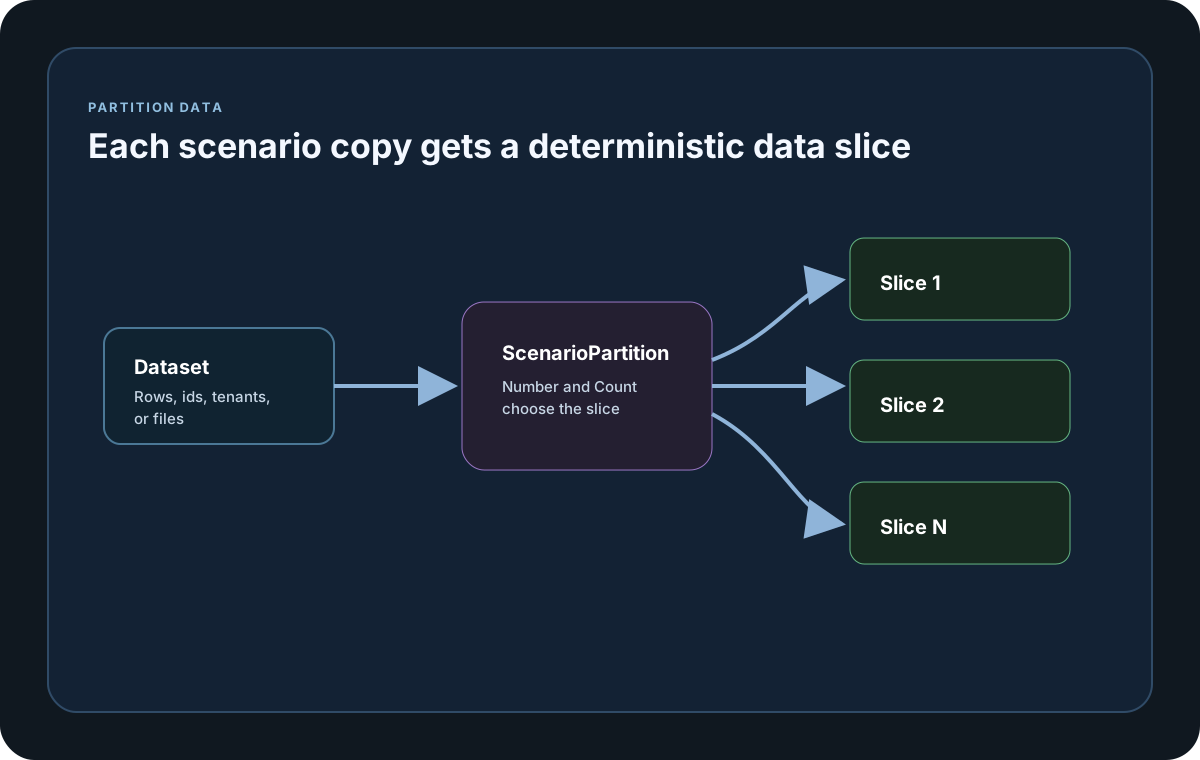
Partition data prevents every node or scenario copy from sending the same dataset rows. It is the simplest way to avoid duplicate test data, duplicate ids, and duplicate writes during clustered runs.
Where the values come from
LoadStrikeScenarioInitContext.ScenarioPartition exposes Number and Count. Use those values to divide files, database rows, tenant lists, or generated ids across copies or nodes.
What a safe strategy looks like
Treat Number as the current shard index and Count as the total shard count. Keep the partition logic deterministic so reruns and debugging sessions choose the same slice of data for the same partition.
Cluster setup samples
Use these samples to compare the documented cluster settings and helpers before you move the workload onto coordinator and agent nodes.
If you run these examples locally, add a valid runner key before execution starts. Set it with WithRunnerKey("...") or the config key LoadStrike:RunnerKey.
Partition Test Data by ScenarioPartition
using LoadStrike;

var allUsers = Enumerable.Range(1, 10000).Select(i => $"user-{i}").ToArray();
var partitions = new ConcurrentDictionary<string, string[]>();

var scenario = LoadStrikeScenario.Create("partitioned-users", context =>
    {
        var shard = partitions[context.ScenarioInfo.InstanceId];
        var userId = shard[context.Random.Next(shard.Length)];
        return Task.FromResult(LoadStrikeResponse.Ok(statusCode: "200", message: userId));
    })
    .WithInit(init =>
    {
        var p = init.ScenarioPartition;
        partitions[init.ScenarioInfo.InstanceId] = allUsers.Where((_, i) => i % p.Count == p.Number).ToArray();
        return Task.CompletedTask;
    })
    .WithLoadSimulations(LoadStrikeSimulation.KeepConstant(4, TimeSpan.FromSeconds(20)));

LoadStrikeRunner.RegisterScenarios(scenario)
    .WithRunnerKey("rkl_your_local_runner_key")
    .Run();
package main
import loadstrike "loadstrike.com/sdk/go"
func main() {
scenario := loadstrike.Empty("partitioned-data").
WithInitAsync(func(ctx loadstrike.LoadStrikeScenarioInitContext) loadstrike.LoadStrikeTask {
rowsCounter := loadstrike.Metric.CreateCounter("partition_rows_total", "rows")
ctx.RegisterMetric(rowsCounter)
partition := ctx.ScenarioPartition()
ctx.Logger().Information("partition %d of %d", partition.Number, partition.Count)
return loadstrike.CompletedTask()
})
loadstrike.RegisterScenarios(scenario).Run()
}import java.util.concurrent.ConcurrentHashMap;
import java.util.stream.IntStream;
import com.loadstrike.runtime.LoadStrikeRuntime.LoadStrikeResponse;
import com.loadstrike.runtime.LoadStrikeRuntime.LoadStrikeRunner;
import com.loadstrike.runtime.LoadStrikeRuntime.LoadStrikeScenario;
import com.loadstrike.runtime.LoadStrikeRuntime.LoadStrikeSimulation;
var allUsers = IntStream.rangeClosed(1, 10_000).mapToObj(i -> "user-" + i).toList();
var partitions = new ConcurrentHashMap<String, java.util.List<String>>();
var scenario = LoadStrikeScenario.create("partitioned-users", context -> {
var shard = partitions.get(context.scenarioInfo.getInstanceId());
var userId = shard.get(context.random.nextInt(shard.size()));
return LoadStrikeResponse.ok(userId);
})
.withInit(init -> {
int number = init.scenarioPartition.getNumber();
int count = init.scenarioPartition.getCount();
var shard = IntStream.range(0, allUsers.size())
.filter(index -> index % count == number)
.mapToObj(allUsers::get)
.toList();
partitions.put(init.scenarioInfo.getInstanceId(), shard);
return null;
})
.withLoadSimulations(LoadStrikeSimulation.keepConstant(4, 20d));
LoadStrikeRunner
.registerScenarios(scenario)
.withRunnerKey("rkl_your_local_runner_key")
.run();from loadstrike_sdk import LoadStrikeResponse, LoadStrikeRunner, LoadStrikeScenario, LoadStrikeSimulation
all_users = [f"user-{index}" for index in range(1, 10001)]
partitions = {}
def init_partition(init_context):
partition = init_context.scenario_partition
shard = [user for index, user in enumerate(all_users) if index % partition.count == partition.number]
partitions[init_context.scenario_info.instance_id] = shard
scenario = (
LoadStrikeScenario.create(
"partitioned-users",
lambda context: LoadStrikeResponse.ok(
message=partitions[context.scenario_info.instance_id][context.random.Next(0, len(partitions[context.scenario_info.instance_id]))]
),
)
.with_init(init_partition)
.with_load_simulations(LoadStrikeSimulation.keep_constant(4, 20))
)
LoadStrikeRunner.register_scenarios(scenario) \
.with_runner_key("rkl_your_local_runner_key") \
.run()import { LoadStrikeResponse, LoadStrikeRunner, LoadStrikeScenario, LoadStrikeSimulation } from "@loadstrike/loadstrike-sdk";
const allUsers = Array.from({ length: 10_000 }, (_, index) => `user-${index + 1}`);
const partitions = new Map<string, string[]>();
const scenario = LoadStrikeScenario
.create("partitioned-users", async (context) => {
const shard = partitions.get(context.scenarioInfo.instanceId) ?? [];
const userId = shard[context.random.Next(0, shard.length)];
return LoadStrikeResponse.ok(undefined, undefined, userId);
})
.withInit((initContext) => {
const { Number, Count } = initContext.ScenarioPartition;
const shard = allUsers.filter((_, index) => index % Count === Number);
partitions.set(initContext.scenarioInfo.instanceId, shard);
})
.withLoadSimulations(LoadStrikeSimulation.keepConstant(4, 20));
await LoadStrikeRunner
.registerScenarios(scenario)
.withRunnerKey("rkl_your_local_runner_key")
.run();const { LoadStrikeResponse, LoadStrikeRunner, LoadStrikeScenario, LoadStrikeSimulation } = require("@loadstrike/loadstrike-sdk");
(async () => {
const allUsers = Array.from({ length: 10_000 }, (_, index) => `user-${index + 1}`);
const partitions = new Map();
const scenario = LoadStrikeScenario
.create("partitioned-users", async (context) => {
const shard = partitions.get(context.scenarioInfo.instanceId) || [];
const userId = shard[context.random.Next(0, shard.length)];
return LoadStrikeResponse.ok(undefined, undefined, userId);
})
.withInit((initContext) => {
const { Number, Count } = initContext.ScenarioPartition;
const shard = allUsers.filter((_, index) => index % Count === Number);
partitions.set(initContext.scenarioInfo.instanceId, shard);
})
.withLoadSimulations(LoadStrikeSimulation.keepConstant(4, 20));
await LoadStrikeRunner
.registerScenarios(scenario)
.withRunnerKey("rkl_your_local_runner_key")
.run();
})();Partition-related fields
Zero-based shard number for the current scenario instance or node.
Total shard count available for the scenario run.
A common pattern is rowIndex % Count == Number so every row is assigned to exactly one shard.
Append partition number and invocation number to generated ids when uniqueness matters across nodes.
shard(i) => i % partition.Count == partition.Number