
Scenario
A scenario is the main unit of work in LoadStrike. Use it to define one transaction or workflow you want to run under load.
Matching docs
Search across docs titles, summaries, groups, and section headings.
Use Up and Down Arrow to move through results, then press Enter to open the active page.
No indexed docs matched that search. Try a broader term or open the docs hub.
What this page helps you do
What this page helps you do
A scenario is the main unit of work in LoadStrike. Use it to define one transaction or workflow you want to run under load.
Who this is for
Engineers writing or reviewing scenario code in one of the supported SDKs.
Prerequisites
- A scenario or runtime surface you want to wire correctly in code
By the end
The exact SDK surface you need for this part of the runtime.
Use this page when
Use this reference when you already know the workflow and need the exact Scenario API surface in code.
Visual guide
Guide
What a scenario is
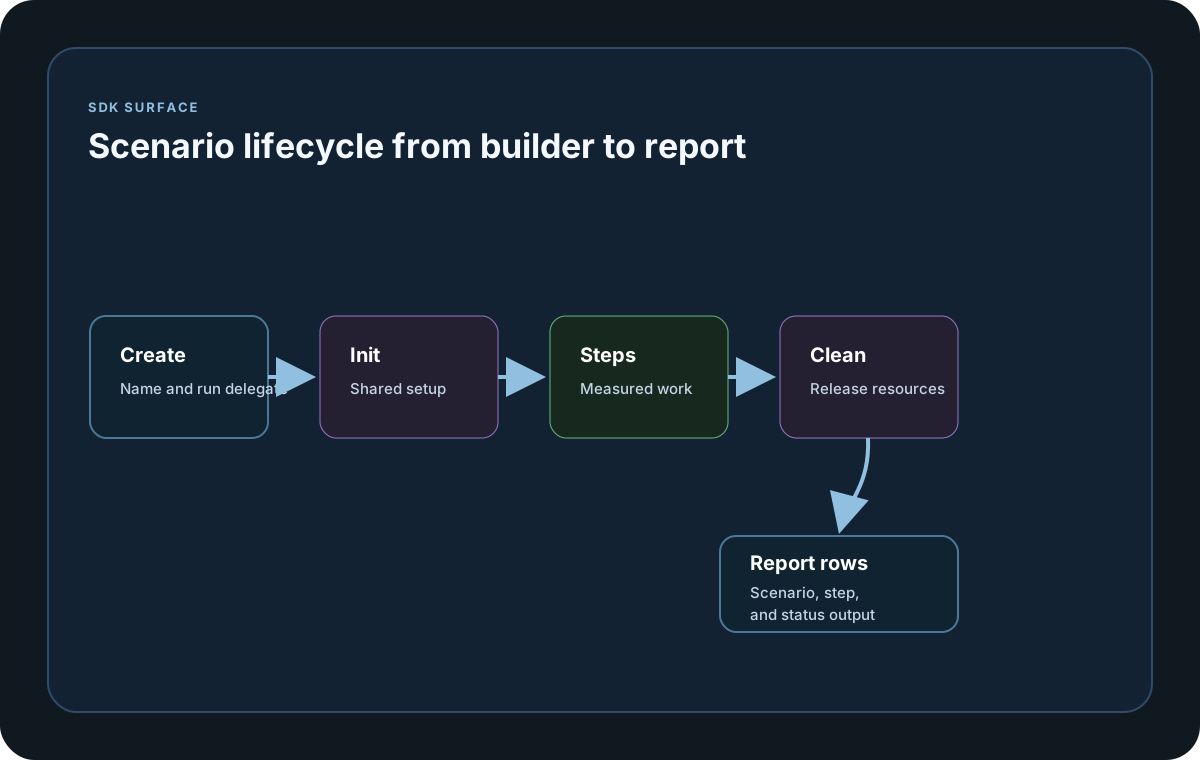
A scenario is the executable workload unit in LoadStrike. It owns the scenario name, the run delegate, optional init and clean hooks, and the load simulations and thresholds that shape execution.
When to reach for Create or Empty
Use Create when you already know the runnable workflow. Use Empty when another helper, such as cross-platform tracking configuration, will attach the actual run behavior later.
What changes scenario behavior
Scenario methods control lifecycle hooks, load shape, thresholds, warmup, restart-on-fail behavior for iteration mode, fail-count boundaries, and cluster weighting. Each method returns a new scenario instance so you can chain configuration fluently.
SDK reference samples
Use these SDK samples to compare how Scenario is exposed across the supported languages before you wire it into a full scenario.
If you run these examples locally, add a valid runner key before execution starts. Set it with WithRunnerKey("...") or the config key LoadStrike:RunnerKey.
Scenario
using LoadStrike;

HttpClient? client = null;

var scenario = LoadStrikeScenario.CreateAsync("submit-orders", async context =>
{
    var step = await LoadStrikeStep.Run<string>("POST /orders", context, async () =>
    {
        var payload = new
        {
            orderId = $"ord-{context.InvocationNumber}",
            amount = 49.95m
        };

        using var response = await client!.PostAsJsonAsync("/orders", payload);
        return response.IsSuccessStatusCode
            ? LoadStrikeResponse.Ok<string>(statusCode: ((int)response.StatusCode).ToString())
            : LoadStrikeResponse.Fail<string>(statusCode: ((int)response.StatusCode).ToString());
    });

    return step.AsReply();
})
.WithInitAsync(initContext =>
{
    client = new HttpClient
    {
        BaseAddress = new Uri("https://api.example.com")
    };
    return Task.CompletedTask;
})
.WithCleanAsync(cleanContext =>
{
    client?.Dispose();
    client = null;
    return Task.CompletedTask;
})
.WithLoadSimulations(LoadStrikeSimulation.KeepConstant(2, TimeSpan.FromSeconds(15)));

LoadStrikeRunner.RegisterScenarios(scenario)
    .WithRunnerKey("rkl_your_local_runner_key")
    .Run();
package main
import loadstrike "loadstrike.com/sdk/go"
func main() {
scenario := loadstrike.CreateScenarioAsync("orders", func(ctx loadstrike.LoadStrikeScenarioContext) loadstrike.LoadStrikeValueTask[loadstrike.LoadStrikeReply] {
return loadstrike.TaskFromResult(loadstrike.LoadStrikeResponse.Ok("202"))
}).
WithInitAsync(func(ctx loadstrike.LoadStrikeScenarioInitContext) loadstrike.LoadStrikeTask {
environment, _ := ctx.GlobalCustomSettings().Lookup("environment")
ctx.Logger().Information("initializing %s for %s in %v", ctx.ScenarioInfo().ScenarioName, ctx.TestInfo().TestSuite, environment)
return loadstrike.CompletedTask()
}).
WithCleanAsync(func(ctx loadstrike.LoadStrikeScenarioInitContext) loadstrike.LoadStrikeTask {
ctx.Logger().Information("cleaning %s", ctx.ScenarioInfo().ScenarioName)
return loadstrike.CompletedTask()
}).
WithLoadSimulations(loadstrike.LoadStrikeSimulation.KeepConstant(2, loadstrike.DurationFromSeconds(15)))
loadstrike.RegisterScenarios(scenario).
WithGlobalCustomSettings(map[string]any{"environment": "staging"}).
WithRunnerKey("rkl_your_local_runner_key").
Run()
}import java.net.URI;
import java.net.http.HttpClient;
import java.net.http.HttpRequest;
import java.net.http.HttpResponse;
import java.util.concurrent.CompletableFuture;
import java.util.concurrent.atomic.AtomicReference;
import com.loadstrike.runtime.LoadStrikeRuntime.LoadStrikeResponse;
import com.loadstrike.runtime.LoadStrikeRuntime.LoadStrikeRunner;
import com.loadstrike.runtime.LoadStrikeRuntime.LoadStrikeScenario;
import com.loadstrike.runtime.LoadStrikeRuntime.LoadStrikeSimulation;
import com.loadstrike.runtime.LoadStrikeRuntime.LoadStrikeStep;
var clientRef = new AtomicReference<HttpClient>();
var scenario = LoadStrikeScenario
.createAsync("submit-orders", context -> {
var client = clientRef.get();
var reply = LoadStrikeStep.run("POST /orders", context, () -> {
String body = "{\"orderId\":\"ord-" + context.invocationNumber + "\",\"amount\":49.95}";
var request = HttpRequest.newBuilder(URI.create("https://api.example.com/orders"))
.header("Content-Type", "application/json")
.POST(HttpRequest.BodyPublishers.ofString(body))
.build();
var response = client.sendAsync(request, HttpResponse.BodyHandlers.ofString()).join();
return response.statusCode() < 400
? LoadStrikeResponse.ok(Integer.toString(response.statusCode()))
: LoadStrikeResponse.fail(Integer.toString(response.statusCode()));
}).asReply();
return CompletableFuture.completedFuture(reply);
})
.withInitAsync(initContext -> {
clientRef.set(HttpClient.newHttpClient());
return CompletableFuture.completedFuture(null);
})
.withCleanAsync(cleanContext -> {
clientRef.set(null);
return CompletableFuture.completedFuture(null);
})
.withLoadSimulations(LoadStrikeSimulation.keepConstant(2, 15d));
LoadStrikeRunner
.registerScenarios(scenario)
.withRunnerKey("rkl_your_local_runner_key")
.run();import requests
from loadstrike_sdk import LoadStrikeResponse, LoadStrikeRunner, LoadStrikeScenario, LoadStrikeSimulation, LoadStrikeStep
resources = {}
def init_context(init_context):
resources["session"] = requests.Session()
def clean_context(clean_context):
resources.pop("session").close()
def run_orders(context):
session = resources["session"]
def run_step():
payload = {
"orderId": f"ord-{context.invocation_number}",
"amount": 49.95,
}
response = session.post("https://api.example.com/orders", json=payload, timeout=15)
if response.ok:
return LoadStrikeResponse.ok(str(response.status_code))
return LoadStrikeResponse.fail(str(response.status_code))
return LoadStrikeStep.run("POST /orders", context, run_step).as_reply()
scenario = (
LoadStrikeScenario.create_async("submit-orders", run_orders)
.with_init_async(init_context)
.with_clean_async(clean_context)
.with_load_simulations(LoadStrikeSimulation.keep_constant(2, 15))
)
LoadStrikeRunner.register_scenarios(scenario) \
.with_runner_key("rkl_your_local_runner_key") \
.run()import {
LoadStrikeRunner,
LoadStrikeResponse,
LoadStrikeScenario,
LoadStrikeSimulation,
LoadStrikeStep
} from "@loadstrike/loadstrike-sdk";
let baseUrl = "";
const scenario = LoadStrikeScenario
.createAsync("submit-orders", async (context) => {
const step = await LoadStrikeStep.run("POST /orders", context, async () => {
const response = await fetch(`${baseUrl}/orders`, {
method: "POST",
headers: { "content-type": "application/json" },
body: JSON.stringify({
orderId: `ord-${context.invocationNumber}`,
amount: 49.95
})
});
return response.ok
? LoadStrikeResponse.ok(String(response.status))
: LoadStrikeResponse.fail(String(response.status));
});
return step.asReply();
})
.withInitAsync(async () => {
baseUrl = "https://api.example.com";
})
.withCleanAsync(async () => {
baseUrl = "";
})
.withLoadSimulations(LoadStrikeSimulation.keepConstant(2, 15));
await LoadStrikeRunner
.registerScenarios(scenario)
.withRunnerKey("rkl_your_local_runner_key")
.run();const {
LoadStrikeRunner,
LoadStrikeResponse,
LoadStrikeScenario,
LoadStrikeSimulation,
LoadStrikeStep
} = require("@loadstrike/loadstrike-sdk");
(async () => {
let baseUrl = "";
const scenario = LoadStrikeScenario
.createAsync("submit-orders", async (context) => {
const step = await LoadStrikeStep.run("POST /orders", context, async () => {
const response = await fetch(`${baseUrl}/orders`, {
method: "POST",
headers: { "content-type": "application/json" },
body: JSON.stringify({
orderId: `ord-${context.invocationNumber}`,
amount: 49.95
})
});
return response.ok
? LoadStrikeResponse.ok(String(response.status))
: LoadStrikeResponse.fail(String(response.status));
});
return step.asReply();
})
.withInitAsync(async () => {
baseUrl = "https://api.example.com";
})
.withCleanAsync(async () => {
baseUrl = "";
})
.withLoadSimulations(LoadStrikeSimulation.keepConstant(2, 15));
await LoadStrikeRunner
.registerScenarios(scenario)
.withRunnerKey("rkl_your_local_runner_key")
.run();
})();Important scenario methods and parameters
These are the public scenario methods a beginner will actually use when shaping execution.
Creates an executable scenario. name is required and run is the delegate that performs the workload.
Convenience alias for Create when you want the async intent to be obvious in code. It uses the same async-capable runtime behavior underneath.
Creates a named scenario shell for helper APIs that attach the actual runtime behavior later.
Runs once per scenario instance before steady execution. Use it for shared clients, seeded data, browser setup, or metric registration.
Convenience alias for WithInit when you want an explicit async lifecycle name. The handler behavior is the same as WithInit.
Runs once per scenario instance after execution finishes. Use it to release resources created by WithInit.
Convenience alias for WithClean when you want an explicit async cleanup name. The handler behavior is the same as WithClean.
Required when you want the scenario to run under a defined traffic model. Pass the full ordered simulation list each time because the collection is replaced.
Attaches pass or fail rules that inspect scenario, step, or custom metric stats while the run is executing.
Stops the scenario after the configured number of failures is reached.
Disables the default warmup behavior when you want measurement to begin immediately.
Overrides the warmup duration for scenarios that need a longer or shorter stabilization phase.
Controls whether failed iteration-mode executions are retried, subject to the runner-level restart-attempt limit.
Changes scenario distribution weight during clustered execution when some scenarios should receive more work than others.
Each WithLoadSimulations or WithThresholds call replaces the current collection, so pass the full ordered set you want to keep.