
CLI Arguments
CLI arguments let you change a run at launch time without editing code. They are useful for CI, containers, and reusable test hosts.
Matching docs
Search across docs titles, summaries, groups, and section headings.
Use Up and Down Arrow to move through results, then press Enter to open the active page.
No indexed docs matched that search. Try a broader term or open the docs hub.
What this page helps you do
What this page helps you do
CLI arguments let you change a run at launch time without editing code. They are useful for CI, containers, and reusable test hosts.
Who this is for
Engineers writing or reviewing scenario code in one of the supported SDKs.
Prerequisites
- A scenario or runtime surface you want to wire correctly in code
By the end
The exact SDK surface you need for this part of the runtime.
Use this page when
Use this reference when you already know the workflow and need the exact CLI Arguments API surface in code.
Visual guide
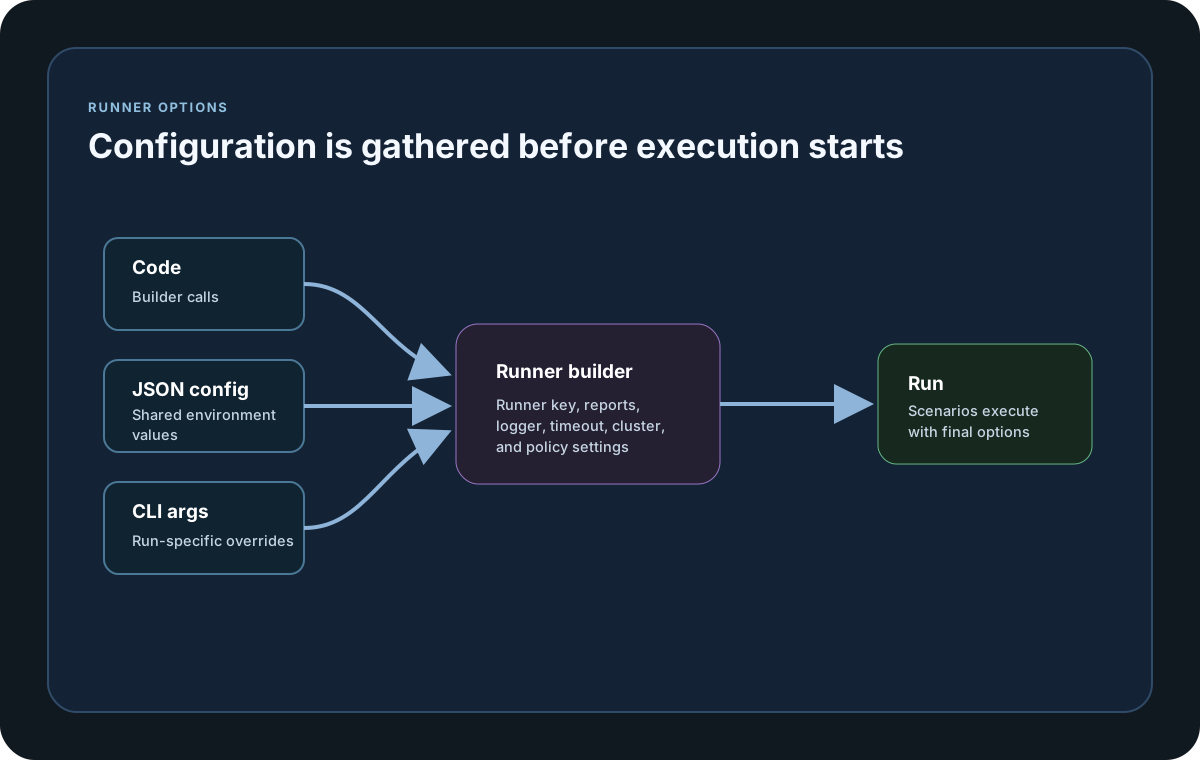
Guide
Format
CLI availability is SDK-specific. Where a key is supported, use `--key=value` syntax; arguments without `--` and key-only flags are ignored. Consult the language tab before relying on a launch-time override.
Supported Arguments
The wider SDK surface includes config paths, run identity, reports, cluster settings, scenario targeting, logging, restart attempts, and licensing, but not every SDK accepts every key from CLI. Pass only the keys documented for the executable, script, or container command that launches the scenario host.
Go CLI Subset
Go Run(args) currently recognizes `--restartiterationmaxattempts`, `--sinkretrycount`, and `--sinkretrybackoffms`, each with a non-negative whole number. Configure Go identity, reports, cluster settings, runner key, logging, and other values through fluent methods or LoadConfig. A literal key-only token is ignored because Go requires `--name=value`. Normal license validation remains required and cannot be bypassed through CLI arguments.
When To Use
CLI arguments are most useful when the same test host should run in multiple environments without code changes, such as CI pipelines, container jobs, or shared runtime images.
SDK reference samples
Use these SDK samples to compare how CLI Arguments is exposed across the supported languages before you wire it into a full scenario.
If you run these examples locally, add a valid runner key before execution starts. Set it with WithRunnerKey("...") or the config key LoadStrike:RunnerKey.
CLI Run Example
dotnet run --project tests/LoadStrike.PerformanceTests -- \
  --testsuite=smoke \
  --testname=orders-http-to-kafka \
  --targetscenarios=orders-http-to-kafka \
  --reportfolder=./reports \
  --reportformats=html,csv \
  --runnerkey=rkl_your_local_runner_key
go run ./cmd/performance-tests -- \
--testsuite=smoke \
--testname=orders-http-to-kafka \
--targetscenarios=orders-http-to-kafka \
--reportfolder=./reports \
--reportformats=html,csv \
--runnerkey=rkl_your_local_runner_keymvn exec:java \
-Dexec.mainClass=com.example.performance.OrdersLoadTest \
-Dexec.args="--testsuite=smoke --testname=orders-http-to-kafka --targetscenarios=orders-http-to-kafka --reportfolder=./reports --reportformats=html,csv --runnerkey=rkl_your_local_runner_key"python tests/performance/orders_load_test.py \
--testsuite=smoke \
--testname=orders-http-to-kafka \
--targetscenarios=orders-http-to-kafka \
--reportfolder=./reports \
--reportformats=html,csv \
--runnerkey=rkl_your_local_runner_keynpx tsx tests/performance/orders-load-test.ts \
--testsuite=smoke \
--testname=orders-http-to-kafka \
--targetscenarios=orders-http-to-kafka \
--reportfolder=./reports \
--reportformats=html,csv \
--runnerkey=rkl_your_local_runner_keynode tests/performance/orders-load-test.js \
--testsuite=smoke \
--testname=orders-http-to-kafka \
--targetscenarios=orders-http-to-kafka \
--reportfolder=./reports \
--reportformats=html,csv \
--runnerkey=rkl_your_local_runner_keySupported CLI arguments
CLI support is language-specific. The wider list below applies only where the selected SDK documents that key. Go Run(args) recognizes a smaller explicit subset.
Recognizes `--restartiterationmaxattempts`, `--sinkretrycount`, and `--sinkretrybackoffms` with non-negative whole-number values. Configure other Go settings with fluent methods or LoadConfig. A key-only token is ignored, and normal license validation remains required.
Load normal runtime config or infra config from a JSON file before the run starts.
Override run identity values for one execution without changing the code.
Control local report output and output formats. reportformats uses the same comma-delimited format tokens as JSON config.
Positive millisecond values for realtime reporting cadence and timeout behavior.
Cluster role and transport overrides for one execution.
Comma-delimited scenario filters that change which scenarios run on which roles.
Language-specific logging and runtime overrides. Boolean values must be explicit true or false where supported. Go accepts only restartiterationmaxattempts from this group.
Set the runner key and the license-validation timeout for the current run only.
Arguments must use the --key=value form. Key matching is case-insensitive. Key-only flags are ignored rather than inferred as true.