
Correlation Runtime Controls
Tune correlation runtime behavior, timeout sweeps, and comparison rules when the default matching behavior needs adjustment.
Matching docs
Search across docs titles, summaries, groups, and section headings.
Use Up and Down Arrow to move through results, then press Enter to open the active page.
No indexed docs matched that search. Try a broader term or open the docs hub.
What this page helps you do
What this page helps you do
Tune correlation runtime behavior, timeout sweeps, and comparison rules when the default matching behavior needs adjustment.
Who this is for
Teams controlling runtime behavior, tracking, reporting, licensing, or policy from code, JSON, or CLI settings.
Prerequisites
- A scenario or run configuration that already works locally
By the end
The documented runtime setting or policy surface for this part of the product.
Use this page when
Use this page when runtime behavior changes because of configuration, policy, or execution settings rather than the scenario body itself.
Visual guide
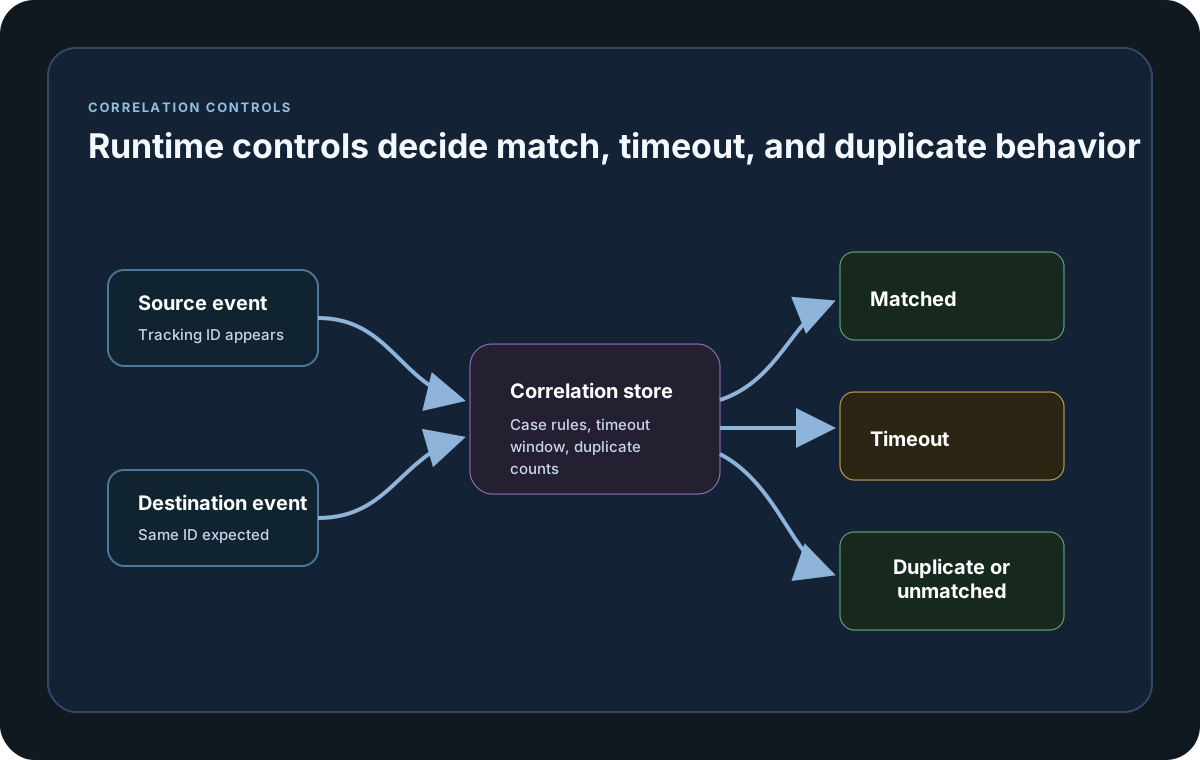
Guide
Execution Toggle
ExecuteOriginalScenarioRun controls whether the original scenario run delegate still executes alongside the tracking runtime in wrapped scenarios. Use it when the scenario should keep its original execution behavior as correlation is added around it.
Correlation Store Helpers
CorrelationStoreConfiguration exposes the in-memory and Redis helper constructors directly on the public SDK surface. Go now publishes the same InMemory() and RedisStore(...) helper names as the other SDKs, so the store selection docs and sample references stay aligned when you switch languages.
Timeout Sweep Settings
TimeoutSweepInterval controls how often timeout scans run, and TimeoutBatchSize controls how many pending items are processed in each sweep cycle. Public SDK helpers also expose sweepTimeoutEntries(...) for detailed timeout batches and preserve FIFO matching across repeated tracking IDs. Time durations must be positive when they are set through endpoint or config contracts.
Value Comparison Controls
TrackingFieldValueCaseSensitive and GatherByFieldValueCaseSensitive both default to true. Turn either one off when matching or grouping should ignore case, while the report still keeps the first-seen original value casing.
Metric Prefix
MetricPrefix controls the naming prefix used for tracking counters and gauges written to the Metrics report section and realtime sinks.
Store TTL
When Redis is used as the correlation store, RedisCorrelationStoreOptions.EntryTtl controls how long correlation entries are retained.
Configuration samples
Use these samples to see how Correlation Runtime Controls is configured in code, JSON, or CLI surfaces where this page documents them.
If you run these examples locally, add a valid runner key before execution starts. Set it with WithRunnerKey("...") or the config key LoadStrike:RunnerKey.
Runtime Controls
using LoadStrike;

var source = new HttpEndpointDefinition
{
    Name = "orders-api",
    Mode = TrafficEndpointMode.Produce,
    TrackingField = TrackingFieldSelector.Parse("header:X-Correlation-Id"),
    Url = "https://api.example.com/orders",
    Method = "POST"
};

var destination = new KafkaEndpointDefinition
{
    Name = "orders-events",
    Mode = TrafficEndpointMode.Consume,
    TrackingField = TrackingFieldSelector.Parse("header:X-Correlation-Id"),
    BootstrapServers = "localhost:9092",
    Topic = "orders.completed",
    ConsumerGroupId = "orders-tests"
};

var tracking = new CrossPlatformTrackingConfiguration
{
    Source = source,
    Destination = destination,
    RunMode = TrackingRunMode.GenerateAndCorrelate,
    CorrelationTimeout = TimeSpan.FromSeconds(15),
    TimeoutSweepInterval = TimeSpan.FromMilliseconds(250),
    TimeoutBatchSize = 200,
    TimeoutCountsAsFailure = true,
    TrackingFieldValueCaseSensitive = false,
    GatherByFieldValueCaseSensitive = false,
    MetricPrefix = "orders_tracking",
    CorrelationStore = CorrelationStoreConfiguration.RedisStore(new RedisCorrelationStoreOptions
    {
        ConnectionString = "localhost:6379",
        KeyPrefix = "loadstrike:orders",
        EntryTtl = TimeSpan.FromMinutes(5)
    })
};

var scenario = CrossPlatformScenarioConfigurator
    .Configure(LoadStrikeScenario.Empty("orders-runtime-controls"), tracking)
    .WithLoadSimulations(LoadStrikeSimulation.Inject(10, TimeSpan.FromSeconds(1), TimeSpan.FromSeconds(20)));

LoadStrikeRunner.RegisterScenarios(scenario)
    .WithRunnerKey("rkl_your_local_runner_key")
    .Run();
package main
import loadstrike "loadstrike.com/sdk/go"
var inMemoryStore = loadstrike.CorrelationStoreConfiguration{}.InMemory()
var redisStore = loadstrike.CorrelationStoreConfiguration{}.RedisStore(loadstrike.RedisCorrelationStoreOptions{
ConnectionString: "redis://127.0.0.1:6379/1",
Database: 1,
KeyPrefix: "orders",
EntryTTLSeconds: 300,
})
var tracking = &loadstrike.TrackingConfigurationSpec{
RunMode: "GenerateAndCorrelate",
CorrelationTimeoutSeconds: 45,
TimeoutSweepIntervalSeconds: 0.5,
TimeoutBatchSize: 100,
TimeoutCountsAsFailure: true,
TrackingFieldValueCaseSensitive: false,
GatherByFieldValueCaseSensitive: false,
ExecuteOriginalScenarioRun: true,
MetricPrefix: "orders",
}
var _ = inMemoryStore
var _ = redisStoreimport com.loadstrike.runtime.CorrelationStoreConfiguration;
import com.loadstrike.runtime.CrossPlatformScenarioConfigurator;
import com.loadstrike.runtime.CrossPlatformTrackingConfiguration;
import com.loadstrike.runtime.HttpEndpointDefinition;
import com.loadstrike.runtime.KafkaEndpointDefinition;
import com.loadstrike.runtime.LoadStrikeCorrelation.TrackingFieldSelector;
import com.loadstrike.runtime.LoadStrikeRuntime.LoadStrikeRunner;
import com.loadstrike.runtime.LoadStrikeRuntime.LoadStrikeScenario;
import com.loadstrike.runtime.LoadStrikeRuntime.LoadStrikeSimulation;
import com.loadstrike.runtime.RedisCorrelationStoreOptions;
import com.loadstrike.runtime.LoadStrikeTransports;
var redis = new RedisCorrelationStoreOptions();
redis.connectionString = "localhost:6379";
redis.keyPrefix = "loadstrike:orders";
redis.entryTtl = java.time.Duration.ofMinutes(5);
var source = new HttpEndpointDefinition();
source.name = "orders-api";
source.mode = LoadStrikeTransports.TrafficEndpointMode.Produce;
source.trackingField = TrackingFieldSelector.parse("header:X-Correlation-Id");
source.url = "https://api.example.com/orders";
source.method = "POST";
var destination = new KafkaEndpointDefinition();
destination.name = "orders-events";
destination.mode = LoadStrikeTransports.TrafficEndpointMode.Consume;
destination.trackingField = TrackingFieldSelector.parse("header:X-Correlation-Id");
destination.bootstrapServers = "localhost:9092";
destination.topic = "orders.completed";
destination.consumerGroupId = "orders-tests";
var tracking = new CrossPlatformTrackingConfiguration();
tracking.source = source;
tracking.destination = destination;
tracking.runMode = LoadStrikeTransports.TrackingRunMode.GenerateAndCorrelate;
tracking.correlationTimeout = java.time.Duration.ofSeconds(15);
tracking.timeoutSweepInterval = java.time.Duration.ofMillis(250);
tracking.timeoutBatchSize = 200;
tracking.timeoutCountsAsFailure = true;
tracking.trackingFieldValueCaseSensitive = false;
tracking.gatherByFieldValueCaseSensitive = false;
tracking.metricPrefix = "orders_tracking";
tracking.correlationStore = CorrelationStoreConfiguration.RedisStore(redis);
var scenario = CrossPlatformScenarioConfigurator.Configure(
LoadStrikeScenario.empty("orders-runtime-controls"),
tracking
).withLoadSimulations(LoadStrikeSimulation.inject(10, 1d, 20d));
LoadStrikeRunner
.registerScenarios(scenario)
.withRunnerKey("rkl_your_local_runner_key")
.run();from loadstrike_sdk import (
CorrelationStoreConfiguration,
CrossPlatformScenarioConfigurator,
LoadStrikeRunner,
LoadStrikeScenario,
LoadStrikeSimulation,
RedisCorrelationStoreOptions,
)
tracking = {
"Source": {
"Kind": "Http",
"Name": "orders-api",
"Mode": "Produce",
"TrackingField": "header:X-Correlation-Id",
"Url": "https://api.example.com/orders",
"Method": "POST",
},
"Destination": {
"Kind": "Kafka",
"Name": "orders-events",
"Mode": "Consume",
"TrackingField": "header:X-Correlation-Id",
"BootstrapServers": "localhost:9092",
"Topic": "orders.completed",
"ConsumerGroupId": "orders-tests",
},
"RunMode": "GenerateAndCorrelate",
"CorrelationTimeoutSeconds": 15,
"TimeoutSweepIntervalSeconds": 0.25,
"TimeoutBatchSize": 200,
"TimeoutCountsAsFailure": True,
"TrackingFieldValueCaseSensitive": False,
"GatherByFieldValueCaseSensitive": False,
"MetricPrefix": "orders_tracking",
"CorrelationStore": CorrelationStoreConfiguration.redis_store(
RedisCorrelationStoreOptions(
connection_string="localhost:6379",
key_prefix="loadstrike:orders",
entry_ttl_seconds=300,
)
),
}
scenario = (
CrossPlatformScenarioConfigurator.Configure(
LoadStrikeScenario.empty("orders-runtime-controls"),
tracking,
)
.with_load_simulations(LoadStrikeSimulation.inject(10, 1, 20))
)
LoadStrikeRunner.register_scenarios(scenario) \
.with_runner_key("rkl_your_local_runner_key") \
.run()import {
CorrelationStoreConfiguration,
CrossPlatformScenarioConfigurator,
LoadStrikeRunner,
LoadStrikeScenario,
LoadStrikeSimulation,
RedisCorrelationStoreOptions,
TrackingFieldSelector
} from "@loadstrike/loadstrike-sdk";
const redisOptions = new RedisCorrelationStoreOptions();
redisOptions.ConnectionString = "localhost:6379";
redisOptions.KeyPrefix = "loadstrike:orders";
redisOptions.EntryTtlSeconds = 300;
const tracking = {
Source: {
Kind: "Http",
Name: "orders-api",
Mode: "Produce",
TrackingField: new TrackingFieldSelector("Header", "X-Correlation-Id"),
Url: "https://api.example.com/orders",
Method: "POST"
},
Destination: {
Kind: "Kafka",
Name: "orders-events",
Mode: "Consume",
TrackingField: new TrackingFieldSelector("Header", "X-Correlation-Id"),
BootstrapServers: "localhost:9092",
Topic: "orders.completed",
ConsumerGroupId: "orders-tests"
},
RunMode: "GenerateAndCorrelate",
CorrelationTimeoutSeconds: 15,
TimeoutSweepIntervalSeconds: 0.25,
TimeoutBatchSize: 200,
TimeoutCountsAsFailure: true,
TrackingFieldValueCaseSensitive: false,
GatherByFieldValueCaseSensitive: false,
MetricPrefix: "orders_tracking",
CorrelationStore: CorrelationStoreConfiguration.RedisStore(redisOptions)
};
const scenario = CrossPlatformScenarioConfigurator
.Configure(LoadStrikeScenario.empty("orders-runtime-controls"), tracking)
.withLoadSimulations(LoadStrikeSimulation.inject(10, 1, 20));
await LoadStrikeRunner
.registerScenarios(scenario)
.withRunnerKey("rkl_your_local_runner_key")
.run();const {
CorrelationStoreConfiguration,
CrossPlatformScenarioConfigurator,
LoadStrikeRunner,
LoadStrikeScenario,
LoadStrikeSimulation,
RedisCorrelationStoreOptions,
TrackingFieldSelector
} = require("@loadstrike/loadstrike-sdk");
const redisOptions = new RedisCorrelationStoreOptions();
redisOptions.ConnectionString = "localhost:6379";
redisOptions.KeyPrefix = "loadstrike:orders";
redisOptions.EntryTtlSeconds = 300;
const tracking = {
Source: {
Kind: "Http",
Name: "orders-api",
Mode: "Produce",
TrackingField: new TrackingFieldSelector("Header", "X-Correlation-Id"),
Url: "https://api.example.com/orders",
Method: "POST"
},
Destination: {
Kind: "Kafka",
Name: "orders-events",
Mode: "Consume",
TrackingField: new TrackingFieldSelector("Header", "X-Correlation-Id"),
BootstrapServers: "localhost:9092",
Topic: "orders.completed",
ConsumerGroupId: "orders-tests"
},
RunMode: "GenerateAndCorrelate",
CorrelationTimeoutSeconds: 15,
TimeoutSweepIntervalSeconds: 0.25,
TimeoutBatchSize: 200,
TimeoutCountsAsFailure: true,
TrackingFieldValueCaseSensitive: false,
GatherByFieldValueCaseSensitive: false,
MetricPrefix: "orders_tracking",
CorrelationStore: CorrelationStoreConfiguration.RedisStore(redisOptions)
};
(async () => {
const scenario = CrossPlatformScenarioConfigurator
.Configure(LoadStrikeScenario.empty("orders-runtime-controls"), tracking)
.withLoadSimulations(LoadStrikeSimulation.inject(10, 1, 20));
await LoadStrikeRunner
.registerScenarios(scenario)
.withRunnerKey("rkl_your_local_runner_key")
.run();
})();Correlation runtime fields
Required source endpoint definition.
Optional in GenerateAndCorrelate, required in CorrelateExistingTraffic.
Selects whether LoadStrike produces the source traffic or only observes existing traffic.
How long a source event may wait for a match. Must be positive.
How often pending items are checked for timeout expiry. Must be positive.
How many expired correlation entries are processed in one sweep. Must be positive.
Decides whether timed-out entries count toward failure totals in reports and sink exports.
Defaults to true. When false, source and destination tracking values are matched without case, but reports keep the first-seen original value casing.
Defaults to true. When false, GatherByField values are grouped without case, but reports keep the first-seen original group value casing.
Runs the original scenario delegate in addition to the tracking runtime when you need both behaviors together.
Required prefix for the correlation counters and gauges emitted by the runtime.
Selects the storage backing for pending matches. Use InMemory for simple runs or RedisStore(...) when correlation state must survive broader distributed conditions.
Any timeout or poll value you set directly must be a positive value.