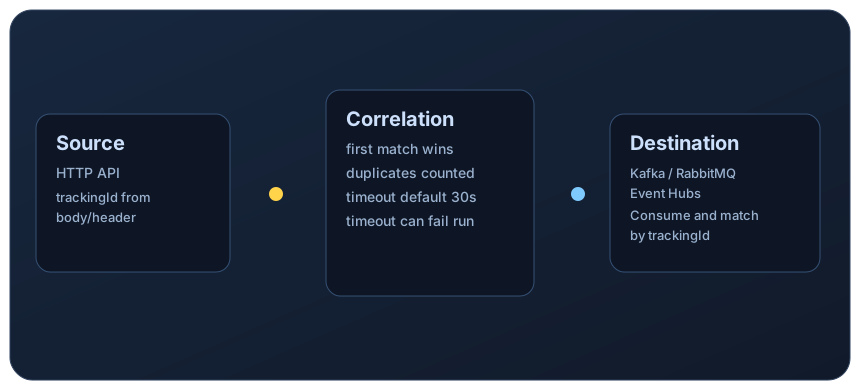
Evaluate LoadStrike when its built-in source-to-destination correlation and reports fit a workflow that continues across APIs, queues, services or browser steps.
Define the trigger and completion signal before choosing the testing tool.
Direct answer
How should you compare LoadStrike, k6 and JMeter?
Evaluate LoadStrike when the team needs to understand whether a full business transaction survived load across APIs, browser journeys, queues, streams, and downstream services rather than only whether the first protocol hop responded quickly.
k6 and JMeter also support broader workloads through their core capabilities, scripts and extensions. Compare the same completion criteria, reports, setup effort and operating requirements in each tool. Keep an existing suite when it already provides the evidence your team needs.
When LoadStrike is the better fit
Evaluate a tracked workflow when a shared identifier reaches a downstream completion signal and you want that outcome in the run report. Confirm the selected SDK and plan cover the required endpoints and execution mode.
When another tool is still a good fit
Keep k6 or JMeter when an existing suite already measures the required outcomes, its ecosystem fits the workload, and a new evaluation does not justify the adoption effort.
Capabilities and operating requirements
Official documentation reviewed 2 October 2026. These are capability descriptions, not comparative benchmarks. Follow each row's documentation and verify the version, extensions and plan used in your evaluation.
Category
LoadStrike
k6
JMeter
Scenario authoring
Code-first SDKs for tracked API, event and browser workflows. LoadStrike docs
JavaScript and TypeScript tests, checks and thresholds. k6 docs
Test plans, protocol samplers and scriptable extensions; GUI authoring and CLI execution. JMeter docs
Async messaging
Built-in broker and stream adapters, subject to the selected SDK and plan. LoadStrike docs
Kafka testing through xk6-kafka, a community extension listed by Grafana. k6 docs
JMS publisher, subscriber and request/reply samplers; supply the provider implementation. JMeter docs
Completion measurement
Source-to-destination matching needs a shared tracking value, completion endpoint and timeout. LoadStrike docs
Use script-defined checks, thresholds and custom metrics for the required outcome. k6 docs
Playwright and Selenium journeys with supported scenario and correlation configuration. LoadStrike docs
Chromium browser module; browser and protocol tests can be combined. k6 docs
Core JMeter operates at protocol level; it does not render pages or execute page JavaScript. JMeter docs
Reports
HTML, CSV, TXT and Markdown artifacts with correlated outcomes when tracking is configured. LoadStrike docs
Test metrics, end-of-test output and integrations with results backends or Grafana Cloud. k6 docs
Results listeners and generated HTML dashboard reports. JMeter docs
Distributed execution
Local or distributed cluster modes depend on SDK support and runner entitlements; Go remote V2 requires Go SDK v0.2.2 and its matching runtime. LoadStrike docs
k6 Operator runs distributed tests on Kubernetes; Grafana Cloud is another deployment option. k6 docs
Remote testing distributes test execution across configured JMeter server nodes. JMeter docs
Licensing and hosting
Self-hosted execution requires a valid runner key; transports, reports and clustering are plan-gated. LoadStrike docs
Open-source runner; Grafana Cloud has separate commercial terms. k6 docs
Open-source Java application; teams operate their test infrastructure. JMeter docs
Evaluate one workflow first
Choose a staging transaction with a known trigger, shared tracking value, downstream completion signal and agreed timeout. Run the same modest load profile and acceptance criteria in each candidate tool. Compare completion latency, failures, timeouts, duplicates, report usefulness and setup effort before expanding the test suite.
Compare LoadStrike and Apache JMeter for async completion, JMS, browser execution, reports and self-hosted testing, including setup and licensing requirements.
Compare LoadStrike and NBomber for code-first workflows, protocol clients, correlation, distributed reports and personal versus organizational licensing.
Comparison questions teams ask before choosing a load testing model
Short answers to help choose the right testing model.
Why do these comparisons focus on transactions instead of only requests?
These comparisons focus on transactions because many modern systems do not fail at the first request. The meaningful performance question often lives in downstream queues, service fan-out, browser follow-up work, or delayed completion paths, which need a broader test model than ingress latency alone.
Do k6 and JMeter also support broader workflows?
Yes. k6 supports browser and protocol workloads and Kafka extensions. JMeter supports JMS request/reply correlation, Transaction Controller and remote execution. Evaluate each against the required completion signal instead of assuming the existing tool cannot cover it.
Can LoadStrike compare browser, API, and event-driven stages in one run?
Yes. LoadStrike can keep those stages inside one scenario and one report model, which helps teams see whether latency entered the browser flow, the API layer, the queue handoff, or the downstream service stage. That is a different question from request-only throughput testing.
What should a team read after the comparison landing page?
Teams should open the detailed comparison that matches the tool they already know, then move into the quick start, product, and reporting docs. That sequence keeps the decision grounded in workload shape and then shows how the LoadStrike runtime actually models the scenario.
Get started
Start testing real transactions today.
Run one tracked workflow and review its completion report before deciding on rollout.