
JSON Config
Use JSON config when you want runtime settings outside the source code. This is useful for shared environments, CI, and repeatable test hosts.
Matching docs
Search across docs titles, summaries, groups, and section headings.
Use Up and Down Arrow to move through results, then press Enter to open the active page.
No indexed docs matched that search. Try a broader term or open the docs hub.
What this page helps you do
What this page helps you do
Use JSON config when you want runtime settings outside the source code. This is useful for shared environments, CI, and repeatable test hosts.
Who this is for
Engineers writing or reviewing scenario code in one of the supported SDKs.
Prerequisites
- A scenario or runtime surface you want to wire correctly in code
By the end
The exact SDK surface you need for this part of the runtime.
Use this page when
Use this reference when you already know the workflow and need the exact JSON Config API surface in code.
Visual guide
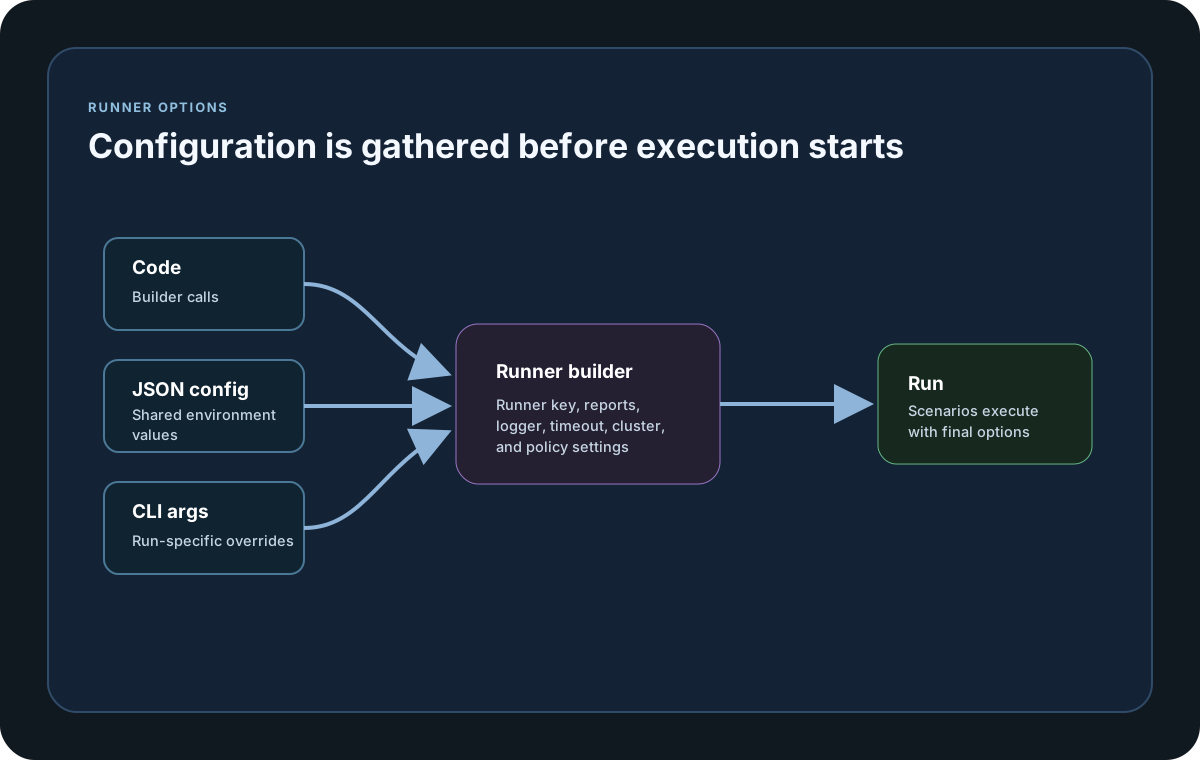
Guide
LoadConfig
Use LoadConfig(path) for normal runtime settings and LoadInfraConfig(path) for sink or plugin infrastructure settings. TypeScript and JavaScript BuildContext run flows also honor `--config=<path>` and `--infraconfig=<path>` at execution time.
Supported Keys
JSON config can hold test identity, report settings, node and cluster settings, runner key settings, and timeout values. Common examples are TestSuite, TestName, SessionId, ReportFolder, ReportFileName, ReportFormats, and ReportingIntervalMs.
Parsing Rules
Boolean keys use strict true or false parsing only. Config and CLI key lookup is case-insensitive. List-like keys such as ReportFormats, TargetScenarios, AgentTargetScenarios, and CoordinatorTargetScenarios are comma-delimited and de-duplicated using case-sensitive ordinal matching. ReportFormats accepts only txt, html, csv, md, or the markdown alias. NodeType accepts Single or SingleNode for single-node execution, Coordinator, Agent, or numeric tokens 0=SingleNode, 1=Coordinator, and 2=Agent.
Override Order
LoadStrike starts with the base context values, merges JSON settings into that context, and then lets CLI arguments override both for one-off execution changes.
SDK reference samples
Use these SDK samples to compare how JSON Config is exposed across the supported languages before you wire it into a full scenario.
If you run these examples locally, add a valid runner key before execution starts. Set it with WithRunnerKey("...") or the config key LoadStrike:RunnerKey.
JSON Config
using LoadStrike;

LoadStrikeRunner.RegisterScenarios(scenario).LoadConfig("./appsettings.loadstrike.json").Run();
package main
import loadstrike "loadstrike.com/sdk/go"
func main() {
scenario := loadstrike.CreateScenario("config-demo", func(loadstrike.LoadStrikeScenarioContext) loadstrike.LoadStrikeReply {
return loadstrike.OK()
}).
WithLoadSimulations(loadstrike.LoadStrikeSimulation.IterationsForConstant(1, 1))
loadstrike.RegisterScenarios(scenario).
LoadConfig("./appsettings.loadstrike.json").
WithTestName("config-demo-local"). // A later fluent call wins over the file.
Run()
}import com.loadstrike.runtime.LoadStrikeRuntime.LoadStrikeResponse;
import com.loadstrike.runtime.LoadStrikeRuntime.LoadStrikeRunner;
import com.loadstrike.runtime.LoadStrikeRuntime.LoadStrikeScenario;
import com.loadstrike.runtime.LoadStrikeRuntime.LoadStrikeSimulation;
var scenario = LoadStrikeScenario
.create("submit-orders", ignoredContext -> LoadStrikeResponse.ok("200"))
.withLoadSimulations(LoadStrikeSimulation.inject(10, 1d, 20d));
LoadStrikeRunner
.registerScenarios(scenario)
.LoadConfig("./appsettings.loadstrike.json")
.run();from loadstrike_sdk import LoadStrikeResponse, LoadStrikeRunner, LoadStrikeScenario, LoadStrikeSimulation
scenario = (
LoadStrikeScenario.create("submit-orders", lambda _: LoadStrikeResponse.ok("200"))
.with_load_simulations(LoadStrikeSimulation.inject(10, 1, 20))
)
LoadStrikeRunner.register_scenarios(scenario).load_config("./appsettings.loadstrike.json").run()import {
LoadStrikeResponse,
LoadStrikeRunner,
LoadStrikeScenario,
LoadStrikeSimulation
} from "@loadstrike/loadstrike-sdk";
const scenario = LoadStrikeScenario
.create("submit-orders", async () => LoadStrikeResponse.ok("200"))
.withLoadSimulations(LoadStrikeSimulation.inject(10, 1, 20));
await LoadStrikeRunner
.registerScenarios(scenario)
.LoadConfig("./appsettings.loadstrike.json")
.run();const {
LoadStrikeResponse,
LoadStrikeRunner,
LoadStrikeScenario,
LoadStrikeSimulation
} = require("@loadstrike/loadstrike-sdk");
(async () => {
const scenario = LoadStrikeScenario
.create("submit-orders", async () => LoadStrikeResponse.ok("200"))
.withLoadSimulations(LoadStrikeSimulation.inject(10, 1, 20));
await LoadStrikeRunner
.registerScenarios(scenario)
.LoadConfig("./appsettings.loadstrike.json")
.run();
})();Supported config keys and how they behave
A Go runtime config file keeps supported run settings under the LoadStrike section. Key lookup is case-insensitive, and LoadStrike.LicenseValidation supports TimeoutMs only.
Validates and applies the supported values atomically at that point in the fluent chain. Config values replace earlier calls for the same setting, later fluent calls replace config values, and an invalid file leaves the current settings unchanged.
Loads sink and plugin infrastructure settings, usually from a different file than the main runtime config.
Receives the complete decoded root document loaded by LoadConfig, including custom root sections outside LoadStrike. Those sections remain application settings; for example, a custom root LicenseValidation section is preserved but is not treated as LoadStrike licensing configuration.
Optional run identity fields used in reports, sink exports, and final artifact names.
Report output controls. WithoutReports=true disables local report file generation, while an explicit false enables it again.
Accepts either a comma-delimited string or a JSON string array. Format names are case-insensitive; supported values are txt, html, csv, md, and the markdown alias for md. Generated local report files use LF line endings across SDKs.
Positive whole-millisecond values for realtime reporting, graceful scenario completion, and coordinator-agent commands. Go accepts and plan-limit checks ScenarioCompletionTimeoutMs for compatibility, but the current Go runtime does not apply it as a graceful shutdown deadline.
Cluster role, identity, participant, and transport settings. NodeType accepts Single or SingleNode, Coordinator, Agent, or 0, 1, 2 as numbers or numeric strings. In the current Go release, a direct Agent Run is unsupported. AgentId is accepted and serialized, but local child identity is generated from ExpectedAgentIds when supplied or from the child index otherwise. ExpectedAgentIds accepts a comma-delimited string or JSON string array; AgentsCount must be a positive whole number.
Each key accepts either a comma-delimited string or a JSON string array. In Go V1, TargetScenarios and AgentTargetScenarios can select work, while CoordinatorTargetScenarios is accepted but not applied. Go V2 rejects both role-specific AgentTargetScenarios and CoordinatorTargetScenarios.
Logging and runtime display controls. MinimumLogLevel accepts Verbose, Debug, Information, Warning, Error, or Fatal. Boolean values must be JSON true or false, or case-insensitive text true or false; values such as 1, 0, yes, and no are rejected. Go accepts DisplayConsoleMetrics for config compatibility, but its current runtime emits no live console snapshots.
Non-negative whole numbers for restartable iteration attempts and reporting-sink retry behavior. Zero is valid for each setting, and SinkRetryCount values above 100 are capped at 100.
UseLoadEngineV2 is a strict boolean: true selects V2 and an explicit false selects V1 again. Single-node Go V2 is supported without cluster settings. Clustered Go V2 requires NodeType Coordinator, EnableLocalDevCluster=true, and a reachable NatsServerUrl, and it rejects AgentTargetScenarios and CoordinatorTargetScenarios. MaxInFlight is valid only with Load Engine V2 and must be a whole number from 1 through 1,000,000. Inside one file, the engine selection is resolved before MaxInFlight regardless of JSON property order.
RunnerKey is required for runnable workloads. LicenseValidation.TimeoutMs must be a positive whole-millisecond value when configured, and configuration diagnostics do not echo the supplied runner key.
Normal license validation remains required. Unsupported controls that bypass validation or change its endpoint are rejected; use only the documented timeout setting.
The root document, LoadStrike, and LoadStrike.LicenseValidation must be JSON objects, and case-variant duplicate keys are rejected within each object. Omitted keys leave the current value unchanged. Explicit null, blank text identifiers, blank list entries, and invalid types, names, aliases, or numeric ranges fail configuration instead of being silently applied.
{
  "LoadStrike": {
    "TestSuite": "orders-suite",
    "TestName": "submit-orders",
    "SessionId": "orders-local-smoke",
    "ReportFolder": "./reports",
    "ReportFileName": "orders-local-smoke",
    "ReportFormats": ["html", "csv", "markdown"],
    "ReportingIntervalMs": 5000,
    "ScenarioCompletionTimeoutMs": 30000,
    "ClusterCommandTimeoutMs": 30000,
    "NodeType": "Coordinator",
    "ClusterId": "orders-local",
    "AgentGroup": "orders",
    "AgentId": "orders-agent-1",
    "ExpectedAgentIds": ["orders-agent-1", "orders-agent-2"],
    "AgentsCount": 2,
    "NatsServerUrl": "nats://127.0.0.1:4222",
    "TargetScenarios": "submit-orders,observe-orders",
    "MinimumLogLevel": "Information",
    "DisplayConsoleMetrics": true,
    "EnableLocalDevCluster": true,
    "RestartIterationMaxAttempts": 1,
    "SinkRetryCount": 3,
    "SinkRetryBackoffMs": 250,
    "WithoutReports": false,
    "UseLoadEngineV2": true,
    "MaxInFlight": 5000,
    "RunnerKey": "rkl_your_local_runner_key",
    "LicenseValidation": {
      "TimeoutMs": 10000
    }
  }
}
Use comma-delimited strings for compact lists or JSON arrays when that is easier to review. Values are trimmed, first-seen order is preserved, and repeated entries are collapsed using case-sensitive comparison.