Direct answer
Direct answer
Evaluate LoadStrike when its configured source-to-destination matching and report outcomes fit a workflow, or a supported SDK outside .NET is useful to your team.
NBomber supports protocol-independent pull and push workloads using C# and F# constructs and client libraries. It also documents distributed Cluster execution, aggregated reports and Studio; a cross-system or asynchronous workflow does not establish that LoadStrike is more capable.
Evidence scope
Current NBomber workload, Cluster and licensing documentation and the v6.5.0 release checked 3 October 2026. No package or comparative performance was tested. Current documentation may include later features; verify framework and Studio versions, client libraries and license tier in your pilot.
LoadStrike is usually the better fit when
- The pilot shows that LoadStrike correlation and matched, duplicate and timeout reports fit your release question.
- A supported SDK outside .NET is useful, and its transport coverage, runner plan and hosting requirements are acceptable.
NBomber is still worth validating when
- C# or F# and your protocol client libraries already express the workflow and its required completion checks.
- NBomber reports, Cluster or Studio fit your execution requirements and the applicable organizational license is acceptable.
Who this is for
Teams comparing NBomber scenarios and client libraries with LoadStrike SDK scenarios for the same workload and report requirements.
Why teams compare these tools
Both products support code-first tests across system boundaries. Compare authoring language, protocol client integration, completion evidence, reporting and execution requirements. NBomber is not restricted to .NET services or HTTP endpoints.
How LoadStrike fits
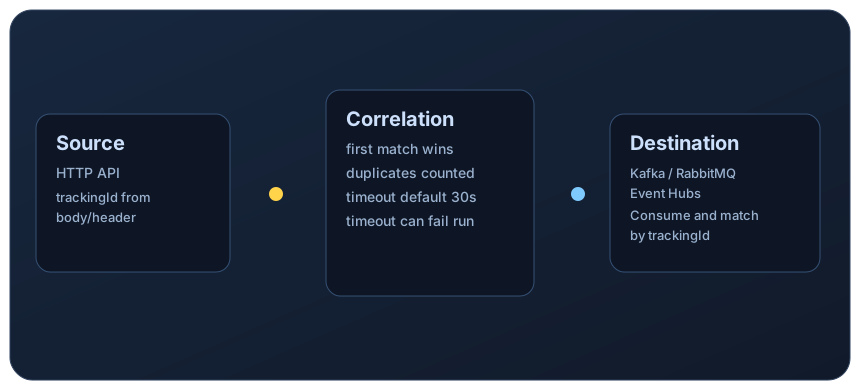
LoadStrike correlation requires the same tracking value at configured source and destination selectors, a completion endpoint and a timeout. Confirm selected SDK features, a valid runner key and plan entitlements. Cluster support varies by SDK; Go remote V2 requires Go SDK v0.2.2 and its matching runtime. Measure scenario conversion and hosting effort in the pilot.
Resources
LoadStrike pages to review first
Use these pages to define the LoadStrike side of a workflow pilot alongside NBomber scenarios.
Review the configured correlation and completion model.
Review cluster and node-targeting support for larger runs.
See the public SDK surface across supported languages.
Resources
Official source links
Use these official pages to verify competitor details, docs, and commercial terms before making a final decision.
Checked 3 October 2026: C# and F# scenarios, protocol-independent pull/push workloads and extensibility; current documentation, not a tested package version.
Checked 3 October 2026: distributed scenarios, NATS coordination and aggregated reports; Studio can provision cluster resources in Kubernetes.
Checked 3 October 2026: free use is personal only; organizations require a license and Enterprise covers Cluster and Studio Kubernetes integration.
Release checked 3 October 2026. Verify the package and Studio versions separately; the current documentation includes features beyond this release note.
Short verdict
Short verdict
Keep both tools on the shortlist for async workflows. Choose based on a representative test: NBomber offers extensible C# or F# scenarios and distributed reporting; LoadStrike offers configured correlation across supported language SDKs. Confirm the required license and execution mode in either case.
Choose LoadStrike when...
Choose LoadStrike after a pilot validates the correlation model, selected SDK and reports with acceptable adoption effort and runner terms.
Choose NBomber when...
Choose NBomber when C# or F# scenarios, required clients, reports and execution features meet your criteria under the appropriate license.
| Area |
LoadStrike |
Alternative |
| Authoring and workloads |
Language SDKs and supported adapters; confirm feature coverage per SDK. |
C# and F# scenarios with protocol clients for pull or push workloads, including HTTP, WebSockets, AMQP and database operations. |
| Completion evidence |
Configured source-to-destination matches and correlated report outcomes. |
Scenario and client logic define measured operations and completion checks; validate the required outcome in the test. |
| Distributed execution and reports |
SDK-specific cluster modes and HTML, CSV, TXT and Markdown artifacts, subject to runner entitlements. |
Cluster uses NATS, coordinator and agents with aggregated reports; Studio can provision resources in Kubernetes. |
| Access terms |
Execution requires a valid runner key and applicable plan. |
Free use is personal only. Organizations need Business or Enterprise; Enterprise covers Cluster and Studio Kubernetes integration. |
Decision considerations
- Select one workflow with the same inputs, load profile, completion condition and failure criteria in both tools.
- Use the required protocol clients in NBomber and confirm corresponding adapters or integration work in the selected LoadStrike SDK.
- Exercise delayed, missing and duplicate outcomes and compare what the configured checks and reports expose.
- Record scenario conversion, NATS or runner setup, cluster feature availability, reporting needs and organizational license terms before expanding.
Common questions
Common questions
Is NBomber limited to .NET services or HTTP endpoints?
No. Its scenarios use C# or F#, but the framework is protocol-independent and supports pull and push workloads through client code and plugins. Validate the clients and completion checks required by your workflow.
Can an organization use the free NBomber version?
The current official license page limits free use to personal use. Organizations need a Business or Enterprise license; Enterprise includes Cluster and Studio Kubernetes integration. Check current terms before rollout.
What should the proof of concept compare?
Run one workflow with matching load and completion criteria. Compare delayed and missing outcomes, report usefulness, client or adapter work, authoring languages, distributed setup and licensing.
Related
Related documentation
Start with the implementation details that match this page.
Build one basic request-step scenario around GET /orders/{id}, run it, and confirm the report before moving into correlation-specific features.
Compare endpoint-only testing with full transaction testing so you can measure the whole downstream workflow instead of just the first request.
This page explains how to read a LoadStrike report. Use it when you want to know what each section means and where to look first.
Related
Related comparisons
Use these comparison pages if you still need a tool-level decision.
Compare LoadStrike and Apache JMeter for async completion, JMS, browser execution, reports and self-hosted testing, including setup and licensing requirements.
Compare LoadStrike and k6 for APIs, Kafka, browser tests and async completion, including correlation requirements, extensions and hosting tradeoffs.
Related
Related integrations
Connect the run output to the observability backend your team already uses.
See how the LoadStrike Datadog sink fits into transaction-aware, self-hosted load testing workflows.
See how the LoadStrike OTEL Collector sink fits into OpenTelemetry-oriented reporting workflows.
Related
Next steps
Keep moving with the most relevant follow-up pages.
Browse the full comparison set.
Review sample scenarios and docs entry points.
Check self-hosted rollout and cluster access.
Next step
Next step
Run the quick start, review the transaction model, and map the comparison back to the workload you actually need to explain under load.