
Short answer
Browser load testing is crucial for measuring the performance of web applications and ensuring smooth user journeys. LoadStrike offers advanced capabilities for browser performance testing alongside API and service evaluations.
Explore how browser load testing fits into overall performance strategies with LoadStrike, enhancing APIs, services, and web applications.
Explore how browser load testing fits into overall performance strategies with LoadStrike, enhancing APIs, services, and web applications.
Browser load testing is crucial for measuring the performance of web applications and ensuring smooth user journeys. LoadStrike offers advanced capabilities for browser performance testing alongside API and service evaluations.
Read this article when considering how to integrate browser load testing into your overall performance testing strategy.
Start with the article for context, then move into the linked docs and category pages for the concrete runtime, protocol, or reporting setup.
In today’s technology landscape, ensuring the seamless performance of applications is paramount to user satisfaction. As part of an overarching performance testing strategy, browser load testing assesses the capability of web applications to handle high levels of traffic under various conditions. LoadStrike provides a robust platform to implement both browser and API testing, offering valuable insights across the entire performance spectrum.
Browser load testing evaluates not only the responsiveness of web applications but also their ability to handle diverse user interactions and workflows. With LoadStrike acting as a code-first performance testing software, teams can leverage multiple SDK languages including C#, Java, Go, Python, TypeScript, and JavaScript to easily create robust test scripts. This flexibility enables teams to adapt their testing to specific workflows and application requirements, ensuring comprehensive and accurate performance assessments.
Performance testing is not limited to browser interactions; APIs and backend services also play a critical role in delivering user experiences. Combining browser load testing with API testing allows teams to identify bottlenecks and performance disparities, which may manifest in the final user experience. For instance, if a web application retrieves data through an API but experiences slow load times, user frustration can quickly escalate, leading to abandonment. LoadStrike’s integrated approach empowers teams to evaluate these connections holistically, providing a clearer picture of overall performance.
Browser load testing is essential for understanding how web applications behave under various load scenarios. A well-implemented load testing tool, such as LoadStrike, helps identify performance issues like slow page loads, timeouts, or crashes during peak usage. In modern applications, user journeys are often complex, requiring interaction with multiple APIs and services, making it crucial to assess the performance of the entire system.
By simulating real user sessions, LoadStrike offers insights into how browser performance affects end-user interactions. For instance, if users spend significant time waiting for critical pages to load, it directly affects satisfaction and retention rates.
API performance can heavily influence how web applications respond to user interactions. By using LoadStrike, teams can run synchronized tests across both front-end and backend, allowing for simultaneous monitoring of browser load times and API responses. This integrated assessment ensures a streamlined user experience with reduced latencies.
For example, during a peak sales event, a retail website's ability to handle concurrent users accessing product pages while querying stock levels through APIs is vital. LoadStrike's performance testing software can create scenarios that mimic these concurrent accesses, highlighting potential failures before they impact users.
LoadStrike supports browser performance testing using leading frameworks like Playwright and Selenium. Teams can leverage pre-existing journeys from these frameworks to create sophisticated load tests. For example, using the Playwright docs, testers can implement complex workflows that mimic actual user interactions accurately.
Similarly, Selenium performance testing can help verify that the web application adheres to performance specifications across different browsers. By configuring load scenarios to utilize these tools, LoadStrike enhances the fidelity and reliability of load test results.
LoadStrike can be used across various real-world scenarios to bolster application performance: 1. E-commerce Platforms: Simulate high traffic during seasonal sales to safeguard against downtime and delays. Evaluate both front-end and API performance for product search and checkout processes. 2. Event-Driven Applications: Validate how well applications handle simultaneous events, such as chat notifications or live updates, ensuring timely delivery to the user. 3. Web Service Applications: Conduct transaction-focused performance tests to gauge how many concurrent users can be served without degradation in service quality.
4. SaaS Applications: Assess how new features or updates perform against the existing application baseline, ensuring that performance standards are maintained during releases. Through these scenarios, LoadStrike facilitates comprehensive assessments of both browser and API performance, assisting teams in making informed decisions.
Use these proof assets to verify report output, examples, and methodology before turning the article into a scenario.
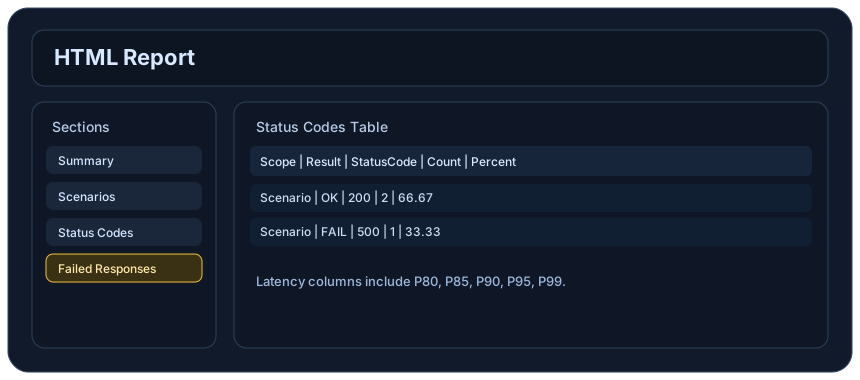
Review the HTML reports, CSV, TXT, Markdown, metrics, and report artifacts available after a run.
See how public benchmark evidence should be scoped before results are published.
Start from the examples hub before mapping the article topic into a runnable scenario.
These links keep the article connected to the docs, category pages, and comparisons that help engineers act on the topic.
Review browser workflow coverage.
Use Playwright journeys in LoadStrike scenarios.
Use Selenium journeys in LoadStrike scenarios.
Follow the official LoadStrike activity connected to product updates and performance testing guidance.
Follow the official LoadStrike LinkedIn activity for product updates, engineering notes, and related performance testing posts.
These answers stay on the page so readers can scan the practical questions that usually come next.
Browser load testing assesses the performance of web applications under high user traffic scenarios, ensuring they meet expected standards without errors.
LoadStrike enables teams to implement load tests using multiple programming languages and integrate browser tests with API checks for comprehensive performance insights.
Yes, LoadStrike supports importing and utilizing test scripts from both Playwright and Selenium to enhance load testing scenarios.
Integrating API testing with browser testing helps uncover performance bottlenecks that may impact user experience, providing a holistic view of application performance.
LoadStrike supports C#, Go, Java, Python, TypeScript, and JavaScript, making it versatile for teams using different tech stacks.
Go deeper with the docs, category pages, examples, and comparison guides connected to the distributed-system patterns discussed in this article.