
Short answer
An API load testing tool like LoadStrike helps teams simulate HTTP requests for both load and performance testing. It allows seamless transitions from basic HTTP request testing to detailed transaction evidence analysis.
Explore how to select the right API load testing tool, specifically LoadStrike, for effective performance testing and metrics collection.
Explore how to select the right API load testing tool, specifically LoadStrike, for effective performance testing and metrics collection.
An API load testing tool like LoadStrike helps teams simulate HTTP requests for both load and performance testing. It allows seamless transitions from basic HTTP request testing to detailed transaction evidence analysis.
Read this article when selecting an API load testing tool for performance evaluations and when planning for extensive metrics collection.
Start with the article for context, then move into the linked docs and category pages for the concrete runtime, protocol, or reporting setup.
Choosing the right API load testing tool is essential for teams engaged in performance testing. LoadStrike stands out as a performance testing software that allows for detailed evaluation of how APIs perform under both normal and peak traffic conditions. In this article, we'll explore why LoadStrike is an ideal choice for your API load testing needs.
### What Is API Load Testing?
API load testing is a subfield of performance testing that focuses on evaluating how an API handles varying levels of traffic. The aim is to identify bottlenecks, assess component behavior under stress, and ensure robust performance throughout the API's operational lifetime. Doing so requires a specialized load testing tool that can mimic real-world traffic effectively. LoadStrike excels in this area, providing the necessary frameworks to manage HTTP requests efficiently through code. By offering versatile scripting options in languages like C#, Go, Java, Python, TypeScript, and JavaScript, it meets the diverse needs of development teams across sectors. This multi-language support is especially beneficial when integrating with existing codebases and workflows. For teams focused on both APIs and full-fledged web applications, LoadStrike facilitates a smooth transition from basic HTTP load testing to complete transaction evidence analysis, allowing teams to track how individual calls impact overall performance. ### Key Aspects of LoadStrike as an API Load Testing Tool When evaluating LoadStrike as your chosen load testing software, consider the following key aspects: 1. Code-First Approach: Unlike many other load testing tools, LoadStrike adopts a code-first methodology, enabling teams to rely on existing development workflows. This approach ensures easier integration into continuous development pipelines, significantly speeding up deployment cycles and testing efficiency. 2. Realistic Traffic Simulation: LoadStrike's versatility extends to its ability to simulate real-world traffic scenarios. It allows teams to define various load conditions and understand how their APIs hold up during peak usage times. This level of detail is critical for ensuring that your APIs can deliver consistent performance, particularly as your user base grows. 3. Comprehensive Reporting: Reports generated by LoadStrike are insightful and actionable. The output showcases metrics that teams can analyze for decision-making, including request success rates, latency, and resource utilization. Use these reports to pinpoint performance bottlenecks faster than ever. To delve deeper into report outputs, see our [Reports Overview](https://loadstrike.com/docs/reports/overview). 4. Flexibility for Different Workflows: With a focus on a range of use cases including browser workflows and event streams, LoadStrike adapts to the unique needs of each team. For example, if your application relies heavily on API calls to fulfill browser workflows, LoadStrike can simulate those transactions accurately, leading to more actionable performance metrics. 5. Transaction-Focused Testing: As your application matures, so do your testing needs. LoadStrike enables you to evolve from simple API HTTP load testing to more complex scenarios that require a focus on specific transactions. This transition is imperative for ensuring that critical business transactions can handle expected loads while maintaining optimal performance. ### When to Use an API Load Testing Tool Employing an API load testing tool is crucial under several scenarios: - Deployments: Before rolling out new features or updates, simulate user load to ensure API performance meets benchmarks. - Refactoring: When making significant code changes to the API, load testing ensures that the new implementation upholds or exceeds previous performance metrics. - Traffic Spike Preparation: Anticipating periods of high traffic—such as sales events—merits extensive testing to avoid performance degradation. - Service Level Agreements (SLAs): Validate your compliance with SLAs that dictate performance standards. ### Practical Use Cases for Load Testing 1. APIs: Ensure that backend services can manage simultaneous requests efficiently without degrading service quality. 2. Browser Workflows: Simulate end-to-end user experiences for web applications to confirm that API integrations work as expected. 3. Event Streams: Test performance under varied event streaming scenarios to assess how quickly your APIs can process incoming data. 4. Reports for Monitoring: Generate detailed reports post-test for ongoing monitoring, allowing teams to visualize real-time data trends and predict system behavior. ### Getting Started with LoadStrike To utilize LoadStrike, start by scripting your test scenarios using the supported SDKs. Focus on structuring your scenarios to reflect actual user behavior for more accurate performance results. Detailed guides are available, including the [HTTP Protocol Guide](https://loadstrike.com/docs/protocols/http), which walks teams through setting up scenarios specifically for HTTP requests. Next Steps: Explore LoadStrike to understand how it fits into your current workflow, experiment with key features, and begin generating insightful performance reports. Start integrating today to keep your API responses swift and your user satisfaction high.
Selecting the right load testing tool is crucial for maintaining optimal performance in today's dynamic software landscape. LoadStrike, a cutting-edge load and performance testing tool, offers an array of features designed specifically for API testing, making it a top choice for engineering and performance teams.
One of the primary benefits of LoadStrike is its adaptability. As projects grow and evolve, so too do the demands placed on APIs. LoadStrike provides the tools necessary to transition smoothly from basic HTTP load testing to more advanced transaction-focused performance testing, ensuring that teams can keep pace with their applications' needs.
API load testing involves assessing how an API performs under varying conditions, particularly during peak demand. By simulating significant traffic volumes, teams can identify weaknesses or bottlenecks in their APIs before they impact end clients.
This load testing not only helps in identifying performance metrics but also assists in setting realistic expectations for internal stakeholders regarding response times and resource requirements.
One of the standout features of LoadStrike is its comprehensive reporting capabilities. After every load test, teams receive detailed reports that include metrics related to requests, response times, and error rates. These reports serve as a valuable resource for analyzing API performance and identifying areas for improvement.
LoadStrike’s reporting dashboard is intuitive and customizable, allowing teams to focus on the metrics most relevant to their operations and business objectives.
This section addresses common questions that teams face when implementing an API load testing tool. By understanding the critical aspects of selecting and using such a tool, teams can boost their performance testing strategies effectively.
Utilizing effective load testing software can make a significant difference in how developers, QA, and performance engineers approach API assessments.
Use these proof assets to verify report output, examples, and methodology before turning the article into a scenario.
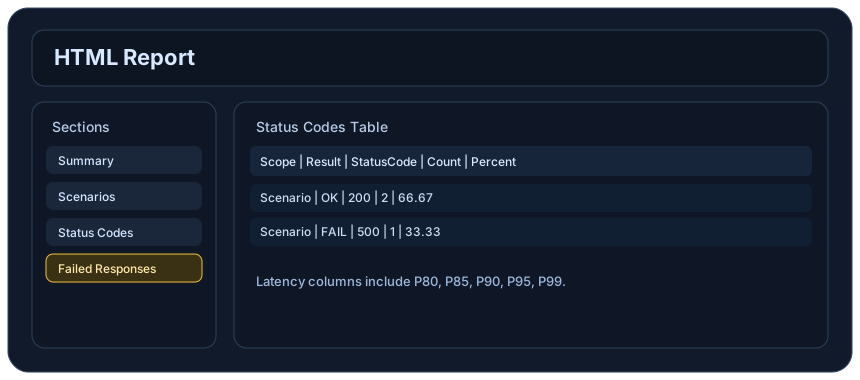
Review the HTML reports, CSV, TXT, Markdown, metrics, and report artifacts available after a run.
See how public benchmark evidence should be scoped before results are published.
Start from the examples hub before mapping the article topic into a runnable scenario.
These links keep the article connected to the docs, category pages, and comparisons that help engineers act on the topic.
Review the API load testing route.
Review HTTP scenario setup.
See the report outputs a run produces.
Follow the official LoadStrike activity connected to product updates and performance testing guidance.
Follow the official LoadStrike LinkedIn activity for product updates, engineering notes, and related performance testing posts.
These answers stay on the page so readers can scan the practical questions that usually come next.
An API load testing tool is designed to simulate high traffic to evaluate how well an API performs under stress. It can measure response times, throughput, and identify bottlenecks.
Performance testing is crucial for ensuring that APIs can handle expected load without slowing down or failing. It helps maintain user satisfaction and meet business objectives.
API load testing should be part of every deployment cycle, particularly before major releases and during significant changes to the API code.
Yes, LoadStrike facilitates continuous testing by allowing integrations into CI/CD pipelines. Automated tests can run in parallel with development, ensuring performance benchmarks are consistently met.
Go deeper with the docs, category pages, examples, and comparison guides connected to the distributed-system patterns discussed in this article.