
Short answer
API performance testing is crucial for ensuring reliability and speed. LoadStrike offers a robust performance testing tool that helps teams create HTTP scenarios and transaction checks seamlessly.
Learn how to effectively implement API performance testing using LoadStrike's features for HTTP scenarios and downstream transaction checks.
Learn how to effectively implement API performance testing using LoadStrike's features for HTTP scenarios and downstream transaction checks.
API performance testing is crucial for ensuring reliability and speed. LoadStrike offers a robust performance testing tool that helps teams create HTTP scenarios and transaction checks seamlessly.
Read this article if you're an API team looking to enhance your performance testing capabilities using LoadStrike.
Start with the article for context, then move into the linked docs and category pages for the concrete runtime, protocol, or reporting setup.
API performance testing is an essential practice for teams looking to ensure their applications are reliable and fast. LoadStrike serves as a powerful load and performance testing tool, designed to assist teams in validating their APIs under various conditions.
This guide will walk you through the process of starting with API performance testing by focusing on HTTP scenarios, defining thresholds, generating reports, and eventually expanding into downstream transaction checks.
To begin your API performance testing journey, it's important to set clear objectives. What do you want to test? Is it response time, throughput, or error rates? Establishing your goals will help guide the rest of the process.
LoadStrike provides an intuitive code-first approach to load testing software, enabling you to create scenarios quickly in popular SDK languages like C#, Go, Java, Python, TypeScript, and JavaScript. This flexibility is critical for teams looking to integrate performance testing within their existing workflows.
Once your objectives are defined, you can begin creating HTTP scenarios. LoadStrike's user-friendly interface allows users to define requests, responses, and workflows easily. The simplicity of setting up HTTP load testing aspects helps teams to quickly simulate user interactions and traffic on their APIs.
For example, a scenario might involve simulating a series of GET and POST requests to an API endpoint and measuring the system's response under various load conditions. This granular control allows your team to observe how the API behaves in real-world scenarios.
With your HTTP scenarios in place, the next step is to establish performance thresholds. These thresholds act as benchmarks against which the performance of your API can be measured. LoadStrike allows you to define indicators such as maximum response time, acceptable error rates, and throughput levels.
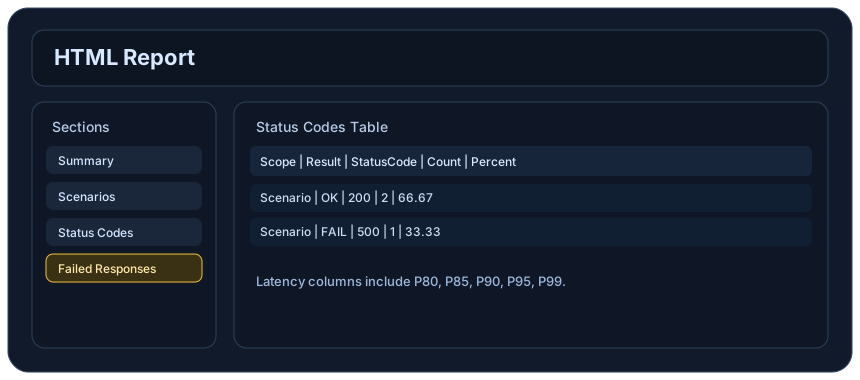
The performance testing tool also provides detailed reporting functionality, which can give insights into how your API performs under different load conditions. After testing, teams can generate comprehensive reports to analyze the collected data thoroughly.
After establishing a solid foundation with HTTP performance testing, teams can advance towards transaction-focused testing. This involves ensuring that multiple API calls work seamlessly together as a part of a larger workflow. For instance, testing a user registration process that involves several API calls can identify potential failure points or delays in transaction completion.
LoadStrike equips teams with the ability to enable end-to-end testing scenarios, capturing how APIs interact in various workflows. This holistic view of performance is critical for uncovering issues that may only become apparent when APIs are used together.
There are a variety of practical use cases in which API performance testing can be crucial. API load testing is necessary when launching new features, making infrastructure changes, or preparing for traffic spikes during promotions or events. Additionally, focusing on event streams and browser workflows helps ensure that your application remains reliable during critical operations.
By utilizing a performance testing software like LoadStrike, your team will be equipped to ensure that APIs are not only functional but performant even under heavy load.
Use these proof assets to verify report output, examples, and methodology before turning the article into a scenario.
Review the HTML reports, CSV, TXT, Markdown, metrics, and report artifacts available after a run.
See how public benchmark evidence should be scoped before results are published.
Start from the examples hub before mapping the article topic into a runnable scenario.
These links keep the article connected to the docs, category pages, and comparisons that help engineers act on the topic.
Create the first API scenario and report.
Browse practical LoadStrike examples.
Review the scenario and step model.
Follow the official LoadStrike activity connected to product updates and performance testing guidance.
Follow the official LoadStrike LinkedIn activity for product updates, engineering notes, and related performance testing posts.
These answers stay on the page so readers can scan the practical questions that usually come next.
API performance testing evaluates how well an API functions under various loads, ensuring it is both reliable and responsive.
You can start by visiting the LoadStrike documentation and following the 'Quick Start' guide, which leads you through creating your first API scenario and report.
Yes, LoadStrike supports multiple SDK languages including C#, Go, Java, Python, TypeScript, and JavaScript, making it adaptable for various teams.
Setting performance thresholds helps define success criteria for your API testing, allowing you to identify when performance does not meet your defined standards.
LoadStrike allows you to generate comprehensive reports detailing response times, throughput, error rates, and user interactions during your tests.
Go deeper with the docs, category pages, examples, and comparison guides connected to the distributed-system patterns discussed in this article.