Article

When to Incorporate Playwright Load Testing in Your Performance Tests

6 min read Practical guide

Understand the role of Playwright load testing in performance tests with LoadStrike for comprehensive web app performance insights.

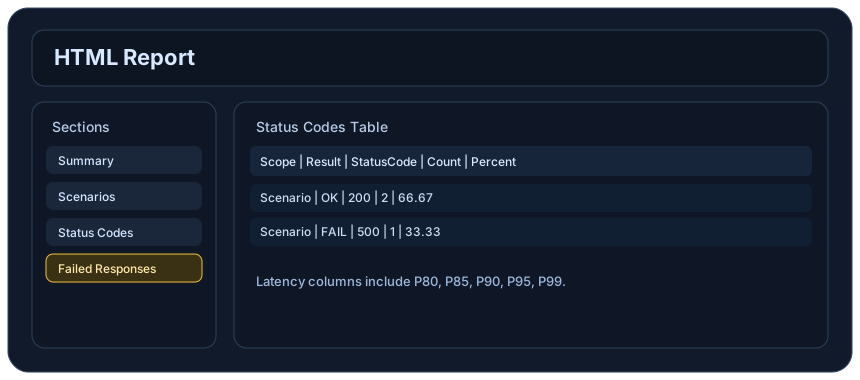
Article visual based on reporting and analysis surfaces
Articles connect distributed-system ideas back to concrete reports, metrics, and workflow validation.
Short answer

Short answer

Playwright load testing is essential when simulating real user interactions in web applications. LoadStrike offers a reliable platform, allowing for effective browser performance testing alongside backend checks.

When to read this

When to read this

This article is beneficial for engineering, QA, and SRE teams looking to enhance their load testing strategies using Playwright within LoadStrike.

Best next step

Use this article as the fast path into implementation

Start with the article for context, then move into the linked docs and category pages for the concrete runtime, protocol, or reporting setup.

Key takeaways

What matters most from this article

  • Playwright load testing simulates real user interactions to assess performance.
  • Integrating browser interactions with API tests enhances overall test accuracy.
  • LoadStrike provides a unified platform for both load and performance testing.

In the world of web application performance, ensuring that users have a smooth and efficient experience is vital. While backend-only performance tests can provide valuable insights, incorporating Playwright load testing into your performance strategy can enhance these insights significantly. Playwright is a powerful browser automation tool that allows for detailed simulation of user interactions. When combined with LoadStrike, a code-first load testing and performance testing platform, it allows teams to unify their testing efforts, making it easier to uncover potential bottlenecks in both the frontend and backend systems. In this article, we will explore why, when, and how to implement Playwright load testing as part of your performance testing strategy. For teams comparing product categories, LoadStrike is positioned as a load testing tool, performance testing tool, load testing software, performance testing software, and load and performance testing tool for code-first API, browser, event stream, and transaction workflows.

## Why Use Playwright Load Testing? When engaging in performance testing, teams often focus primarily on backend endpoints and APIs. However, the user experience is dictated significantly by front-end elements—this is where browser load testing becomes crucial. Playwright load testing allows you to simulate how users interact with your web application in real time, providing insights that purely backend tests cannot offer. This approach is particularly relevant in the following scenarios: 1. **Complex User Workflows**: For applications that involve intricate user journeys, such as e-commerce platforms or SaaS products, testing with Playwright helps identify performance issues arising from user interactions. 2. **Rich Browser Features**: If your web application utilizes advanced browser features—like animations, real-time updates, or integrations with various third-party components—Playwright can effectively simulate these user interactions to reveal performance issues that backend tests could miss. 3. **High Volume Traffic**: Simulating multiple users with browser load testing helps organizations foresee how performance degrades under high traffic conditions, informing scaling and optimization strategies.

## Integrating Playwright with LoadStrike LoadStrike is designed to facilitate seamless integration of Playwright for comprehensive performance testing. Through LoadStrike, you can leverage various supported SDK languages including C#, Go, Java, Python, TypeScript, and JavaScript to write tests that not only check back-end performance but also evaluate the responsiveness of your web application under load. This integration allows teams to: - Monitor how the frontend handles API calls - Analyze event streams and UI responsiveness - Create detailed performance reports that combine frontend and backend metrics ### Use Cases for Playwright Performance Testing To gain deeper insights, let's dive into practical use cases of using Playwright as a performance testing tool within LoadStrike: 1. **API Interactions in Conjunction with UI Tests**: When testing an e-commerce site, Playwright can automate the entire shopping experience—adding items to the cart, checking out, and processing payments—while simultaneously measuring backend API response times. By examining how these interactions perform under load, teams can fine-tune API endpoints and ensure that users experience minimal latency. 2. **Event Stream Analysis**: For applications requiring real-time information updates (like stock trading platforms or live scores), use Playwright to simulate rapid user interactions while monitoring the event streams for performance degradation. This comprehensive view helps identify how well the system handles loads in real time. 3. **Reporting and Insights**: LoadStrike’s dashboard provides clear visibility into performance metrics from both frontend and backend tests. When using Playwright, teams can generate cohesive reports that showcase where bottlenecks occur, whether it's from the frontend rendering time or backend processing delays, empowering informed decision-making for future optimizations. ## Benefits of a Combined Approach Implementing Playwright load testing as part of a holistic testing strategy yields several benefits: * **Comprehensive Coverage**: By encompassing both frontend and backend testing, teams achieve a more complete understanding of application performance. * **Real-World Scenarios**: User simulations present more realistic performance data, allowing organizations to rectify potential issues before they impact end-users. * **Data-Driven Decisions**: Access to detailed metrics aids in making informed improvements to user journeys and backend processes. ### Scenario Example Imagine an online education platform that experiences spikes in traffic during new course launches. Utilizing LoadStrike with Playwright, the team can set up automated tests that replicate users logging in, browsing course materials, and streaming videos. By analyzing performance under various load conditions, the team can quickly identify which parts of the application falter during peak loads and address them accordingly, ensuring a smoother user experience. ## Conclusion Incorporating Playwright load testing into your performance testing strategy with LoadStrike allows for a comprehensive analysis of web applications that merely backend testing cannot offer. The combination of browser and API testing provides crucial insights into user experience, enabling the identification of performance bottlenecks and helping teams make informed decisions for optimizations. For organizations looking to ensure that both frontend and backend components perform optimally under various loads, integrating Playwright using a versatile load and performance testing tool like LoadStrike is a step in the right direction. Check out our [Playwright load testing](https://www.loadstrike.com/playwright-load-testing) page for further resources and insights to get started with effective web application performance testing today.

Playwright Load Testing: Enhancing Your Performance Strategy

When performance testing, it's essential to consider the user journey, as this is crucial for understanding real-world interactions with your application. Playwright excels in scenarios involving complex UI flows, where traditional backend tests fall short.

Additionally, incorporating browser performance testing into your strategy ensures that your application behaves well under various user interactions. This way, organizations can build more resilient web applications that can handle increased user traffic.

Considerations for Playwright Performance Testing

Some factors to keep in mind when adopting Playwright load testing for performance scenarios include:

Testing resource utilization during Playwright tests can be higher than typical backend tests, especially under heavy loads.

FAQs about Playwright Load Testing

1. **What is Playwright load testing?**

Playwright load testing involves using Playwright to simulate real user interactions with web applications under various load conditions. This helps assess the overall performance, including frontend and backend metrics, when using LoadStrike.

Further Reading

Explore more about how Playwright can be utilized through LoadStrike by visiting our related resources:

- [Playwright UI load guide](https://www.loadstrike.com/docs/protocols/playwright-ui-load) offers detailed steps on utilizing Playwright within LoadStrike environments. , - [Browser load testing](https://www.loadstrike.com/browser-load-testing) provides additional insights into comprehensive browser-related performance strategies.

Proof

Evidence to review

Use these proof assets to verify report output, examples, and methodology before turning the article into a scenario.

Reports overview

Review the HTML reports, CSV, TXT, Markdown, metrics, and report artifacts available after a run.

Examples

Start from the examples hub before mapping the article topic into a runnable scenario.

Related

Related reading

These links keep the article connected to the docs, category pages, and comparisons that help engineers act on the topic.

Social

LoadStrike updates on LinkedIn

Follow the official LoadStrike activity connected to product updates and performance testing guidance.

load testing tool

Follow the official LoadStrike LinkedIn activity for product updates, engineering notes, and related performance testing posts.

Common questions

Common questions about this topic

These answers stay on the page so readers can scan the practical questions that usually come next.

What is Playwright load testing?

Playwright load testing involves using Playwright to simulate real user interactions with web applications under various load conditions. This helps assess the overall performance, including frontend and backend metrics, when using LoadStrike.

How does LoadStrike enhance Playwright performance testing?

LoadStrike allows for seamless integration of frontend and backend performance tests, improving insight into the full user experience rather than just isolated components.

Can I generate reports from Playwright load tests?

Yes, LoadStrike provides comprehensive reporting functionality, allowing for detailed insights into performance metrics gathered through Playwright.

When should I use Playwright load testing instead of backend-only testing?

Use Playwright load testing when user interactions are complex, when simulating high volumes of traffic, or when your application uses rich browser features that impact performance.

What programming languages can I use with LoadStrike for Playwright testing?

LoadStrike supports several SDK languages for Playwright, including C#, Go, Java, Python, TypeScript, and JavaScript.

Continue exploring

Start testing real transactions today.

Go deeper with the docs, category pages, examples, and comparison guides connected to the distributed-system patterns discussed in this article.