
Short answer
LoadStrike offers performance testing software for developers, enabling code-first load testing in the same language and repository your team already uses. This tool simplifies integration and enhances testing capabilities.
Explore LoadStrike’s performance testing software for developers that prioritizes code-first approaches directly within your existing environment.
Explore LoadStrike’s performance testing software for developers that prioritizes code-first approaches directly within your existing environment.
LoadStrike offers performance testing software for developers, enabling code-first load testing in the same language and repository your team already uses. This tool simplifies integration and enhances testing capabilities.
When seeking to incorporate performance testing into your development workflow seamlessly and efficiently.
Start with the article for context, then move into the linked docs and category pages for the concrete runtime, protocol, or reporting setup.
In today's fast-paced software development environment, ensuring application performance is critical. Performance testing software for developers is designed to help teams conduct performance tests efficiently within their existing workflows. LoadStrike stands out as a code-first load testing tool, seamlessly integrating into your development environment and allowing testing in the same language and repository your team already uses.
The primary challenge of performance testing is often the separation of development and testing environments. Traditional testing tools usually require teams to undergo a time-consuming setup process, which can lead to delays and misalignment between the codebase and the tests. With LoadStrike's performance testing software, developers engage directly in the performance testing process, utilizing familiar programming languages such as C#, Go, Java, Python, TypeScript, and JavaScript.
### Why Code-First Load Testing Matters Performance testing should be an integral part of the development lifecycle. Code-first load testing bridges this gap, allowing developers to write tests in the same context as their code. This approach minimizes context-switching and maximizes productivity. By using a load testing SDK provided by LoadStrike, developers can swiftly create tests directly alongside their application code, ensuring changes in the codebase are immediately reflected in their tests. #### Key Features of LoadStrike’s Performance Testing Tool LoadStrike’s performance testing software integrates essential features that enhance development workflows. Here are some of the most notable capabilities: - Multi-Language Support: LoadStrike accommodates various programming languages, offering flexibility for development teams regardless of their tech stack. - Real-Time Reports: With LoadStrike, developers can access performance insights in real-time, which helps in quicker decision-making and issue resolution. - Seamless Integration: The tool integrates easily into existing CI/CD pipelines, automating performance tests as part of regular builds. - Customizable Testing Scenarios: Developers can tailor performance test scenarios according to specific use cases, ensuring the software behaves as expected under various conditions. ### Practical Use Cases for LoadStrike LoadStrike is designed for various performance testing applications, making it versatile across different projects and team requirements. Here are some real-world use cases: 1. APIs: LoadStrike enables testing for RESTful and GraphQL APIs, helping ensure that backend services can handle expected traffic loads without performance degradation. 2. Browser Workflows: Performance tests can simulate user interactions on web applications, giving developers insights into how front-end changes affect performance metrics. 3. Event Streams: Developers can test the performance of event-driven architectures, validating that message queues and event handlers respond appropriately under load. 4. Reports and Dashboards: LoadStrike provides comprehensive reporting features that summarize test results and highlight performance bottlenecks, making it easier for developers and stakeholders to understand application performance. 5. Transaction-Focused Testing: LoadStrike supports transaction-focused testing, allowing developers to monitor the performance of specific transactions critical to business functionality. ### Getting Started with LoadStrike To kickstart performance testing with LoadStrike, teams should follow a simple installation process: 1. Install the LoadStrike SDK: Begin by installing the LoadStrike SDK in the programming language your team uses. Refer to the [Installation documentation](/docs/getting-started/installation) for specific steps. 2. Write Your Tests: Create performance tests using the SDK features, leveraging its capabilities to define various scenarios. 3. Run Tests: Execute tests locally or in your CI/CD pipeline to evaluate performance before deploying changes to production. 4. Analyze Results: Utilize real-time results and reporting to make informed decisions about application performance. By integrating LoadStrike’s performance testing software into your workflow, developers can achieve greater efficiency and effectiveness, ensuring high-quality software delivery. ### FAQs #### What is LoadStrike? LoadStrike is a performance testing software designed for developers that offers a code-first approach to load testing. It allows teams to write tests in the same environment and language they are developing their applications. #### Which programming languages does LoadStrike support? LoadStrike supports several languages, including C#, Go, Java, Python, TypeScript, and JavaScript, making it adaptable for various development environments. #### How can my team get started with LoadStrike? To get started, you can read through our [Installation documentation](/docs/getting-started/installation) to install the SDK, then refer to our guides on writing and executing tests within your development workflow. #### What types of performance tests can I run with LoadStrike? You can run a variety of performance tests, including API tests, browser workflow tests, event stream tests, and transaction-focused tests, to ensure comprehensive coverage of your application’s performance metrics. #### How does LoadStrike benefit my development team? LoadStrike helps your development team streamline performance testing, enabling developers to create tests in familiar programming languages and environments, which minimizes context switching and maximizes efficiency in delivering high-quality software.
A dedicated performance testing software is tailored specifically for developers, focusing on integrating performance testing into everyday coding practices. LoadStrike addresses this need with its code-first approach, empowering teams to write and execute load tests directly alongside their application code.
This eliminates the historical segregation often seen between development and testing, allowing teams to ensure application reliability right from the start.
The advantages of implementing LoadStrike performance testing software within your development cycle are considerable. By adopting this code-first load testing tool, your team not only benefits from efficiency increases but also from improved software quality and reduced time-to-market.
Some benefits include:
Opting for LoadStrike as your performance testing software paves the way for a smoother, more accountable development experience. As teams reconcile coding efforts with performance assurance, the end product becomes more resilient and user-ready. This collaboration between coding and testing fosters an environment where quality work is consistently prioritized.
For teams ready to enhance their performance testing processes, visiting the [Performance testing software for developers](/performance-testing-software-for-developers) page is an excellent starting point. Engaging with LoadStrike’s features directly correlates with improved software delivery and user satisfaction.
LoadStrike's FAQ section aims to clarify common inquiries about the performance testing software, ensuring teams have the knowledge needed to utilize the software effectively.
Addressing these frequently asked questions can streamline implementation and promote best practices.
Use these proof assets to verify report output, examples, and methodology before turning the article into a scenario.
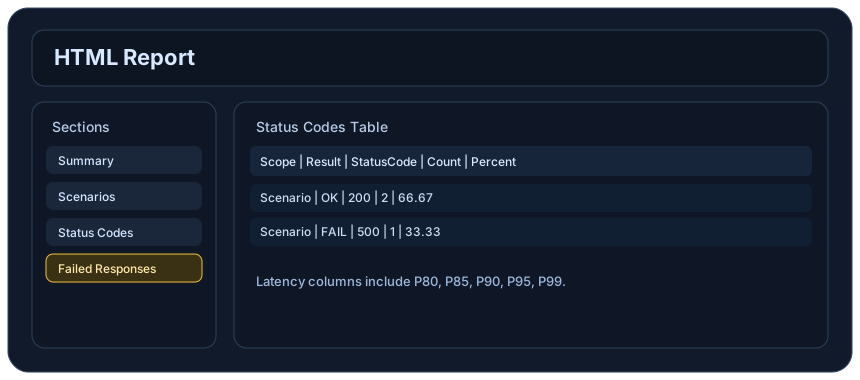
Review the HTML reports, CSV, TXT, Markdown, metrics, and report artifacts available after a run.
See how public benchmark evidence should be scoped before results are published.
Start from the examples hub before mapping the article topic into a runnable scenario.
These links keep the article connected to the docs, category pages, and comparisons that help engineers act on the topic.
Review the developer-first route.
Install the SDK in the language your team uses.
Use AI assistants with LoadStrike SDKs safely.
Follow the official LoadStrike activity connected to product updates and performance testing guidance.
Follow the official LoadStrike LinkedIn activity for product updates, engineering notes, and related performance testing posts.
These answers stay on the page so readers can scan the practical questions that usually come next.
Yes, LoadStrike is designed with user-friendliness in mind, making it suitable for both experienced developers and those new to performance testing.
LoadStrike can be integrated easily with CI/CD tools and other development software, facilitating seamless workflows.
LoadStrike employs advanced algorithms and real-time data analysis features to provide accurate and reliable performance testing results.
LoadStrike offers comprehensive documentation, tutorials, and customer support to assist users in maximizing their use of the software.
Yes, LoadStrike allows for extensive customization of performance tests to suit specific project requirements.
Go deeper with the docs, category pages, examples, and comparison guides connected to the distributed-system patterns discussed in this article.