
Short answer
LoadStrike offers multi-language load testing, allowing teams to use their existing programming skills in C#, Java, Go, Python, TypeScript, and JavaScript for efficient performance testing.
Discover how LoadStrike enables multi-language load testing, streamlining your performance testing with familiar programming languages.
Discover how LoadStrike enables multi-language load testing, streamlining your performance testing with familiar programming languages.
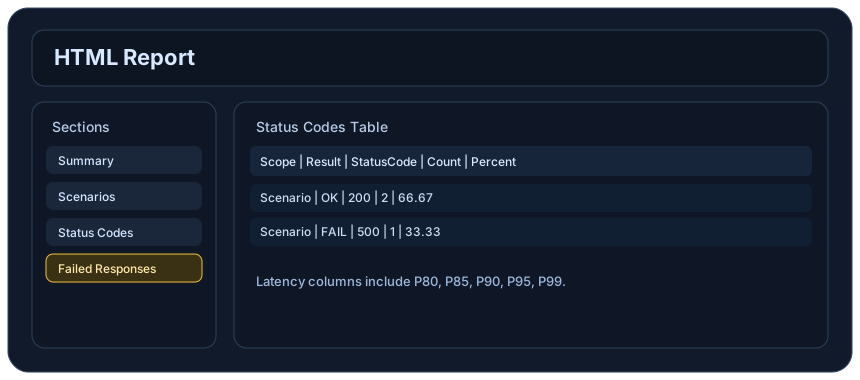
LoadStrike offers multi-language load testing, allowing teams to use their existing programming skills in C#, Java, Go, Python, TypeScript, and JavaScript for efficient performance testing.
This article is ideal for development and QA teams looking to enhance their performance testing strategies without learning new languages or tools.
Start with the article for context, then move into the linked docs and category pages for the concrete runtime, protocol, or reporting setup.
Load testing is a critical component of application development, ensuring that software can handle expected traffic. As teams increasingly adopt diverse technologies, the need for a flexible, multi-language load testing solution has never been greater. LoadStrike meets this demand by enabling developers to write performance tests in the languages they already use, facilitating faster implementation and better collaboration.
Traditionally, many load testing tools require users to learn a proprietary domain-specific language (DSL). This approach can lead to several challenges, including the steep learning curve, reduced team productivity, and limited talent pooling. LoadStrike, as a code-first load testing and performance testing product, eliminates these issues by providing SDKs in popular programming languages such as C#, Java, Go, Python, TypeScript, and JavaScript. By allowing teams to craft tests in their preferred languages, LoadStrike ensures seamless integration into existing workflows and helps accelerate performance testing initiatives.
### Why Multi-Language Load Testing Matters Multi-language load testing is essential for several reasons: - Fostering Collaboration: Developers and QA engineers often have expertise in different languages. By allowing testing in various languages, LoadStrike fosters better team collaboration. Teams can work together more effectively, as everyone can contribute in their preferred language. - Speeding Up Development: Learning a new DSL takes time; using a familiar programming language reduces the time required to create and run tests. This improvement can significantly impact project timelines and allow teams to focus on other critical tasks. - Lowering Barriers to Entry: New team members often struggle to learn proprietary languages. When the load testing tool supports widely-used programming languages, onboarding becomes significantly easier, enhancing the ability to bring new talent into the team quickly. ### Supported Languages and Their Use Cases LoadStrike supports several programming languages, each bringing unique advantages to your performance testing efforts: - C# Load Testing: Ideal for .NET developers, C# load testing allows for seamless integration with applications built on Microsoft technologies. Use cases include testing ASP.NET applications and services. - Java Load Testing: Java's widespread use in enterprise applications makes LoadStrike's Java SDK perfect for testing Java-based back-end services, REST APIs, and applications across diverse environments. - Go Load Testing: As Go becomes increasingly popular for cloud-native applications, using LoadStrike's Go SDK can help ensure maximum performance in microservices and serverless functions. - Python Load Testing: Python's versatility and simplicity make it a favorite among DevOps and QA teams. Use LoadStrike's Python SDK to script and execute comprehensive performance tests on web apps and APIs efficiently. - TypeScript Load Testing: With the increasing adoption of TypeScript in web development, utilizing LoadStrike's TypeScript support allows for enhanced testing of front-end applications while ensuring maximal type safety. - JavaScript Load Testing: Load performance on JavaScript-heavy applications (like SPAs) can be effectively evaluated using LoadStrike's JavaScript capabilities, ensuring websites perform well under load and during high traffic events. ### Practical Use Cases LoadStrike's flexibility in language support translates to various practical use cases: 1. API Load Testing: Validate the performance of REST and GraphQL APIs by simulating user interactions and understanding API response times, error rates, and bottlenecks when scaling. 2. Browser Workflow Testing: Use automated scripts written in JavaScript to replicate realistic user journeys in the browser, effectively determining how applications perform under simultaneous user load. 3. Event Stream Testing: With Go or Python, simulate events to test message brokers and event-driven architecture performance, ensuring that your system can handle the expected and unexpected influx of events. 4. Transaction-Focused Performance Testing: Using any supported language, developers can script complex transactions that mimic real user behavior, allowing validation of performance and application stability under load. 5. Reporting and Metrics: LoadStrike allows teams to generate detailed performance reports that can highlight areas needing improvement, track performance trends over time, and validate optimizations post-deployment. ### Install LoadStrike and Get Started Getting started with LoadStrike is straightforward. Teams can install the SDK for their preferred language using the provided guidelines found in the [Installation](https://loadstrike.com/docs/getting-started/installation) section. Follow the instructions specific to each language, whether it’s C#, Java, Go, Python, TypeScript, or JavaScript. This approach ensures that you can efficiently begin creating your performance tests right where you are most comfortable. ### Leverage AI Agents for Improved Testing LoadStrike also features [AI agent skills](https://loadstrike.com/docs/getting-started/loadstrike-ai-agent-skills), providing an intelligent, guided approach to test creation. Using AI assistants helps teams draft SDK-specific tests swiftly and safely, reducing the learning curve further and encouraging best practices. ### Next Steps To effectively enhance your performance testing capabilities, consider integrating LoadStrike into your workflows: 1. Identify the preferred languages among your teams. 2. Review the [Product overview](https://loadstrike.com/product) to better understand what LoadStrike offers in terms of performance testing software. 3. Install the relevant LoadStrike SDK and start writing tests in the language that fits your team's workflow. 4. Utilize the AI skills for optimized test development. By adopting LoadStrike for multi-language load testing, you leverage existing team knowledge, streamline development processes, and effectively enhance your application’s performance under load!
The shift toward multi-language programming environments is a growing trend among modern development teams. LoadStrike recognizes this necessity by providing robust options that eliminate traditional barriers to performance testing, aiding diverse teams in their testing efforts.
Multi-language load testing allows developers to write tests in the same language they utilize for application development, which is particularly beneficial in agile environments.
Transitioning to LoadStrike as your load and performance testing tool is a simple process. Begin by choosing the appropriate SDK for your language, which can be easily found in the documentation.
Follow the installation guide specific to your programming language and start crafting your performance tests using the familiar syntax you're accustomed to. This ease of onboarding helps teams transition smoothly without disrupting established workflows.
Below are some frequently asked questions regarding the multi-language load testing capabilities of LoadStrike.
If you have any additional questions or need further clarification, our support team is available to assist.
Incorporating multi-language load testing is more than just a trend; it’s a strategic advantage for teams aiming for efficiency and effectiveness in application performance evaluation.
With LoadStrike, leveraging existing programming skills becomes a seamless process that not only speeds up testing but also enhances collaboration between developers and QA professionals.
Use these proof assets to verify report output, examples, and methodology before turning the article into a scenario.
Review the HTML reports, CSV, TXT, Markdown, metrics, and report artifacts available after a run.
See how public benchmark evidence should be scoped before results are published.
Start from the examples hub before mapping the article topic into a runnable scenario.
These links keep the article connected to the docs, category pages, and comparisons that help engineers act on the topic.
Install the SDK for each supported language.
Use AI assistants to draft SDK-specific tests safely.
Review the product model and supported languages.
Follow the official LoadStrike activity connected to product updates and performance testing guidance.
Follow the official LoadStrike LinkedIn activity for product updates, engineering notes, and related performance testing posts.
These answers stay on the page so readers can scan the practical questions that usually come next.
LoadStrike provides SDKs for C#, Java, Go, Python, TypeScript, and JavaScript, allowing teams to write performance tests in their preferred languages.
LoadStrike simplifies the testing process by enabling teams to use languages they are familiar with, leading to improved productivity and more precise tests.
Yes, LoadStrike is capable of simulating user interactions for browser-based applications, effectively testing their performance under load.
Yes, LoadStrike can be integrated into CI/CD workflows, ensuring that performance testing is a continuous process throughout the development cycle.
Go deeper with the docs, category pages, examples, and comparison guides connected to the distributed-system patterns discussed in this article.