
Short answer
Performance testing software, such as LoadStrike, should seamlessly integrate into team workflows, aid in source control, and support various SDK languages like C# and Python.
Explore how performance testing software should fit within team workflows, SDK choices, and reporting evidence with LoadStrike.
Explore how performance testing software should fit within team workflows, SDK choices, and reporting evidence with LoadStrike.
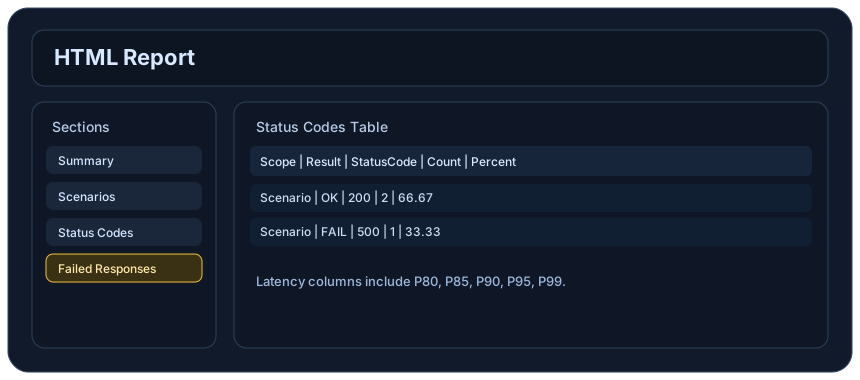
Performance testing software, such as LoadStrike, should seamlessly integrate into team workflows, aid in source control, and support various SDK languages like C# and Python.
Read this article when evaluating performance testing software for your development and QA teams.
Start with the article for context, then move into the linked docs and category pages for the concrete runtime, protocol, or reporting setup.
Performance testing is an essential component of software development, especially in today’s world of continuous integration and delivery (CI/CD). With the increasing complexity of applications, it’s critical that your performance testing software fits into your existing team workflows, respects code structure, and provides meaningful reporting. LoadStrike is a code-first load testing and performance testing product designed to streamline this process. This article explores how performance testing software, like LoadStrike, can be effectively integrated into engineering teams' routines.
### Performance Testing Software Should Fit Team Workflows To ensure successful integration of performance testing software into your team workflows, it’s important to consider a few key aspects. Effective performance testing should be a natural extension of your existing processes rather than an isolated function. Here’s how you can ensure that: - Embedding in CI/CD Pipelines: Choose a performance testing tool that can be plugged into your CI/CD workflows. LoadStrike's ability to create automated testing scenarios within popular CI tools enables teams to execute performance tests alongside other automated tests. - Collaboration Across Teams: Performance testing should involve collaboration between development, QA, and operations teams. This ensures that performance considerations are integrated into the software lifecycle at every stage, from development to deployment. - Regular Feedback Loops: Utilize your performance testing software to provide regular feedback. LoadStrike allows for continuous monitoring and can alert teams to performance degradations as they occur. This helps teams catch issues before they escalate into bigger problems. ### Source Control and Performance Testing Tools Integrating performance testing within source control is critical for maintaining the integrity of your tests and code. Here’s how to effectively manage this integration: - Version Control for Test Scripts: Store your performance test scripts in the same source control repository as your application code. This enables easy tracking of changes and ensures that performance tests are updated alongside code changes. - Incorporate Test Dependencies: Make sure that your load and performance testing tool supports external dependencies that your application may rely on. LoadStrike supports various dependencies, allowing you to accurately mimic real-world scenarios. ### SDK Language Choice: Enhancing Developer Adoption Choosing the right SDK language for your performance testing tools can significantly impact developer adoption and effectiveness. LoadStrike supports various languages, including: - C#: Ideal for .NET applications where integration into existing workflows can be critical. - Java: The go-to language for many enterprise applications, making it essential for performance testing tools to offer excellent support. - Python: A popular choice for scripting and data analysis, thus ideal for automation of performance tests. - Go: Particularly beneficial for cloud-native applications and microservices architecture. - TypeScript/JavaScript: Important for testing modern web applications and front-end performance. Each language comes with its own unique ecosystem and developer preferences, making the ability to choose a language vital for adoption. By providing flexible SDK options, LoadStrike allows teams to use their preferred programming language while conducting performance tests. ### Report Evidence and Ensure Meaningful Insights The outcome of performance testing hinges on the quality of insights gained from testing reports. Here’s how to ensure that your load testing software provides actionable data: - Comprehensive Reporting: Use tools that provide complete reporting on metrics such as response times, throughput, and error rates. LoadStrike generates in-depth reports that help identify performance bottlenecks. - Transaction-Focused Analysis: Focus on key transactions that are critical to the user experience. LoadStrike’s transaction-focused performance testing helps isolate performance issues related to specific operations. - Visualization Tools: Utilize visualization tools that make it easier for teams to digest performance data. Graphs and charts can illustrate trends over time, making it easier to pinpoint troubling areas. ### Practical Use Cases for Load Testing Software Let’s look at some specific scenarios where performance testing software proves invaluable: - APIs: Test the performance of APIs under varying load conditions to ensure they can handle production traffic. LoadStrike simulates multiple concurrent users accessing APIs, providing insights into response times and potential failures. - Browser Workflows: Assess the performance of web applications from the user’s perspective. LoadStrike allows you to simulate real browser behavior, ensuring that performance metrics reflect user experiences. - Event Streams: For applications using event-driven architectures, it’s important to test how these systems perform under load. Using LoadStrike, engineers can create scenarios that simulate high event volumes to stress-test event processing mechanics. - Transaction-Focused Performance Testing: Monitor specific transactions, such as checkout processes in e-commerce applications. Identifying how these transactions perform under stress can help ensure a smooth user experience during peak times. ### Conclusion Incorporating performance testing software into your workflows isn’t just beneficial—it’s essential for maintaining high-quality software. By using LoadStrike’s capabilities in workflow integration, source control management, SDK language support, and report generation, your team can ensure that performance testing becomes an integral part of your product development lifecycle. The complexities of modern applications necessitate that performance testing be a critical focus, enabling organizations to deliver reliable, high-performing software that meets user expectations.
When selecting a performance testing tool, it's vital to consider how it aligns with your current tools and processes. The integration of performance testing software within your existing workflows helps teams manage expectations and avoids introducing friction into development processes.
Another key factor is how the performance testing tool supports your team’s specific objectives. Performance testing software should enhance the team’s ability to meet delivery timelines while ensuring that quality remains high.
Your choice of performance testing tool must reflect both the complexity of your application and the specific requirements of your team. With LoadStrike, teams can choose languages that fit their existing expertise while ensuring effective load testing solutions are at their disposal. The flexibility in SDK choices allows teams to work in environments they are already familiar with.
Furthermore, considering both developer comfort and business needs will ensure that the performance tests yield valuable insights and allow for rapid iteration.
LoadStrike stands out as a code-first load testing and performance testing tool that allows developers to easily create and manage performance tests in their existing languages. This approach not only reduces the learning curve for new tools but also empowers teams to write tests that reflect real-world conditions.
The agility provided by LoadStrike means that teams can react to changes in application architecture without the need for extensive retraining or onboarding with new testing tools.
To begin leveraging LoadStrike for your performance testing needs, refer to our Getting Started Guide. This document outlines how to install the SDK for each supported language and provides examples of how to structure test scripts.
Additionally, ensure that your team is aligned on objectives and metrics before diving into performance testing to maximize the results of your efforts.
Use these proof assets to verify report output, examples, and methodology before turning the article into a scenario.
Review the HTML reports, CSV, TXT, Markdown, metrics, and report artifacts available after a run.
See how public benchmark evidence should be scoped before results are published.
Start from the examples hub before mapping the article topic into a runnable scenario.
These links keep the article connected to the docs, category pages, and comparisons that help engineers act on the topic.
Review team evaluation criteria.
Review code-first adoption.
Install the SDK for each supported language.
Follow the official LoadStrike activity connected to product updates and performance testing guidance.
Follow the official LoadStrike LinkedIn activity for product updates, engineering notes, and related performance testing posts.
These answers stay on the page so readers can scan the practical questions that usually come next.
Look for features that integrate seamlessly with your existing workflows, support multiple SDK languages, and provide comprehensive reporting features that yield actionable insights.
LoadStrike’s integration with CI/CD pipelines allows for automated execution of performance tests, enabling teams to catch performance issues as part of their regular development process.
Yes, LoadStrike is designed to test APIs effectively by simulating multiple users and providing valuable performance metrics under load.
LoadStrike supports C#, Go, Java, Python, TypeScript, and JavaScript, enabling teams to write performance tests in their preferred languages.
Go deeper with the docs, category pages, examples, and comparison guides connected to the distributed-system patterns discussed in this article.