
Short answer
A load testing tool is essential for evaluating system performance under stress. LoadStrike offers a robust code-first performance testing solution, ideal for APIs and browser journeys.
Discover the best load testing tool for your needs. Learn how LoadStrike empowers teams with a comprehensive code-first performance testing solution.
Discover the best load testing tool for your needs. Learn how LoadStrike empowers teams with a comprehensive code-first performance testing solution.
A load testing tool is essential for evaluating system performance under stress. LoadStrike offers a robust code-first performance testing solution, ideal for APIs and browser journeys.
Read this article when your team needs to evaluate a load testing tool for APIs, websites, or transaction testing, ensuring your application performs optimally under load.
Start with the article for context, then move into the linked docs and category pages for the concrete runtime, protocol, or reporting setup.
In today’s digital environment, ensuring that applications can handle concurrent users and intricate workflows is more important than ever. This is where a load testing tool comes into play. Load testing tools help developers, QA engineers, and SREs simulate traffic to applications, enabling teams to identify bottlenecks and performance issues before they impact end-users. Among these tools, LoadStrike stands out as a code-first approach that allows teams to define tests in familiar programming languages, offering great flexibility for performance evaluation.
LoadStrike is designed with a variety of use cases in mind, including APIs, browser workflows, and event streams. As a developer-oriented performance testing tool, it allows teams to write performance tests as code, which can be integrated into the CI/CD pipeline. This approach not only saves time but also maintains consistency across testing environments and scenarios.
A load testing tool is software specifically designed to simulate virtual users accessing a system simultaneously. This load can be generated on various components, such as APIs, databases, or front-end applications. The main goal of load testing is to measure system behavior or performance under anticipated or actual load conditions. Typically, these tools help identify how many users a system can handle before it starts to degrade in performance or crash altogether.
When evaluating a load testing software, consider functionalities such as scalability, ease-of-use, accuracy, and support for various testing environments. LoadStrike excels in these areas, making it one of the best performance testing tools for developers and testers alike.
LoadStrike's strength lies in its versatility as a load and performance testing tool. It supports various SDK languages such as C#, Go, Java, Python, TypeScript, and JavaScript. This means teams can conduct performance testing within their existing codebase without needing to switch tools or environments. Below, we explore some of the notable features of LoadStrike.
Key features include:
1. API Performance Testing: LoadStrike enables detailed API load testing, allowing developers to simulate requests that mirror user behavior, uncovering performance bottlenecks before they affect users.
2. Browser Workflow Testing: With LoadStrike, teams can automate load tests for web applications, ensuring that browser-based workflows can handle consistent user loads without degradation in performance. This is especially useful for applications with heavy transaction processing or data retrieval operations. 3. Event Stream Testing: Event-driven architectures can often lead to performance challenges. LoadStrike provides the ability to validate message queues and streaming services under load, ensuring that even during peak times, the system behaves as expected. 4. Transaction-focused Testing: For applications where users frequently engage in complex transactions (like e-commerce checkout or data submissions), LoadStrike aids in simulating these layered scenarios to ensure they operate seamlessly under load. This focused approach allows teams to pinpoint weaknesses in their systems and address them proactively.
When choosing the best load testing tool, consider several factors including your development environment, team expertise, and specific testing needs. LoadStrike's code-first approach aligns well with teams that prioritize development-led testing. For teams experienced in coding and familiar with languages like Java or Python, LoadStrike allows them to compose load tests directly within their established workflows, facilitating easier maintenance and adaptability.
Furthermore, with the increasing trend towards performance testing as code, companies are seeing the benefit of creating tests that are version-controlled alongside application code. This reduces the chance of inconsistency between application updates and test scenarios, resulting in a more reliable user experience.
Use these proof assets to verify report output, examples, and methodology before turning the article into a scenario.
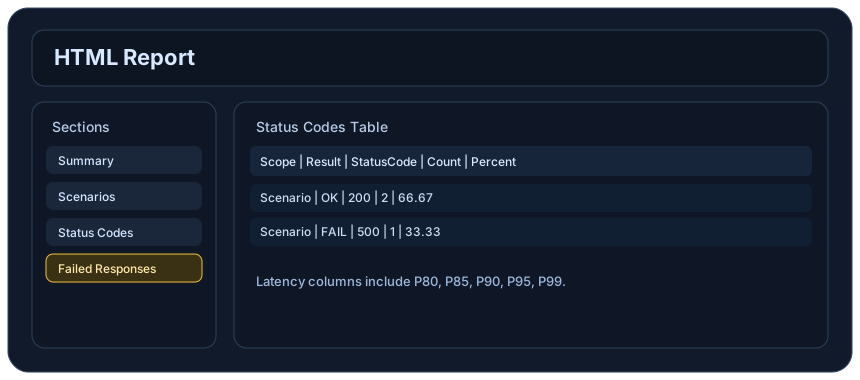
Review the HTML reports, CSV, TXT, Markdown, metrics, and report artifacts available after a run.
See how public benchmark evidence should be scoped before results are published.
Start from the examples hub before mapping the article topic into a runnable scenario.
These links keep the article connected to the docs, category pages, and comparisons that help engineers act on the topic.
See where LoadStrike fits in the broader load testing category.
Review LoadStrike capabilities, plans, reports, and SDK support.
Run the first scenario in your chosen SDK language.
Follow the official LoadStrike activity connected to product updates and performance testing guidance.
Follow the official LoadStrike LinkedIn activity for product updates, engineering notes, and related performance testing posts.
These answers stay on the page so readers can scan the practical questions that usually come next.
A load testing tool simulates concurrent users accessing the system to identify performance issues under stress. It works by generating traffic to the application while monitoring its behavior.
LoadStrike offers a code-first approach for writing performance tests in the same language as your application, enabling easier integration, better accuracy, and flexibility.
LoadStrike supports multiple languages, including C#, Go, Java, Python, TypeScript, and JavaScript. This allows teams to leverage LoadStrike within their existing development environments.
Yes, LoadStrike is designed to integrate seamlessly into CI/CD workflows, allowing for automated load testing as part of the development lifecycle.
LoadStrike can be used to test APIs, web applications, event streams, and any system requiring transaction-based performance evaluation.
Go deeper with the docs, category pages, examples, and comparison guides connected to the distributed-system patterns discussed in this article.