
Short answer
API performance testing with LoadStrike starts with a small HTTP scenario, clear thresholds, and generated reports, then expands into downstream transaction checks when first-hop latency is not enough.
Learn api performance testing with LoadStrike: begin using HTTP scenarios, set thresholds, generate reports, then expand to downstream checks.
Learn api performance testing with LoadStrike: begin using HTTP scenarios, set thresholds, generate reports, then expand to downstream checks.
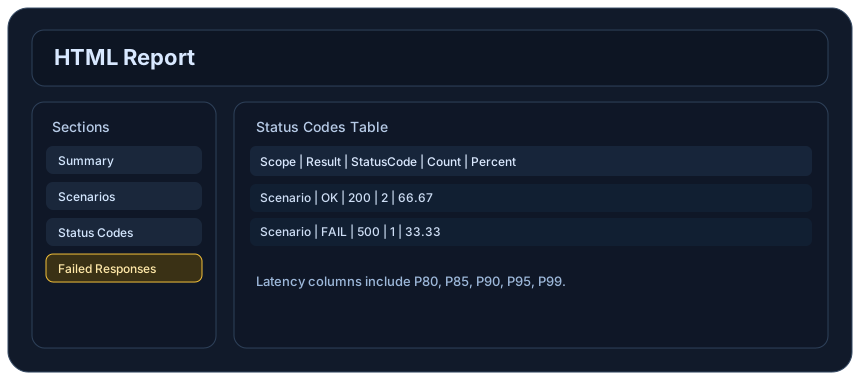
API performance testing with LoadStrike starts with a small HTTP scenario, clear thresholds, and generated reports, then expands into downstream transaction checks when first-hop latency is not enough.
Use this guide when your API team needs a fast starting point for api performance testing—without losing visibility into downstream behavior.
Start with the article for context, then move into the linked docs and category pages for the concrete runtime, protocol, or reporting setup.
LoadStrike is a code-first load testing and performance testing product built for teams that want repeatable, reviewable performance tests—starting simple and scaling to deeper transaction checks.
If you’re planning api performance testing, the fastest path is usually to begin with HTTP scenarios: exercise your REST endpoints, define pass/fail thresholds, and produce reports you can share with engineering, QA, and SRE.
Once the basics are stable, you can expand into downstream transaction-focused checks so you’re not only measuring the request you sent, but also how the system behaves across dependent services and data paths.
The goal of the first phase of api performance testing is to get reliable signals quickly. Begin with http load testing against your public or staging REST API endpoints.
In LoadStrike, you create scenarios and generate reports so results are consistent across runs. This makes it easier to compare builds, investigate regressions, and align on what “good” looks like.
For api load testing, your baseline should map to how clients actually call your service. For many teams, that first version is rest api load testing: a small set of representative HTTP calls that match production behavior in method, payload size, and response expectations.
Even at this stage, you can capture useful performance testing outcomes: how the service responds under concurrency, whether error rates rise, and whether p95/p99 latency drifts as load increases.
A performance testing tool becomes useful when results are reviewable and comparable. LoadStrike supports report generation for your scenarios, which helps you share outcomes across engineering, QA, and SRE.
Set thresholds that match your service-level expectations. If a threshold fails, the report gives you a place to start diagnosis: whether the issue is latency, errors, or capacity under concurrent load.
Once your HTTP baseline is stable, expand into downstream transaction checks. This is where api performance testing becomes more representative of real system behavior.
Instead of only measuring the response to one REST call, model the flow that the user or upstream service triggers across dependencies—so you can detect issues like slow downstream dependencies, cascading timeouts, or bottlenecks that only appear under end-to-end conditions.
Performance testing rarely stops at a REST endpoint. Many teams also need to validate browser workflows, event-driven processing, and end-user journeys alongside API behavior.
LoadStrike’s scenario docs can help you understand the scenario and step model so you can evolve tests from simple HTTP calls into broader workflows and event stream scenarios as your coverage grows.
Use these proof assets to verify report output, examples, and methodology before turning the article into a scenario.
Review the HTML reports, CSV, TXT, Markdown, metrics, and report artifacts available after a run.
See how public benchmark evidence should be scoped before results are published.
Start from the examples hub before mapping the article topic into a runnable scenario.
These links keep the article connected to the docs, category pages, and comparisons that help engineers act on the topic.
Create the first API scenario and report.
Browse practical LoadStrike examples.
Review the scenario and step model.
Follow the official LoadStrike activity connected to product updates and performance testing guidance.
Follow the official LoadStrike LinkedIn activity for product updates, engineering notes, and related performance testing posts.
These answers stay on the page so readers can scan the practical questions that usually come next.
Start with rest api load testing using a small set of HTTP scenarios that mirror real client calls. Add thresholds and generate reports for p95/p99 latency, error rate, and throughput before you add multi-step downstream checks.
Set thresholds that reflect your service expectations (latency and error rate) and your target load profile. Start with what you can measure confidently from the HTTP baseline, then tighten thresholds as you validate stability and infrastructure readiness.
Yes. After the HTTP baseline passes, expand scenarios into multi-step flows that represent the downstream transaction path. This turns request-level measurements into transaction-focused performance testing across dependencies.
LoadStrike supports SDK languages for scenario authoring: C#, Go, Java, Python, TypeScript, and JavaScript.
Use the LoadStrike docs and examples pages to browse practical scenarios and report outputs. Start with the Quick start to create your first API scenario and report, then explore additional patterns in Examples.
Go deeper with the docs, category pages, examples, and comparison guides connected to the distributed-system patterns discussed in this article.